
Will do.
posting here because ah4c is all i really care about at the moment.
I don't think I setup wsl and docker properly last year and was struggling to setup olivetin ect..
I did have portainer and ah4c working.
I started over by removing my stacks and images from docker, before uninstalling docker and wsl with reboots.
installed wsl, reboot, then updated wsl w/ reboot.
I then used olivetin-ez-start-soup-to-nuts-portable-installer-for-windows-11-cdvr-server-wsl-debian-docker-desktop-portainer-olivetin-for-channels-with-project-one-click-all-a-click-away
I'll admit it did not go very smooth for me, but I could have screwed up anywhere.
I do have things working again except I'm missing the scripts in \\wsl.localhost\Debian\data\ah4c\scripts\osprey\directv
also it's set read only so now I'm lost again.
I'm sure there's something fairly easy to getting it working since I can use a firestick script, but obviously doesn't function the osprey right.
this was the standard error from oneclick
+ dvr=10.0.0.7:8089
++ basename /config/ah4c.sh
+ extension=ah4c.sh
+ extension=ah4c
+ cp /config/ah4c.env /tmp
+ envFile=/tmp/ah4c.env
+ [[ -n 10.0.0.7 ]]
+ extensionURL=10.0.0.7:7654
+ [[ # == \# ]]
+ cdvrStartingChannel=
+ [[ -n '' ]]
+ cdvrIgnoreM3UNumbers=
+ cdvrM3UName=dtvosprey.m3u
+ cdvrM3UNameNoExt=dtvosprey
+ dirsFile=/tmp/ah4c.dirs
+ ah4cContainer='#'
+ [[ # == \# ]]
+ ah4cContainer=
+ envVars=("TAG=$2" "CONTAINER_NAME=$extension$ah4cContainer" "HOSTNAME=$extension$ah4cContainer" "DOMAIN=$3" "ADBS_PORT=$4" "HOST_PORT=$5" "SCRC_PORT=$6" "IPADDRESS=$7" "NUMBER_TUNERS=$8" "TUNER1_IP=$9" "ENCODER1_URL=${10}" "TUNER2_IP=${11}" "ENCODER2_URL=${12}" "TUNER3_IP=${13}" "ENCODER3_URL=${14}" "TUNER4_IP=${15}" "ENCODER4_URL=${16}" "TUNER5_IP=${17}" "ENCODER5_URL=${18}" "TUNER6_IP=${19}" "ENCODER6_URL=${20}" "TUNER7_IP=${21}" "ENCODER7_URL=${22}" "TUNER8_IP=${23}" "ENCODER8_URL=${24}" "TUNER9_IP=${25}" "ENCODER9_URL=${26}" "STREAMER_APP=${27}" "CHANNELSIP=${28}" "ALERT_SMTP_SERVER=${29}" "ALERT_AUTH_SERVER=${30}" "ALERT_EMAIL_FROM=${31}" "ALERT_EMAIL_PASS=${32}" "ALERT_EMAIL_TO=${33}" "LIVETV_ATTEMPTS=${34}" "CREATE_M3US=${35}" "UPDATE_SCRIPTS=${36}" "UPDATE_M3US=${37}" "TZ=${38}" "SPEED_MODE=${39}" "KEEP_WATCHING=${40}" "AUTOCROP_CHANNELS=${41}" "LINKPI_HOSTNAME=${42}" "LINKPI_USERNAME=${43}" "LINKPI_PASSWORD=${44}" "USER_SCRIPT=${45}" "HOST_DIR=${46}" "CDVR_STARTING_CHANNEL=${47}" "CDVR_M3U_NAME=${48}" "AH4C_CONTAINER=${49}")
+ synologyDirs=("${46}/ah4c$ah4cContainer/scripts" "${46}/ah4c$ah4cContainer/m3u" "${46}/ah4c$ah4cContainer/adb")
+ printf '%s\n' TAG=latest CONTAINER_NAME=ah4c HOSTNAME=ah4c DOMAIN=localdomain ADBS_PORT=5037 HOST_PORT=7654 SCRC_PORT=7655 IPADDRESS=minipc:7654 NUMBER_TUNERS=2 TUNER1_IP=10.0.0.130:5555 ENCODER1_URL=http://10.0.0.121/live/stream0 TUNER2_IP=10.0.0.130:5555 ENCODER2_URL=http://10.0.0.121/live/stream1 TUNER3_IP=# ENCODER3_URL=# TUNER4_IP=# ENCODER4_URL=# TUNER5_IP=# ENCODER5_URL=# TUNER6_IP=# ENCODER6_URL=# TUNER7_IP=# ENCODER7_URL=# TUNER8_IP=# ENCODER8_URL=# TUNER9_IP=# ENCODER9_URL=# STREAMER_APP=scripts/firetv/directv CHANNELSIP=minipc ALERT_SMTP_SERVER=smtp.gmail.com:587 ALERT_AUTH_SERVER=smtp.gmail.com [email protected] ALERT_EMAIL_PASS=xxxxxxxxxxxxxxxx [email protected] LIVETV_ATTEMPTS= CREATE_M3US=false UPDATE_SCRIPTS=true UPDATE_M3US=true TZ=US/Central SPEED_MODE=false KEEP_WATCHING=4h AUTOCROP_CHANNELS= LINKPI_HOSTNAME= LINKPI_USERNAME= LINKPI_PASSWORD= USER_SCRIPT= HOST_DIR=/data CDVR_STARTING_CHANNEL=# CDVR_M3U_NAME=dtvosprey.m3u AH4C_CONTAINER=#
+ printf '%s\n' /data/ah4c/scripts /data/ah4c/m3u /data/ah4c/adb
+ sed -i /=#/d /tmp/ah4c.env
+ /config/portainerstack.sh ah4c
+ [[ 0 == 1 ]]
++ tr -d '\n'
+++ customChannels
+++ cat
++ echo -n '{
  "name": "ah4c - dtvosprey",
  "type": "MPEG-TS",
  "source": "URL",
  "url": "http://10.0.0.7:7654/m3u/dtvosprey.m3u",
  "text": "",
  "refresh": "24",
  "limit": "",
  "satip": "",
  "numbering": "",
  "start_number": "",
  "logos": "",
  "xmltv_url": "",
  "xmltv_refresh": "3600"
}'
+ customChannelsJSON='{  "name": "ah4c - dtvosprey",  "type": "MPEG-TS",  "source": "URL",  "url": "http://10.0.0.7:7654/m3u/dtvosprey.m3u",  "text": "",  "refresh": "24",  "limit": "",  "satip": "",  "numbering": "",  "start_number": "",  "logos": "",  "xmltv_url": "",  "xmltv_refresh": "3600"}'
+ true
+ curl -s -o /dev/null http://10.0.0.7:7654
+ [[ -n '' ]]
+ sleep 5
+ true
+ curl -s -o /dev/null http://10.0.0.7:7654
++ echo 0
+ extensionUp=0
+ [[ -n 0 ]]
+ break
+ echo -e '\nJSON response from 10.0.0.7:8089:'
+ curl -X PUT -H 'Content-Type: application/json' -d '{  "name": "ah4c - dtvosprey",  "type": "MPEG-TS",  "source": "URL",  "url": "http://10.0.0.7:7654/m3u/dtvosprey.m3u",  "text": "",  "refresh": "24",  "limit": "",  "satip": "",  "numbering": "",  "start_number": "",  "logos": "",  "xmltv_url": "",  "xmltv_refresh": "3600"}' http://10.0.0.7:8089/providers/m3u/sources/ah4c-dtvosprey
  % Total    % Received % Xferd  Average Speed   Time    Time     Time  Current
                                 Dload  Upload   Total   Spent    Left  Speed

  0     0    0     0    0     0      0      0 --:--:-- --:--:-- --:--:--     0
100   274    0     0  100   274      0   1356 --:--:-- --:--:-- --:--:--  1363
100   278  100     4  100   274     14   1026 --:--:-- --:--:-- --:--:--  1045
The STREAMER_APP= value should be scripts/osprey/dtvosprey to use remote control emulation style tuning (channel number-based tuning on the Osprey), or scripts/osprey/dtvospreydeeplinks to use deeplinks.
Stop the ah4c stack, change that value, and click Update the stack.
sorry that was copy/pasted from explorer. here's my env
TAG=latest
CONTAINER_NAME=ah4c
HOSTNAME=ah4c
DOMAIN=localdomain
ADBS_PORT=5037
HOST_PORT=7654
SCRC_PORT=7655
IPADDRESS=minipc:7654
NUMBER_TUNERS=2
TUNER1_IP=10.0.0.130:5555
ENCODER1_URL=http://10.0.0.121/live/stream0
TUNER2_IP=10.0.0.131:5555
ENCODER2_URL=http://10.0.0.121/live/stream1
STREAMER_APP=scripts/osprey/directv
CHANNELSIP=minipc
ALERT_SMTP_SERVER=smtp.gmail.com:587
ALERT_AUTH_SERVER=smtp.gmail.com
[email protected]
ALERT_EMAIL_PASS=xxxxxxxxxxxxxxxx
[email protected]
LIVETV_ATTEMPTS=
CREATE_M3US=false
UPDATE_SCRIPTS=true
UPDATE_M3US=true
TZ=US/Central
SPEED_MODE=false
KEEP_WATCHING=4h
AUTOCROP_CHANNELS=
LINKPI_HOSTNAME=
LINKPI_USERNAME=
LINKPI_PASSWORD=
USER_SCRIPT=
HOST_DIR=/data
CDVR_M3U_NAME=dtvosprey.m3u
This is what you need to change -- as posted above.
 ya know, I sometimes have dyslexia when reading a tape measure, but it's easy to tell when you cut a board wrong. maybe that's why I got out of the IT game 20yrs ago.
it's working now.
the first few times today I copy/pasted that field, but not this last time.. 
thanks!
so I noticed my previous problem was due to code change I missed, not a mistype 
anyway a new one popped up this week.
high winds affected the cable lines to my neighborhood creating an unstable connection for a while so I ended up with this screen for a couple hours of recordings.

once it hits this screen the osprey does not try to reload on it's own, you must hit select with the remote (or enter with keyboard)
any way to detect this screen and hit enter or re-tune? or is that only a adbtuner thing?
Both ah4c and ADBTuner have mechanisms for capturing screenshots and doing OCR on them. Usually this is done at the beginning of the virtual tune, is that when this screen would show up?
2 Likes
I no longer have the recordings as I record msnow all day, and only keep the last 5.
it showed up during the middle of an hour, but persisted until I finally caught it a few hours later.
since the recordings are all on the same channel it never re-tuned.
I re-created by turning the QOS to that osprey down to 1 or 2 Mbps and got the no internet screen a few times which it recovered from, but after a couple times it goes to this screen.
Monitoring for something like that could done, but you'd need some reasonable parameters for it. Lots of screen captures with associated OCR could be a little heavy if done too frequently. What would you have in mind?
I think even if it just still did the normal checks at the start of a recording even though it's not changing the channel would at least limit the bad recordings to just the one.
although I could see usefulness for a check every 30min or 1hr in the case of longer recordings such as sports. you may miss some, but not all. sorta thing.
For anyone using this, it looks like the latest few NBC app updates have gotten rid of the dim screen on video launch. So you don't have to do the workaround where you bring up the guide and clear it to get rid of the dim screen.
1 Like
@bnhf previously when I only had ah4c in my stack I was able to customize the m3u. (older verision I know) now that I have it installed via olivetin/one-click It seems I'm no longer able to change the file, only via the web interface but don't see what file that change is reflected. also doing this 1 at a time on the web interface is painful. 
I did set up a adbtuner stack in prep for another linkpi and used the dtv guide pull you built. any way we can use that with ah4c too? any way to backup just the channel list with disable & favorites so when I mess something up too bad and want to start over I can just import my preferred listings
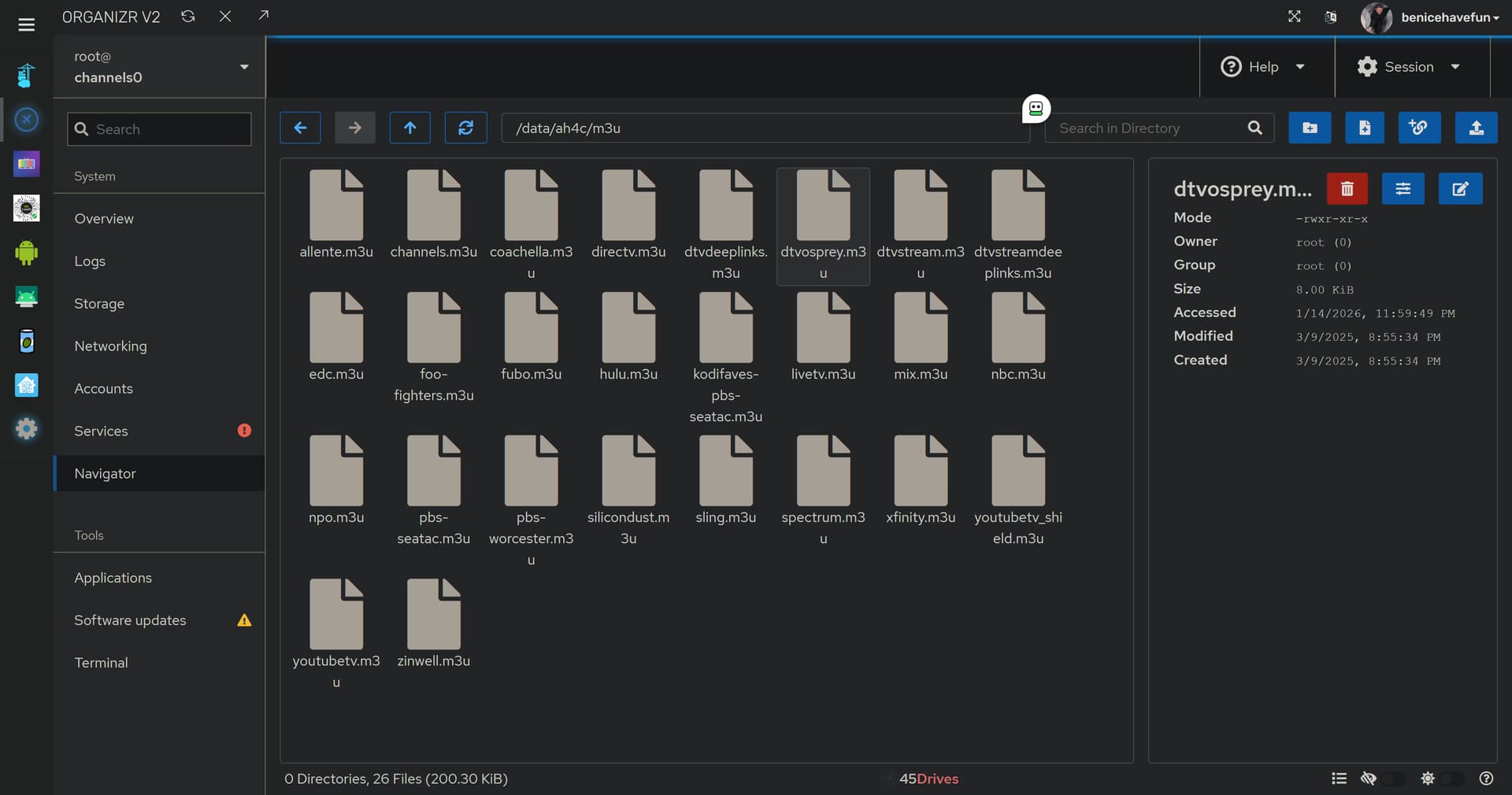
You can still edit the file directly. It's stored under ah4c/m3u/, apend your parent data directory to the front and the M3U name you used to the end. Here's mine (though you probably won't have so many options):
If you export the JSON from ADBTuner, you should be able to use jq to create an M3U you can use in ah4c. An AI "helper can guide you through it.
that's where I've been trying to edit/replace the dtvosprey.m3u.
cdvr source m3u as set by one-click is http://10.0.0.7:7654/m3u/dtvosprey.m3u
if i use a different name it can't find the file.
I'm thinking I'm hitting a volume mount issue or something. I'm still very green with linux especially when mixed with windows... and docker..
I just realized I probably need to set cdvr to use file instead of url, but I don't know the correct syntax. I did however just notice cdvr has the option for text and I was able to paste mydtvosprey custom m3u into that and it works!
I'm still a little skittish with ai and pretty much just use the google search one, but earlier in the week I did convert the adbtuner m3u to the ah4c m3u format (kinda manually in notepadd++)
That's the correct URL to use in CDVR Custom Channels Sources. But, when you want access the file to modify it, that's done via your Docker host's file system (or the M3U Editor). Like for me, on a Linux host that file would be found at /data/ah4c/m3u/dtvosprey.m3u.
What OS is your Docker host running, and what did you use for your HOST_DIR value when you set up ah4c in Project One-Click?
win11, i put my custom one here. c:\Dock\data\ah4c\m3u
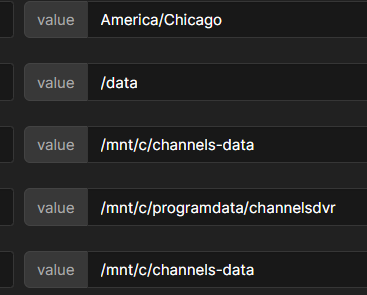
here's my olivetin var
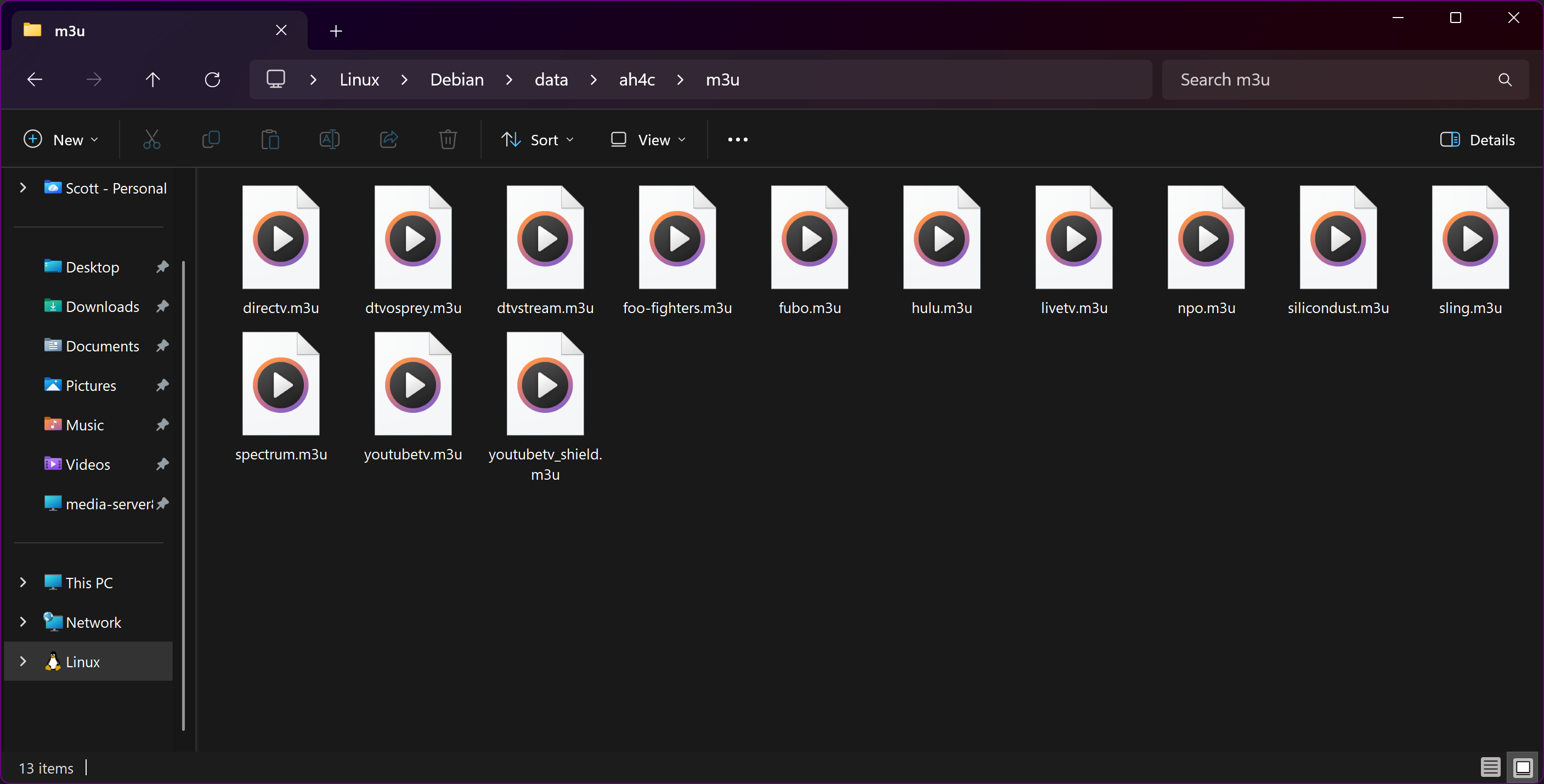
Generally, the idea is to store all of your bound data directories in the same place for easiest management. For example, here's mine when viewed from File Explorer in Windows 11:
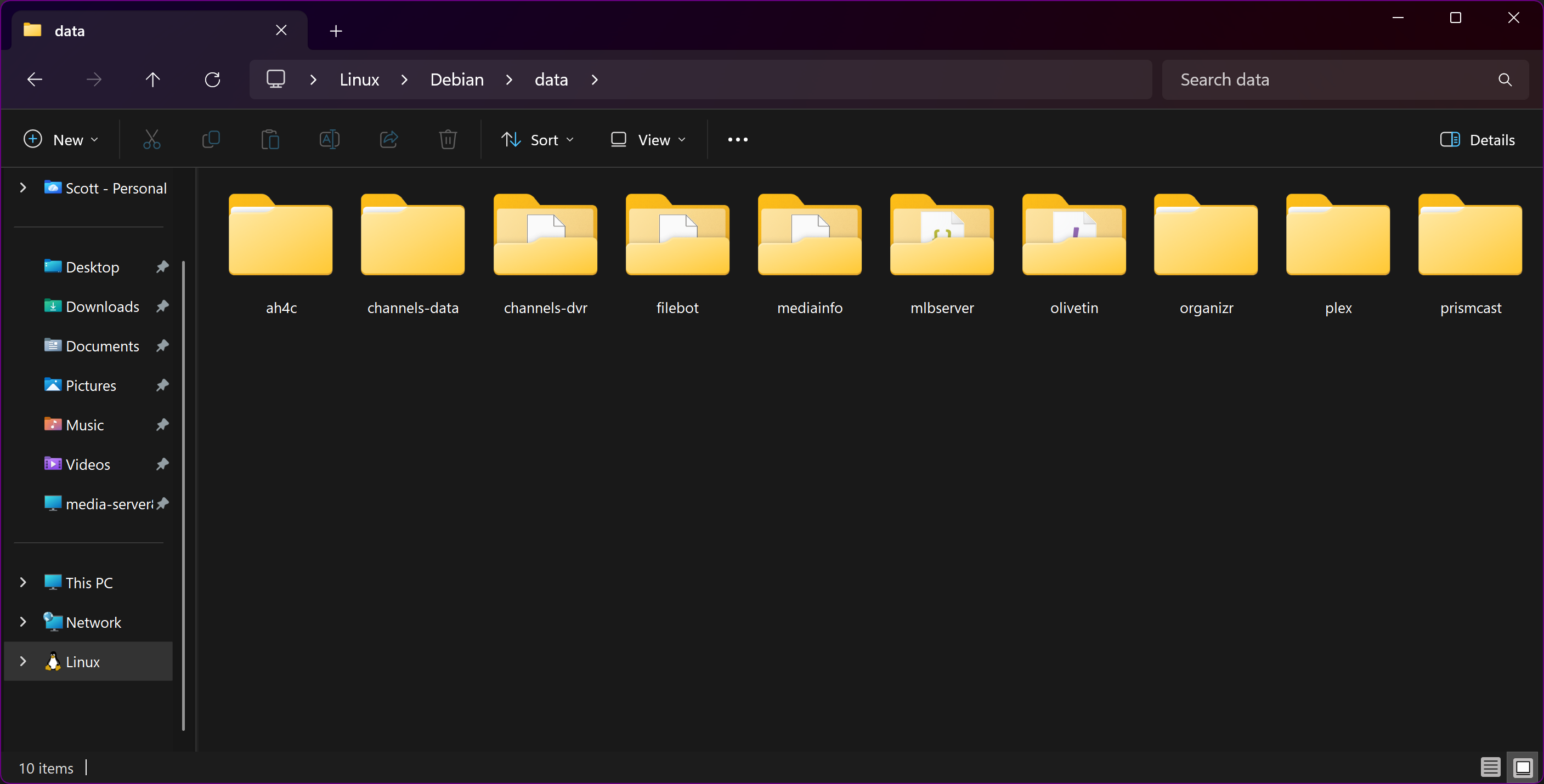
And looking more globally, here's everything I've installed via WSL2 on the laptop I have with me:
Assuming you left /data as the value for HOST_DIR when you spun-up ah4c, you should find the M3U under /data/ah4c/m3u.