
@rss7 Also, I was just looking at your last post in the ADBTuner thread, where you got Hulu Live working with your Google Streamer device. Now that you have a working virtual tuning setup there, your easiest path forward would be to add this TiVo device to that ADBTuner setup.
But the tivo doesn't support deeplinks at all so I figured ah4c was the only hope for the tivo?
Are you sure about that?
Are the Hulu package names the same on the TiVo and the streamer? What version of Android is the TiVo running?
I spent hours truing to get adbtuner to work with the tivo. Once I got the google Streamer it was working in 15 mins Here are my ah4c ENV variables:
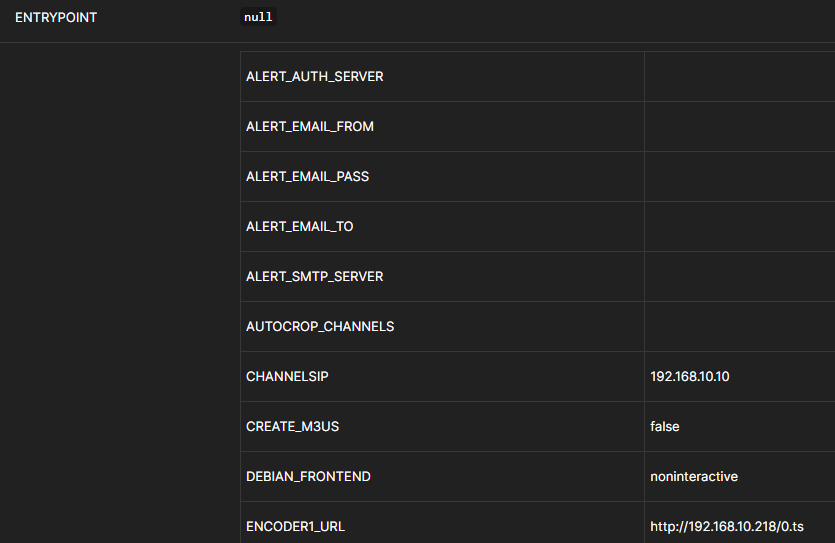
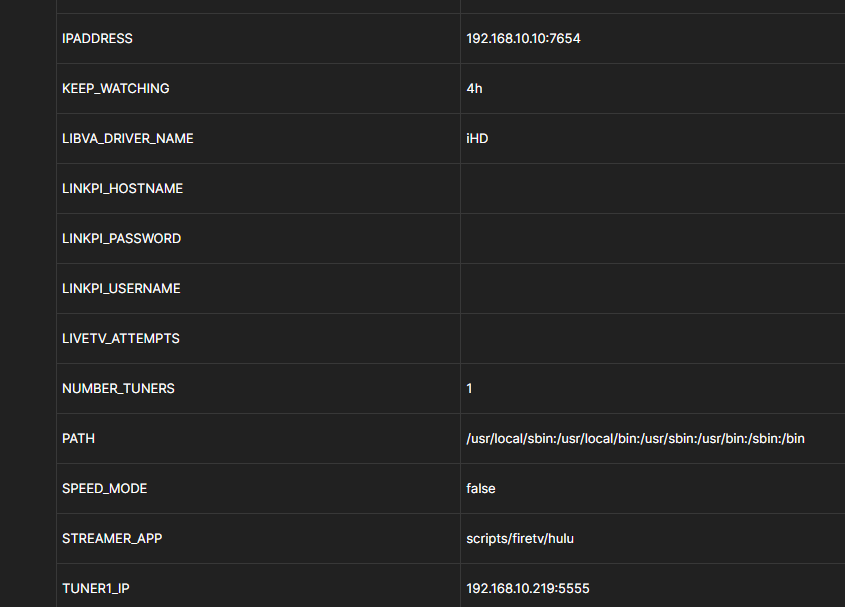
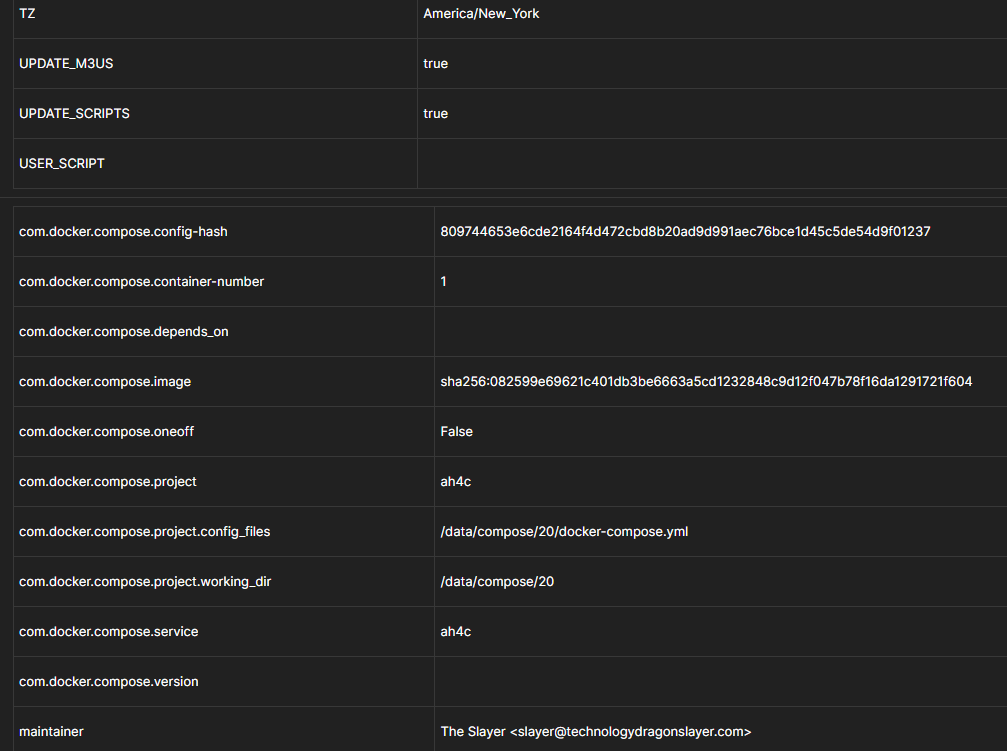
Please post the env vars as shown in the Environment variables section of the Portainer-Stacks Editor. They should look like this:
TAG=latest
DOMAIN=tailxxxxx.ts.net localdomain
ADBS_PORT=5037
HOST_PORT=7654
WSCR_PORT=7655
IPADDRESS=channels0:7654
NUMBER_TUNERS=2
TUNER1_IP=192.168.1.93:5555
ENCODER1_URL=http://192.168.1.52:8090/stream0
TUNER2_IP=192.168.1.201:5555
ENCODER2_URL=http://192.168.1.52:8090/stream2
STREAMER_APP=scripts/firetv/xfinity
CHANNELSIP=utheater-pc
CHANNELSPORT=8089
ALERT_SMTP_SERVER=smtp.gmail.com:587
ALERT_AUTH_SERVER=smtp.gmail.com
ALERT_EMAIL_FROM=[Redacted]
ALERT_EMAIL_PASS=[Redacted]
ALERT_EMAIL_TO=[Redacted]
UPDATE_SCRIPTS=false
UPDATE_M3US=false
TZ=US/Central
SPEED_MODE=false
KEEP_WATCHING=4h
AUTOCROP_CHANNELS=1810 1812 1841 1842 1846 1848 1852 1862
LINKPI_HOSTNAME=linkpi-encoder
LINKPI_USERNAME=admin
LINKPI_PASSWORD=[Redacted]
USER_SCRIPT=scripts/update_hosts.sh
HOST_DIR=/data
@rss7 I'd still like the answers to these questions -- including the actual Hulu package name on the TiVo, whether it's the same as the Streamer or not...
package name on the tivo Stream 4K device is: com.hulu.livingroomplus. its running android 12.
Here are the env variables from stacks. I could not open the editor to get them to appear exactly like your example, but there screenshots of what the env variables are in the stack. :
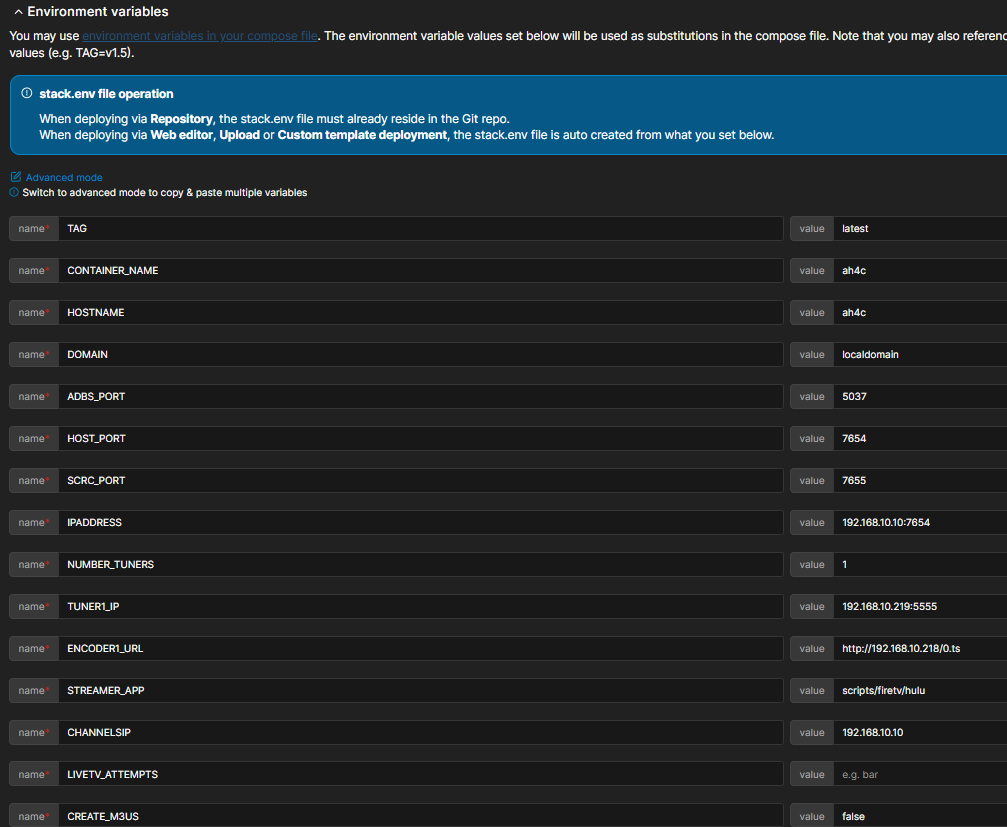
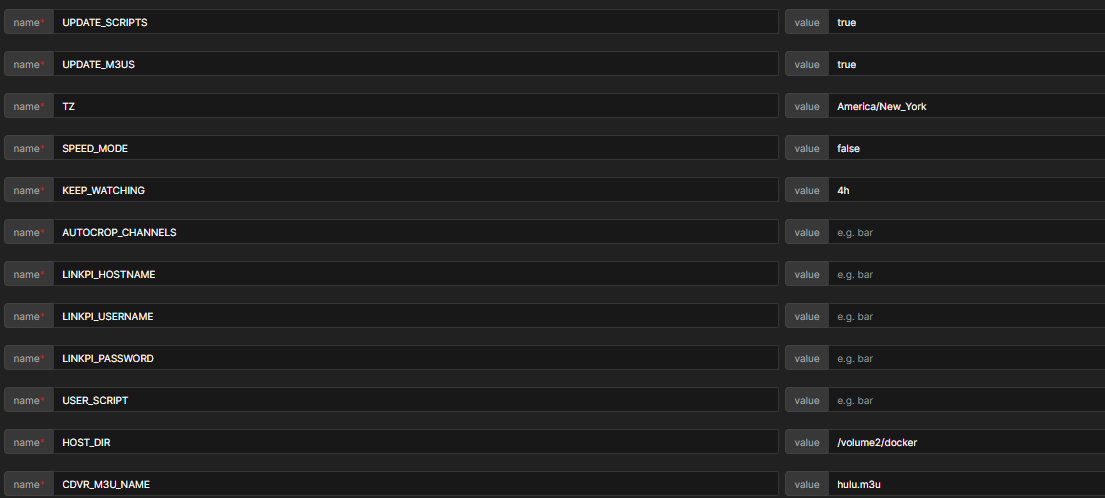
Click on the Advanced mode to copy/paste text, like it says in your screenshot
Then copy them and paste them
```
If you paste between two lines of three backticks
It will look like this
```
  If you paste between two lines of three backticks
  It will look like *this*
Using the ws-scrcpy ADB shell available on port 7655, run the following command:
dumpsys package com.hulu.livingroomplus 2>/dev/null | awk '/^Activity Resolver Table:/{f=1} f&&/^[^[:space:]]/&&$0!="Activity Resolver Table:"{exit} f'
Then post the results here. We want to get an idea what schemes and non-data actions are available. It should look similar to this:
Activity Resolver Table:
  Schemes:
      https:
        d596037 com.peacocktv.peacockandroid/com.peacock.peacocktv.GoogleMainActivity filter 233a30d
          Action: "android.intent.action.VIEW"
          Category: "android.intent.category.DEFAULT"
          Category: "android.intent.category.BROWSABLE"
          Scheme: "https"
          Authority: "www.peacocktv.com": -1
          Path: "PatternMatcher{GLOB: /deeplink}"
          AutoVerify=true

  Non-Data Actions:
      android.intent.action.MAIN:
        d596037 com.peacocktv.peacockandroid/com.peacock.peacocktv.GoogleMainActivity filter be8e9a4
          Action: "android.intent.action.MAIN"
          Action: "android.intent.action.TTS_SERVICE"
          Category: "android.intent.category.LAUNCHER"
          Category: "android.intent.category.LEANBACK_LAUNCHER"
          Category: "android.intent.category.DEFAULT"
      android.intent.action.TTS_SERVICE:
        d596037 com.peacocktv.peacockandroid/com.peacock.peacocktv.GoogleMainActivity filter be8e9a4
          Action: "android.intent.action.MAIN"
          Action: "android.intent.action.TTS_SERVICE"
          Category: "android.intent.category.LAUNCHER"
          Category: "android.intent.category.LEANBACK_LAUNCHER"
          Category: "android.intent.category.DEFAULT"
Activity Resolver Table:
  Schemes:
      http:
        58ffb43 com.hulu.livingroomplus/.WKFactivity filter f7672f9
          Action: "android.intent.action.VIEW"
          Category: "android.intent.category.DEFAULT"
          Category: "android.intent.category.BROWSABLE"
          Scheme: "http"
          Scheme: "https"
          Authority: "www.hulu.com": -1
          Path: "PatternMatcher{PREFIX: /}"
          AutoVerify=true
      hulu:
        58ffb43 com.hulu.livingroomplus/.WKFactivity filter 2d089f
          Action: "android.intent.action.VIEW"
          Category: "android.intent.category.DEFAULT"
          Category: "android.intent.category.BROWSABLE"
          Scheme: "hulu"
          Authority: "video": -1
          Path: "PatternMatcher{PREFIX: /}"
      https:
        58ffb43 com.hulu.livingroomplus/.WKFactivity filter f7672f9
          Action: "android.intent.action.VIEW"
          Category: "android.intent.category.DEFAULT"
          Category: "android.intent.category.BROWSABLE"
          Scheme: "http"
          Scheme: "https"
          Authority: "www.hulu.com": -1
          Path: "PatternMatcher{PREFIX: /}"
          AutoVerify=true
      android-app:
        58ffb43 com.hulu.livingroomplus/.WKFactivity filter 20d023e
          Action: "android.intent.action.VIEW"
          Category: "android.intent.category.DEFAULT"
          Category: "android.intent.category.BROWSABLE"
          Scheme: "android-app"
          Authority: "com.hulu.plus": -1
          Path: "PatternMatcher{PREFIX: /}"

  Non-Data Actions:
      android.intent.action.MAIN:
        58ffb43 com.hulu.livingroomplus/.WKFactivity filter 5ae95c0
          Action: "android.intent.action.MAIN"
          Action: "hulu.intent.action.PLAY_CONTENT"
          Category: "android.intent.category.DEFAULT"
          Category: "android.intent.category.LEANBACK_LAUNCHER"
          Category: "android.intent.category.LAUNCHER"
      hulu.intent.action.PLAY_CONTENT:
        58ffb43 com.hulu.livingroomplus/.WKFactivity filter 5ae95c0
          Action: "android.intent.action.MAIN"
          Action: "hulu.intent.action.PLAY_CONTENT"
          Category: "android.intent.category.DEFAULT"
          Category: "android.intent.category.LEANBACK_LAUNCHER"
          Category: "android.intent.category.LAUNCHER"
      android.intent.action.SEARCH:
        58ffb43 com.hulu.livingroomplus/.WKFactivity filter 5c74dec
          Action: "android.intent.action.SEARCH"

Receiver Resolver Table:
  Non-Data Actions:
      android.intent.action.BOOT_COMPLETED:
        6638fbb com.hulu.livingroomplus/.WKFrecommendationsScheduler filter 3d15cd8
          Action: "android.intent.action.BOOT_COMPLETED"
      android.intent.action.MEDIA_BUTTON:
        2245b5 com.hulu.livingroomplus/androidx.media.session.MediaButtonReceiver filter ed3044a
          Action: "android.intent.action.MEDIA_BUTTON"
and here are the Env Variables from Stack editor:
TAG=latest
CONTAINER_NAME=ah4c
HOSTNAME=ah4c
DOMAIN=localdomain
ADBS_PORT=5037
HOST_PORT=7654
SCRC_PORT=7655
IPADDRESS=192.168.10.10:7654
NUMBER_TUNERS=1
TUNER1_IP=192.168.10.219:5555
ENCODER1_URL=http://192.168.10.218/0.ts
STREAMER_APP=scripts/firetv/hulu
CHANNELSIP=192.168.10.10
LIVETV_ATTEMPTS=
CREATE_M3US=false
UPDATE_SCRIPTS=true
UPDATE_M3US=true
TZ=America/New_York
SPEED_MODE=false
KEEP_WATCHING=4h
AUTOCROP_CHANNELS=
LINKPI_HOSTNAME=
LINKPI_USERNAME=
LINKPI_PASSWORD=
USER_SCRIPT=
HOST_DIR=/volume2/docker
CDVR_M3U_NAME=hulu.m3u
From that same ADB shell try running this command:
am start -n com.hulu.livingroomplus/.WKFactivity -d https://www.hulu.com/watch/cnn-d8bcc76b-0ab5-4b4f-bf87-a707fd94e04d
Then check with VLC connected to your encoder to confirm if CNN starts playing.
If that doesn't work try:
am start -n com.hulu.livingroomplus/.WKFactivity -d hulu://www.hulu.com/watch/cnn-d8bcc76b-0ab5-4b4f-bf87-a707fd94e04d
Post errors here if neither work.
First command ran without error but Tivo screen got stuck on "who's watching" screen waiting for the profile to be chosen and this came back: Starting: Intent { dat=https://www.hulu.com/... cmp=com.hulu.livingroomplus/.WKFactivity }
2nd one I tried got CNN to play! And it came back with this response: Warning: Activity not started, intent has been delivered to currently running top-most instance. Did you just prove that deeplinks works on this Tivo Stream 4K?
Just tried the tivo with ADBtuner and it works. Not sure what I did wrong on 1st attempt with it but you were right! Thanks for all of your help.
1 Like
I'm new to AH4C and testing it out. I noticed I can't get this menu to load and I'm not sure what I have misconfigured. I'm just using standard docker compose. It errors out and causes the stream to time out when I click it.
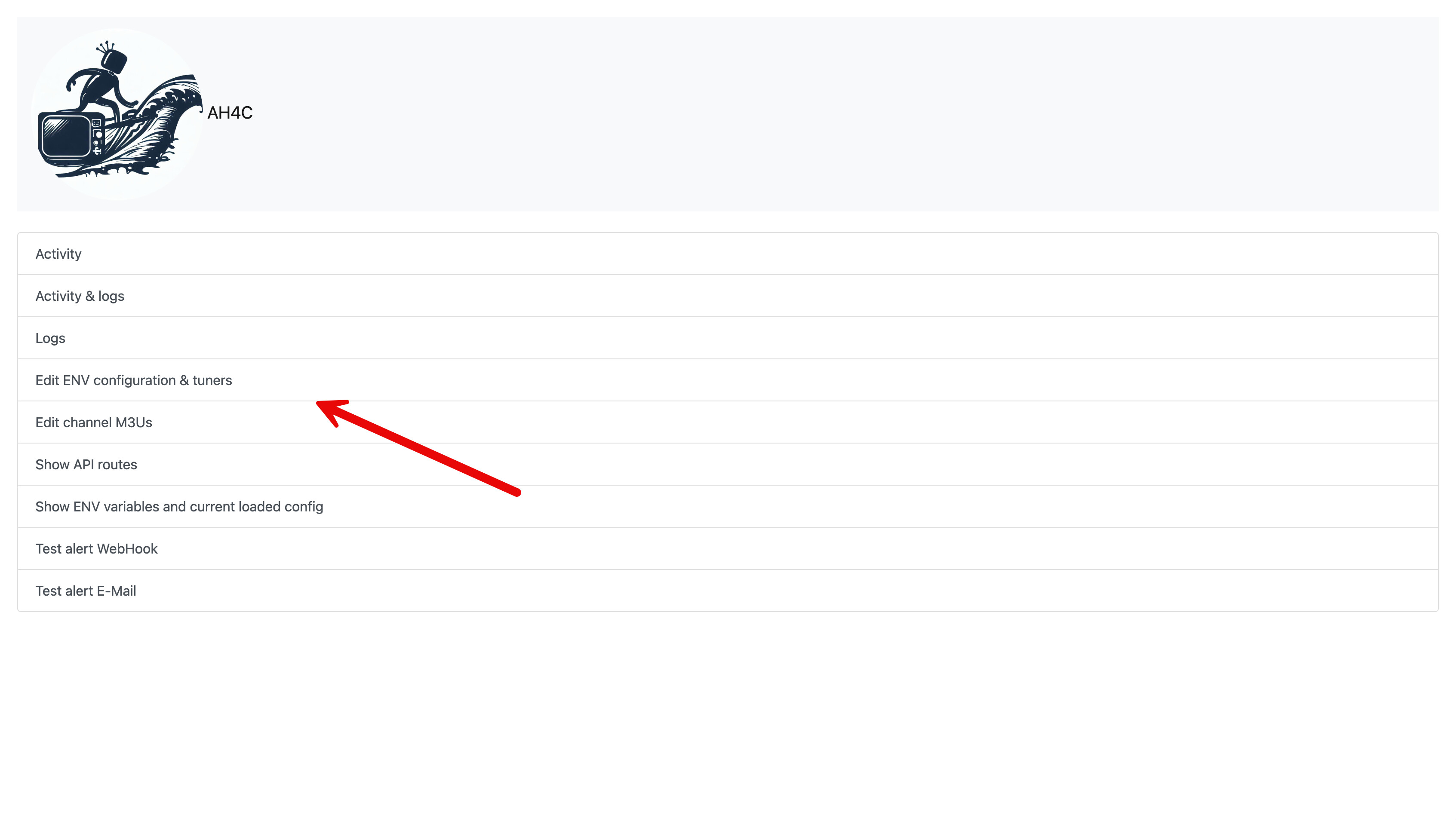
Edit: It seems that this may not pertain to docker installs? Should it cause my stream to crash though?
Only the activity and logs options are relevant to Docker installations, and even those are of modest value, as the logs available through Portainer are best. You can pretty much ignore the WebUI, as it's mostly for non-Docker users, of which there are very few.
That's great to know. As as aside, is there a simple way to prevent my ospreys from sleeping when I stop tuning. I prefer to keep them running. It looks like I can just edit the bash script?
Any advice? Your help is always appreciated.
There are others that can help you more with Osprey specifics, but generally yes, a big part of what people like about ah4c is being able to customize the scripts.
prebmitune.sh wakes up the streaming device, or does any other quick setup to prepare for tuning.
bmitune.sh does the virtual tuning.
stopbmitune.sh puts the device to sleep, or performs any other post tune requirements.
All three scripts must exist, but the can be no-op, if they're not needed.
Is there a way to delay the stream coming up on the TV, kind of like with ADB Tuner?
The only thing I'm running into is when I don't sleep the boxes and tune to a channel, it shows the previous channel for a good 2 to 3 seconds before it tunes to the new channel. I'm just curious if there's a way to avoid that.
I'm trying to modify the shell script to allow me to do that. I just can't figure out exactly the architecture to get that to work.
That doesn't require scripts modification, but is rather done this way:
1 Like
Thank you so much! That was super easy to set up!