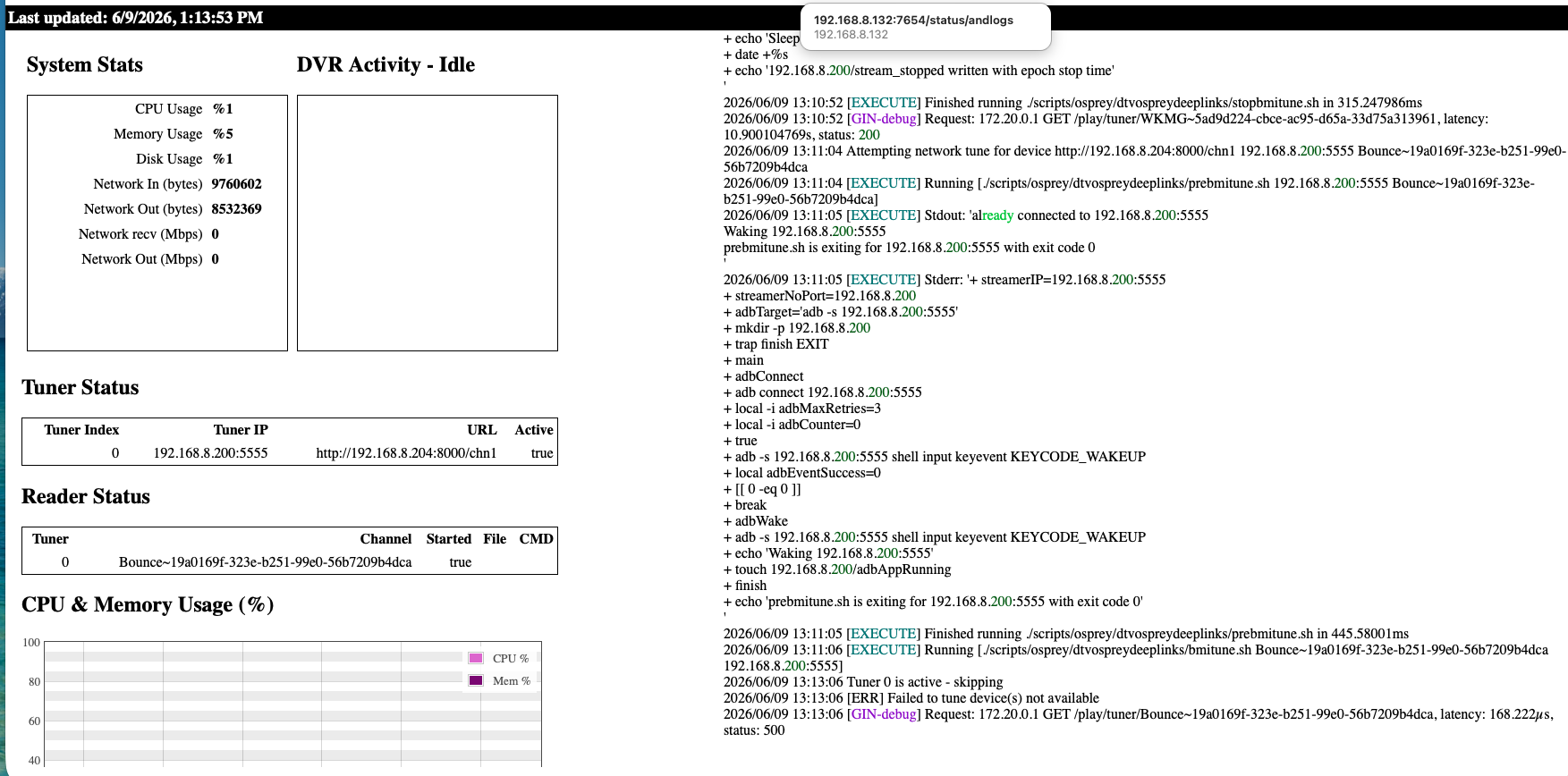
So tune something and go to that http://192.168.8.204:8000/chn1 in vlc and see if you see it.
Also you are hitting ah4c at http://192.168.8.132:7654?

So tune something and go to that http://192.168.8.204:8000/chn1 in vlc and see if you see it.
Also you are hitting ah4c at http://192.168.8.132:7654?
I can see the correct programming streaming inside VLC at: http://192.168.8.204:8000/chn1
http://192.168.8.132:7654 does take me to ah4c
WAIT!
can you stop your docker. go to your scripts directory that you are using and run
chmod +x prebmitune.sh
chmod +x bmitune.sh
chmod +x stopbmitune.sh
Just do it one at a time. I wonder if something broke permissions and stopbmitune isn't running and therefore not releasing the tuner.
@PSPS I'd suggest you go back to TAG=latest, since the older container is doing the same thing. Then, let's reconfigure for a single tuner, by changing TUNERS=1 and leave TUNER2_IP=, ENCODER2_URL=, TUNER3_IP=, and TUNER3_IP= all blank.
Let's debug with just a single virtual tuner for now...
Trying to figure out exactly how/where to do this in windows but that doesn't seem to be it
No worries, I've never ran this in Windows. I'd listen to @bnhf over me as it seems like my changes aren't the culprit!
You do have a WSL2 Linux distro installed, correct? With default distro integration enabled in Docker Desktop?
yes, that's correct
This is completed
OK, try a tune and let's see what the log tells us.
First tune was normal, I released it and tried a second and it looks like it's doing the same thing.
CDVR log:
2026/06/09 13:11:06.211344 [TNR] Opened connection to M3U-ah4c1-dtv407deeplinks for ch82 BounceTV
2026/06/09 13:13:06.212390 [TNR] Closing connection M3U-ah4c1-dtv407deeplinks ch82 after no data was received for 2m0s
2026/06/09 13:13:06.212390 [TNR] Closed connection to M3U-ah4c1-dtv407deeplinks for ch82 BounceTV
2026/06/09 13:13:06.212865 [SNR] Buffer statistics for 192.168.8.132 (192.168.8.132) for ch82 BounceTV: buf=0% drop=0%
2026/06/09 13:13:06.227017 [ERR] Could not start stream for ANY ch82 BounceTV: M3U: GET: http://192.168.8.132:7654/play/tuner/Bounce~19a0169f-323e-b251-99e0-56b7209b4dca: 500 Internal Server Error
Portainer:
127.0.0.1	localhost
::1	localhost ip6-localhost ip6-loopback
fe00::	ip6-localnet
ff00::	ip6-mcastprefix
ff02::1	ip6-allnodes
ff02::2	ip6-allrouters
172.20.0.2	ah4c1
* daemon not running; starting now at tcp:5037
* daemon started successfully
List of devices attached
connected to 192.168.8.200:5555
No existing ./scripts/firetv/directv/prebmitune.sh found or UPDATE_SCRIPTS set to true
No existing ./scripts/osprey/dtvospreydeeplinks/prebmitune.sh found or UPDATE_SCRIPTS set to true
No existing ./scripts/firetv/directv/bmitune.sh found or UPDATE_SCRIPTS set to true
No existing ./scripts/osprey/dtvospreydeeplinks/bmitune.sh found or UPDATE_SCRIPTS set to true
No existing ./scripts/firetv/directv/stopbmitune.sh found or UPDATE_SCRIPTS set to true
No existing ./scripts/osprey/dtvospreydeeplinks/stopbmitune.sh found or UPDATE_SCRIPTS set to true
No existing allente.m3u found or UPDATE_M3US set to true
No existing channels.m3u found or UPDATE_M3US set to true
No existing coachella.m3u found or UPDATE_M3US set to true
No existing directv.m3u found or UPDATE_M3US set to true
No existing dtvdeeplinks.m3u found or UPDATE_M3US set to true
No existing dtvosprey.m3u found or UPDATE_M3US set to true
No existing dtvstream.m3u found or UPDATE_M3US set to true
No existing dtvstreamdeeplinks.m3u found or UPDATE_M3US set to true
No existing edc.m3u found or UPDATE_M3US set to true
No existing foo-fighters.m3u found or UPDATE_M3US set to true
No existing fubo.m3u found or UPDATE_M3US set to true
No existing hulu.m3u found or UPDATE_M3US set to true
No existing kodifaves-pbs-seatac.m3u found or UPDATE_M3US set to true
No existing livetv.m3u found or UPDATE_M3US set to true
No existing nbc.m3u found or UPDATE_M3US set to true
No existing npo.m3u found or UPDATE_M3US set to true
No existing pbs-seatac.m3u found or UPDATE_M3US set to true
No existing pbs-worcester.m3u found or UPDATE_M3US set to true
No existing silicondust.m3u found or UPDATE_M3US set to true
No existing sling.m3u found or UPDATE_M3US set to true
No existing spectrum.m3u found or UPDATE_M3US set to true
No existing xfinity.m3u found or UPDATE_M3US set to true
No existing youtubetv_shield.m3u found or UPDATE_M3US set to true
No existing youtubetv.m3u found or UPDATE_M3US set to true
No existing zinwell.m3u found or UPDATE_M3US set to true
No user-defined custom script to run
[START] ah4c is starting
[ENV] Not loading env
[ENV] IPADDRESS                  192.168.8.132:7654
[ENV] ALERT_SMTP_SERVER
[ENV] ALERT_AUTH_SERVER
[ENV] ALERT_EMAIL_FROM
[ENV] ALERT_EMAIL_PASS
[ENV] ALERT_EMAIL_TO
[ENV] ALERT_WEBHOOK_URL
[ENV] ALLOW_DEBUG_VIDEO_PREVIEW
[ENV] NULL_FRAME_INSERTION
[ENV] Creating tuner             1
[ENV] ENCODER1_URL               http://192.168.8.204:8000/chn1
[ENV] TUNER1_IP                  192.168.8.200:5555
[ENV] CMD1
[ENV] TEECMD1
[ENV] PRE SCRIPT                 ./scripts/osprey/dtvospreydeeplinks/prebmitune.sh
[ENV] START SCRIPT               ./scripts/osprey/dtvospreydeeplinks/bmitune.sh
[ENV] STOP SCRIPT                ./scripts/osprey/dtvospreydeeplinks/stopbmitune.sh
[ENV] REBOOT SCRIPT              ./scripts/osprey/dtvospreydeeplinks/reboot.sh
[GIN-debug] [WARNING] Running in "debug" mode. Switch to "release" mode in production.
 - using env:	export GIN_MODE=release
 - using code:	gin.SetMode(gin.ReleaseMode)
[GIN-debug] GET    /favicon.ico              --> main.run.(*RouterGroup).StaticFile.func24 (2 handlers)
[GIN-debug] HEAD   /favicon.ico              --> main.run.(*RouterGroup).StaticFile.func24 (2 handlers)
[GIN-debug] Loaded HTML Templates (11):
	-
	- index.html

	- logs.html

	- m3us.html
	- routes.html
	- status.html
	- stream.html
	- config.html

	- edit.html
	- editm3u.html
	- status_and_logs.html
[GIN-debug] GET    /static/*filepath         --> github.com/gin-gonic/gin.(*RouterGroup).createStaticHandler.func1 (2 handlers)
[GIN-debug] HEAD   /static/*filepath         --> github.com/gin-gonic/gin.(*RouterGroup).createStaticHandler.func1 (2 handlers)
[GIN-debug] GET    /                         --> main.run.func1 (2 handlers)
[GIN-debug] GET    /routes                   --> main.run.func2 (2 handlers)
[GIN-debug] GET    /play/tuner:tuner/:channel --> main.run.func3 (2 handlers)
[GIN-debug] GET    /m3u/:channel             --> main.run.func4 (2 handlers)
[GIN-debug] GET    /env                      --> main.run.func5 (2 handlers)
[GIN-debug] GET    /logs/text                --> main.run.func6 (2 handlers)
[GIN-debug] GET    /logs                     --> main.run.func7 (2 handlers)
[GIN-debug] GET    /status/andlogs           --> main.run.func8 (2 handlers)
[GIN-debug] GET    /logs/json                --> main.run.func9 (2 handlers)
[GIN-debug] GET    /video                    --> main.run.func10 (2 handlers)
[GIN-debug] GET    /status                   --> main.statusPageHandler (2 handlers)
[GIN-debug] GET    /api/status               --> main.apiStatusHandler (2 handlers)
[GIN-debug] GET    /stream                   --> main.run.func11 (2 handlers)
[GIN-debug] GET    /test/webhook             --> main.run.func12 (2 handlers)
[GIN-debug] GET    /test/email               --> main.run.func13 (2 handlers)
[GIN-debug] GET    /status/channelsactivity  --> main.run.func14 (2 handlers)
[GIN-debug] GET    /edit                     --> main.run.func15 (2 handlers)
[GIN-debug] POST   /save                     --> main.run.func16 (2 handlers)
[GIN-debug] POST   /m3usave/:file            --> main.run.func17 (2 handlers)
[GIN-debug] GET    /m3us                     --> main.run.func18 (2 handlers)
[GIN-debug] GET    /editm3u/:file            --> main.run.func19 (2 handlers)
[GIN-debug] GET    /config                   --> main.run.func20 (2 handlers)
[GIN-debug] POST   /configsave               --> main.run.func21 (2 handlers)
[START] ah4c is ready
[GIN-debug] Listening and serving HTTP on :7654
> [email protected] start
> node ./index.js
Listening on:
	http://ah4c1:8000/ http://localhost:8000/
	http://127.0.0.1:8000/ http://172.20.0.2:8000/
	http://[::1]:8000/
Attempting network tune for device http://192.168.8.204:8000/chn1 192.168.8.200:5555 WKMG~5ad9d224-cbce-ac95-d65a-33d75a313961
[EXECUTE] Running [./scripts/osprey/dtvospreydeeplinks/prebmitune.sh 192.168.8.200:5555 WKMG~5ad9d224-cbce-ac95-d65a-33d75a313961]
[EXECUTE] Stdout: 'already connected to 192.168.8.200:5555
Waking 192.168.8.200:5555
prebmitune.sh is exiting for 192.168.8.200:5555 with exit code 0
'
[EXECUTE] Stderr: '+ streamerIP=192.168.8.200:5555
+ streamerNoPort=192.168.8.200
+ adbTarget='adb -s 192.168.8.200:5555'
+ mkdir -p 192.168.8.200
+ trap finish EXIT
+ main

+ adbConnect
+ adb connect 192.168.8.200:5555
+ local -i adbMaxRetries=3
+ local -i adbCounter=0
+ true
+ adb -s 192.168.8.200:5555 shell input keyevent KEYCODE_WAKEUP
+ local adbEventSuccess=0
+ [[ 0 -eq 0 ]]
+ break

e
+ adb -s 192.168.8.200:5555 shell input keyevent KEYCODE_WAKEUP
+ echo 'Waking 192.168.8.200:5555'
+ touch 192.168.8.200/adbAppRunning
+ finish
+ echo 'prebmitune.sh is exiting for 192.168.8.200:5555 with exit code 0'
'
[EXECUTE] Finished running ./scripts/osprey/dtvospreydeeplinks/prebmitune.sh in 531.252765ms
[EXECUTE] Running [./scripts/osprey/dtvospreydeeplinks/bmitune.sh WKMG~5ad9d224-cbce-ac95-d65a-33d75a313961 192.168.8.200:5555]
[Tue Jun  9 13:10:42 EDT 2026] Keep-alive started for 192.168.8.200:5555 (interval: 4h)
[IO] io.Copy: write tcp 172.20.0.2:7654->172.20.0.1:57248: write: broken pipe
[IOINFO] Successfully copied 7873344 bytes
[IOINFO] Transfer speed: 6.322951070441473 Mbits/second
Performing Close() for 192.168.8.200:5555
[EXECUTE] Running [./scripts/osprey/dtvospreydeeplinks/stopbmitune.sh 192.168.8.200:5555 WKMG~5ad9d224-cbce-ac95-d65a-33d75a313961]
[EXECUTE] Stdout: 'Starting: Intent { act=android.intent.action.VIEW dat=https://deeplink.directvnow.com/... pkg=com.att.tv.openvideo }
bmitune.sh is exiting for 192.168.8.200:5555 with exit code 0
'
[EXECUTE] Stderr: '++ echo WKMG~5ad9d224-cbce-ac95-d65a-33d75a313961
++ awk -F~ '{print $2}'
+ channelID=5ad9d224-cbce-ac95-d65a-33d75a313961
++ echo WKMG~5ad9d224-cbce-ac95-d65a-33d75a313961
++ awk -F~ '{print $1}'
+ channelName=WKMG
+ specialID=WKMG
+ streamerIP=192.168.8.200:5555
+ streamerNoPort=192.168.8.200
+ adbTarget='adb -s 192.168.8.200:5555'
+ [[ false == '' ]]
+ speedMode=false
+ mkdir -p 192.168.8.200
+ echo 116
+ trap finish EXIT
+ main
+ tuneChannel
+ adb -s 192.168.8.200:5555 shell 'am start -a android.intent.action.VIEW -d '\''https://deeplink.directvnow.com/tune/live/channel/WKMG/5ad9d224-cbce-ac95-d65a-33d75a313961'\'' com.att.tv.openvideo'
Warning: Activity not started, intent has been delivered to currently running top-most instance.
+ echo -e '#!/bin/bash\n\necho "[$(date)] Keep-alive started for 192.168.8.200:5555 (interval: 4h)" > /proc/1/fd/1\nwhile true; do sleep 4h; echo "[$(date)] Keep-alive sent to 192.168.8.200:5555" > /proc/1/fd/1; adb -s 192.168.8.200:5555 shell input keyevent KEYCODE_MEDIA_PLAY; done'
+ chmod +x ./192.168.8.200/keep_watching.sh
+ finish
+ [[ -n 4h ]]
+ echo 'bmitune.sh is exiting for 192.168.8.200:5555 with exit code 0'
+ nohup ./192.168.8.200/keep_watching.sh
Terminated
'
[EXECUTE] Finished running ./scripts/osprey/dtvospreydeeplinks/bmitune.sh in 10.157159476s
[EXECUTE] Stdout: 'Sleep initiated for 192.168.8.200:5555
192.168.8.200/stream_stopped written with epoch stop time
'
[EXECUTE] Stderr: '+ streamerIP=192.168.8.200:5555
+ streamerNoPort=192.168.8.200
+ adbTarget='adb -s 192.168.8.200:5555'
+ main
+ bmituneDone
+ bmitunePID=116
++ pgrep -f 192.168.8.200/keep_watching.sh
+ keepWatchingPID=128
++ ps -o ppid= -p 128
+ keepWatchingPPID='  127'
++ pgrep -P 128
+ keepWatchingCPID=130
+ ps -p 116
+ [[ -n 4h ]]
+ pkill -P 127
+ kill 130
+ rm ./192.168.8.200/keep_watching.sh
+ adbSleep
+ sleep='input keyevent KEYCODE_SLEEP'
+ adb -s 192.168.8.200:5555 shell input keyevent KEYCODE_SLEEP
+ echo 'Sleep initiated for 192.168.8.200:5555'
+ date +%s
+ echo '192.168.8.200/stream_stopped written with epoch stop time'
'
[EXECUTE] Finished running ./scripts/osprey/dtvospreydeeplinks/stopbmitune.sh in 315.247986ms
[GIN-debug] Request: 172.20.0.1 GET /play/tuner/WKMG~5ad9d224-cbce-ac95-d65a-33d75a313961, latency: 10.900104769s, status: 200
Attempting network tune for device http://192.168.8.204:8000/chn1 192.168.8.200:5555 Bounce~19a0169f-323e-b251-99e0-56b7209b4dca
[EXECUTE] Running [./scripts/osprey/dtvospreydeeplinks/prebmitune.sh 192.168.8.200:5555 Bounce~19a0169f-323e-b251-99e0-56b7209b4dca]
[EXECUTE] Stdout: 'already connected to 192.168.8.200:5555
Waking 192.168.8.200:5555
prebmitune.sh is exiting for 192.168.8.200:5555 with exit code 0
'
[EXECUTE] Stderr: '+ streamerIP=192.168.8.200:5555
+ streamerNoPort=192.168.8.200
+ adbTarget='adb -s 192.168.8.200:5555'
+ mkdir -p 192.168.8.200
+ trap finish EXIT
+ main

+ adbConnect
+ adb connect 192.168.8.200:5555
+ local -i adbMaxRetries=3
+ local -i adbCounter=0
+ true
+ adb -s 192.168.8.200:5555 shell input keyevent KEYCODE_WAKEUP
+ local adbEventSuccess=0
+ [[ 0 -eq 0 ]]
+ break

e
+ adb -s 192.168.8.200:5555 shell input keyevent KEYCODE_WAKEUP
+ echo 'Waking 192.168.8.200:5555'
+ touch 192.168.8.200/adbAppRunning
+ finish
+ echo 'prebmitune.sh is exiting for 192.168.8.200:5555 with exit code 0'
'
[EXECUTE] Finished running ./scripts/osprey/dtvospreydeeplinks/prebmitune.sh in 445.58001ms
[EXECUTE] Running [./scripts/osprey/dtvospreydeeplinks/bmitune.sh Bounce~19a0169f-323e-b251-99e0-56b7209b4dca 192.168.8.200:5555]
[Tue Jun  9 13:11:06 EDT 2026] Keep-alive started for 192.168.8.200:5555 (interval: 4h)
Tuner 0 is active - skipping
[ERR] Failed to tune device(s) not available
[GIN-debug] Request: 172.20.0.1 GET /play/tuner/Bounce~19a0169f-323e-b251-99e0-56b7209b4dca, latency: 168.222µs, status: 500
sorry, been meaning to tell you about that in the one-click action
I'm not seeing where you stopped the stream here before starting another.
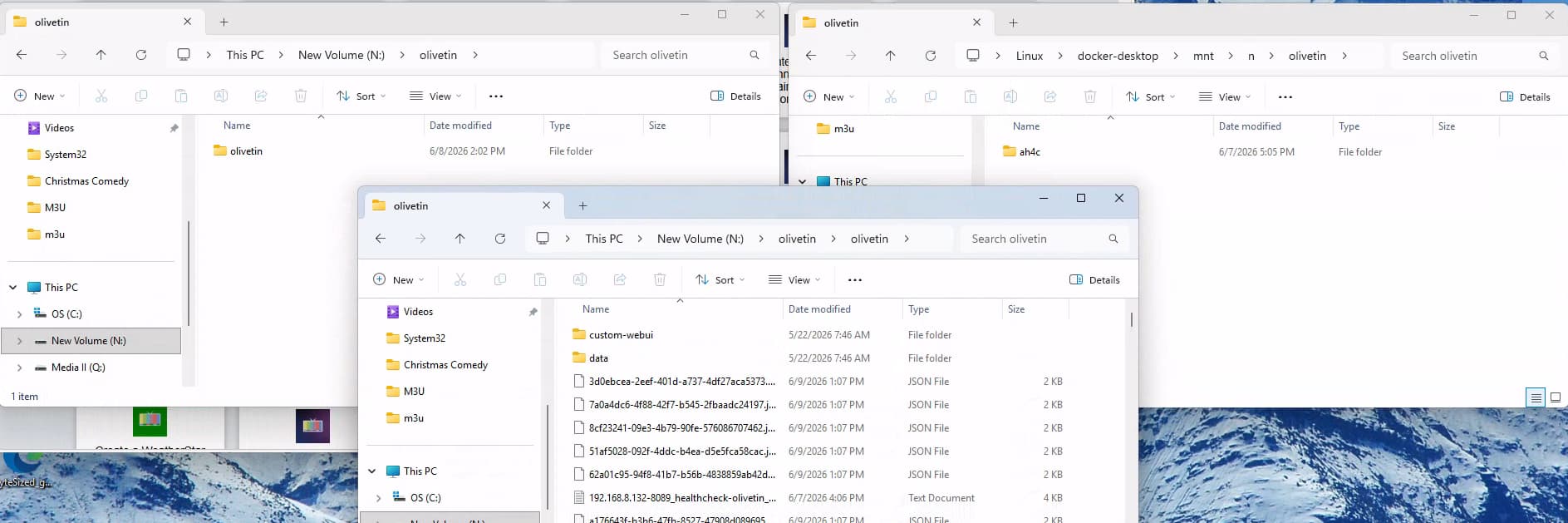
/mnt/n/olivetin
On your Windows PC can you access N:\olivetin? I'm just wondering if the bind mounts aren't correct or there is some script execution issue with Windows. It just feels like these scripts are failing to fully run. Out of curiosity maybe turn keep watching to FALSE. That reduces complexity and may help if it's a weird escaping issue.
The first stream is above, WKMG
Terminated
'
[EXECUTE] Finished running ./scripts/osprey/dtvospreydeeplinks/bmitune.sh in 10.157159476s
[EXECUTE] Stdout: 'Sleep initiated for 192.168.8.200:5555
192.168.8.200/stream_stopped written with epoch stop time
'
[EXECUTE] Stderr: '+ streamerIP=192.168.8.200:5555
+ streamerNoPort=192.168.8.200
+ adbTarget='adb -s 192.168.8.200:5555'
+ main
+ bmituneDone
+ bmitunePID=116
++ pgrep -f 192.168.8.200/keep_watching.sh
+ keepWatchingPID=128
++ ps -o ppid= -p 128
+ keepWatchingPPID='  127'
++ pgrep -P 128
+ keepWatchingCPID=130
+ ps -p 116
+ [[ -n 4h ]]
+ pkill -P 127
+ kill 130
+ rm ./192.168.8.200/keep_watching.sh
+ adbSleep
+ sleep='input keyevent KEYCODE_SLEEP'
+ adb -s 192.168.8.200:5555 shell input keyevent KEYCODE_SLEEP
+ echo 'Sleep initiated for 192.168.8.200:5555'
+ date +%s
+ echo '192.168.8.200/stream_stopped written with epoch stop time'
'
[EXECUTE] Finished running ./scripts/osprey/dtvospreydeeplinks/stopbmitune.sh in 315.247986ms
[GIN-debug] Request: 172.20.0.1 GET /play/tuner/WKMG~5ad9d224-cbce-ac95-d65a-33d75a313961, latency: 10.900104769s, status: 200
Attempting network tune for device http://192.168.8.204:8000/chn1 192.168.8.200:5555 Bounce~19a0169f-323e-b251-99e0-56b7209b4dca
[EXECUTE] Running [./scripts/osprey/dtvospreydeeplinks/prebmitune.sh 192.168.8.200:5555 Bounce~19a0169f-323e-b251-99e0-56b7209b4dca]
[EXECUTE] Stdout: 'already connected to 192.168.8.200:5555
Waking 192.168.8.200:5555
prebmitune.sh is exiting for 192.168.8.200:5555 with exit code 0
'
I think that's a good idea, although I believe you just leave KEEP_WATCHING= blank to accomplish that.
You'd know better than me!!! I just wonder if Windows + weird bash escaping is preventing teardown.
You might be on to something here. If I look at N:\olivetin it is different than if I browse the linux path \wsl.localhost\docker-desktop\mnt\n\olivetin
That actually looks correct just one directory up. Unless those two Olivetins are not the same Olivetin