
Bear with me. I’m old enough to have one foot in the grave and one foot on a banana peel  The last real programming I did was in the 80s and that was primarily Assembler and COBOL.
1 Like
No worries, hence why I provided screenshots.
Thanks for this project! I'm waiting on my LinkPi to arrive, hopefully in the next week. While waiting, I decided to set up the Fire TV Sticks and install ah4c to work the kinks out before the final hardware piece arrives. I'm using Xfinity Stream and have read a good bit of this thread, but especially everything with Xfinity in it. My current hangup is finding the proper m3u setup for my channel listing. AI walked me through capturing the channel list from the console, but that is turning out to be showing guide data, not the actual channel numbers.
For example, for channel 1036, it had:
#EXTINF:-1 channel-id="1036" channel-number="1036" tvc-guide-stationid="8167265010082066117" tvg-name="WATLD" tvg-chno="1036",WATLD
http://{{ .IPADDRESS }}/play/tuner/1036
when what I really needed was something like:
#EXTINF:-1 channel-id="1036" channel-number="1036" tvc-guide-stationid="5162125970112283117" tvg-name="WATL-HD" tvg-chno="1036",WATLD
http://{{ .IPADDRESS }}/play/tuner/WATLD-7275065179929881105
I don't think that's entirely correct because the github xfinity.m3u has much shorter tvc station ids like 59368.
I'm so close on this but can't crack the code on how to get the other hundreds of channels other than clicking each channel and copying the URL to get the correct code for the m3u.
Is there a better way to capture the required channel data for an Xfinity lineup?
Also, is there a way to tune through ah4c while the LinkPi isn't attached? Using a dummy entry for the encoder address in ah4c appears to give a successful tune, ie no obvious error in the log, but by the time I walk to my network room the stream has already terminated and put the device back to sleep. This was using curl "http://192.168.99.63:7654/play/tuner/KMSPD-8615637520029897105" -o /dev/null.
I can successfully tune through adb with:
adb -s 192.168.99.35:5555 shell input keyevent KEYCODE_WAKEUP && adb -s 192.168.99.35:5555 shell am force-stop com.xfinity.cloudtvr.tenfoot && adb -s 192.168.99.35:5555 shell am start -a android.intent.action.VIEW -d "https://www.xfinity.com/stream/live/watch/7275065179929881105/WATLD" com.xfinity.cloudtvr.tenfoot
I feel like I'm right on the verge of getting this correct. I will keep trying to automatically generate the m3u until the LinkPi arrives. Then I'll probably punt and manually access each channel one by one. I already have most of the m3u data correct; I just need the correct tvc-guide-stationid and /play/tuner action.
It's been a while since I put my remote xfinity setup together, but this is the M3U I use (which is the same as posted on the repo:
#EXTM3U

#EXTINF:-1 channel-id="1002" channel-number="1002" tvc-guide-stationid="21634" tvg-group="" tvg-logo="",KTCA-DT
http://{{ .IPADDRESS }}/play/tuner/tpt2H-8037961156532819105

#EXTINF:-1 channel-id="1004" channel-number="1004" tvc-guide-stationid="21234" tvg-group="" tvg-logo="",WCCO-DT
http://{{ .IPADDRESS }}/play/tuner/WCCOD-5669032547815822105

#EXTINF:-1 channel-id="1005" channel-number="1005" tvc-guide-stationid="21236" tvg-group="" tvg-logo="",KSTP-DT
http://{{ .IPADDRESS }}/play/tuner/KSTPD-8713109229817176105

#EXTINF:-1 channel-id="1009" channel-number="1009" tvc-guide-stationid="24504" tvg-group="" tvg-logo="",KMSP-DT
http://{{ .IPADDRESS }}/play/tuner/KMSPD-8615637520029897105

#EXTINF:-1 channel-id="1011" channel-number="1011" tvc-guide-stationid="20505" tvg-group="" tvg-logo="",KARE-DT
http://{{ .IPADDRESS }}/play/tuner/KARED-7728061817102576105

#EXTINF:-1 channel-id="1017" channel-number="1017" tvc-guide-stationid="21865" tvg-group="" tvg-logo="",KTCI-DT3
http://{{ .IPADDRESS }}/play/tuner/TPTL-8037961156532819105

#EXTINF:-1 channel-id="1023" channel-number="1023" tvc-guide-stationid="34425" tvg-group="" tvg-logo="",WUCW-DT
http://{{ .IPADDRESS }}/play/tuner/TPTL-8037961156532819105

#EXTINF:-1 channel-id="1041" channel-number="1041" tvc-guide-stationid="36071" tvg-group="" tvg-logo="",KPXM-DT
http://{{ .IPADDRESS }}/play/tuner/IONHD-8070479734704376105

#EXTINF:-1 channel-id="1111" channel-number="1111" tvc-guide-stationid="58646" tvg-group="" tvg-logo="",CNN HD
http://{{ .IPADDRESS }}/play/tuner/CNNHD-7551018075264600105

#EXTINF:-1 channel-id="1167" channel-number="1167" tvc-guide-stationid="73502" tvg-group="" tvg-logo="",KSTC-DT2
http://{{ .IPADDRESS }}/play/tuner/MeTV-4757730922757252105

#EXTINF:-1 channel-id="1168" channel-number="1168" tvc-guide-stationid="75977" tvg-group="" tvg-logo="",KSTC-DT4
http://{{ .IPADDRESS }}/play/tuner/KSTC2-8760927753427221105

#EXTINF:-1 channel-id="1174" channel-number="1174" tvc-guide-stationid="92038" tvg-group="" tvg-logo="",WCCO-DT2
http://{{ .IPADDRESS }}/play/tuner/START-8313187410358697105

#EXTINF:-1 channel-id="1182" channel-number="1182" tvc-guide-stationid="52331" tvg-group="" tvg-logo="",WUCW-DT2
http://{{ .IPADDRESS }}/play/tuner/COMET-6532506444970079105

#EXTINF:-1 channel-id="1183" channel-number="1183" tvc-guide-stationid="69640" tvg-group="" tvg-logo="",WUCW-DT3
http://{{ .IPADDRESS }}/play/tuner/CHARG-6872374361091213105

#EXTINF:-1 channel-id="1205" channel-number="1205" tvc-guide-stationid="32645" tvg-group="" tvg-logo="",ESPN HD
http://{{ .IPADDRESS }}/play/tuner/ESPND-7642769970651506105

#EXTINF:-1 channel-id="1206" channel-number="1206" tvc-guide-stationid="45507" tvg-group="" tvg-logo="",ESPN2 HD
http://{{ .IPADDRESS }}/play/tuner/ES2HD-7642769970651506105

#EXTINF:-1 channel-id="1208" channel-number="1208" tvc-guide-stationid="82547" tvg-group="" tvg-logo="",FS1 HD
http://{{ .IPADDRESS }}/play/tuner/FS1HD-5628918118244997105

#EXTINF:-1 channel-id="1209" channel-number="1209" tvc-guide-stationid="59305" tvg-group="" tvg-logo="",FS2 HD
http://{{ .IPADDRESS }}/play/tuner/FS2-8827972050046699105

#EXTINF:-1 channel-id="1223" channel-number="1223" tvc-guide-stationid="61854" tvg-group="" tvg-logo="",Golf Channel HD
http://{{ .IPADDRESS }}/play/tuner/GOLFD-7547469904399748105

#EXTINF:-1 channel-id="1224" channel-number="1224" tvc-guide-stationid="60316" tvg-group="" tvg-logo="",Tennis Channel HD
http://{{ .IPADDRESS }}/play/tuner/TNND-5272992504836762105

#EXTINF:-1 channel-id="1250" channel-number="1250" tvc-guide-stationid="74436" tvg-group="" tvg-logo="",Bally Sports North HD
http://{{ .IPADDRESS }}/play/tuner/BSNRD-5676071061539263105

#EXTINF:-1 channel-id="1313" channel-number="1313" tvc-guide-stationid="58774" tvg-group="" tvg-logo="",Big Ten Network Minnesota HD
http://{{ .IPADDRESS }}/play/tuner/B10HD-7916016111854078105

#EXTINF:-1 channel-id="1403" channel-number="1403" tvc-guide-stationid="58452" tvg-group="" tvg-logo="",USA Network HD
http://{{ .IPADDRESS }}/play/tuner/USAHD-6198908101479551105

#EXTINF:-1 channel-id="1404" channel-number="1404" tvc-guide-stationid="42642" tvg-group="" tvg-logo="",TNT HD
http://{{ .IPADDRESS }}/play/tuner/TNTHD-5966517083150279105

#EXTINF:-1 channel-id="1405" channel-number="1405" tvc-guide-stationid="59337" tvg-group="" tvg-logo="",AMC HD
http://{{ .IPADDRESS }}/play/tuner/AMCHD-8004546766543596105

#EXTINF:-1 channel-id="1418" channel-number="1418" tvc-guide-stationid="64492" tvg-group="" tvg-logo="",BBC America HD
http://{{ .IPADDRESS }}/play/tuner/BBCAM-7159950156799115105

#EXTINF:-1 channel-id="1430" channel-number="1430" tvc-guide-stationid="64490" tvg-group="" tvg-logo="",truTV HD
http://{{ .IPADDRESS }}/play/tuner/TRTVD-5197383487287436105

#EXTINF:-1 channel-id="1434" channel-number="1434" tvc-guide-stationid="58515" tvg-group="" tvg-logo="",TBS HD
http://{{ .IPADDRESS }}/play/tuner/TBSHD-6937726884423880105

#EXTINF:-1 channel-id="1458" channel-number="1458" tvc-guide-stationid="66268" tvg-group="" tvg-logo="",Hallmark Channel HD
http://{{ .IPADDRESS }}/play/tuner/HCHD-7889068523651137105

#EXTINF:-1 channel-id="1459" channel-number="1459" tvc-guide-stationid="46710" tvg-group="" tvg-logo="",Hallmark Mystery HD
http://{{ .IPADDRESS }}/play/tuner/HMYS-7889068523651137105

#EXTINF:-1 channel-id="1802" channel-number="1802" tvc-guide-stationid="19548" tvg-group="" tvg-logo="",HBO HD
http://{{ .IPADDRESS }}/play/tuner/HBOHD-5232923399725817105

#EXTINF:-1 channel-id="1803" channel-number="1803" tvc-guide-stationid="10244" tvg-group="" tvg-logo="",HBO (PACIFIC)
http://{{ .IPADDRESS }}/play/tuner/HBO-W-5232923399725817105

#EXTINF:-1 channel-id="1804" channel-number="1804" tvc-guide-stationid="59368" tvg-group="" tvg-logo="",HBO2 HD
http://{{ .IPADDRESS }}/play/tuner/HBO2H-5232923399725817105

#EXTINF:-1 channel-id="1806" channel-number="1806" tvc-guide-stationid="10243" tvg-group="" tvg-logo="",HBO Signature
http://{{ .IPADDRESS }}/play/tuner/HBOSG-5232923399725817105

#EXTINF:-1 channel-id="1808" channel-number="1808" tvc-guide-stationid="16585" tvg-group="" tvg-logo="",HBO Family
http://{{ .IPADDRESS }}/play/tuner/HBOFE-5232923399725817105

#EXTINF:-1 channel-id="1810" channel-number="1810" tvc-guide-stationid="18429" tvg-group="" tvg-logo="",HBO Comedy
http://{{ .IPADDRESS }}/play/tuner/HBOCM-5232923399725817105

#EXTINF:-1 channel-id="1812" channel-number="1812" tvc-guide-stationid="18431" tvg-group="" tvg-logo="",HBO Zone
http://{{ .IPADDRESS }}/play/tuner/HBOZN-5232923399725817105

#EXTINF:-1 channel-id="1840" channel-number="1840" tvc-guide-stationid="21868" tvg-group="" tvg-logo="",Paramount+ with Showtime HD
http://{{ .IPADDRESS }}/play/tuner/SHOHD-6578292319676893105

#EXTINF:-1 channel-id="1841" channel-number="1841" tvc-guide-stationid="22532" tvg-group="HD" tvg-logo="",SHOWHDP
http://{{ .IPADDRESS }}/play/tuner/SHOHW-6578292319676893105

#EXTINF:-1 channel-id="1842" channel-number="1842" tvc-guide-stationid="11116" tvg-group="" tvg-logo="",SHO2e
http://{{ .IPADDRESS }}/play/tuner/SHO2e-6578292319676893105

#EXTINF:-1 channel-id="1846" channel-number="1846" tvc-guide-stationid="16153" tvg-group="" tvg-logo="",Showtime Showcase
http://{{ .IPADDRESS }}/play/tuner/SHOCe-6578292319676893105

#EXTINF:-1 channel-id="1848" channel-number="1848" tvc-guide-stationid="18086" tvg-group="" tvg-logo="",Showtime Extreme
http://{{ .IPADDRESS }}/play/tuner/SHOXe-6578292319676893105

#EXTINF:-1 channel-id="1852" channel-number="1852" tvc-guide-stationid="25274" tvg-group="" tvg-logo="",Showtime Familyzone
http://{{ .IPADDRESS }}/play/tuner/SHOFe-6578292319676893105

#EXTINF:-1 channel-id="1860" channel-number="1860" tvc-guide-stationid="35329" tvg-group="" tvg-logo="",The Movie Channel HD
http://{{ .IPADDRESS }}/play/tuner/TMCHD-9102031849685959105

#EXTINF:-1 channel-id="1862" channel-number="1862" tvc-guide-stationid="60951" tvg-group="" tvg-logo="",The Movie Channel Extra HD
http://{{ .IPADDRESS }}/play/tuner/TMCXe-9102031849685959105

#EXTINF:-1 channel-id="1871" channel-number="1871" tvc-guide-stationid="65687" tvg-group="" tvg-logo="",MGM+ HD
http://{{ .IPADDRESS }}/play/tuner/MGM+-7697030199876428105

#EXTINF:-1 channel-id="1873" channel-number="1873" tvc-guide-stationid="67929" tvg-group="" tvg-logo="",MGM+ Hits HD
http://{{ .IPADDRESS }}/play/tuner/MGMHT-7697030199876428105

#EXTINF:-1 channel-id="1874" channel-number="1874" tvc-guide-stationid="74073" tvg-group="" tvg-logo="",MGM+ Marquee HD
http://{{ .IPADDRESS }}/play/tuner/MGMMR-7697030199876428105

#EXTINF:-1 channel-id="1875" channel-number="1875" tvc-guide-stationid="103828" tvg-group="" tvg-logo="",MGM+ Drive-In HD
http://{{ .IPADDRESS }}/play/tuner/MGMDR-7697030199876428105
The channel-id and channel-number I used are the standard Xfinity channel numbers. The tvc-guide-stationid values are the Gracenote Station IDs so you get the correct guide data.
The play/tuner/ URL is <callsign>-<deeplink>, which I got by tuning each channel I wanted through Xfinity Stream in browser, and grabbing the deeplink from the redirect when the channel was playing. I believe the callsigns I used were from Zap2it, but I'm not 100% on that.
I've moved to using tildes rather than dashes between tuning values like that in recent years, but the Xfinity scripts probably still use dashes -- so stick with that to start, but maybe we'll update to tildes as we're getting you up-and-running.
EDIT: Actually, if you're in MN, the repo M3U (posted here too) should be a good (and accurate) starting point. I don't know of way to automate the process of getting all the deeplink values you need, but if figure one out, I'll add it to Project One-Click.
1 Like
Thanks, that's all I needed to stop messing with trying to capture it from the browser console. There surely is a way, but I haven't been able to find it in several hours of testing. Knowing one correct tuning ID, I have not been able to capture it in the browser Networking > XHR tab while starting the known channel. I'll go through them one by one using your .m3u as a starting point. My guide has roughly 1400 channels in it, but many of them are SD versions with HD duplicates, TV-GO channels (which may or may not tune), foreign language channels I don't need, etc. Once I get a working m3u, I'm happy to share with the community. My lineup is for GA, but I would imagine many of the national channels would match other users' setups.
That'd be great. I remember when I did it I went through and made favorites of the channels I cared about, and then tuned and grabbed deeplinks from Favorites. You can always go back and grab others later.
If your LinkPi is coming from China (so it's going to be a while), you could buy a Capture Card like this one:
Then you'd setup a CDVR Custom Channel Source to transcode input from the Capture Card. This creates a "virtual encoder". That virtual encoder can then be used in ah4c just like a hardware encoder. There's documentation on the forum about how to do this.
BTW, one thing to know about Xfinity in particular is that tuning via deeplinks in not quick. Channel surfing is definitely out, but obviously this doesn't really make a difference for recordings, and when you're tuning from the guide it's slow-ish, but usable.
The new pre-roll feature in ah4c allows you to insert a static image (like the ah4c splash pages I've posted here before, or you can even add fun, short videos (like Snack Canyon maybe?) to fill some of the time before streaming starts. I'm thinking it's maybe 20 seconds to tune for me, but I'm remote to the LinkPi.
Would m3u from HDHR Prime on Xfinity be of use?
Does it have Gracenote Station IDs in it? If so, then I'd say yes.
I'm actually using an HDHR Prime in my current setup, but Xfinity de-authorized my CableCARD, and I can't get anyone to re-authorize it. I figured I'd switch now anyway since they will likely die soon.
Anyway, is there somewhere in my current Setup I should be able to find/generate the m3u from my HDHR lineup?
EDIT: answered my own question and downloaded the m3u from sources > manage > copy m3u url. The downloaded URL contains some of my channels, but none of the IDs that will be needed to stream as far as I can tell.
#EXTINF:-1 channel-id="1032" tvg-id="1032" tvg-chno="1032" tvg-logo="https://tmsimg.fancybits.co/assets/s70436_ll_h15_ac.png?w=360&h=270" tvc-guide-stationid="63861" tvg-name="WGTADT" group-title="SD",METVN
http://192.168.99.61:8089/devices/1324A55C/channels/1032/stream.mpg?format=ts&codec=copy
That's one example channel. It has some of the same data, but not all.
Actually I'm not finding it easy to get m3u to output.
Here is what I get from an incognito window:
"https://abc.com/watch-live/b2f23a6e-a2a4-4d63-bd3b-e330921b0942?view=full&mvpdId=Comcast_SSO"
Just want to speak up please if you care give my mackid1993/ah4c latest or beta a try let me know of any bugs. I made a change to ws-scrcpy and am looking for feedback then I am done unless anyone can find bugs. The only thing I caught and have to fix is on the /status (Activity) page when using FastChannels the callsign doesn't show. That is my last thing for this pass so I'd really like to know people are happy.
Maybe we'll release this as bnhf/ah4c:latest tomorrow morning, if no show-stoppers come up today? Sound good?
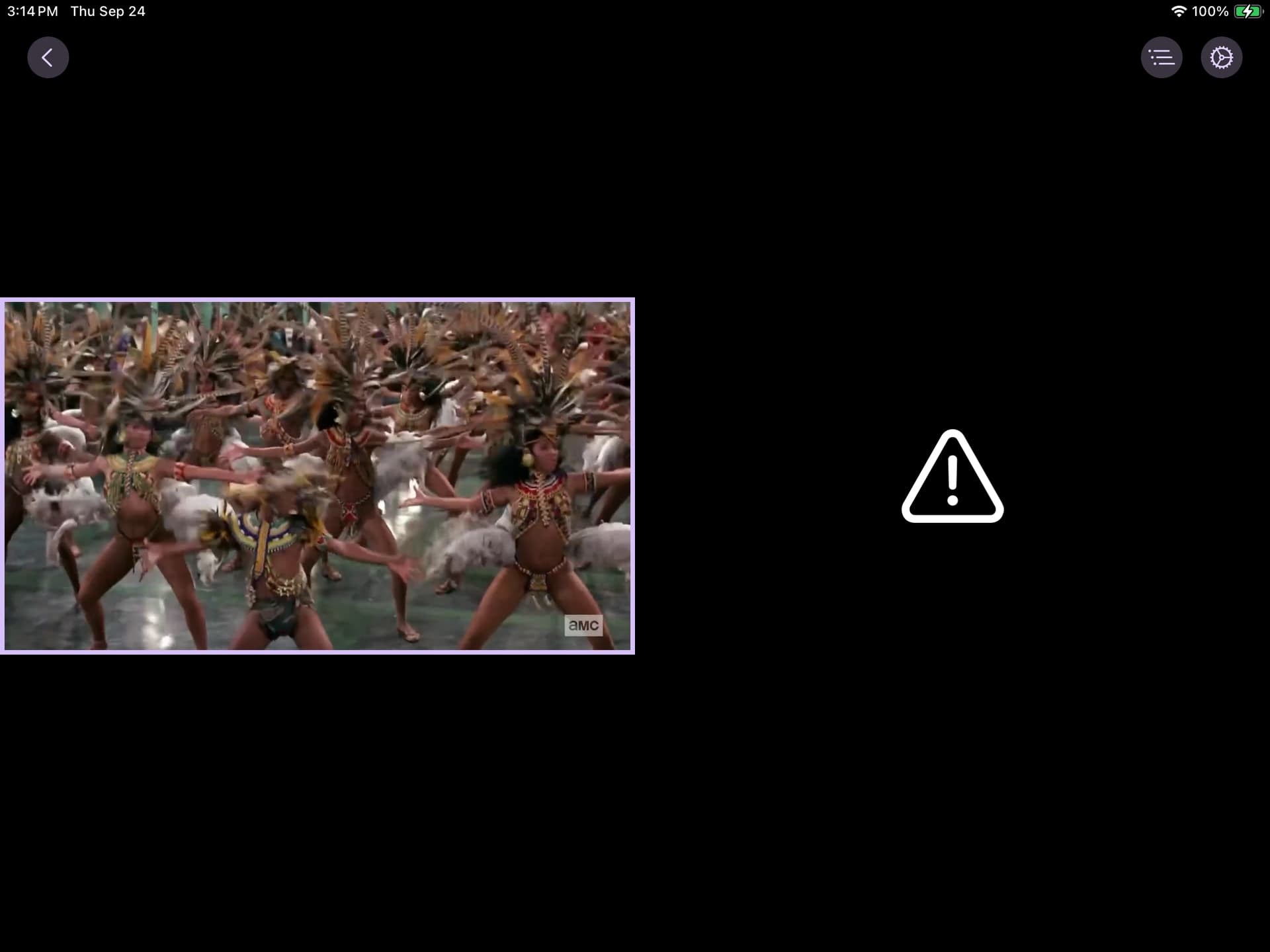
Has anyone tried the replace channel function in CDVR multi view when using ah4c. I think I found a race condition, but not sure.
Here is what Im seeing in channels
I had my other grandpa Sonnet the V, look at the CDVR log and parse it agains the ah4c logs.
It seems like when channels does the replace in the multiview UI. The call from channels for the new stream happens within milliseconds, but the actual stopbmitune isnt issued for almost a second. Im not sure whether this is a new issue or not, and Id like to see if anyone can repeat this with android sticks and rule out the PYATV branch all together. This was one of the things I was seeing yesterday. There is another issue where I saw the tuner get locked forever. I am continuing stress testing to duplicate that issue, but it is very infrequent. I was able to use the incredible handy tuner unlock feature in the dashboard. ANOTHER BRAVO @mackid1993
Here is grandpa's summary.
This was using the AUGUST spectrum scripts with NO CHANGES.
# Possible race condition: tuner shows "active" briefly after a multi-view channel replace, causing a frozen client

## TL;DR

When I replace the channel on one pane of a multi-view session (not stop/restart, just changing the channel on a pane that's already playing), the pane freezes with a warning icon and never recovers. Looking at the logs side by side, it looks like Channels DVR closes the old stream and opens the new one only a couple milliseconds apart, but ah4c doesn't actually mark that tuner free until its teardown script against the physical device finishes — which takes close to a second. The new tune request lands right in that gap, gets told "device(s) not available," and the client just hangs instead of recovering.

## Setup

- ah4c container with two Apple TV tuners running the Spectrum TV app
- Tuner 0 → 192.168.1.22
- Tuner 1 → 192.168.1.210
- Channels DVR server, tested from an iPad Pro 10.5" (192.168.1.103) using the multi-view UI

## How to reproduce it

1. Open multi-view on a client and start two stations, one per pane. Both tune fine and play normally.
2. On one of the panes, use the UI to replace the channel — a live channel swap on a pane that's already playing, not stopping and restarting it.
3. That pane goes to a frozen/warning icon with no video and doesn't seem to come back on its own.

I've been able to get this every time I try it, so it seems fully repeatable.

## What the logs show

I pulled the ah4c and Channels DVR logs from the same window and lined up the timestamps. Here's the sequence right around the freeze:

| Time | ah4c (Tuner 1 / .210) | Channels DVR (client 192.168.1.103) |
|---|---|---|
| 14:44:25.610 | Attempting network tune for device ... 192.168.1.210 58623 | Opened connection to M3U-hdmicontour for ch3032 SYFY |
| 14:44:35 | bmitune SUCCESS — tuner-2 tuned to SYFY | streaming normally |
| 14:45:09.971216 | — | Buffer statistics for 192.168.1.103 (iPad Pro 10.5) for ch3032 SYFY: buf=0% drop=0% |
| 14:45:09.971805 | — | Closed connection to M3U-hdmicontour for ch3032 SYFY |
| 14:45:09.974345 | — | Opened connection to M3U-hdmicontour for ch3026 Paramount (+2.5 ms after the close) |
| 14:45:09.974495 | — | Closed connection to M3U-hdmicontour for ch3026 Paramount (+0.15 ms later) |
| 14:45:09 | Tuner 0 is active - skipping | — |
| 14:45:09 | Tuner 1 is active - skipping | — |
| 14:45:09 | tune failed after 1ms; ending the stream so the DVR retries: device(s) not available | Buffer statistics for 192.168.1.103 for ch3026 Paramount: buf=0% drop=0% |
| 14:45:10 | stopbmitune.sh for 192.168.1.210 finally runs (takes 733ms) | — |

## What I think is happening

The channel-replace on the client closes the old stream and opens the new one almost instantly — about 2.5ms apart. The problem is that ah4c doesn't seem to free up the tuner the moment that connection closes. It only clears the tuner once `stopbmitune.sh` actually finishes tearing down the Apple TV, and in this capture that script didn't even start until roughly a second after the close, then took another 733ms to finish.

So the new tune request for the replacement channel shows up way before the old tuner is actually marked free. ah4c checks both tuners, sees Tuner 0 legitimately busy with the other pane, and sees Tuner 1 still flagged busy too (even though it's about to be released), and rejects the request with "device(s) not available." The log even mentions the DVR should retry, but from what I can see the client never actually recovers — it just sits frozen.

## How this is different from the tuner-lock bug I ran into earlier

This isn't the same as the stuck-tuner situation I found and fixed using the new beta6 tuner-unlock UI — that one left a tuner locked indefinitely until I manually cleared it. This one seems to be a short-lived timing race: the tuner really does free up a second or so later, but the replacement tune request goes out before that happens, and whatever retry logic exists doesn't seem to pick it back up successfully.

## Things that might be worth looking at

- Could ah4c mark a tuner as "releasing" right when the connection closes, instead of waiting for the stop script to fully finish, to shrink this window?
- Could the channel-replace flow in Channels DVR wait for some kind of stop acknowledgment before requesting the new tune, instead of firing both almost back to back?
- Is the retry mentioned in the ah4c log actually happening? If so, why isn't it succeeding once the tuner is genuinely free again a moment later?

Happy to share the full raw logs from both sides if that'd help track this down further.
You only have two tuners correct? I'd consider five to be the minimum to use MultiView effectively. Or, at least one more than number of views you plan to use.
What you're seeing doesn't surprise me, as ah4c does need time to free up a tuner, before that tuner can be used for a fresh tune. The only real fix for that I know of for this kind of thing is more tuners.
Thank you bnhf. I need a little (maybe more than a little) extra help. I really don't know what to do with the solution youre providing. The adbturner utility was pretty straight forward and it was my first time using docker and portainer. The adbtuner setup was simple and my four directv devices were managed/shared correctly. I thought I was done until the devices stopped streaming because was ADB enabled. Could you provide a quick list of steps I need to take to get this to function? Do I use ah4c to manage/share the multiple devices? Thank you for your patience and assistance.
I only have two tuners.
This makes a lot of sense now that you explained it. Thank you!!!
Your Ospreys look pretty out of date, maybe try a reset on one to see if that helps.
ah4c is equally straightforward these days, while at the same time having more to offer the advanced/power user. There's a new version being released tomorrow morning (most likely), that includes a new settings WebUI, so you should wait for that.
But otherwise, the basics are the same -- in fact, ADBTuner was based on early work done in this project. You'll need to add your virtual tuners (encoder port + streaming device), and then setup your CDVR Custom Channel Source. ah4c uses a standard M3U file, and one that would be correct for channel number tuning an Osprey/Gemini, I posted for you earlier.
However, using the Project One-Click Action I mentioned above, you'd actually be able to generate an M3U file that's exactly the set of channels in your subscription.
Here's a minimal Docker Compose you can use with new version I'll be pushing tomorrow:
services:
  # 2026.09.16
  # GitHub home for this project with setup instructions: https://github.com/sullrich/ah4c
  # Docker Hub home for this project: https://hub.docker.com/repository/docker/bnhf/ah4c
  ah4c: # This docker-compose typically requires no editing. Use the Environment variables section of Portainer to set your values.
    image: bnhf/ah4c:${TAG:-latest}
    container_name: ${CONTAINER_NAME:-ah4c}
    hostname: ${HOSTNAME:-ah4c}
    dns_search: ${DOMAIN:-localdomain} # Specify the name of your LAN's domain, usually local or localdomain
    runtime: ${DOCKER_RUNTIME:-runc} # Closed captions only. Set DOCKER_RUNTIME=nvidia for an NVIDIA GPU with the CUDA engine build. Requires the NVIDIA container toolkit.
    devices:
      - ${GPU_DEVICE:-/dev/null} # Closed captions only. Set GPU_DEVICE=/dev/dri to let the Vulkan engine build use an Intel or AMD GPU. Left at the default it passes /dev/null, which always exists and does nothing.
    ports:
      - ${HOST_PORT:-7654}:7654 # Port used by this ah4c proxy
    environment:
      - AH4C_COMPOSE=2026.09.16 # Compose file date stamp - do not change. The startup log flags it when out of date.
      - NVIDIA_VISIBLE_DEVICES=${NVIDIA_VISIBLE_DEVICES} # For the CUDA caption engine and/or an NVENC CMDn. Set to all alongside DOCKER_RUNTIME=nvidia to expose an NVIDIA GPU. Empty means no GPU and is the default.
      - NVIDIA_DRIVER_CAPABILITIES=${NVIDIA_DRIVER_CAPABILITIES} # Set to compute,utility for the CUDA caption engine. A CMDn using h264_nvenc/hevc_nvenc also needs video - use compute,utility,video (or all).
    volumes:
      - ${HOST_DIR:-/data}/ah4c/config:/opt/config # Settings saved from the web interface
      - ${HOST_DIR:-/data}/ah4c/scripts:/opt/scripts # pre/stop/bmitune.sh scripts will be stored in this bound host directory under streamer/app
      - ${HOST_DIR:-/data}/ah4c/m3u:/opt/m3u # m3u files will be stored here and hosted at http://<hostname or ip>:7654/m3u for use in Channels DVR - Custom Channels settings
      - ${HOST_DIR:-/data}/ah4c/adb:/root/.android # Persistent data directory for adb keys
      - ${HOST_DIR:-/data}/ah4c/captions:/opt/captions # Closed caption settings, and the speech model, engine and any GPU driver downloaded from the Closed Captions page. Stays empty unless you turn captions on
      - ${HOST_DIR:-/data}/ah4c/preroll:/opt/preroll # A video or still image shown to the DVR instead of NULL packets, during a PLAYBACK_DELAY/PLAYBACK_DETECTION hold or a NULL_FRAME_INSERTION stall. Set PREROLL_FILE to a host path, or drop the file into this directory. Anything ffmpeg reads; prepared once at startup, loops until the real stream is ready
    restart: unless-stopped
Use the above Docker Compose (with no edits!) in the Portainer-Stacks Editor, and then in the special section of the Editor for environment variables, you can put in the values that are specific to you.
Here are some example values:
TAG=latest
GPU_DEVICE=
HOST_DIR=/data
Most likely all you'll need to change (and decide on), is where you want to store your persistent data. I usually use /data, but what's right for you can vary depending on the OS on your host system.