Audio track on imports defaults to commentary

With the new download feature, I have started to import my movies. After watching a couple of them to test, they each default to the commentary audio track when I play then. I change it to just the standard audio track, leave the movie, and when I come back it has reverted back to the commentary audio.

Is there a setting I am missing or do I need to adjust the audio track on every movie I import every time I play it?

Thanks for the help!
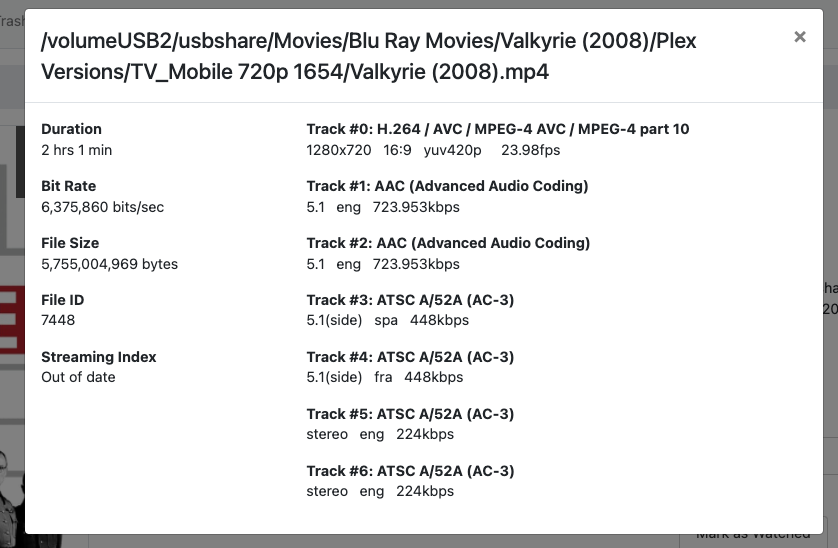
Sounds like the default in the file itself is set to the commentary. What is the output of mediainfo, ffprobe, or similar for an affected file?

I don’t know about any of that, sorry. I have my Blu-rays that I ripped with Make MKV, that’s it. If I play them in Plex the correct audio plays.

Which client?

We’ll need more information about the video file. Find the movie in your Channels DVR Server web admin and view info on it and post a screenshot.

Thank you! I'm playing back on ATV. I think I figured out an issue, but not sure how to resolve it. I realized that I am playing back a Plex Optimized version. Both the original and the optimized version plays correctly in Plex, and Infuse. In Channels, the original version plays fine, but the optimized version defaults to the commentary track. Would I need to convert the original MKV files for all my movies using something other than Plex in order to download them for offline viewing in Channels? I've attached screenshots with the details. The first is the optimized version and the second is the original MKV.


One more thing - the reason I would prefer the optimized version is to avoid downloading 40GB movie files when traveling, in case that wasn't a given :slight_smile: