Backup custom artworks using Channels DVR via Docker

Pretty new to the whole Channels DVR & docker setup on my new Synology NAS. Installed the fancybits-channels-dvr and everything is working great. Recreated my container to test restoration of the configuration. All went well except my Star Wars channels logo was lost - the horror!

I have /mnt/disk/dvr/recordings mapped as per the compose details, but found nothing under /mnt/disk/dvr/config and instead mapped to /channels-dvr as it appeared to be the correct spot. The only thing that appears to be off are the logos/artwork uploaded to /dvr/uploads/X/content. I tried creating a mapping to the root /dvr/uploads, but nothing appears to update on the mounted share. Maybe there's some mounting/linkage there that's messing it up as I also see the original uploaded artwork under /mnt/disk/dvr/recordings/Images/uploads. Tried to simply reference the file directly under the recordings dir, but the web interface doesn't seem to allow a selection outside of /dvr/uploads.

The short of it is that I'd like to ensure any artwork uploaded and set to a virtual channel or collection is preserved over future updates. Currently the artwork is set to a broken image/link as the database is referring to files no longer present in the new container. Help Me Obi-Wan Kenobi, You’re My Only Hope!
Here's what I do on my two Synology's

create directory
 /volume1/docker/channels-dvr
create shared folder
 /volume1/chDVRrecord

docker pull image fancybits/channels-dvr:latest
(use :tve tag instead of :latest if using for TVE)

docker run \
 --detach \
 --env TZ=America/Los_Angeles \
 --name=channels-dvr \
 -p 8089:8089/tcp \
 --restart=unless-stopped \
 --device /dev/dri:/dev/dri \
 --volume /volume1/docker/channels-dvr:/channels-dvr \
 --volume /volume1/chDVRrecord:/shares/dvr \
 fancybits/channels-dvr:latest

(use :tve tag instead of :latest if using for TVE)

I think we're pretty much the same, at least /channels-dvr for config and I'm using /mnt/disk/dvr/recordings which I'm assuming is another link of /shares/dvr.

Do you use custom artwork/logos for channels/collections and do they get carried over into new containers? Everything else is fine for me i.e. passes, recordings, movie database, guide data (no TVE for me), etc.

Thanks!

It appears you don't understand docker volume mapping.
That and docker port and device mapping were confusing to me when I first started using docker.

Breaking it down, you have the host device (Synology NAS) on the left of the colon and the docker container to the right.

directory on Synology for config/executable code
/volume1/docker/channels-dvr

shared folder on Synology for recording directory
/volume1/chDVRrecord

Synology port 8089 : maps to container port 8089
-p 8089:8089/tcp

Synology device /dev/dri : maps to container device /dev/dri
--device /dev/dri:/dev/dri

Synology directory /volume1/docker/channels-dvr : maps to container directory /channels-dvr
--volume /volume1/docker/channels-dvr:/channels-dvr

Synology directory /volume1/chDVRrecord : maps to container directory /shares/dvr
--volume /volume1/chDVRrecord:/shares/dvr

Yes. I can manage then under DVR > Manage > Images

Channels DVR only sees the directories inside the container it runs in (Alpine linux).
In order for it to access directories on your host device (Synology NAS) you have to provide volume mappings with the docker compose or run command.

If Channels DVR writes something to a directory in the container that isn't volume mapped to your host device (Synology NAS), it is only stored in the container, will not be seen in a Synology directory and will disappear when the container is deleted.

Definitely not an expert with Docker, but I get the general gist of it.

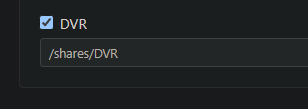
After reviewing my mappings I realized that I had mapped to /mnt/disk/dvr/recordings and actually had my mappings backwards; therefore, it's no wonder /mnt/disk/dvr/config didn't work, but I'm surprised /mnt/disk/dvr/recordings worked ... at least for everything except the custom artwork (made lots of recordings and haven't has an issue all week). Anyways, created a fresh container that correctly maps to /channels-dvr & /shares/DVR and after transferring to yet another container I now have the custom artwork transferred - hooray!

I'm relying on the Docker GUI for mappings without importing the compose file directly which of course leads to human error. Thanks for helping clear up my mappings! :grin:

Just be aware that is different than /shares/dvr since linux is case sensitive (I know from experience when I couldn't find new recordings on my Synology)

No problem. Wish I would have known all that when I started using docker a couple years ago.

1 Like

Well aware of the case-sensitivity and after realizing my mapping error reverted to those noted under https://hub.docker.com/r/fancybits/channels-dvr which has /shares/DVR ... it works and I'm not sure how it makes a difference so long as the DVR is set to the correct folder in the container. For me it seemed to make a difference specifically with the custom artwork, but everything else seemed to be intact.

image

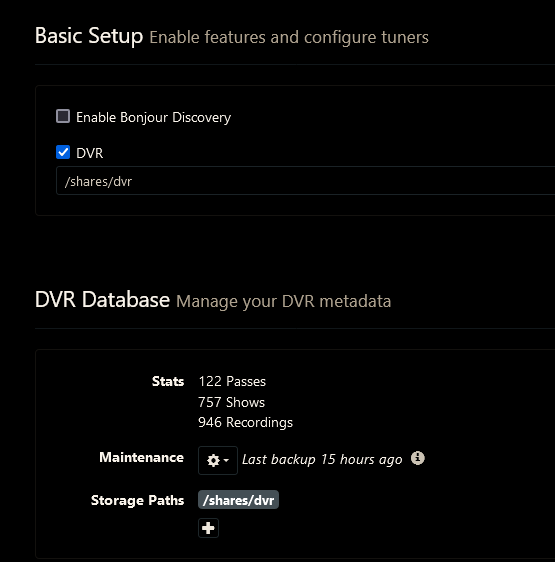
When I goofed up I was using /shares/DVR in the docker run command, but chose /shares/dvr in the Channels DVR web admin UI.

Since the container directory /shares/dvr wasn't volume mapped, Channels ended up recording into the container instead of to my Synology. Lesson learned the hard way.

1 Like

This topic was automatically closed 365 days after the last reply. New replies are no longer allowed.