Yes, this was mentioned in the original post.
These formats mirror Plex’s requirements.

Yes, this was mentioned in the original post.
These formats mirror Plex’s requirements.
Sure I see that now. Plex just isn't case sensitive on the folders.
Extras seem to work fine when I do them inline: Example: Showtime (2002)-The Making of Showtime-featurette. However, nested directories are not working for me and I can't figure out what I am doing wrong. I have used Plex and Emby before which has worked.
Please ensure your capitalization is correct.
Also attempt using something other than Extras as a directory name, as you mentioned using before this did not work.
While it’s been confirmed it does work, please try other directory names to see if you have the same issues, to attempt to debug what is happening with your results.
Thanks for suggestions. I have tried all of these tips but it will not work for me. I tried featurettes and deleted scenes. Followed the guide with the correct capitalization. I just can't figure it out. I know you said it models "Plex" language which I have used for many years with extras with no issues.
If you could provide any details regarding your setup that might be unique, that would be helpful.
While I believed it’s not working for you, it doesn’t make quite sense.
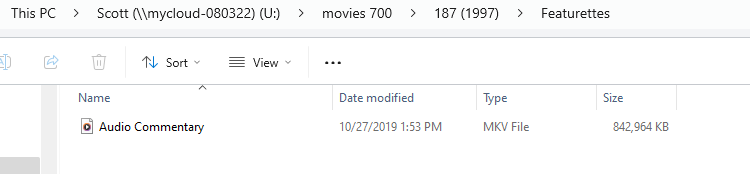
I have main directory called Movies which houses movie folders for each movie. Within those folders are the actual movie file and then subdirectories: Featurettes, Deleted Scenes. Within these subdirectories are the file names. For instance, I put a file called Audio Commentary within the featurettes folder.
Also, having trouble with a movie called "187" with Samuel Jackson. This won't bring in extras either via in-line style or subdirectory way.
As of the latest PreRelease, the directory names are no longer cases sensitive.
Maddox, I have figured out why it was not working and wonder if it may be a bug to check out. I have a WD Cloud drive on my network but I have it mapped to my computer. When I added the the "mapped drive" as a folder, no extras would come in with the subdirectories option. I deleted that and pointed to the drive on the "network path." Bang, it all showed up correctly.
Please provide example paths for what you mean by “mapped drive” and “network path”.
Mapped Drive: (Mapped network drive to pc as U: drive- (Not working with subdirectory extras)

Same Drive on Network: (Works with subdirectory extras)
\MYCLOUD-080322\Scott\movies 700
Both of these point to the same files. One is simply accessed via Network share while the other one is mapped to my PC.
What was in the U:\ directory? You're going to have to give us more details to be able to help you.
I have it settled, but I would love to get some insight on something if you can. Two questions:
1.) I really like how Apple (purchased movies with extras) handles their extras. You play the movie and there is a button for "extras" that you click on which brings your extras up. No program (Plex, Emby, Jellyfin, Infuse, Channels) does it that way. Is that an impossible task to incorporate it in that manner?
2.) Plex/Emby offer TV extras at the season and episode level. Is that a challenge to include within the Channels program?
Thanks in advance!
I'd be curious your opinion on how Apple incorporates movie extras on point #1???
Ok, we're all wrapped up. Channels 7.0 is shipped out. Thanks for the feedback on this feature. Please open any new issues on this topic in a normal thread.