
There's no plans to add a "Start from Beginning" button there.
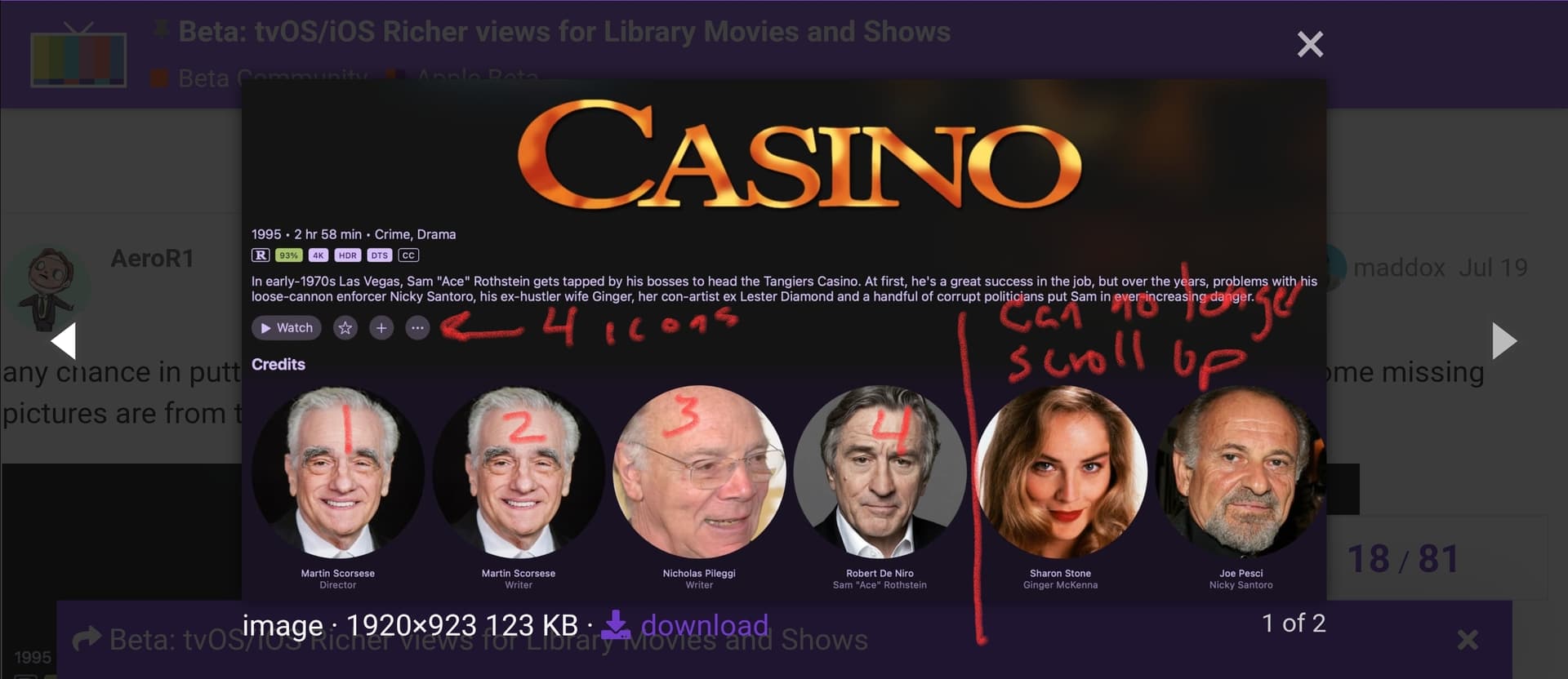
I am seeing something that i would like to request be modified. When you open a movie and then scroll down to see more information (to the credits section in my case). If you then go right to look at more people, at a certain point, you cant scroll up anymore without first going back to the left.
This is because whatever is above where you are, you can only go up if there is a corresponding item above you. Example below... after the 4th person in the list, you can no longer scroll up because there are no items above corresponding to wherever you are in the list. The expected behavior is for the user to still be able to scroll up, just landing at the last available location above.
This should be resolved in the latest TestFlight build:
1 Like
So, I have been playing around more this weekend with different aspects of Channels. I got around to the backdrops and updating some that aren't "right weighted" and noticed that on my iPad, it is cutting off the right side of the backdrop a little bit. I noticed when updating the backdrop for the movie The Karate Kid II. Mr. Myagi's head is cut out a bit. It looks fine on the Apple TV so I figure it is something with the spacing? Just wanted to bring it up in case it hasn't been noticed.
Yes, the images are 16:9, and your iPad is not. So it zooms a bit to go full top to bottom to fill the view port when in landscape. This is by design and is working properly.
Ok, we're all wrapped up. Channels 7.0 is shipped out. Thanks for the feedback on this feature. Please open any new issues on this topic in a normal thread.
1 Like