
Interesting, basically the opposite results -- works with Chromium, but not with Chrome. Hopefully @slampman will post back regarding YTTV.
1 Like
No go unfortunately. I cant get the container out of a restart loop
exec /run.sh: no such file or directory
exec /run.sh: no such file or directory
exec /run.sh: no such file or directory
exec /run.sh: no such file or directory
exec /run.sh: no such file or directory
exec /run.sh: no such file or directory
exec /run.sh: no such file or directory
exec /run.sh: no such file or directory
from the build log:
Processing triggers for libc-bin (2.36-9+deb12u10) ...

 ---> Removed intermediate container 043550cc98b1

 ---> 6df2f275923d

Step 5/8 : EXPOSE 8089


 ---> Running in 5b586b11c683

 ---> Removed intermediate container 5b586b11c683

 ---> a430560135a1

Step 6/8 : ADD run.sh .


 ---> d1a556b2e07a

Step 7/8 : RUN chmod +x run.sh


 ---> Running in 5131e80ff2a0

 ---> Removed intermediate container 5131e80ff2a0

 ---> 98369ebf5109

Step 8/8 : CMD ["/run.sh"]


 ---> Running in 6e873c6f25f1

 ---> Removed intermediate container 6e873c6f25f1

 ---> 4cc6ddf43ccf

Successfully built 4cc6ddf43ccf

Successfully tagged channels-dvr-local:tve
Ok so doing better... I did the run.sh script in Notepad++ but i forgot to do edit > eol conversion > unix
Update, works as is for YTTV!!!
1 Like
I went ahead and pushed the container I built to my Docker hub. Just add bnhf/ in front of the image name in the Docker Compose above, and you should be able to pull it rather than using your locally built version.
Like this:
image: bnhf/channels-dvr-local:${TAG}
As you can tell, I'm very curious to know if this works for you too. Apparently it's a bust with Xfinity, but it worked for me with YTTV.
Glad to hear it! Weird that it failed for Xfinity -- but it's kind of a niche fix, and those that really want to use YTTV credentials in a Docker container will probably be happy to have a working option.
@eric It looks like we have a fix/workaround for using YTTV in Docker by using Chrome rather than Chromium. I'm happy to maintain this niche fix, but I'm wondering if you'd be willing to post the Dockerfile you use to build fancybits/channels-dvr:tve?
I'd like to confirm I'm including all needed components, and eliminate anything I'm adding that's not required.
1 Like
Just for grins...
I was able to add a TVE source using my free SlingTV Freestream account.
Of course it only added the 68 FAST channels 6700-6993, but it did add the source and streaming works.
It just doesn't like Xfinity for some reason.
2 Likes
I uploaded our current Dockerfiles here. You can send us pull requests.
2 Likes
@chDVRuser If you're willing, here are a couple of updates to the image building process in post #1, that will yield a result even closer to "stock" (based on the recently posted fancybits Dockerfiles). This also works with YTTV, and it'd be interesting to know if it makes a difference with Xfinity.
A second bash script is needed, in addition to run.sh listed above. As always, when creating Linux scripts be sure your editor is using Linux-style linefeed line endings:
extract-version.sh:
#!/bin/sh
dpkg -s google-chrome-stable | awk -F': ' '/^Version/ {print $2}' | cut -d- -f1 > /chrome-version

echo "Chrome version: $(cat /chrome-version)"
And here's the Dockerfile, as closely matching the fancybits version as possible, while using Debian 12 and Chrome:
FROM debian:bookworm-slim

# Install dependencies
RUN apt-get update && \
    apt-get install -y --no-install-recommends \
        curl \
        gnupg \
        ca-certificates \
        tzdata \
        xvfb \
        tini && \
    rm -rf /var/lib/apt/lists/*

# Add Google Chrome APT repo and install Chrome Stable
RUN curl -fsSL https://dl.google.com/linux/linux_signing_key.pub | gpg --dearmor -o /usr/share/keyrings/google-chrome.gpg && \
    echo "deb [arch=amd64 signed-by=/usr/share/keyrings/google-chrome.gpg] http://dl.google.com/linux/chrome/deb/ stable main" > /etc/apt/sources.list.d/google-chrome.list && \
    apt-get update && \
    apt-get install -y --no-install-recommends google-chrome-stable && \
    rm -rf /var/lib/apt/lists/*

# Create necessary directories
RUN mkdir -p /channels-dvr/data /data

# Copy and execute version extraction script
ADD extract-version.sh /usr/local/bin
RUN chmod +x /usr/local/bin/extract-version.sh && \
    /usr/local/bin/extract-version.sh && \
    rm /usr/local/bin/extract-version.sh

# Copy run script
ADD run.sh .
RUN chmod +x run.sh

# Set volume
VOLUME ["/channels-dvr"]

# Set tini as the init system
ENTRYPOINT ["/usr/bin/tini", "--"]
CMD ["./run.sh"]
Before clicking build, be sure you attach both run.sh and extract-version.sh. Use the typical <Ctrl>-Left Click method for selecting additional files after clicking on the first. It should look like this:
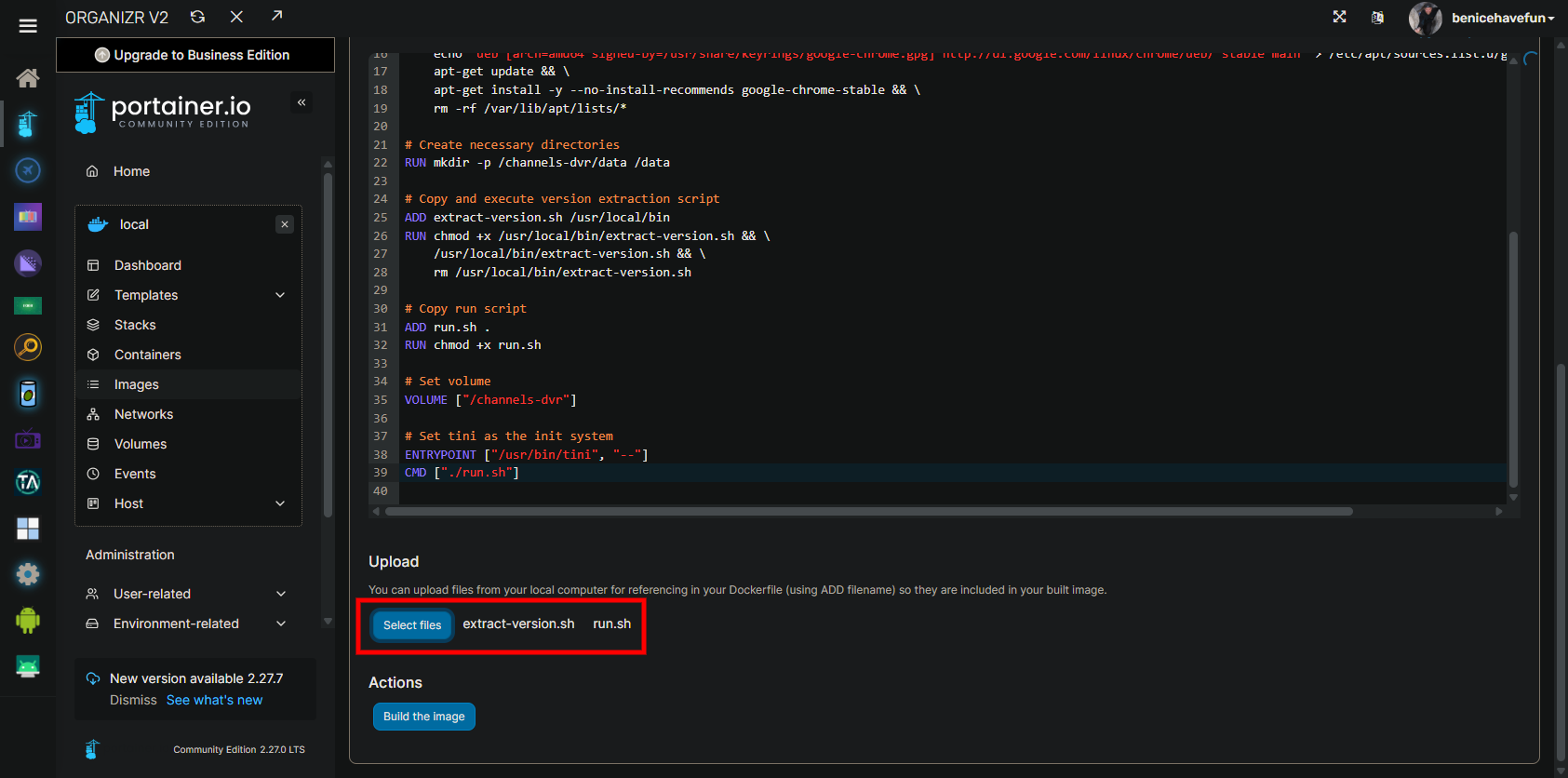
Probably a bit of a longshot that it'll make a difference -- but, who knows?
1 Like
Thanks for the try, but same result. Fails.
Tries to authenticate Discovery (not in my package) then CSPAN (in my package) and fails on both.
Are you still considering supporting this image?
I've been using it (your latest post here, based on the recently posted fancybits Dockerfiles) in addition to the Channels DVR TVE image for YTTV and it's been working great so far.
I assume that to update Chrome in yours, one just needs to rebuild the image and then redeploy the CDVR TVE stack in Portainer.
Happy to do it.
Yes, to update Chrome in a way that will survive reboots, means rebuilding the image.
I may add this to Project One-Click at some point -- to automate the build, but for now I'll maintain the Dockerfile and it'll be a DIY local build.
Sound reasonable?
1 Like
Thanks, Sounds good.
I'll just build a new image if I need to update Chrome (currently v138).
This topic was automatically closed 30 days after the last reply. New replies are no longer allowed.
Still working, just created a new version with Debian 12.14 (bookworm) & Chrome v148
1 Like
Just built this, Chrome 149, running on Synology NAS (DSM 7), still getting the AMC login screen failure adding YTTV TVE source. 
I don't think the AMC issue has to do with chrome. It has worked on an off for me over the last week or so. But today it doesn't. This is with Philo.
Did you submit diagnostics?
Try the latest pre-release