CableCard refugees: What's next?

I wanted to open this fresh thread for everyone, like me, that's ignored the ADB + Encoder solutions, but now are facing the deadline of November 5th, 2026 of CableCard deactivation.

C-Day.

Let's use this as a fresh thread to discuss modern options for Device + Encoder. If anyone has good success stories with what they're pairing with their encoders, this would be a great place to post it.

  • What streaming device are you using?
  • Why?
  • What did you try before?
  • What makes it better?
  • What sucks about it?
  • What middleware are you using?

What this solution is, is essentially us building our own HDHomeRun Prime devices. Which, those that have one, know is the best solution for Live TV in Channels.

So, what's the best pairing for the least amount of maintenance?

I see a lot of people using Osprey boxes, but why? Are they easier to integrate with? Is the TV plan cheap? These are some of the questions we want to get into, to figure out the best options.

Some core tenants for a good pairing, and things that might factor into peoples choices:

  1. TV Plan price
  2. How much maintenance is there? Is it set and forget and reliable?
  3. How do you power all these at scale?
  4. How do you organize all of the physical objects?
  5. How much do the devices cost?
  6. How fast is it from a channel change to a tuned channel?

Maintenance is a biggie, especially since this setup scales. If a device is finicky and you have to fix logins a lot, and you have FIVE of them, that's gonna be awful.

Anyways, let's kick this off and figure out the future, and thanks to all of those that have been doing this for years for being the testers!
6 Likes

FireStick 4K Max Gen1 and Gen2

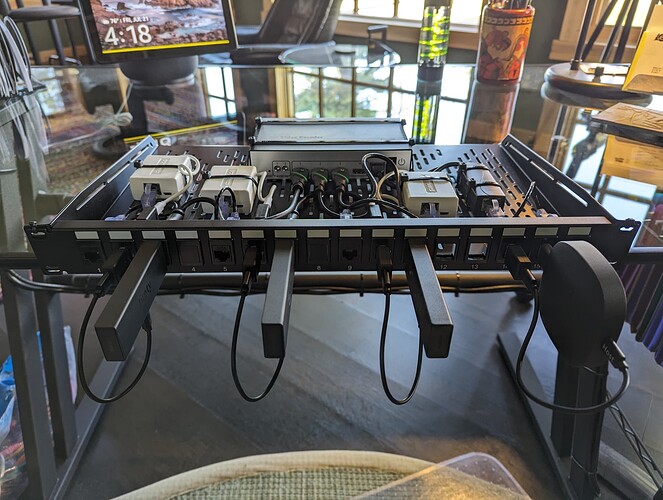
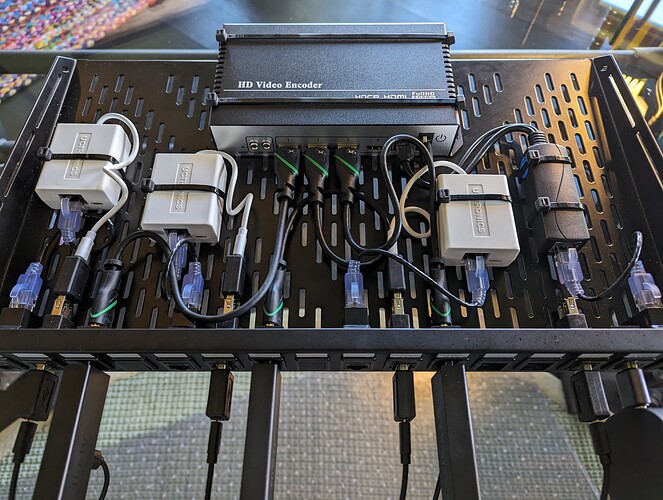
The form factor is great for rack mounting or desktop use. I stopped using the ONN device pictured, as its Ethernet support would not survive reboots with ADB enabled. Plus, the size of the ONN device was not as good for a rack.

2b092007cf3d0e611673e48d04c506e0fa793462_2_663x500

b146116dad29cba2b0fd35e68882c79b215f5bef_2_663x500

Here's my build list for the above. Quality and functionality were prioritized over price (pretty much true for everything I do :slight_smile: ). Understanding of the USB OTG standard is important for deviations from this parts list:
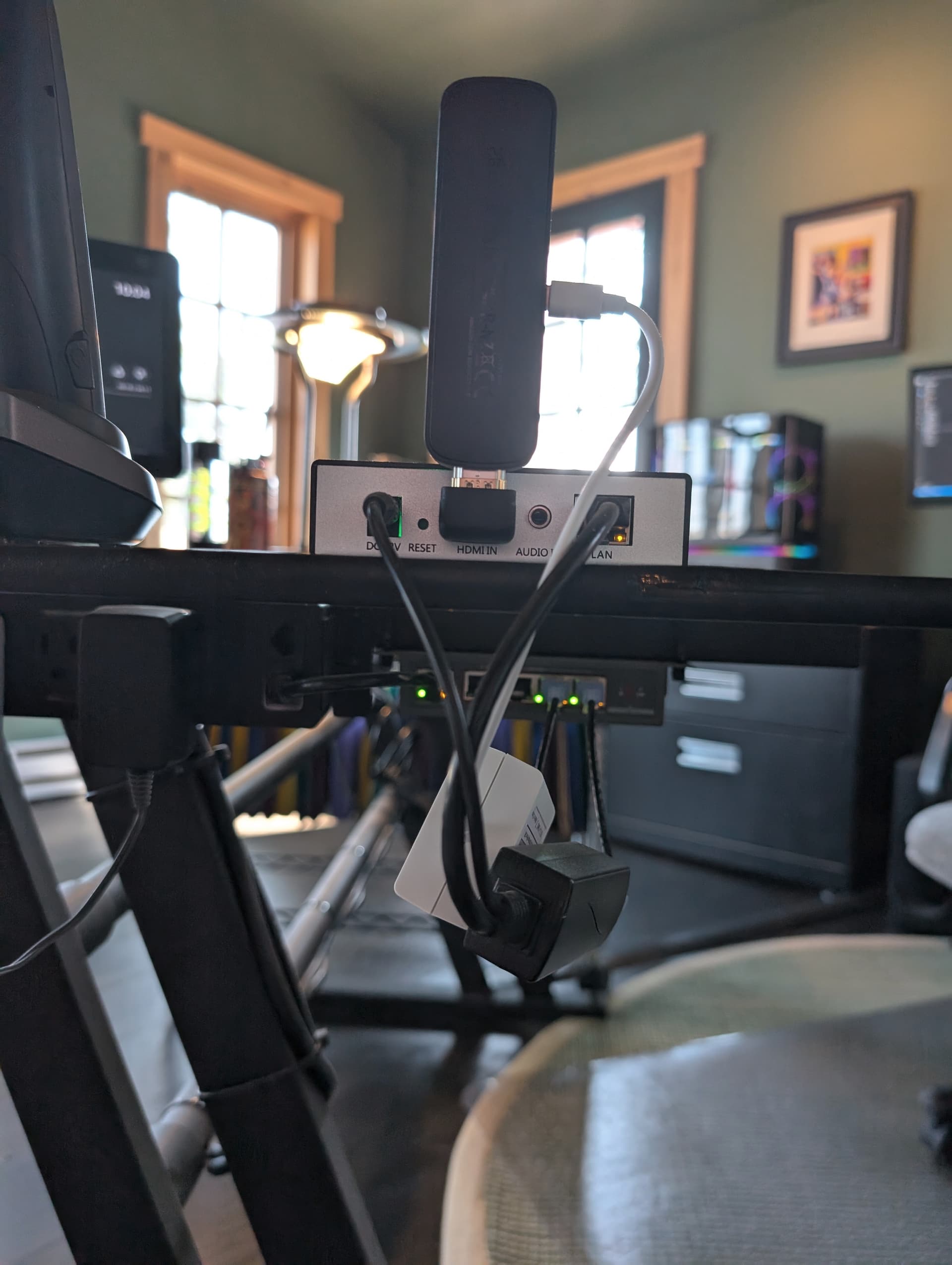
They work with certain PoE Ethernet dongles, which is ideal for rack mounting. It's also nice if you're clutter-averse (which I am :slight_smile:), as even the single port unit I use for development is PoE powered via a PoE Ethernet dongle -- as is the LinkPi, via a PoE splitter.

The small PoE+ powered splitter, also delivers PoE, and is mounted under the desk.

Their interface is busy, but you don't need to see that with either ADBTuner or ah4c with config options.

I use both ADBTuner and ah4c. ADBTuner locally, and ah4c in a remote installation. To populate the virtual channels in ADBTuner, and create a CDVR Custom Channels Source, I use OliveTin's Project One-Click Action designed for this purpose.

The Action will grab your exact DTV channel line-up, and create a matching set of virtual channels. You can use DTV's channel numbers, and they provide the correct Gracenote Station IDs. You can re-run this process anytime your package changes. Easy, fast and foolproof.

I use DirecTV Stream these days, and they have lots of different options for packages.

Pretty close with the combination of stuff I use.

PoE for the rack, and I use a TP-Link smart power strip remotely -- which is easily controlled with an HA Docker container from anywhere. I'm currently building another "desktop" setup that'll use an industrial USB hub for power. Pictures of that soonish.

Rackmount, as pictured above locally, and then right angle HDMI adapters for the remote setup. Very, very compact that way. The FireSticks make either approach tight.

FireStick 4K Maxs are often on sale for ~$35, and you can often trade-in old devices against that.

Maybe 8-10 seconds? It's fast enough for me, but I use the guide to select what I want to watch as opposed to channel surfing.

2 Likes
  • What streaming device are you using? Apple TVs (4)

  • Why? I had a lot of them laying around after upgrading on various TVs around the house

  • What did you try before? I tried CC4C, but was somewhat disappointed with the video/audio quality

  • What makes it better? 1. Video/Audio is near perfect (except sometime I miss 5.1 audio); 2. I get Every channel in my plan (no DRM); 3. Tuning is fast (2-4s) and reliable

  • What sucks about it? It does require a little babysitting, particularly when I was on Spectrum. Less so once I switched to DTV Stream. Spectrum app upgrades could cause problems, but the worst was their EBS. But even then, it was pretty reliable. So far (knock on wood) DTV has been flawless.

  • What middleware are you using? I use a custom version of the tmm1's OG aH4C, along with some management/control I built in Home Assistant. I also use espn4cc4c, to get ESPN+ tuned on the ESPN app.

I have not had issues with logins, the ATV is pretty good with that. I think it helps that I am just using two apps (DTV and ESPN) at the moment.

  • What streaming device are you using?
    Heh I've got a real mishmash, my IPTV 'cable' provider uses Android STBs so I can control both of them with ADB and do direct channel tuning via numbers. They are hooked to two different HDMI encoders that I got at different times. But they only give us two of them included with the package and I wanted more tuners, so...

I also have an ONN 4K and a fire stick 4K Max that I use to run and control native apps. Onn is hooked up to a URay HDMI encoder and the fire stick is hooked up to a super cheap USB capture device ($12). Channels does the hardware encoding for that one via DirectShow capture on my Win11 server.

  • Why?
    Because TVE is dying and the Chrome-based solutions like Prismcast have issues.

  • What did you try before?
    TVE, basically. NBC was the first stream to go DRM 3 years ago iirc.

  • What makes it better?
    I have full control over tuning and monitoring with my own adb scripts.

  • What sucks about it?
    I have to keep up the scripts that do full tuning and monitoring lol. More importantly, there's no auto re-auth so you have to do test recordings for anything you care about to make sure the apps still work.

And finally, some of these apps require remote control just like you were using them manually. Which means you're constantly going to be chasing your tail when they move stuff around in the menus.

  • What middleware are you using?
    What got me started on all of this was when @tmm1 released the Android for HDMI program written in Go. I'm still using that to this day with my own scripts.

Those questions were about your choices in device and provider for an encoding setup. Not about the concept in general.

1 Like

Well you're going to quickly see that the choices for devices and encoders are all over the place.

But just to give my quick summary, all of my encoders are rock solid except for an iSeevy Wi-Fi encoder that I got. It has to be hard booted every few weeks. URay 4K, TBS 2603 SE 1080p are fine.

Tuning times are also all over the place and entirely depend on whether or not you can deeplink into apps or have to remote control them to get video.

There's nothing easy or fun about these setups.

lost my cable early 2025.
osprey;
directv quality equipment (former installer :wink: )
normal remote w/channel #'s
Entertainment Pack $43 for most remaining 'cable' channels and includeds Disney+,Hulu, HBO, AMC+

Streaming limits internet connected customers without a Satellite dish

  • Most customers can enjoy unlimited concurrent streaming with DIRECTV on all of your compatible devices while connected to your in-home network.
  • On the go and off your home network? You'll have access to up to 3 concurrent streams

I also have osprey's at my retired fathers house, so when he does watch tv, it's easy.

I ran long term power averages on my boxes via old APC w/ new battery

I have yet to get my setup (configuration/locations not function) to a place to run whole cdvr setup power consumption.

I find the ospreys and linkpi's to be fairly bullet proof these days, it's my n100/w11//docker that is the cause of any problems I have, so I have plans to migrate away from windows and add a machine to lighten the ever expanding load I keep adding to cdvr.

I have not used any deeplink plugins since ah4c does quite well with channel #'s.
I'm personally not concerned with tuning times, as long as recording start on time.

So I can offer a unique perspective, given that I've basically tried everything...

The drawbacks of the current solutions:

  1. Google could alter/replace adb whenever they feel like, and most of these options would be toast. I might be overemphasizing this, but they do have a history here.
  2. Lack of surround sound. I've learned to live with this when TVE was only option, but it was nice to have this back in the cablecard days. It's sort of odd that this hasn't really been taken on by any of the encoders yet.
  3. Client longevity. Already had CCWGTV's basically be deprecated on an android upgrade. Those with Amazon devices are at risk now. The Ospreys are tied to one of the more expensive (but also most programming-rich) providers, and probably most stable long-term. ATVs are too expensive (IMHO) for this level of experimentation, unless you have a bunch around already.

YTTV, with its new ESPN unlimited integration and evolving multi-view, is starting to whittle at the use case for this, in my house. I'm lucky that our programming needs are limited to OTA and Frndly for most recording, and the rest is all live sports, which i mostly watch outside Channels (better PQ, less lag, and surround sound). I do wish I could stay in Channels for all of this, but the drawbacks outweigh the benefits, right now.

1 Like

Just fyi but only recent Fire devices are at risk, the older 4k Max etc. will not get the Vega OS upgrade that doesn't have adb.

In a way, Vega OS might be the best thing to happen for the older Fire OS devices as Amazon might leave them alone and not try to add more restrictions on them.

Do any of these solutions have the capability to capture closed captions without permanently burning them in? Any of them have 5.1 channel audio support?

Regarding hardware, the 4 port HDMI encoder has been the most critical device to have, providing a quantity of inputs and being able to migrate from various input devices and DVR software. That one device has been essential to the success of keeping a home DVR running. The downfalls are no CC and no 5.1 channel audio.

2 Likes

No and no.

Just FYI. While I was experimenting I purchased a magewell 4K HDMI encoder box that does multi-channel audio, including DD 5.1. It actually worked great, but two issues make it not a viable option. 1. It is expensive. I don't remember exactly, but it was north of $500 IIRC; and 2. I could not get the HDCP to be happy unless it was connect to an older ATV (non 4K). Even running at 1080p, it would not sync properly.

Multi-channel audio is possible. But ultimately I realized that only 2 of my 6 TVs can do anything with it, and even then it is only really for certain content. So I abandoned the experiments, and just use different source when necessary.

Don't know about CC. Not even sure how it is encoded. But wondering if the local box could do that with a little AI help.

Not sure why the encoder vendors don't tackle both. But perhaps it allows them to fly under the radar of the content owners.

They don't want to pay for the Dolby license I'm sure.

I actually purchased this back in early 2018:
https://www.amazon.com/dp/B074JFXJG6
It was $350 at the time + an m.2 pcie expansion card to put it in.
I was able to get it to capture video, but it was raw and file sizes were huge.
I had been using the Hauppauge capture devices for quite some time with SageTV. That was the only other device that was ever able to capture in 5.1 channel audio, but the video quality was quite soft. The newer HDMI encoders really have some sharp video, so that's been the tradeoff for losing 5.1 audio. Ever since making the switch to 2 channel audio I really don't watch many movies on the old 7.1 channel entertainment center.

The next couple generations behind me just don't seem to care about 5.1 channel audio, or linear television for that matter, or watching on any screen bigger than 7". That said, I do watch the latest HDMI encoders to see if one of them emerges with the capability to capture the closed captions as a separate track in the video file. Unfortunately it appears that the source must be capable of feeding that CC data in a way that current options can't do.

For me, Bobby Vaughn's native Windows Android ADB Bridge has been a lifesaver. I need the amount of 'moving parts' of the software and operating system to be kept to a minimum, which seems to result in the least maintenance on my part.

I have Onn devices plugged into the 4-port HDMI encoder, and Bobby made this super easy to set up with YoutubeTV. It took longer to get the Onn devices cleaned of their bloat than it did to set up the ADB bridge. If only we had a flashable ROM for the Onn devices specifically tailored to just the stuff needed for Channels DVR.

2 Likes

One additional thing that made my life a lot easier (I don't mean for this to sound like a plug for YTTV) was that YTTV has a $30/month add-on that includes HBO Max, SHOWTIME, and STARZ (it does not include Paramount+ linear television, however). With the Windows Android ADB bridge, I dug out some deeplinks and Channel-ID's with the help of other users here. The key is always to figure out how to remove another level of complexity, in this case trying to reduce the number of paid streaming services and logins.

1 Like

Older devices are also less likely to receive Android upgrades, too. Thinking more provider drops than vega upgrades

I'm watching this thread closely as I like things to just work.

When Verizon FIOS started to drop my cable card support I did an evaluation of options. I had a rather premium and legacy and discontinued plan for FIOS. I did the following:
Made a spreadsheet up of what channels and we I watch and prioritized them.
Then I looked at different ways to receive them and the costs. My conclusion was that an antenna and streaming got me most of what we watch for much less per month. I use SLM to integrate our streaming into Channels and this is great having everything in one place. When installed the antenna I was amazed to see that there are 90 broadcast channels in NYC and that FIOS was only providing about a dozen of them. There are multiple movie channels broadcast in NYC providing many of the classic movies that we can also get via Fast Channels. I'm now paying $100 less per month for equal to better content. There are a few shows I'm missing and looking for reasonably priced ways to get them and that's my interest in the encoder projects.