Cannot add HD Homerun Flex 4k OTA as a source

I just cancelled cable and installed an OTA with the homerun flex 4k. Channels does not discover the flex4k. I tried to add IP address manually, but it still doesn't find it. When I open the HDhomerun App on my laptop I can view the live ota channels.

I still see the old cable provider listed as a source but the HD homerun flex 4k is not.

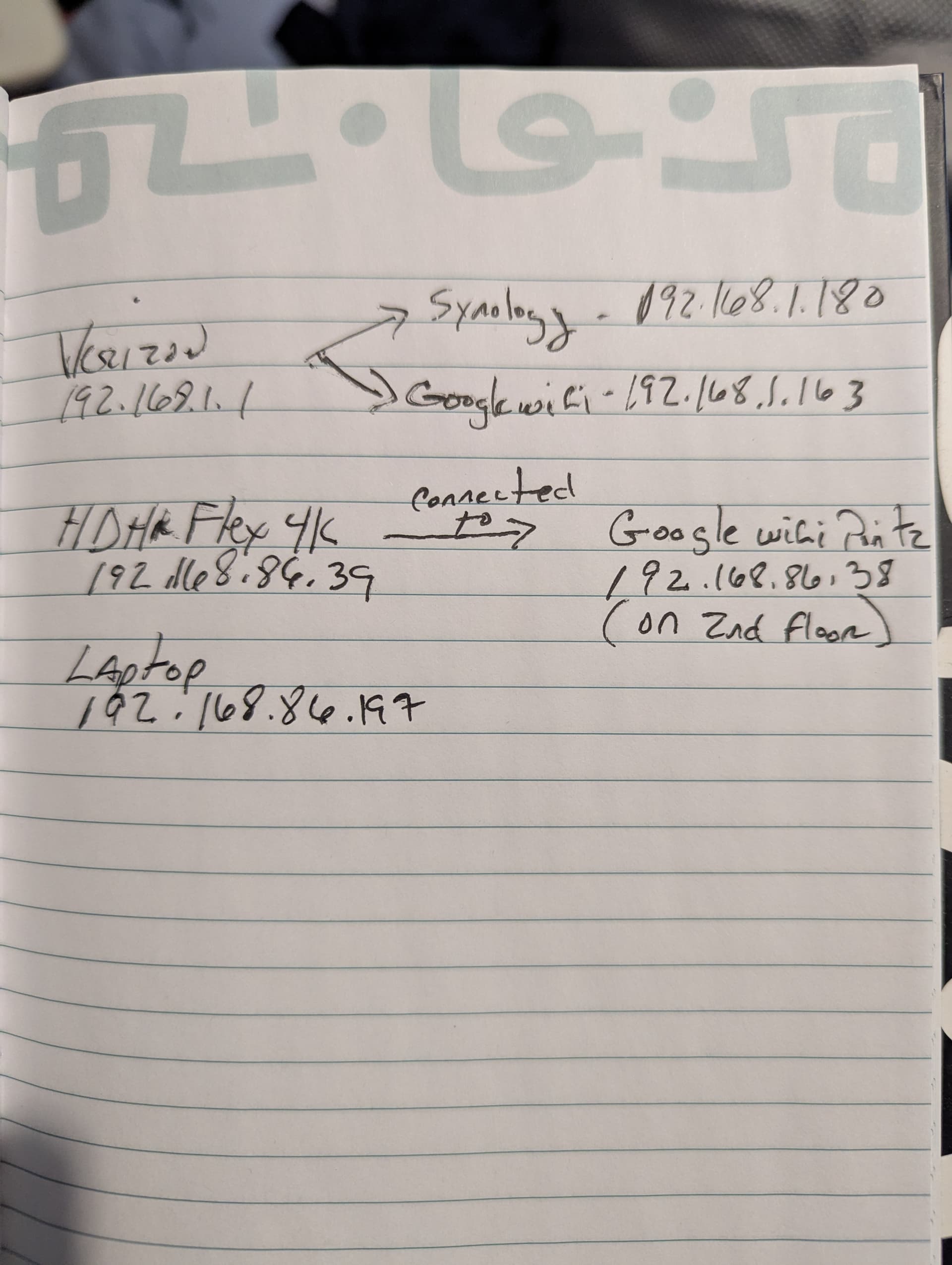
I have my synology nas plugged into the lan port of the Verizon 1 gig router. I also have my google wifi point plugged into the lan port of the verizon router. I am using 2 google wifi points in my home. I have Channels DVR on the nas and I have 3 clients.

Not sure if I have it connected correctly. Should I plug a switch into the verizon router then have the Nas and google wifi point plugged into the switch? Or, having them both plugged into the verizon router not an issue?

Any suggestions?
1 Like

What is your HDHR Flex 4k network cable plugged into?
We would need to see your network topology and IP addresses.

Crude, but you get the idea. Could just draw on paper, take a picture and attach the image


------------------           ---------------------------
|                |-----------| Synolgy NAS 192.168.0.2 |
| Verizon router |           ---------------------------
| 192.168.0.1    |           ---------------------------
|                |-----------| google wifi 192.168.0.3 |
------------------           ---------------------------

----------------             ---------------------------
| HDHR Flex 4k |-------------|           ???           |
| 192.168.0.4  |             |                         |
----------------             ---------------------------

----------------             ---------------------------
| Laptop       |-------------|           ???           |
| 192.168.0.5  |             |                         |
----------------             ---------------------------

----------------             ---------------------------
|     ???      |-------------| google wifi 192.168.0.6 |
----------------             ---------------------------

The Flex 4k network cable is plugged into a google wifi point on the second floor.

laptop is connecting via wifi.

They're on two different networks, so can't talk to each other.
192.168.1.x
192.168.86.x

Can you put your 2nd floor google wifi on 192.168.1.x

Also make sure to rerserve a dhcp IP address for your NAS and HDHR Flex, so their IP addresses don't change.

Mesh is such a mess. Plug your nas into one of the google WiFi points. This will get the nas on to the .86 subnet. Personally I’d never run it like this or mesh at all for that matter but this will at least get you going. :man_facepalming:

1 Like

And I would never put my NAS or HDHR where there's wifi between them.
I would use a MOCA bridge if ethernet cabling wasn't an option.

1 Like

I’m afraid he’s stuck putting the nas on the .86. I’m assuming he’ll have clients that connect to the .86 WiFi, his laptop for example. This situation is just bad all around. Moca would be way better for sure.

1 Like

My Server and my HDHR units are connected wirelessly on a ASUS AIMESH system Via a 6E Backhaul.... and have no missed or interrupted recordings.

Then tell him how to set it up with the google mesh wifi points.

2 Likes

I have my Comcast Router in Bridge Mode and the main ASUS AIMESH unit is the Router giving out DHCP and also reserved IP's for my HDHR and SERVERs.

Perhaps I’m wrong but I don’t think you can even have a google WiFi point act as a simple access point. It will always create its own network on .85 or .86. He’s trapped on using the .86 and he’s probably double NATed as well.

1 Like

The NAS will never discover the HDHR on a different network.
But I would think if you SSH in to the Synology that you could ping the HDHR.
ping 192.168.86.39
If that works, you should be able to specify the IP address of the HDHR in Channels DVR.
The google mesh should know the route to it.
Depends on what he has set as the default gateway on the NAS. Probably 192.168.1.1, the Verizon router. He would have to add a route to 192.168.86.x on his NAS. Messy. Especially so if the 1st floor google wifi IP address changed.

Agree the way the HDHR units are discovered they should be in the same gateway.

Do these Google WIFI points even have ethernet ports if they don't it is a moot point connecting HDHR to them. I would not use a MESH WIFI that has no ethernet ports.

I put the Nas on a static IP yesterday. Good Idea to put the flex 4k on a static one too.

I will try to get the 2nd google wifi on the 192.168.1.xxx and let you know.

Thanks

1 Like

Okay.... I got it fixed. There were 2 issues going on.

First issue....After a call to Verizon we discovered that the Verizon router still had its wifi transmitting along with my google wifi mesh. I logged into the Verizon router and disabled the Verizon wifi. Poof.... all my devices were found! Except my NAS. So I still couldn't add the HDHR flex source.

2nd issue... NAS was plugged directly into the Verizon router. I unplugged from router. connected a gigabit switch to the google wifi point and plugged NAS into the switch. Now I see the NAS on the network and it found the HDHR flex and I was able to add it as a source.

Everything seems to be working correctly.

Thanks for all the input.