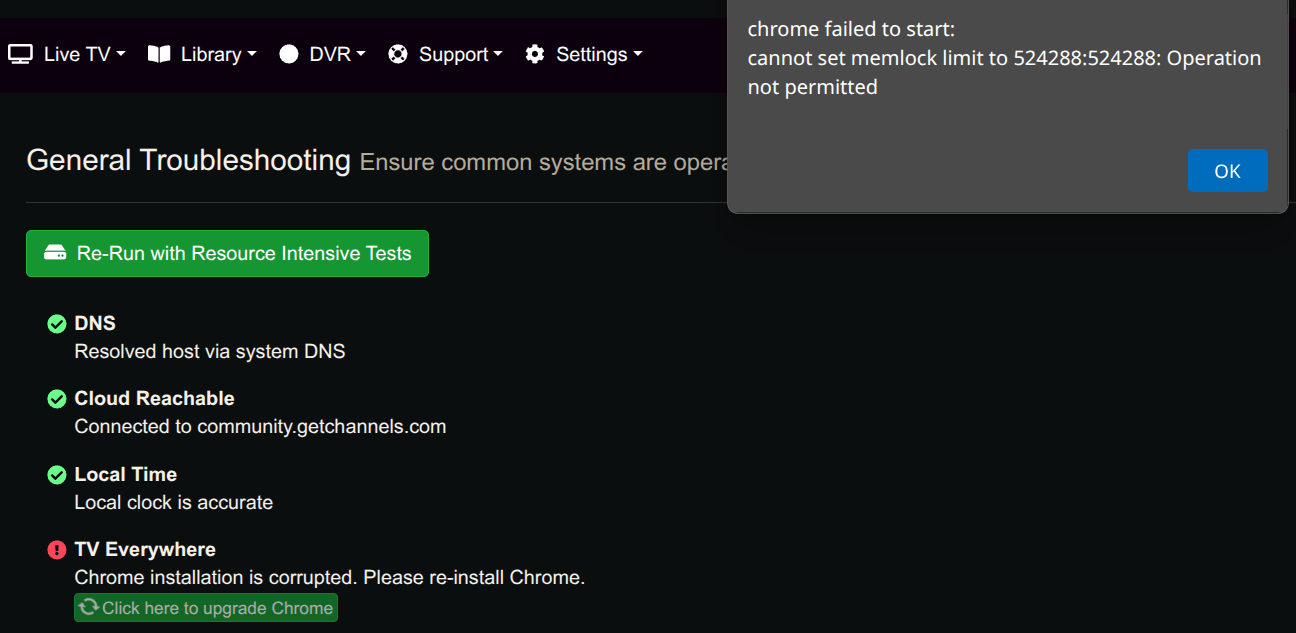
When attempting to add Philo or Sling TV sources I get the error message
" chrome failed to start: cannot set memlock limit to 524288:524288: Operation not permitted"
I tried rebooting my server to no effect.
Version 2025.07.20.0706
Kubuntu 24.04

When attempting to add Philo or Sling TV sources I get the error message
" chrome failed to start: cannot set memlock limit to 524288:524288: Operation not permitted"
I tried rebooting my server to no effect.
Version 2025.07.20.0706
Kubuntu 24.04
Did you install google chrome and or update it to the latest version? In troubleshooting what version of chrome are you on?
It is a problem with Chrome. Troubleshooting revealed
"Chrome installation is corrupted. Please re-install Chrome."
Using the Upgrade Chrome link that appeared with the error message produces the same error message.
I used apt remove google-chrome-stable and apt install google-chrome-stable.
Then troubleshooting produced no errors. So I tried again to add Philo and the original error message appeared. After that I ran troubleshooting again and it once again complained about Chrome being corrupted.
So the original problem returned.
Preparing to unpack .../google-chrome-stable_138.0.7204.157-1_amd64.deb ...
Unpacking google-chrome-stable (138.0.7204.157-1) ...
Setting up google-chrome-stable (138.0.7204.157-1) ...
update-alternatives: using /usr/bin/google-chrome-stable to provide /usr/bin/google-chrome (google-chrome) in auto mode
Processing triggers for gnome-menus (3.36.0-1ubuntu3) ...
Processing triggers for man-db (2.10.2-1) ...
Processing triggers for mailcap (3.70+nmu1ubuntu1) ...
Processing triggers for bamfdaemon (0.5.6+22.04.20220217-0ubuntu1) ...
Rebuilding /usr/share/applications/bamf-2.index...
Processing triggers for desktop-file-utils (0.26-1ubuntu3) ...
When I try to use Channels to update/reinstall Chrome I get the same error,
Tried deleting Chrome .cache and .config folders, unistalling Chrome using apt, then reinstalling chrome via apt, but still fails.
I think you need to go into /home/steve/channels-dvr/data and delete all the chrome folders
I did do.
root@Bart:/home/steve/channels-dvr/data# rm -rf chrome*
but it failed to fix the problem, same error message
There must be something on your system setting a memlock limit that needs to be raised.
root@Bart:/home/steve/channels-dvr/data# ulimit -l
8218980
It seems the max memlock is much higher than Channels requests.
I tried nano /etc/security/limits.conf
and exempted user steve from memlock but still the same failure.
You may need to modify the unit file for the DVR to include something like:
[Service]
LimitMEMLOCK=<big-number>
I don't know where or how to find the unit file for channels.
Try:
~/.config/systemd/user/channels-dvr.service

/etc/systemd/system/channels-dvr.service
Found the file under /etc Added the line to the service section, still fails the same way.
~/.config/systemd/user/channels-dvr.service does not exist.
[Unit]
Description=Channels DVR
Wants=network-online.target
After=network-online.target
[Service]
Type=simple
User=steve
LimitMEMLOCK=<60000000>
Group=steve
WorkingDirectory=/home/steve/channels-dvr/data
ExecStart=/bin/sh -c 'exec /home/steve/channels-dvr/latest/channels-dvr >> /home/steve/channels-dvr/data/chann
els-dvr.log 2>&1'
Restart=always
RestartSec=10
LimitNOFILE=8192
OOMScoreAdjust=-500
[Install]
WantedBy=multi-user.target
root@Bart:/etc/systemd/system#
That value needs to be an integer, it is read as number of bytes. Remove the < and >
LimitMEMLOCK=60000000
or if you just want it open full bore then
LimitMEMLOCK=infinity
I changed it to infinity as shown and then used systemctl daemon-reload
It's FIXED!
Thanks for all of the help.
This thread just saved me - I was having the exact same issue but only with a handful of Philo TVE channels (of course the ones my wife wants to watch - Food, HGTV). The same solution worked for me, though I had to reboot for it to work.
Is it worth considering adding "LimitMEMLOCK=524288" (or something similar) as a default setting? I don't know why only certain channels require more memory.
My ulimit -l shows 479768, but I can't find that default anywhere (this is ubuntu 22.04.2 LTS).
This topic was automatically closed 30 days after the last reply. New replies are no longer allowed.