Can't connect to new TrueNAS server from Android App

I am running my main server on Windows 11. I am trying to move it to a TrueNAS box I have. It is up and running, I can attach to it using a Windows based browser and I can view live and recorded TV via the browser.

But when I try to change my Android TV (Google Streamer) to point to it I get a server not found message. Oddly, rather than advertising on the server IP address (which is where I connect via browser) the settings show that it is advertising @ 172.16.8.2.

This is probably something simple stupid but I'm perplexed. Any help?
On both your servers, go to Settings, General, and makes sure discovery is on for the server you want to use.

Did you install Channels DVR on your TrueNAS box or just move the files to it?

Installed it from scratch - then copied my back up files from the other server - all made it over (I haven't migrated some saved programs)

Done that - I usually run with discovery off and IP entered.

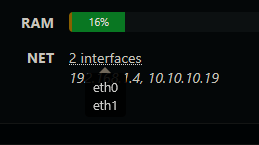
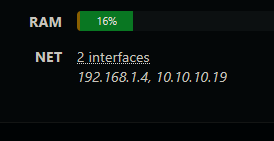
Check the DVR web UI Settings > Status and look at NET
It will show the network adapters.
Capture1

If you hover your mouse cursor over the interfaces line it displays the adapter names.
Capture2

172.16.8.2 sounds like a docker bridge network, or you defined a bridge interface?

If I recall correctly, TrueNAS Scale does not create a bridge by default. If you don't know how to create one, watch a video of how to install Plex on TrueNAS Scale.

If you are using TrueNAS Core, Channels no longer supports it though some old installs might still work if the container OS is not upgraded. If you are on Core, the upgrade is easy.

Is Channels DVR asking you for an Authorization Token when you access it from your Windows PC browser?

If it does and you see this in the DVR log
[HTTP] Detected docker guest gateway. Requiring authentication for: 172.x.x.x
it's a side affect of the security fix they implemented.

What will happen?

If you are affected by the issue, you will no longer be able to freely connect to your Channels DVR Server web admin from your local network. You will be prompted to authenticate with a token.

Additionally, your Channels clients will no longer be able to connect to your Channels DVR Server.

I have a bridge for VMs which routes to a second NIC

No

Scale Elecric Eel

Are you using that same bridge for you docker hosts? Have you changed to host mode per the security update for Docker Deployments?

Specifically, where are you seeing this?
Here?

Take a look at what Channels DVR sees your networks as
http://192.168.3.207:30270/system/network

I believe so. My contaner is set to publish port on host IP and IP is 0.0.0.0 which means app listens on all interfaces. I can access it with the machine IP (192.168.3.207:30270) port 30270 is mapped to 8089

tcp://0.0.0.0:30270:8089

I just changed the container port to 8089 as well so now the interface is
tcp://0.0.0.0:8089:8089
and I can access it with a browser

I'll see if that solves anything when I can use my Android TV (it's busy right now)

[{
        "index": 1,
        "mtu": 65536,
        "name": "lo",
        "hardwareAddr": "",
        "flags": ["up", "loopback"],
        "addrs": [{
                "addr": "127.0.0.1/8"
            }, {
                "addr": "::1/128"
            }
        ]
    }, {
        "index": 211,
        "mtu": 1500,
        "name": "eth0",
        "hardwareAddr": "02:42:ac:10:08:02",
        "flags": ["up", "broadcast", "multicast"],
        "addrs": [{
                "addr": "172.16.8.2/24"
            }
        ]
    }
]

Channels DVR is only seeing two network interfaces, loopback 127.0.0.1 and eth0 172.16.8.2

I see that. Yet I can connect and watch live & recordings via Chrome @ 192.168.3.207:8089. View all settings, etc. Just can't connect with Google Streamer.

I'm not familiar with running Channels DVR on TruNas Scale and how the networking works on it.
Does it run on bare metal, in a VM, an LXC, a container?
Perhaps @Morris_Altman or one of the devs @tmm1 has an idea.

Would be interesting to see what the DVR log shows for the IP of your Windows browser when you try to watch Live TV or a recording from your Windows Chrome browser.

Maybe checkout https://forums.truenas.com/
A quick search there shows something about a June 1 release allowing apps their own IP address.
They also have a Documentation Hub TrueNAS Documentation Hub

You are treating the interface as if it's communicating via a NAT router and only addressing TCP port translation. Could the Android TV be using UDP? You talked about a bridge for your VMs. Does the bridge create that NAT router?