Cert Issue?

Server has been running for years without any major issues. Lately I have not been able to access outside my network. Rebooted router/firewall and server just to be safe. I tested with canyouseeme.org and port 8089 is open. Not seeing any issues in logs at all.

When I try and login outside my network I get this message:

So then I click continue anyway and I get this message after the channels app opens:

I looked on the forum and found some reference to 127.0.0.1:8089/auth/refresh so I tried that but didn't seem to help.

Any ideas?

Thanks in advance!
Does the dvr log show any ssl errors

not a single mention of SSL anywhere in the logs actually. Is there a way to enable verbose logging?

Seems like you're running a reverse proxy or something because it's serving up its own ssl certificate called Piko

That is my security camera software. I run them on the same server and have for years. With the recent update to Piko maybe it modified the cert? Is there a way for channels to use the same cert?

Channels runs on port 8089

Seems like that other software is hijacking's requests or your port forward is wrong

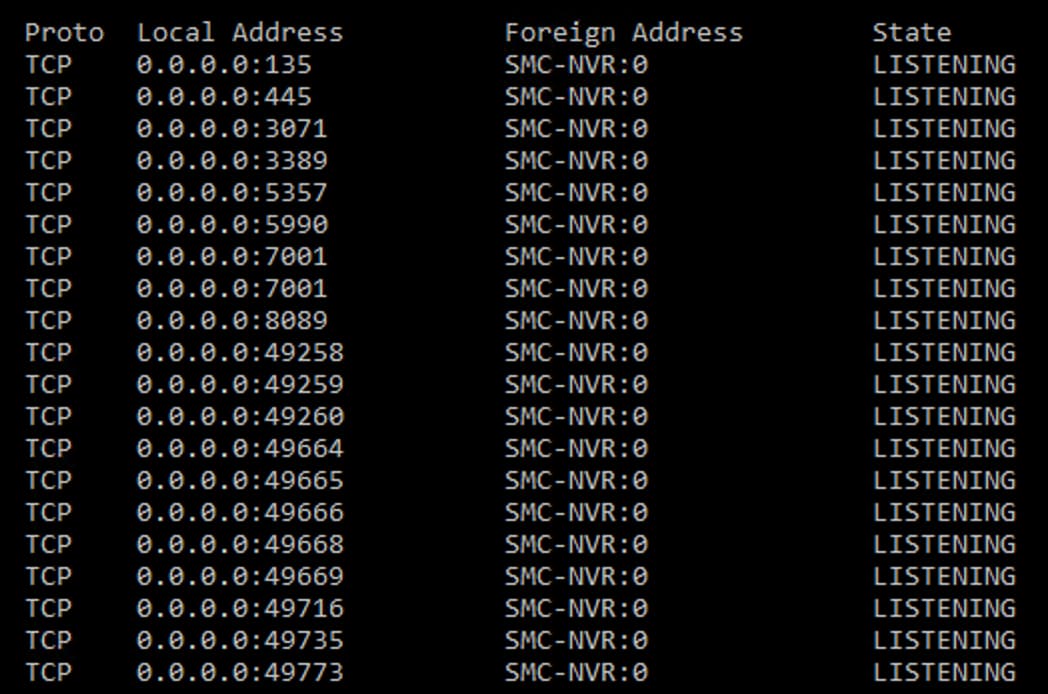
Here is netstat from server. Piko runs on 7001 while channels is set to 8089.

Does my.ChannelsDVR.net load?

yes.

How about over LTE

yes and no.

I get this message:

and if I select visit anyway it takes me to my Piko login which is really odd considering that is hosted on 7001. Should I try and change to another port?

Or can I select which cert to use for channels?

You cannot mix and match certs

Sounds like your routers port forwarding settings are jumbled up. Maybe reboot it

while I don't claim to be a cert expert I'm not understanding how my router has anything to do with this. Piko runs on port 7001 and channels runs on port 8089. It's been this way for years and worked just fine. I updated Piko and Channels and now I'm having this cert issue. Nothing from the ports or router has changed the port forwarding is still working correctly. What's the process to use a custom cert for channels? Maybe I will just make a custom cert for both.

It's not possible to use a custom cert. The certificate is tied to your ChannelsDVR.net domain name.

The issue is pretty straightforward. When you connect remotely on port 8089, it is sending the connection to piko instead of channels. Only your router could be doing that.

In your screenshot of Safari above, click View Certificate you will see it says Piko meaning the connection isn't going to Channels.

Similarly if you click "view this website" it will take you to Piko not Channels.

To summarize you're connecting on your ChannelsDVR domain and port, but the connection is going to some other piece of software instead of Channels. The certificate error is just a symptom not the cause.

Sometimes routers need corrected or rebooted. Escpecially if you have UPNP enabled on your router.
Make sure its port forward rule for port 8089 is pointing to your DVR server at 10.20.30.15.
I would also set your Channels Remote DVR Port Forwarding to Manual