
Two local programs here in particular always ignore my season pass and I have to manually select them for recording. They are both set to "all episodes". I don't suppose there is a way to figure out why it doesn't think it needs to record them? If I go to upcoming episodes, and select one for recording it records. I have missed episodes in the past because of this issue. Particularly annoying, there was a live Valentines day program of "This is Minnesota Orchestra" and it did not record. I know better now than to trust Channels now.
It usually always comes down to a problem with the guide data.
To help troubleshoot, would need to know the following.
What are the source devices (HDHR tuner, Custom M3U channel, etc) for the programs?
Are the source channels using Gracenote guide data or something else (and what is it)?
What are the channels and what are the two programs?
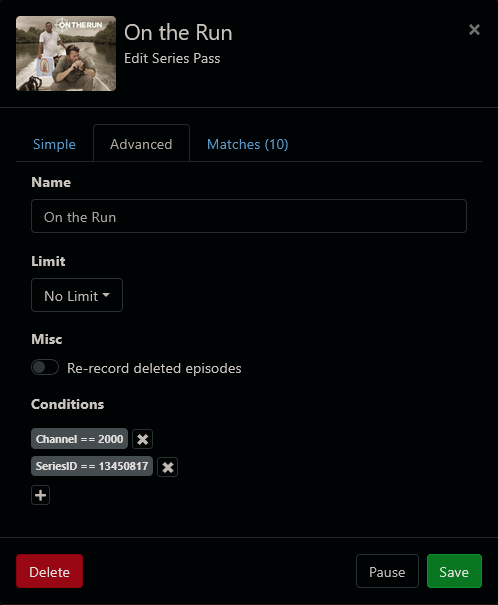
What does the advanced pass view of your failing passes look like?
Chances are all of the episodes have the same unique identifier from the guide source, so Channels thinks every airing is the same episode it has already recorded. (And even if deleted, Channels won't record again an airing/episode unless told to do so.)
What is the source of the guide data? If it is Channels, then the issue is with Gracenote, who provides the guide data; if you are using a different provider, then contact them. Otherwise (and sorry to be blunt), but "garbage in, garbage out".
I have a Channels server subscription. Each episode has a different title and description.
I also have MythTV and SchedulesDirect, which has no issue recording these episodes, but unfortunately has to record a lower resolution (480i) because ATSC 1.0 has been downgraded in my market.
MythTV tells me if the episode is currently recorded, already watched (and deleted) or being recorded earlier. Channels says nothing.
Is there any way to report issues with the schedule?
How do I get to advanced pass view?
Source is HDHR. I had no idea one could select guide data. I have a Channels server subscription. No idea how to find out where the guide data comes.
The Channels are 102.1 and 102.2.
But looking at this some more, there is no guide data for 102.2. I can watch live TV, but it doesn't know what I am watching. It records 2.2 which is 480i instead of 102.2 which is 1080p. So the guide data is completely missing for 102.2.
If I watch 102.2, it says TPTMN@[time]. But it knows the programming on 2.2, which has the programming, but doesn't record it.
Sounds like you need to assign guide data to your atsc3 channels. Server web ui> settings > sources> manage next to your hdhr source> manage lineup> scroll down and next to all your channels in the 100’s click the pencil and choose the corresponding channel number to assign the guide data.
1 Like
Both Channels and Schedules Direct source their data from Gracenote: the guide data is the same.
You can change the guide mapping for 102.1 and 102.2 to be the same as for 2.1 and 2.2 respectively. (On HDHR tuners the 100 channels are the ATSC3 versions of their ATSC1 versions.)
I did the mapping, then had to reload the channel guide to get it to work on live TV.
I found advanced in the Web UI. I hadn't used it for a while. I couldn't see how to do "advanced" from Android. I couldn't get it to record what I wanted, so I deleted the pass, and created a new one with no channel numbers.
I couldn't see any difference in the program number, but the channel was not correct (it is on different sub-channels from one month to the next depending on the season of the episode) so that is what was wrong this time. Now there is no channel number. Are multiple channels supposed to be comma separated?
Look at the Schedule to see what will be recorded.
The channels (if more than one) are comma separated in the order they will be tried.
OK, that caused the last episode in the guide to schedule for recording, but not the next episode which is next Monday:
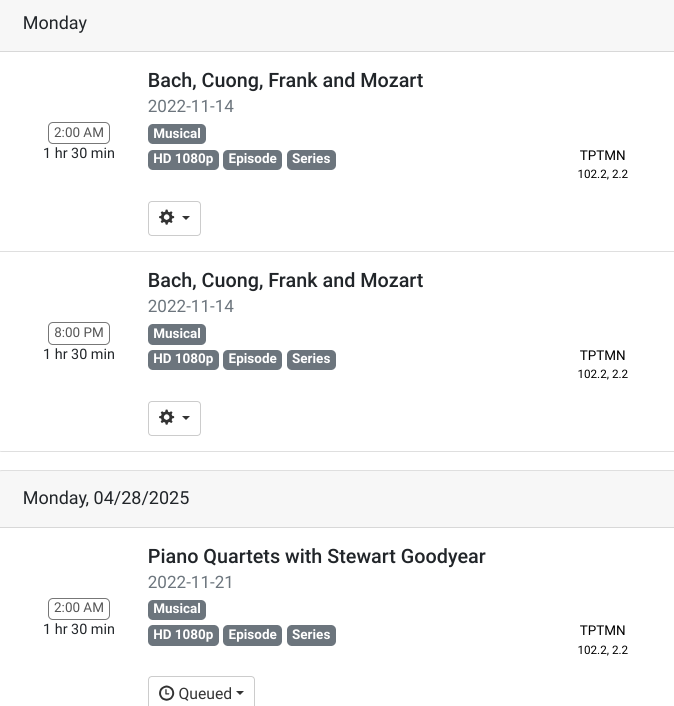
So how do I determine why it is not recording?
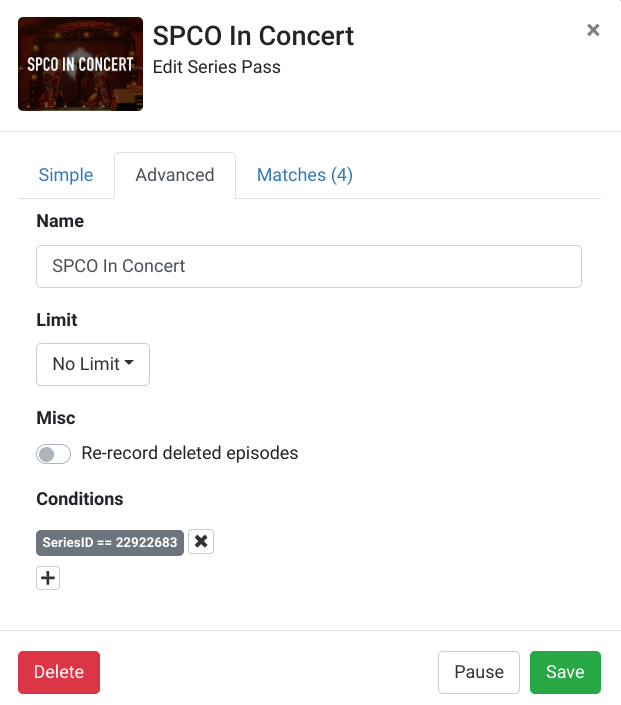
Has channels recorded them prior? Toggle the re-record deleted episodes and see if they que up
I tried that. I tried deleting the pass, sliding the re-record deleted episodes with a new pass. No change.
https://www.tpt.org/spco-in-concert/schedule/
A deep dive, but you would have to dig in to the guide data in Channels DVR to see what the tms ProgramID's are for the airings that won't record. If you pick one that won't record from the grid guide and choose to manually record it, you can then find the tms ProgramID in the Channels DVR API endpoint /dvr/jobs for that recording and see if and how they're listed in your API endpoint /dvr/programs
Looks like in /dvr/jobs, a recording is slated that is not in upcoming recordings.
The field called serial is notably 0 in the job that does not show up in upcoming recordings. Also only one channel instead of 2 (ATSC 1.0 and ATSC 3.0).
Here is the one in upcoming recordings:
"Channels":["102.2","2.2"],"Channel":"","DeviceID":"","RuleID":"65",
"Serial":1744815041,"FileID":"","Skipped":false
Here is the one missing from upcoming recordings:
"Channels":["2.2"],"Channel":"2.2","DeviceID":"","RuleID":"",
"Serial":0,"FileID":"","Skipped":false,
The manual record entry shows this, which matches the one that worked:
"Channels":["102.2","2.2"],"Channel":"","DeviceID":"","RuleID":"",
"Serial":0,"FileID":"","Skipped":false
The SeriesID is the same in all cases:
"SeriesID":"22922683","ProgramID":"EP044512500005","ReleaseYear":2022,
"SeriesID":"22922683","ProgramID":"EP044512500005","ReleaseYear":2022,
"SeriesID":"22922683","ProgramID":"EP044512500006","ReleaseYear":2022,
dvr/programs did not change after manual programming.
"EP044512500005":"queued-1745218800-ch2.2"
"EP044512500006":"queued-1745823600-65"
-ch2.2 looks peculiar. No other job looks like this. I waited a while, and the programs still did not change.
Upcoming recordings did not show the original job, but now it shows something:
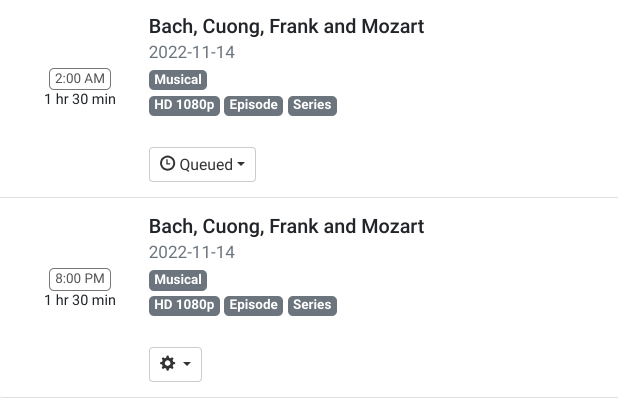
However, if I go to the gear icon on queued and select view job, and search for my job in the schedule, this is what I see:
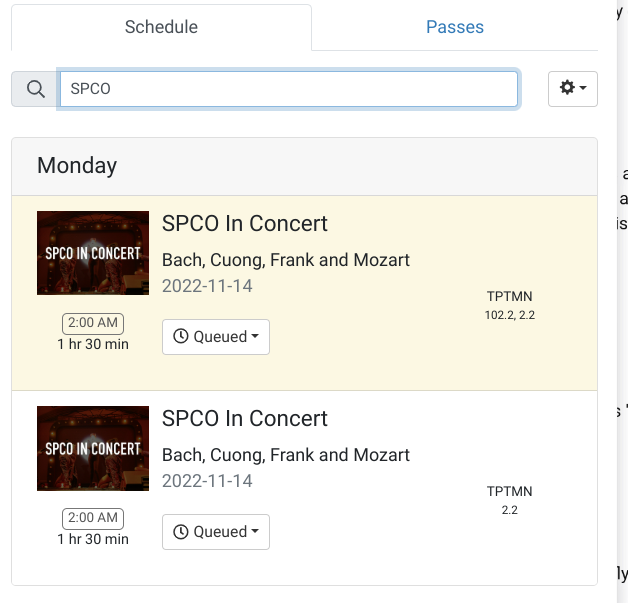
So maybe it was on the schedule all along, but not upcoming recordings?
And the program that I set to manual record is still queued.
Here is a link to my data that I reduced to the relevant portions. I added "new lines" to make it readable:
ChannelsData
Serial will be 0 and RuleID null for manual recordings.
Manual Recording "EP044512500005":"queued-1745218800-ch2.2"
Pass Recording using Rule 65 "EP044512500006":"queued-1745823600-65"
Here's some info I was able to gather from Channels DVR for the show & episodes.
I faked importing episodes of it.
Saint Paul, MN 55101 OTA 2.2 TPT MN "stationId":"31260"

SPCO In Concert
 "entityType": "Show",
 "genres": ["Musical"],
 "origAirDate": "2022-10-17",
 "preferredImage": {"uri": "https://tmsimg.fancybits.co/assets/p22922683_st_h9_aa.jpg?w=720\u0026h=540","height": "540","width": "720","primary": "true","category": "Staple","text": "yes","tier": "Series"}
 "releaseDate": "2022-10-17",
 "releaseYear": 2022,
 "seriesId": "22922683",
 "subType": "Series",
 "title": "SPCO In Concert",
 "titleLang": "en",
 "tmsId": "SH044512500000",
 "totalEpisodes": 14,

OAD        ProgramID      Episode Title
2022-10-17 EP044512500001 Where's My Refuge?
2022-10-24 EP044512500002 Bach's Brandenburg Concertos
2022-10-31 EP044512500003 Eunae Koh Plays Vivaldi's Four Seasons
2022-11-07 EP044512500004 ? Unknown ?
2022-11-14 EP044512500005 Bach, Cuong, Frank and Mozart
2022-11-21 EP044512500006 Piano Quartets with Stewart Goodyear
2022-11-28 EP044512500007 Mozart's Symphony No. 29
2022-12-05 EP044512500012 Jeremy Denk Plays Schumann's Piano Concerto
2022-12-12 EP044512500009 Jonathan Biss Plays Beethoven's Third Piano Concerto
2022-12-19 EP044512500010 Handel's Messiah
2022-12-26 EP044512500011 Beethoven's First Symphony
2023-01-02 EP044512500013 Migration Patterns
2023-01-09 EP044512500014 Mendelssohn's Italian Symphony
What does it show in your DVR API endpoint /dvr/programs for the series?
The episodes would show as EP04451250####
Like these for scheduled pass recordings
"EP044512500005": "queued-1745218800-65",
"EP044512500006": "queued-1745823600-65",
manually scheduled
"EP044512500005": "queued-1745218800-ch2.2"
already recorded episodes
"EP044512500001": "recorded-661",
"EP044512500002": "recorded-662",
skipped episodes
"EP044512500004": "skipped",
Getting a bit hard to follow, but here is what you should do.
Pause the pass.
Delete the manual recording for Monday, 4/21 2am on channel 2.2
Resume the pass.
That should schedule the next three Mondays at 2am on channel 102.2
If not, delete and recreate the guide database on the server.
Settings > Live TV & DVR > Guide Data > Maintenance  > Delete and Recreate Database
I think now that this problem was caused by me originally setting this up for a limited number of channels. This was exacerbated by the schedule not having 2.2 mapped to 102.2. So when it showed up on 2.1, I did not have that channel set up to record. Also, on my Android Shield I don't think I can get to the channel list for a season pass so I had forgotten the channel list.
When I use the web interface, I could clearly see that 102.1 was selected and because of the scheduling error it would not record.
Anyway, enough time has gone by that it is working.
This topic was automatically closed 30 days after the last reply. New replies are no longer allowed.