
I've noticed in today's latest DVR pre release build that individual channels in channel collections will now default to the source with the highest priority. I swear in the past, when I added a channel to a channel collection, it would show the channels from the source from which it was added to collections, not from the source of highest (or higher) priority. For example, I have TVE as a higher priority on the DVR than HDHR prime for recording purposes. In my Favorite channels collection, all cable channels were selection from the HDHR source. With the latest pre release DVR, I've noticed that channels in Favorites collection now default to the highest priority source (TVE), no matter which source they were selected from. Any way to change it back to having channels in collections from the source from which it was actually assigned instead of defaulting to the highest priority source?
Nothing has changed in this area
I have two sources. When I add channels to a collection it picks the other source in guide. How do i correct this. Source 1 is higher than Source 2. Add from Source 1 but guide uses Source 2.
You probably need to add a unique chnnel-id to each TVE source channel,
when you select from that Source in your Collection it will then be unique.
The CDVR rules say this channel-id is required but if you forget it still works but the result is what you describe.
#EXTINF:-1 channel-id="tve1CNN" etc
In another source
#EXTINF:-1 channel-id="tve2CNN" etc
OK but how do you customize channel-ID’s in TVE sources? I can edit those easily in custom channels but I didn’t think TVE sources were editable the same way.
Ok. Time to go down the rabbit hole.
Yes, if using a URL Source then no access to the EXTINF.
So, you need to make sure the Source priority stays Fixed by assigning Source priority at the Server level in Settings.
Even then if the channel you selected in your Collection has a problem, it will still pick it from another Source if available !!!
As I recall, if you don’t have Source priority at the Server level, then if you add a Source then that Source becomes the new top Source, maybe even if you just change a Source(not sure), so your “Client” level Source priority can keep changing.
And at the Server level Then the problem is that as I recall, you can’t rearrange sources at that Server level, unless you delete and re-add them in your desired order. !!
I wish the Devs could fix that.
.
And of course if you paste the Source URL in the URL field of Firefox it will expose the entire playlist and you can copy and paste into a Custom channel as Text, and use MS Word to find and replace the likely tvg-id with channel-id starting with a unique Source string.
But if the stream http’s change then this doesn’t work unless you religiously re-acquire the full playlist again and again.
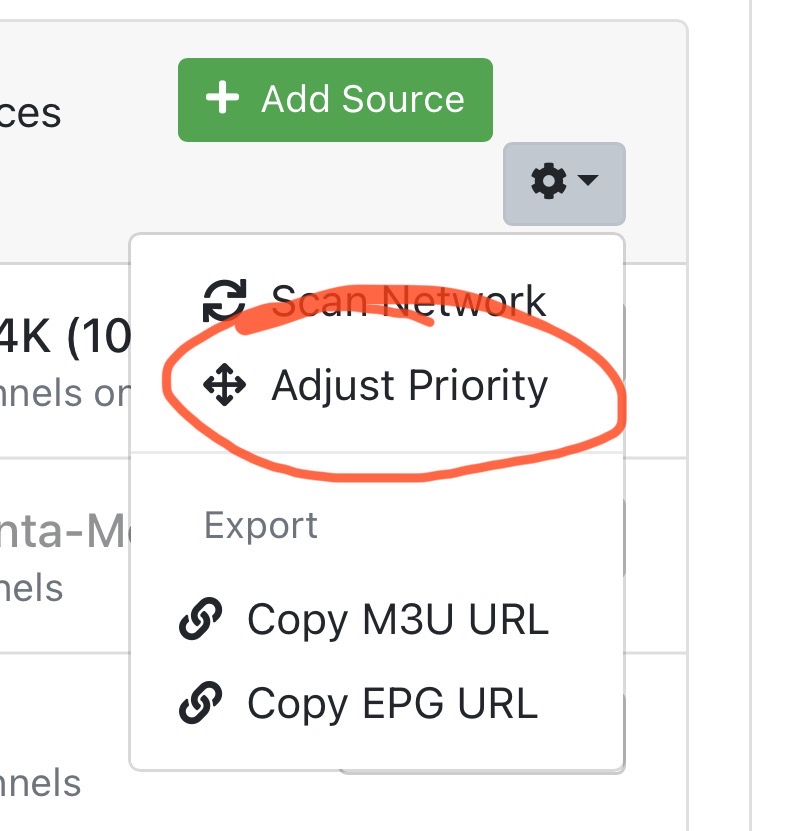
I think that is at the Client level.
I’ll have to try that tho and see if it works with Server level priority. works fine but if you play with new sources like I do and forget to rearrange, then things don’t work as expected… then I remember to go rearrange.
Gets to be a pain in the butt.
That’s why I changed to Priority at the Server level in settings under “ Client's”.
But no rearrange there.
I tried your Adjust Priority in the Source add area.
It does let me move DirecTV from the bottom to near the top.
But when I go and check the Server side settings for Inherit Source Priority, Directv is still at the bottom.
.
I stopped CDVR and restarted and Directv is still at the bottom in Inherit Source Priority on the Server side.
BUT... when I go to a Client and go to Manage Sources, Directv is where I moved it using your suggestion.!!!
Hmmmm, some contradiction here, some kind of bug??
Which is it, what's shown in Manage Sources or in Inherit Source Priority??? DEVS??
I like your method, I had never selected or seen that option before. THANKS
I tried Fofers Adjust Priority in the Source add area.(See Below)
It does let me move DirecTV Source from the bottom to near the top.
But when I go and check the Server side settings for Inherit Source Priority, Directv is still at the bottom.
.
I stopped CDVR and restarted and Directv is still at the bottom in Inherit Source Priority on the Server side.
BUT... when I go to a Client and go to Manage Sources, Directv is where I moved it using Fofer's suggestion.!!!
Hmmmm, some contradiction here, some kind of bug??
Which Priority is it, what's shown in Manage Sources or in Inherit Source Priority???