Channels directories and old files

Hi there. Trying to understand what data Channels stores. I am working on backups for my server and wondering if all is necessary to backup. Here's a look at my Channels dir:

root@nas:/DATA/AppData/channels-dvr# du -sh *
327M    2025.09.12.1628
327M    2025.09.18.0418
332M    2025.09.26.0118
333M    2025.10.28.0018
333M    2025.10.30.0047
333M    2025.11.05.2046
1.1G    data
162M    Database
18M     Images
16K     Imports
0       latest
1.7G    Streaming

Are the 2025.* backups of previous versions? Do these auto purge?

My Streaming directory has files from March 3 2025. Can this be removed?

I know it's not much but trying to reduce the bulk where I can. Thanks
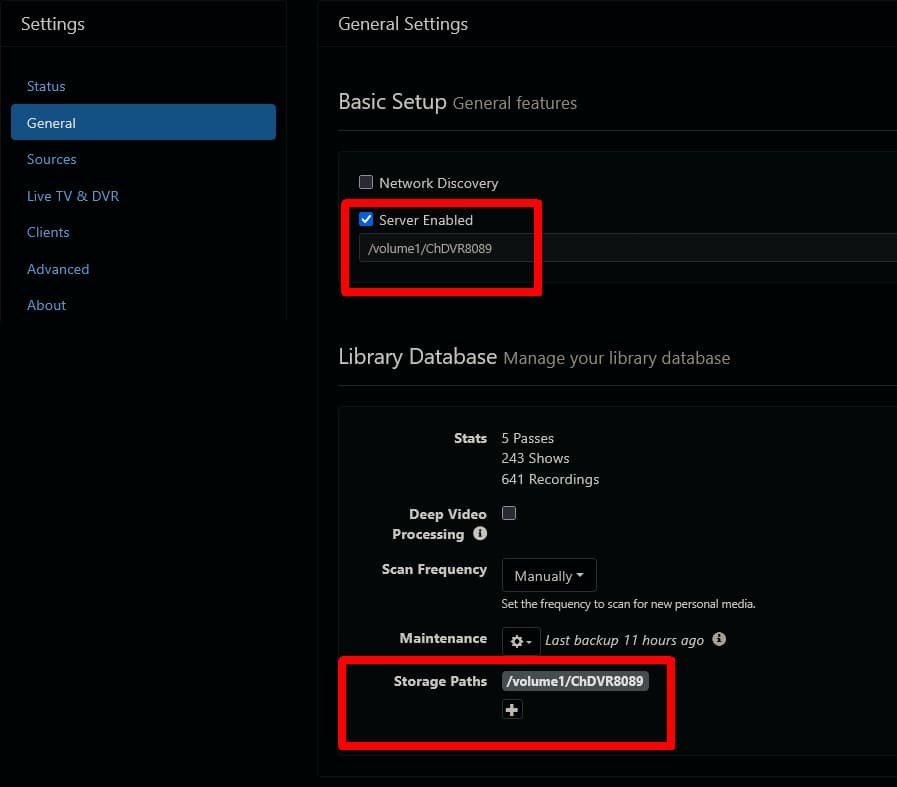
Seems like you have the installation and the DVR storage set to the same folder, which is not recommended.

Only the DVR storage needs to be backed up, i.e the capitalized folders.

Thanks for the quick response. Can you take a look at my Docker config?

version: '3'
services:  

  channels-dvr:
      container_name: Channels-dvr
      image: 'fancybits/channels-dvr:tve'
      # restart: unless-stopped    
      restart: no
      environment:
          - TZ=America/Chicago
      volumes:
          - '/DATA/AppData/channels-dvr/:/channels-dvr'
          - '/mnt/6tb/Media/Channels-DVR:/shares/DVR'
          - '/mnt/6tb/Media/:/mymedia'          
      devices:
          - '/dev/dri:/dev/dri'
      network_mode: host

A bit confused. The /shares/DVR is where the recordings are stored, /mymedia is where my ripped content is. I thought that /channels-dvr would be where all the config stuff would be.

Apologies if this is spelled out somewhere or that I have a configuration within the web gui set wrong. Can you guide me?

The config stuff is copied into /shares/DVR/Database/ and can be used from there to move or restore the DVR

I'm trying to figure out where this is set and how I can get it to be the recommended way.

Not sure. The docker compose you posted is correct.

What do the directories look like in the DVR web UI Settings > General

Perhaps you had previously changed your docker compose
Or it's a hangover from when you migrated to this server from your old one.

Server enabled shows path /shares/DVR
and
Storage Paths shows path /shares/DVR

So these should be different? I'm not sure clear on what these two do.

Thanks for helping btw

Those are correct.
You could add additional Storage Paths, but the first one should match the Server enabled path where Channels DVR records to.

My guess is

Look at the dates of the directories and files in your host OS directories to see when they were last updated
/DATA/AppData/channels-dvr/Database
/DATA/AppData/channels-dvr/Images
/DATA/AppData/channels-dvr/Imports
/DATA/AppData/channels-dvr/Streaming

The video indexes are now stored in your DVR /shares/DVR/Metadata directory, where they used to be in the /shares/DVR/Streaming/m3u8 directory. This appears to have changed with a release sometime in mid September, 2025 as far as I can tell. More specifically, it was one of these updates

v2025.09.12.1628 IMPROVED: Server side settings were added for Multiview, FIXED: Transcoding issues on older macOS
v2025.09.17.0514 Internal updates
v2025.09.18.0418 FIXED: Transcoding errors
v2025.09.19.2234 IMPROVED: internal handling of streaming index metadata

Here's what it looks like:

/channels-dvr

dinki@nas:/DATA/AppData/channels-dvr$ ls -l
total 44
drwxr-xr-x  2 root root 4096 Sep 14 18:55 2025.09.12.1628
drwxr-xr-x  2 root root 4096 Sep 19 15:18 2025.09.18.0418
drwxr-xr-x  2 root root 4096 Sep 26 07:21 2025.09.26.0118
drwxr-xr-x  2 root root 4096 Oct 29 14:49 2025.10.28.0018
drwxr-xr-x  2 root root 4096 Oct 29 20:14 2025.10.30.0047
drwxr-xr-x  2 root root 4096 Nov  5 18:23 2025.11.05.2046
drwxr-xr-x 15 root root 4096 Nov 26 20:36 data
drwxr-xr-x 10 root root 4096 Mar  3  2025 Database
drwxr-xr-x  3 root root 4096 Mar  3  2025 Images
drwxr-xr-x  5 root root 4096 Mar  3  2025 Imports
lrwxrwxrwx  1 root root   15 Nov  5 18:23 latest -> 2025.11.05.2046
drwxr-xr-x  4 root root 4096 Mar  3  2025 Streaming
dinki@nas:/DATA/AppData/channels-dvr$ 

and /shares/DVR

dinki@nas:/mnt/6tb/Media/Channels-DVR$ ls -l
total 48
drwxr-xr-x  32 root  root   4096 Nov 26 19:41 Database
drwxr-xr-x   4 root  root  20480 Nov 26 20:30 Images
drwxr-xr-x   5 root  root   4096 Mar  3  2025 Imports
drwxr-xr-x   4 root  root   4096 Mar  3  2025 Logs
drwxr-xr-x 153 root  root   4096 Nov 26 20:30 Metadata
drwxr-xr-x   2 dinki dinki  4096 Nov  7 01:45 Movies
drwxr-xr-x   6 root  root   4096 Aug 30 18:40 Streaming
drwxr-xr-x  25 dinki dinki  4096 Nov 26 19:00 TV
dinki@nas:/mnt/6tb/Media/Channels-DVR$ 

I did move this from one machine to another but I can't remember when that was. I may have posted about it but you may be correct that some of this is left over from the move. I'd like to clean this up but also don't want to mess things up either.

You can safely delete these HOST OS directories

You left a bread crumb trail. From your post I am own version 2025.02 so way behind it appears March, 2025 was it.

Thanks again for the continued support!

1 Like

I'm just another paying user, like you.

Yes and Yes.
The latest 6 version are kept and older ones are deleted when you update.