Channels DVR access issue

I have the channels dvr running in a container on a Synology NAS. I can access the dvr server via a web browser from an iPad, iPhone or MAC/PC and watch tv live, or I can record tv shows. However when I run the Channels Apps on any device, it cannot find the DVR server so my appletvs' cannot get to the dvr. I installed the fancybits tve image running in a container and I have been able to tie in my xfinity and Directtv services. So it appears to be working correctly. I access the server from "ServerName:8089" from the web browsers but the same address does not work from the apps on any device. So if someone know what I am doing wrong, I would appreciate any help.

-tom
Connect the app using the IP address and port of your Channels DVR Server

In the app go to Settings and tap the Channels logo at the top
Choose Connect to Channels At Home and enter the IP address and port of your Channels DVR Server
Like 192.168.1.4:8089

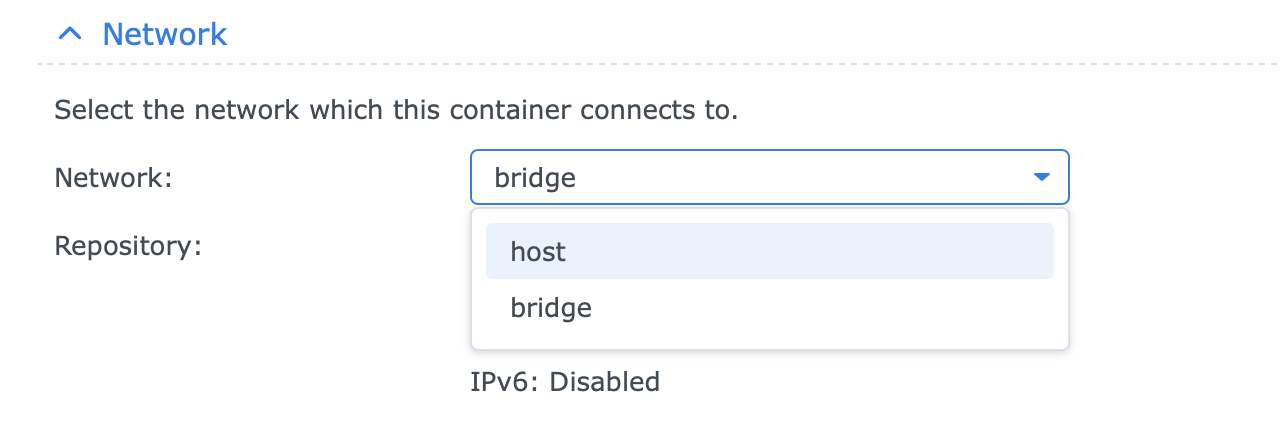
Ensure that you are running the container in host networking. This is required.

If you had to get a key to auth into the web server, then you know you're hosting it wrong.

1 Like

I did have to authenticate, how do I change the hosting method? Newbie to the Synology and containers

That was it, I changed to host networking, I had to duplicate the install but it's working now.

Thanks,

tom

It depends on how you set up the container.

If you used the container manager app in your Synology system, you would choose host as the option for networking:

Synology's container manager is weird in that you can't just edit an existing container. Instead, just choose duplicate and it will let you edit your existing one and start it. Then delete the old one.