
Here is the Hdhomerun premium tv forum. Channels and Silicon dust welcome feedback. There is a thread on lineup requests and SD recently stated they are in talks to get other networks
https://forum.silicondust.com/forum/viewforum.php?f=129&sid=34b1ada41bd10a0e89abf0296f12b7c1
WOW, thank you!
I’m not sure why - but starting sometime Sunday or Monday, my AMC guide data appears to be Western when I’m in the Eastern Timezone. This has caused my AMC recordings to be incorrect. I first noticed it last night when trying to play back Monday’s recording of Better Call Saul. What is interesting is when I tune in via the HDHomeRun App - the guide data is correct. I’m running the latest Beta 2018.09.19.0236 and have tried clicking the update/refresh button on my tuners several times.
The DVR updates itself automatically. Using SHIFT is only for updating to the pre-release builds.
After update the DVR will wait until nothing is recording or being watched. You can see why the DVR is busy by looking at the Activity section of the settings web page.
No it updates from the App Store automatically.
You don’t need both apps. Just pick one and use it.
That shows a Timezone of CDT, which is correct.
You’re looking at the system timezone. I need the output of that specific url above.
I am having a lot stuttering for some reason with premium tv channels.
When I navigate to that url it pulls up the normal Channels settings page, I'm running the DVR on a WD PR4100 if that matters.
Correction: I still had admin in the url - once I removed that it loaded "est"
The guide on the HDHomeRun Shows the correct shows, but AMC is not correct on my Channels guide for some reason. Channels thinks Under Siege is on:
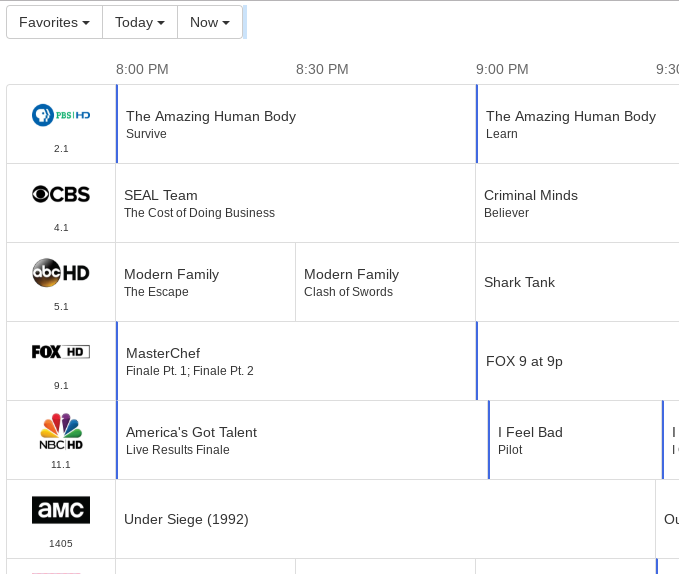
The HD Homerun App shows Tombstone is actually on

Now that I’m looking at it several other channels are incorrect as well:
TBS, TNT, Lifetime, Nat Geo, BET, Cartoon Network are not showing correct guide data
It sounds like SiliconDust is sending you the PST versions of those channels instead of EST. This can happen if you’re using a VPN. You can either contact them with your device ID to tell them to fix it (and send you EST feeds), or switch your guide data to PST mode using Help With Understanding HDHomerun Premium Channel TZ Alignment in Channels DVR
That makes sense why I’m seeing that happen. I reached out on the SD forums to see if they can change it for my devices. I don’t use a VPN, but my ISP was recently acquired and I’ve noticed some web pages think I’m in Oregon now with default location searches when I’m actually in Central. REALLY appreciate the help and your time in response. Channels is great and I’m mad impressed with your response times. Keep up the great work!
The micro pauses continue to happen. And, I didn’t see any reference to additional buffer in the latest beta posted. Any chance this can be increased? Pausing for a couple of seconds is still a workaround but it would be convenient to not have to do this.
Thanks!
Where could I see the DVR beta release history notes?
Recently premium channels will play for like 30 seconds to maybe a minute and I will get a message ‘connection lost’ on any of my iPads or the channel just freezes. Turned on MSNBC and it probably did this 10 times in less than 5 minutes. I am not sure if the problem is the channels DVR service or the premium channels.
Almost sounds like the demo channels. Did your tuners revert or anything? You might be able get to the tuner’s channel lineup from here: http://my.hdhomerun.com/
Nope, they are not in demo mode. For some reason they are just freezing and I am not sure where to troubleshoot the issue.
Does it happen in their app? Does it happen in Channels for OTA channels?
From what it appears, it seems it might be also happening on the antenna channels also. So I am not sure if an update on the Channels DVR is causing this, but I am running this on a Synology NAS and this wasn’t happening until just recently. Any ideas why this would be happening? Thank you.
FWIW, I am still seeing the micro pauses on the premium channels. I haven't really had time to look at it until today. I've done some minimal testing and I see a correlation between the occurrence of micro pauses and the use of tuner sharing. Turning off tuner sharing appears to eliminate the pauses completely while turning it back on causes them to happen within 10-15 seconds of tuning a channel.
It's also worth noting that the logs do not show any evidence at all of the pauses.
My environment is completely Apple. 8 ATVs and a Mac Mini as the DVR server. Everything is wired except one ATV and most are running through the same 48 port switch.
I'll continue to test and report back any significantly different findings. In the meantime, perhaps the tuner sharing component will spark a thought as to the root cause.
2 Likes