
When you have a few minutes, could you please reproduce the error? Once you have the error pop-up, close it and then in the main Manual Recording window, please open the java console. It will have valuable information for me to look at.
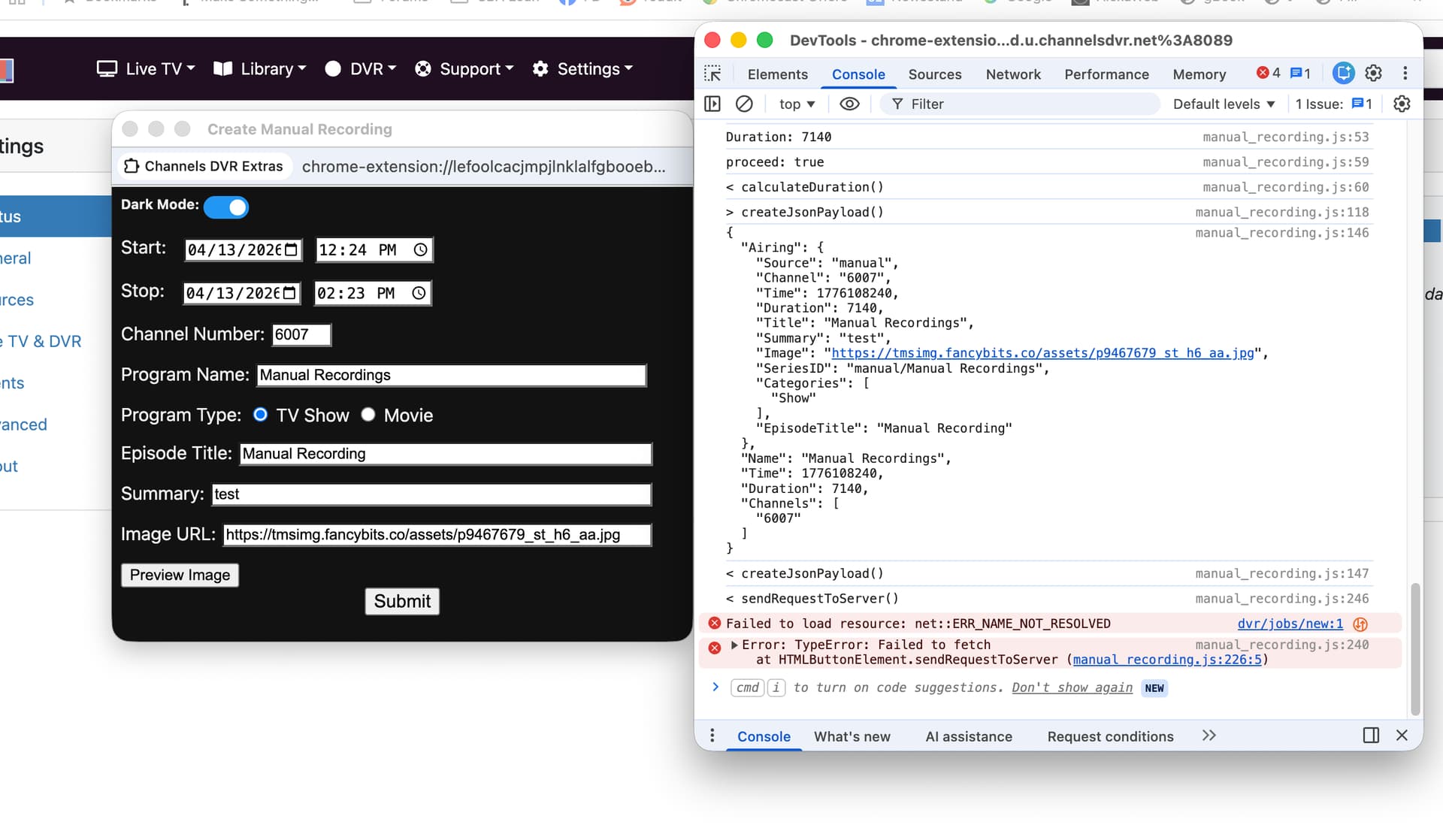
Can you expand the TypeError?
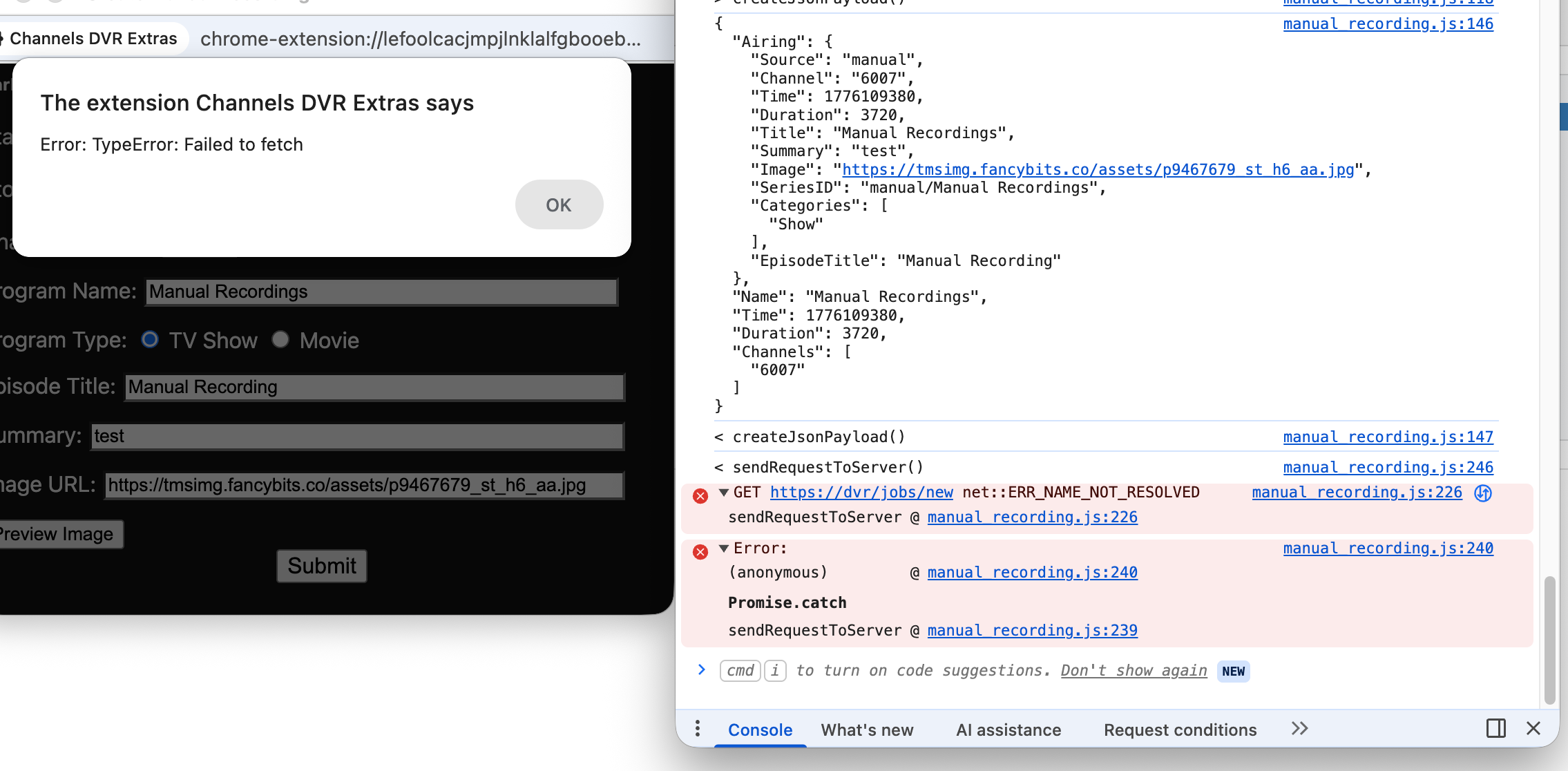
Thanks. At first glance, it looks like it didn't get an acknowledgement from the server.
I'll investigate.
Thank you for reporting this.
I just noticed now that the IP address and the port number of your server were missing in the request:

Also, it should be looking at http:// and not https:// so I don't know where this is coming from.
What was the URL of the main browser window when you opened the Manual Recording window?
Ah, that explains it. I was connecting to the CDVR web interface via my laptop using the remote URL bookmark (my.channelsdvr.net) instead of using its internal LAN IP (http://10.0.1.21:8089)
Once I switched to using the internal LAN IP instead, the Chrome extension worked again for creating a manual recording. Thanks!
Thank you for the clarification!
So now I need to add support a remote connection.
That will be in the next version. No ETA.
1 Like
Thanks for creating this extension! Just wanted to share my very unusual use case and why this extension was critical.
I'm a NHL fan, and I've been recording playoff games on ESPN using ADBTuner with Xfinity Stream on Fire Stick. There are frequently back-to-back games on ESPN, meaning that I've been asking Channels to record for ~6 hours straight.
The problem is that Xfinity Stream on Fire Stick has a mandatory 4 hour timeout. So... my solve is to record the first game using the normal Channels interface, and then record the second game manually to start 1 minute late which is enough to force a cycle of the Xfinity Stream app on Fire Stick. I do miss 1 minute of game time but small sacrifice.
Thanks again!
1 Like
A little off topic, but how is the picture quality for you while watching hockey on ESPN with TVE? I find that it is unwatchable for me on ESPN, TBS & TNT. Especially when the camera swings the length of the ice and the advertising shows up on the boards. And the puck movement is very jittery. I'm on Verizon Fios, and the picture quality is fine on my TiVo using a CableCARD.
I lost ESPN from my TVE a few months, so I've been using the ADBTuner solution. So I'm using Xfinity Stream app tuned to ESPN on FireStick and then piping through a LinkPi. Overall quite happy with it.
Although I admit, I'll likely subscribe to YouTube TV 4k for the World Cup. I did that for the World Cup 2022 and the picture quality really was stunning.
cool!
Wow this is a cool chrome extension tool. Good reason to change my browser to chrome when using the laptop to set up manual recordings.
Thanks for evolution to chrome extension.
1 Like
is there any way to add a REPEAT MANUAL recording option? i have channels that I want to record as a backup of other recordings, but at a different time of day.
I've asked for this before, it would be a great addition.
Sorry for the lack of support and updates but I've had a rough year with my health since the end of last October.
I'm feeling a bit better now overall but still have to deal with one issue.
When I feel up to it, I will resume the work on this.
2 Likes
FYI, I'm starting to think about it. 
More to come.
1 Like
I wish you good health. 
1 Like
Get better! We appreciate your expertise and devotion to development. Will buy you a coffee if you put me on beta test. Lol.
3 Likes