Introducing PrismCast: Browser-based Live TV Capture for Channels DVR and Plex

I wanted to share a bit of an experiment I've been working on called PrismCast — a streaming server that captures live video from web-based TV players and delivers it as HLS streams for Channels DVR.

PrismCast was directly inspired by Chrome Capture for Channels, and I'm grateful to the Channels DVR team for creating the foundation that made this project possible, and hope the community enjoys this contribution.

Why PrismCast?

  • Native HLS output — Serves fMP4/HLS streams directly, which Channels DVR tends to handle better than MPEG-TS.
  • Runs as a service — Designed to be installed as a system service that starts automatically at login. One command to install, runs in the background.
  • Real-time web dashboard — Monitor active streams with live health status, duration, and memory usage. When recording, it even shows the name of the show
    being recorded.
  • Channel management UI — Add, edit, and delete custom channels directly in the browser. No config files to edit.
  • Intelligent recovery — Issue-aware recovery that chooses the right fix for different problems (buffering gets different treatment than paused playback).
  • Site profile system — Data-driven configuration makes it easy to add support for new streaming sites.
  • Quality presets — Choose from 480p to 4K with automatic adaptation to your display.
  • Live log viewer — Stream server logs in real-time for easy troubleshooting.
  • Plex integration - Built-in HDHomeRun emulation lets Plex discover PrismCast as a network tuner. Add it as a DVR source in Plex for live TV and recording.

Getting Started

  npm install -g prismcast
  prismcast service install (to install and start the PrismCast service)
  ...or...
  prismcast -c (to run in console mode)

Then open http://localhost:5589 in your browser. To add to Channels DVR:

  1. Go to Settings → Custom Channels → Add Source
  2. Select M3U Playlist
  3. Enter: http://:5589/playlist
  4. Set Stream Format to HLS

PrismCast comes with most major US television networks preconfigured. Just authenticate with your TV provider and you're ready to go.

Requirements

  • macOS (Linux/Windows may work but are untested)
  • Node.js 22 or later
  • Google Chrome

Links

Feedback, bug reports, and contributions are welcome! If you've got a streaming site that works well with PrismCast, consider submitting a PR to add it to the preconfigured channels.

4 Likes

does not appear to work in docker desktop for windows.
cannot access the webpage

I installed the docker Node.js, but I see they have a windows installer. I may try that later, but I'm going to start from scratch with docker first since I can't seem to get olivetin to work either. right now it's just dd4w, portainer, ah4c.

Gonna need an easier way to install as a docker container (ie. Docker-compose.yml file). I use portainer to watch my containers so yeah.

Seems promising as a potential future TVE standby replacement (and may be quite useful now for the non-TVE channels)

Assuming it auto authenticates when the network tokens expire (like CDVR TVE).

PrismCast is macOS-first, as the documentation notes.

There are hooks for Linux and Windows, but they’re untested and I’m not planning to take on validation/support for those platforms right now. If someone wants to run it there and send PRs to make those paths solid, I’ll review them.

Same for Docker/containers: there’s some notional support, but it isn’t tested and I’m not actively developing for container deployments.

I know Channels DVR setups vary a lot. This project is intentionally macOS-first, with room for the community to extend it to other environments if there’s interest.

Curious what you're running it on, how many max simultaneous streams you've had going and what the resource usage looks like on your device. You using ffmpeg in your setup?

Minimal - same resource usage as CC4C. There’s a native mode with no external dependencies (beyond Chrome of course), and anoother that uses FFmpeg strictly to transcode audio from opus -> AAC - unfortunately Chrome’s native capabilities to emit what we need aren’t very stable for longer recordings in current Chrome builds. Not be a broken record - all this is already documented. :smile:

I spent some time today on the tweaks needed to run this project in a Docker container and Proxmox LXC. Personally, I'm running it in an LXC, but I built a Docker version for people to test it out to see if any other adjustments are needed (specifically for non-MacOS environments), before finalizing a PR.

Here's my recommended Docker Compose for Portainer-Stacks:

services:
  prismcast:
    image: bnhf/prismcast:${TAG:-latest}
    container_name: prismcast
    hostname: prismcast
    dns_search: ${DOMAIN:-localdomain}
    shm_size: '1gb'
    ports:
      - ${HOST_PORT:-5589}:5589
      - ${HOST_VNC_PORT:-5900}:5900
      - ${HOST_NOVNC_PORT:-6080}:6080
    environment:
      - DISPLAY_NUM=${DISPLAY_NUM:-99}
      - SCREEN_WIDTH=${SCREEN_WIDTH:-1920}
      - SCREEN_HEIGHT=${SCREEN_HEIGHT:-1080}
      - SCREEN_DEPTH=${SCREEN_DEPTH:-24}
    healthcheck:
      test: ["CMD", "wget", "-q", "--spider", "http://localhost:5589/health"]
      interval: 30s
      timeout: 10s
      retries: 3
      start_period: 30s
    volumes:
      - prismcast-data:/root/.prismcast
    restart: unless-stopped

volumes:
  prismcast-data:

And, if you need to override any of the default env vars, it can be done in this form in the Environment variables section of the Stacks Editor:

TAG=latest
DOMAIN=localdomain
HOST_PORT=5589
HOST_VNC_PORT=5900
HOST_NOVNC_PORT=6080
DISPLAY_NUM=99
SCREEN_WIDTH=1920
SCREEN_HEIGHT=1080
SCREEN_DEPTH=24

As is typical with containerized versions of projects like this, you need a way to connect to the Chrome instance to login. I've added noVNC at http://<PORTAINER_HOST>:6080/vnc.html, or as with cc4c you can also connect using a standard VNC client on port 5900.

4 Likes

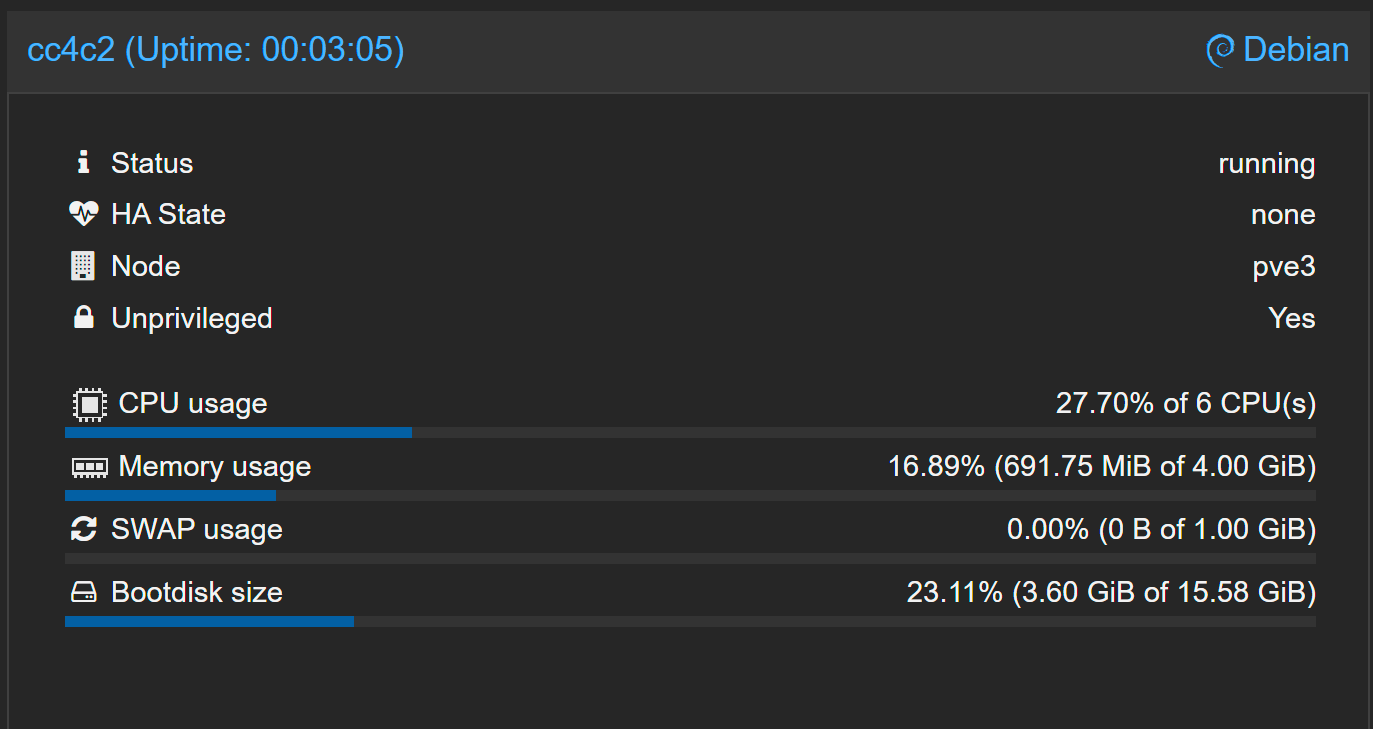
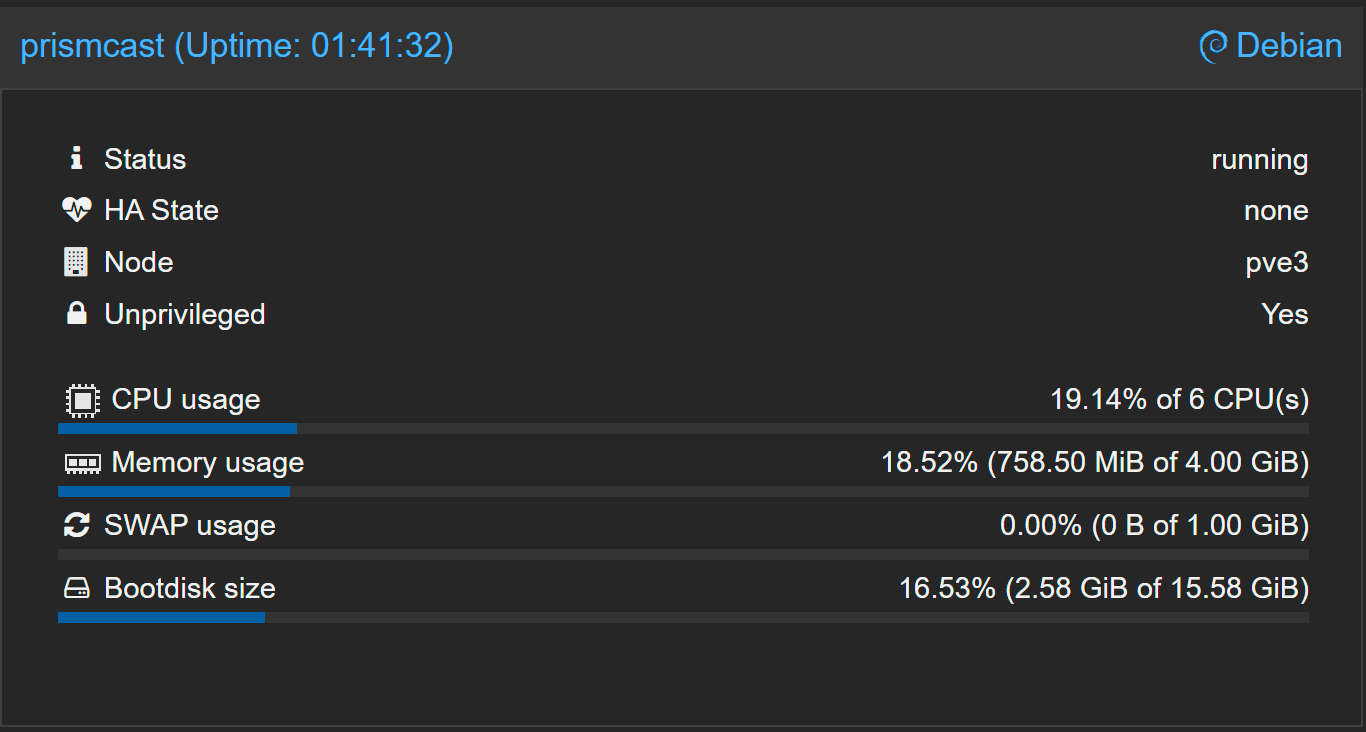
Not a totally scientific test, but resource usage does appear to be lower. These numbers were captured watching the same movie from the same streaming service, with both projects running in Proxmox LXCs with the same resource allocations:

PrismCast:

cc4c:

This type of project remains something that you don't want to run on a low end system. The above Proxmox host is a 10th Gen i7 for reference.

2 Likes

Thanks for taking the time to do this — really appreciate it. How's the experience been so far?

Docker/LXC is a bit out of my day-to-day, but having a working compose/Portainer stack (and the noVNC/VNC bits) will be super helpful for folks running PrismCast outside macOS.

Go ahead and open the PR when you feel it’s ready and you’ve kicked the tires — I’ll review and merge. If you can, just keep it clearly labeled as community-supported / non-macOS so expectations stay sane. :smile:

1 Like

Looking good! You can create user channels as well...YouTube's pretty well supported. In an ideal world, you're doing this with a YouTube RED (or whatever it's called now) subscription so you don't see ads, but you can create YouTube live channels for Channels DVR using PrismCast.

There's a few things there you can tweak once you're up and running and comfortable with the environment...

2 Likes

Also, if you pull up the PrismCast webUI, it'll show you the current incremental memory consumption of a given tab. Specifically, it's showing you how much memory PrismCast's using to livestream that tab. It's not going to show you what Chrome is consuming, so it's an incomplete picture...but the intent was directional. Shouldn't ever see more than 100MB/tab, at most...and often much less.

1 Like

Hey mate,

Wanting to create a custom profile for my streaming site.

ATM, I get cc4c to:

await page.waitForSelector('.TM21VideoTile img', { timeout: 30000 }).catch(() => {});
await page.evaluate(() => window.scrollBy(0, 300));

then use the following constants to load the appropriate channel:

const CUSTOM_CHANNEL_MAP = {
espn: '5bce8eb9e4b0a8faf3c14a94',
footy: '5bcefacfe4b0a8faf3c14ae2',
cricket: '5bcef5ede4b0a8faf3c14acf',
'505': '5bcefaf5e4b0cb6f1d7f46fc',
'503': '5bcef93ae4b0a8faf3c14ada',
'506': '5bcefc4ae4b0a8faf3c14aed',
league: '5bcef901e4b0cb6f1d7f46f3',
news: '5bcefccee4b0a8faf3c14aef',
racing: '5ccacc4ae4b020d0a4eb3979',
ufc: '66d524f4e4b06b17c2bfdd58',
espn2: '5bcef583e4b0a8faf3c14acb',
'507': '5bcefc6be4b0cb6f1d7f4703',

then I get fullscreen with the following:

const FULLSCREEN_TOGGLE_FUNCTION = () => {
  const uniquePathData =
    'M8.384 22.596L8.384 8.384 35.033 8.384 35.033 0 0 0 0 22.596zM8.384 44.954L0 44.954 0 67.313 35.033 67.313 35.033 58.928 8.384 58.928zM81.049 22.596L89.434 22.596 89.434 0 57.391 0 57.391 8.384 81.049 8.384zM81.049 44.954L81.049 58.928 57.391 58.928 57.391 67.313 89.434 67.313 89.434 44.954z';
  const fullscreenPath = document.querySelector(`path[d="${uniquePathData}"]`);
  if (fullscreenPath) {
    const fullscreenButton = fullscreenPath.closest('.gRgwBu');
    if (fullscreenButton) {
      fullscreenButton.click();
      return true;

This was all vibe coded (chatgpt)

some recent changes to try improve it completely broke it for me but would love to try implement this into your project.

Can't seem to find how to make a custom profile to achieve all this.

  1. Add a new user channel in the channels tab in PrismCast.
  2. Select a profile preset - likely in your case one of the keyboardDynamic or keyboardFullscreen ones.
  3. Test it in Channels by tuning the channel. You may need to try a few different presets to find the one that works, and definitely test each preset a few times to ensure it works (or doesn't).

You don't need to restart PrismCast when you add/remove/edit a user channel. It'll just work...you may need to do a reload of the M3U in Channels DVR so the channel shows up in the Channels DVR Guide.

I created PrismCast in part to address esoteric use cases like these.

So the individual channels don’t have a direct url, I’m essentially loading the front page of the website, scrolling to the live channels bar (so they all load) and then picking a channel by the image name (only differentiating factor between the channel boxes).

So I would’ve assumed it would be too complex for the presets, especially without the extra info.

Ah. Well, USA Networks (https://usanetwork.com/live) works the same way, and it's supported by PrismCast. You want to select the keyboardDynamicMultiVideo preset. You'll also want to select the advanced options selector and type in the text to match for your particular channel. The "text" to match for is the actual image file name for the channel on the live grid...PrismCast uses that to figure out which channel you are trying to tune. PrismCast should then be able to tune that.

That's the best I can do to help in your use case, unless you've got a specific URL for me to look at.

Never used CC4C.

I'll just let the other users answer my questions.
Was thinking of trying it on my Mac Mini M4, that's why I asked what you're running it on.

It'll run fine on an M1 or greater Mac. Good luck.

Okay will give it a go

Thanks

@hjd any plans for GPU support? I got an Intel GPU on hand here that I would love to use

1 Like