
@maddox, of course I don't mind if you share it. I too would like to see other Channels user setups. There are so many possibilities and the software is compatible with so many different types of hardware. And I think real-user setup scenarios that work well are fun to read about.
1 Like
Thanks for sharing!
Out of curiosity, what are these devices? (the array of 6 things below the switch)

1 Like
They are Wolf Cub winders. Used to turn the rotor in an automatic watch when not worn.

They work great, but are not related to the network. Most of the major networking components are on the shelf above this.
The top shelf has most of the major networking stuff. There are power outlets here, and 2 UPS batteries, one of which is solely dedicated to the Synology NAS.
I ran cat6 drops throughout the house from this closet, there is a patch panel in the back of the closet.

So the house has 2 ethernet runs going to each of 5 rooms... a total of 10 drops. This allows for Apple TVs and WiFi access points to all connect to the same main switch. I run short cables from the patch panel to the gigabit switch, so Apple TVs and DVR are all plugged into the same place. The network also does wifi with 3 Ubiquiti UniFi AC Lite access points throughout the house. These are connected to the switch via ethernet and powered with POE injectors. They provide excellent wifi coverage for phones, tablets, laptops, etc.... any devices that don't plug in with ethernet.

This system provides excellent wireless network connection throughout the whole house. It is perfect for facilitating the wireless use of high-bandwidth network applications like Channels-DVR.
I'd be happy to do this too... I just ordered a rack for my server gear so when that comes in (this week) and is set up I'll make a write-up of my setup.
I just moved into a 100 year old house (from a new construction house I've been in for the last 10 years) and already have 15 CAT-6A ethernet runs, 4 PoE Ubiquity Access Points, a 14TB double-redundant (and off-site mirror backed up) Synology NAS, an HDHD Dual and HDHR Connect, and more. @djcastaldo has a beautiful and clean setup - great job! I look forward to finishing my network rack and showing off my setup too!
2 Likes
I would be interested to know how you end up running the UniFi controller.
I have a headless, diskless (boots from USB, uses NAS for all I/O) Mac Mini Server (someday I'd like to replace this with a 1U type of blade or something that can handle more RAM) that runs VMware ESXi.
One of the VM's on that ESXi machine is Ubuntu 16.04 -- on that VM is where I run my Channels DVR, Plex, SONARR, RARARR, HomeBridge, and my Unifi Controller (instructions on that here: https://help.ubnt.com/hc/en-us/articles/220066768-UniFi-How-to-Install-Update-via-APT-on-Debian-or-Ubuntu)
Alternatively you could always use the $100 (ish) little PoE device they sell as a replacement for the VM hosting it... https://www.ui.com/unifi/unifi-cloud-key/
I have a 24/7 workstation that can run it.... but originally tried to run it in a Docker container on the Synology. As a container, I had to run AutoHeal to keep it running constantly. The container was too big and all the MongoDB read/writes had a performance impact on the NAS... it was similar to as if it was running RAID scrubbing constantly. The frequent disk I/O caused too much additional load if trying to record on 4+ tuners simultaneously...
I know about the CloudKey.
Awesome setup! I love Channels too - so much more reliable than HDHomeRun and Plex recording software.
Have you found the need to install UPS systems? I just did and now my network runs perfectly. Before I would wake up and my router would be blinking due to low voltage in my rural area. The UPS has solved the problem and no more missed recordings.
Thanks so much for all the pictures🥰
Karen
1 Like
The Synology is a RAID6 array, using 8 individual hard disk drives that function as a single volume. If there was any kind of power issue or some of the drives disconnected, or even if they all lost power but not exactly simultaneously, it would degrade the array. Absolutely, a setup like this necessitates a UPS. So I have one battery (the Cyberpower) just for the NAS. There is another UPS to the left of it, not visible in the picture, that keeps up all the switches, HDHomeruns, and other networking stuff. They all run 24/7 and have never had to be powered off or reset. I have not yet had the power go out at my house, but if it did, the DVR wouldn't know the difference and any scheduled recordings would continue.
Most computer and networking components work better and last longer when they continuously have good regulated power from a UPS.
Well, while not as fancy as @djcastaldo,
Here is my closet:


I have a patch panel that brings in the Ethernet from the Google fiber jack, which is PoE to my Ubiquity EdgeRouter. ( I threw the google network box in a pile, it’s horrible.) my network has 2 other networks, one WiFi and one wired, all off the edgerouter. The power strips connect to a centralized UPS in my “demarc”. The switch is for the wired network, which has the ActionTech MoCA2 adapter. Each TV, and office has a MoCA adapter, and in the Office, a switch. Then there is the dell micro desktop running Channels DVR and the 2 extends. ( I don’t use them to transcode, they just stacked nicer, lol) and the MoCA splitter in the corner.
The Antenna is a ChannelMaster Multidirectional mounted in the attic. Used Signal GH to align it. I’d snap a picture but I hate going up there.
My WiFi is provided throughout the house with just a TPLink 1900 in AP mode, it’s the weakest part of the network. Signals are great, but streaming with both boys playing FPS games forces me to 720 2Mb when using an iPad or iPhone. I put it above the cabinets in the kitchen, had power and efhernet run. Centralized like that on the first floor, I cover 2nd floor to the basement.

2 Likes
cool setup! Nice EdgeRouter. I run my ER-X PoE, using an injector from one of my Access Points and then passthrough from the ERX to the AP. It looks like you still have the power cord plugged into the EdgeRouter, though... you should be able to power the ER just using PoE.
Since you mention that the WiFi is a weak point and are doing MoCA anyway, why not just add a second AP? I have found great success using DFS channels that the neighbors don't have access to.
1 Like
Yeah I’m stuck with decision paralysis on WiFi. Lots of opportunities there. So I keep it as is. My wife and I have our work devices on wired, so it’s just the kids laptops and everyone’s iPhone/iPad devices in WiFi.
Back in Jan2016 I saw the brilliance of GetChannels and bought all my MoCA2 bonded adapters, bought some connects and multiple AppleTVs and signed up for the SD post-Kickstarter DVR deal, all before I could even run the channels app! Just based on a posting on a SD forum. I just saw their brilliance, and here I am frozen on a silly set of WiFi routers. Thank goodness work pays for my DVR host. Craaaaazzzzzyyy.
2 Likes
My "Power Install", from rooftop to WiFi:
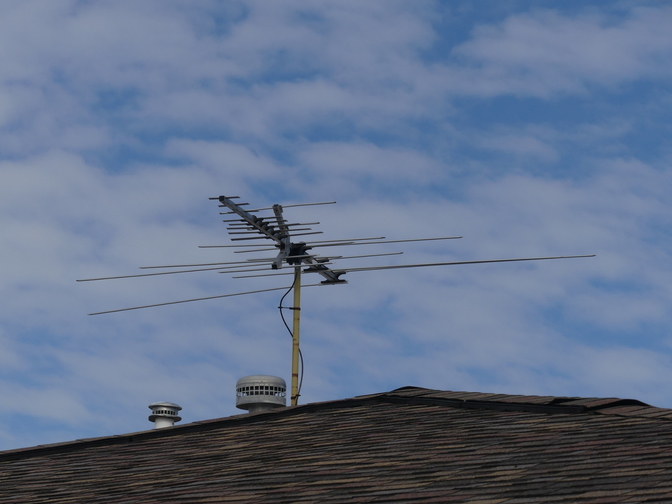
Antenna's a Winegard HD7078P at about 30 feet above ground level (which is about 960 feet AMSL).
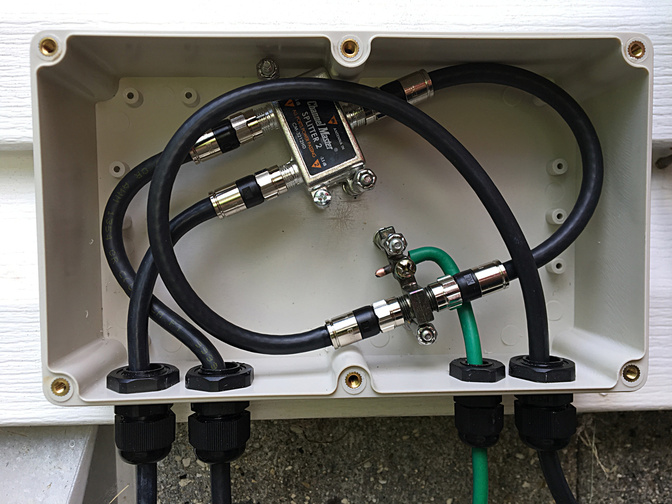
That goes into a lightning arrestor and splitter. One split goes directly to the main TV in the family room, the other to the HDHR CONNECT Quatro in the basement.
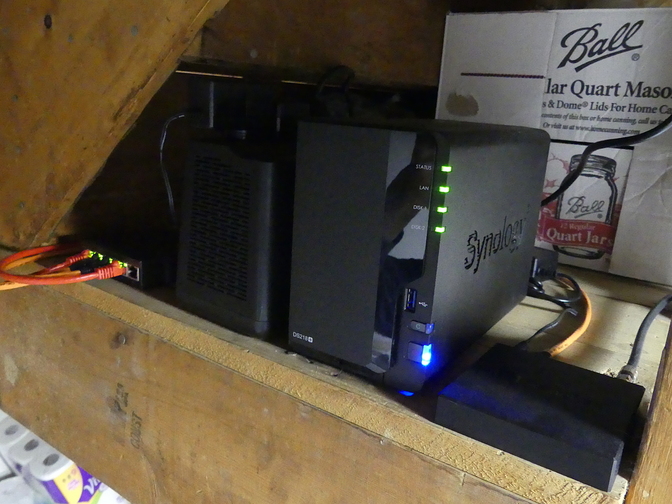
The HDHR CQ and NAS are sitting on a shelf under the stairs to the basement. Left-to-Right: NetGear ProSafe GS105Ev2 managed 5-port Gig-E switch, APC BE600M1 600VA BackUPS, Synology DS218+ NAS, HDHomeRun CONNECT Quatro.
The above back-hauls to the main network cabinet in the computer room. Left-to-Right, Top-to-Bottom: NetGear LB1120 LTE modem (for automatic fail-over Internet connection), Ubiquity EdgeRouter 3 Lite, NetGear ProSafe GS108 8-port unmanaged Gig-E swtich, NetGear ProSafe GS305P unmanaged PoE Gig-E switch, Obi202 VoIP Analog Terminal Adaptor, Comcast SMCD3G modem/router.
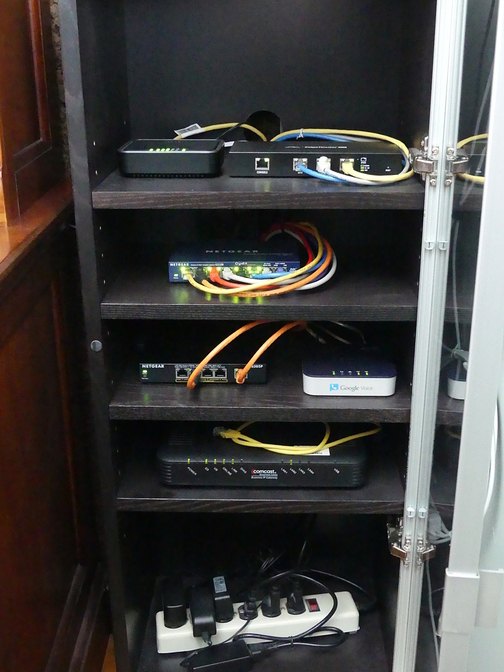
The 8-port unmanaged switch is soon to be replaced with a managed swtich. The 5-port switch is only there for test purposes. Normally there's just a straight PoE adaptor for the EnGenius AP.
Lastly: For an Access Point I've an EnGenius EAP1300 mounted in the ceiling, about dead-center in the middle of the home. I get solid corner-to-corner coverage, even into the basement, and a goodly ways out into the yard.
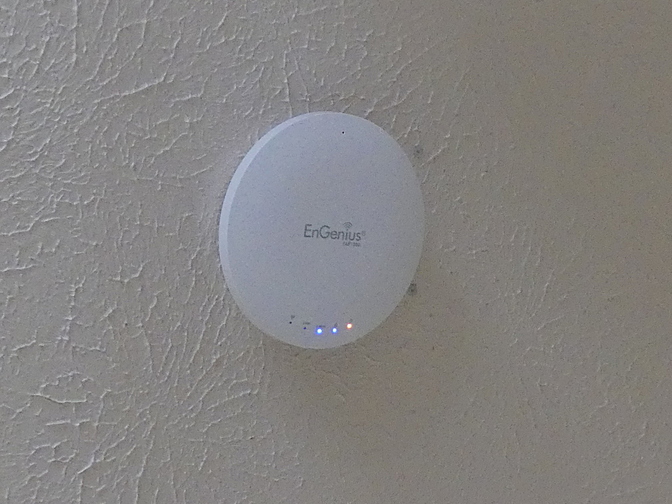
(There used to be an Ubiquiti UniFi AP AC Pro in that location, until their management software did me wrong. [I really need to get around to factory resetting that and putting it up on eBay.])
The TVs (currently three of them--there will eventually be five) have a mix of Amazon FireTV Gen. 2 and Xiaomi MiBox S Android TV devices on them.
The clients all connect wirelessly. I've had five of them streaming HD content simultaneously (all three TVs, my iPad and my iPhone) w/o a single drop/pause/what-have-you. When I increase switch capacity I'll move the FTV sitting atop the network cabinet over to an Ethernet connection--just because it'll be easy to do. (At least one of the planned additional TVs will have a wired streaming device. The other may go on a powerline Ethernet bridge.)
2 Likes
I'm sorry, INS, but I don't understand what that means. Do you possibly mean you're using powerline Ethernet bridges to connect your ERL3 to the Google fiber Internet connection? If so: That's not PoE. That's Ethernet over powerline, which is something else entirely.
sorry that wasnt clearer. I meant that The EdgeRouter supplies power to the Google Fiber Jack over PoE. no, i dont use any ethernet over powerline.
@ImNotSerious, I was confused too. But I just looked up "Google Fiber Jack" and now I get it!
@jseymour Nice Install! That antenna looks huge! I use a ProSafe switch also, I think I have a GS116. I don't really have use for a managed switch, but if I did ever decide to get one, it would be UniFi, since that controller is working well in my experience. How much are you selling the AC Pro for?
I didn't anticipate that this thread would turn into an awesome display of sweet installs, but it is fantastic! Let's keep it going, MOAR POWER!
The problem with the AC Pro (if it's the model I'm thinking of) is that it is no longer supported by the UniFi controller. You can still use the 5.6 LTS series of the controller with it; however the current 5.10 release will not work with them.
(The hassle of maintaining 2 separate UniFi controllers is the reason why I upgraded my APs to the current line. The older AC Pros that are no longer supported are the square-shaped APs. The current line of AC APs (including the Lite and Edu) are all round/disc-shaped.)
1 Like
Thanks! The antenna isn't all that big. Not to me, anyway. But I grew up with rooftop antennas on every roof 
I'm wanting a managed switch so I can segregate my network traffic and isolate the IoT devices.
Yeah... I didn't like the whole "controller" thing. EnGenius has the capability, but also allows simple web-based configuration. For a simple one-AP install, that made more sense to me.
I dunno... <takes a quick look on eBay...> Looks like they're averaging around ±$90 + shipping for used ones?
Nah, mine's one of the new disc-shaped ones.
I was thinking about it, but I shouldn't buy it. I would have bought a used AC Pro if I didn't already have multiple AC Lites, which already perform perfectly for what I need them for. Maybe someone else here will PM you though.
's all right. Like I said: It's been sitting here, getting in the way, waiting for me to factory-reset it, take some photos, box it up and list it--for about... <looks...> oh... hahaha! Seven months. Guess I should get to it