
Hi, I'm drooling over these incredible new projects like "one click," Tubi for Channels, olive tin, etc. But wading through long forum posts always seems to leave me stumped & confused by unfamiliar terminology and procedures. I can't find a place to start. Are there any basic, step by step instructions available, i.e. a "Channels for Dummies" version? Any guidance would be much appreciated!
Most (not all) projects use docker containers, so becoming familiar with using docker on your device of choice is a start. You may be able to run it on the same device you have Channels DVR running on. In addition to knowing how to use your docker, employing a good UI manager for it (like Portainer) will make it a lot easier to deploy and manage docker images and containers mentioned on this forum.
Next step would be visiting a topic here for something you want to try, or install the OliveTin EZ-Start docker container mentioned here Project One-Click: All-in-One Installations of Docker Extensions and CDVR Custom Channels - #535 by bnhf that will install most projects for you.
3 Likes
Basics...
I can totally relate! I visit this forum daily and I'd say that at least 90% of the posts go completely over my head. 
1 Like
Yes, there is a lot of tribal knowledge that us newbies will not understand. I bought a new PC this week and installed the Docker Pluto TV project for the first time.
The biggest obstacle was getting the Windows 11 environment right for Docker. Fortunately I found an excellent Youtube tutorial https://www.youtube.com/watch?v=zy0wR_WmO5g&ab_channel=AleksandarHaberPhD
I'm running Channels version 2025.06.2212 and the menu to add a custom channel looked different than the Github pictures. It took me around 10 minutes to figure it out 
.
Settings\Sources\Live TV\Add Source (Green + button)
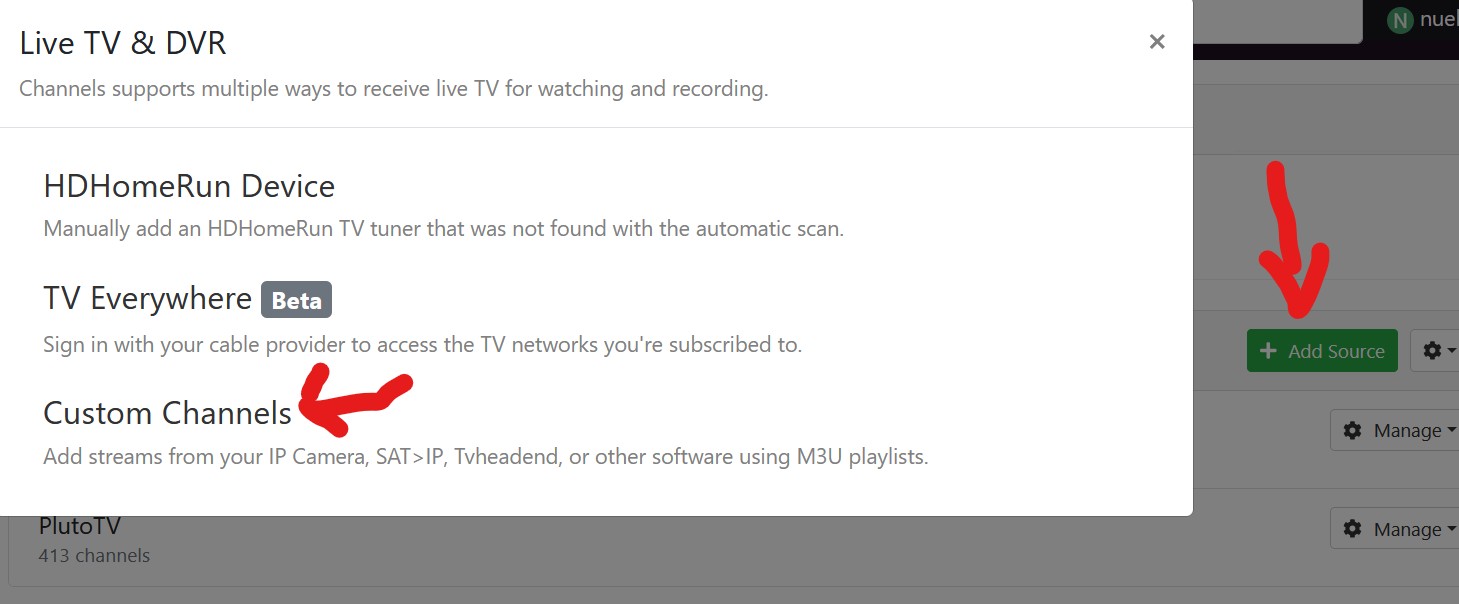
Hope that helps!
OK, thanks, that gives me something to go on! Sounds like first thing is to work on installing the docker and portainer programs on the DVR PC. I see there's a docker and a docker desktop-- is one easier to use than the other?
Are you installing it on a Windows pc, Mac or Linux?
Windows 10 pc. It's the one Channels is installed on.
That is a great video! And wow, lots of steps to follow but just going to plunge in and see how it goes 
First off, everybody has their own opinion of what OS to use for docker. Use what you feel comfortable with and don't feel pressured to switch to something you don't want to use.
With that said, Windows 10 will run WSL2 just fine. I have used WSL2 for a few years and it works well. The simplest way to get docker running on it is Docker Desktop. Docker Desktop is a very easy to use UI for Docker. I use it more than I do Portainer, which is another UI for Docker that offers more features that aren't needed for basic container management.
Windows terminal is easier to use than Linux terminal and I install most of my stuff from terminal. The Command Line is a powerful and simple tool. Installing things like OliveTin for Channels is easier to manage with Portainer CE (community edition) and you can install Portainer along side Docker Desktop and use either one you want to.
Like I said, everyone has an opinion and many will tell you Linux is the only way, but to be honest, Windows works just fine.
Edit: Docker Desktop includes everything you need to run Docker with it. No other Docker is needed.
1 Like
Good info, thanks! Right now working on installing docker desktop but per the video above it apparently requires WSL be installed, which seems to have errored out after command in powershell, "wsl --install" gave "catastrophic error" then after that said it had installed, but I can't find it on the system. Trudging on...
You can run wsl -l -v in PowerShell and see if you have Linux and WSL running and installed
You can also follow the directions at docker.com https://docs.docker.com/desktop/setup/install/windows-install/
OK, thank you all who have chimed in with extremely helpful suggestions--did my best to follow them lol... 25 websites later, diving down rabbit holes, much confusion & looking up of terms--Docker Desktop is running! Not sure what to do with it but feels like progress toward the goal of more TV channels beyond TVE. Babsonnexus says install olive tin because its a catch-all for Channels projects, so will maybe tackle that next plus something called portainer? chicken or egg? All ideas and suggestions considered 
Portainer
Ask their AI assistant (lower right of web page) https://docs.portainer.io/
"Install Portainer CE on Windows Docker Desktop"
Agree that use what you are familiar with regarding OS. That being said, docker installed on Linux Server has the least amount of overhead bar none. That can come in handy when you want to use a machine that may not have the best specs. It also requires pretty much zero config steps.
I configured docker desktop for windows once and found it to be a bloated piece of software that was a system hog that ran on a bloated OS lol. That's when I turned to Linux.
People often avoid Linux because they think it is complicated and you need to have a high level background/training to use it. In reality all you need to know how to do is Google. That's how I got all my knowledge.
1 Like
I have 2 Linux mini PC's that I use for developing and a Windows system for testing and dev stuff too. If I want a python script to be more efficient, I'm not going to bother with docker at all and just run it as a Windows service. Windows is a great way to learn docker especially if you are not comfortable with Linux or CLI.
Followed the instructions to "Install Portainer CE on Windows Docker Desktop" and it's done... Portainer shows up in Docker desktop under "Containers". Ready for the next step, whatever that is.
BTW, happy 4th everyone! 
1 Like
Once you've setup and signed in to Portainer, the next step is installing OliveTin for Channels.
If you already have Channels DVR Server running on the same PC as Docker Desktop and Portainer, you can use the easier OliveTin EZ-Start method.
If you have any issues or questions about it, post them in that topic thread.
1 Like
This topic was automatically closed 30 days after the last reply. New replies are no longer allowed.