
Apparently the bun program we're using to run main.js doesn't support some older processors. I'm guessing this is a Synology, running a processor launched 10-12+ years ago? Post the specs if you could please. @tmm1 was suggesting we switch to a compatibility version of bun.
So I'm actually using a mini PC...a Bmax B3.
For my specs on it, I see Desktop, Intel, Version AMI. For the CPU: 4x Intel(R) Celeron(R) N5095A @ 2.00GHz.
I have 8GB of DDR4 DRAM memory
Let me know if there's any other specs you'd need to see. Thanks!
@tmm1 Any notion of what might be going on with these illegal instruction errors/dumps from bun? This CPU is fairly recent, so it seems unlikely it's missing instructions. Should we consider switching back to node?
@Accustiver I've built a version of cc4c with the tag baseline that uses a version of bun that's intended to be compatible with a wider group of processors (low-end and/or older). So if you wouldn't mind giving it a try, it'd be great to know if it works on your mini PC.
Be sure you're using this compose:
services:
  cc4c:
    # 2025.09.30
    # GitHub home for this project: https://github.com/bnhf/chrome-capture-for-channels.
    # Docker container home for this project with setup instructions: https://hub.docker.com/r/bnhf/cc4c.
    image: bnhf/cc4c:${TAG:-latest}
    container_name: cc4c
    shm_size: '1gb'
    #devices:
      #- /dev/dri:/dev/dri # Uncomment for Intel Quick Sync (GPU) access
    ports:
      - ${HOST_PORT:-5589}:${CC4C_PORT:-5589} # cc4c proxy port
      - ${HOST_VNC_PORT:-5900}:5900 # VNC port for entering credentials
    environment:
      - VIDEO_BITRATE=${VIDEO_BITRATE:-6000000} # Video bitrate in bits per second  [number] [default: 6000000]
      - AUDIO_BITRATE=${AUDIO_BITRATE:-256000} # Audio bitrate in bits per second  [number] [default: 256000]
      - FRAMERATE=${FRAMERATE:-30} # Minimum frame rate  [number] [default: 30]
      - CC4C_PORT=${CC4C_PORT:-5589} # Port number for the server  [number] [default: 5589]
      - HOST_VNC_PORT=${HOST_VNC_PORT:-5900} # VNC port for entering credentials
      - VIDEO_WIDTH=${VIDEO_WIDTH:-1920} # Video width in pixels (e.g., 1920 for 1080p)  [number] [default: 1920]
      - VIDEO_HEIGHT=${VIDEO_HEIGHT:-1080} # Video height in pixels (e.g., 1080 for 1080p)  [number] [default: 1080]
      - TZ=${TZ} # Your local timezone in Linux "tz" format.
    volumes:
      - cookies:/home/chrome/chromedata/Default/Cookies # Creates a persistent Docker Volume in /var/lib/docker/volumes for Chrome cookie data.
      - logins:/home/chrome/chromedata/Default/Login Data # Creates a persistent Docker Volume in /var/lib/docker/volumes for Chrome user login data.
      - localstorage:/home/chrome/chromedata/Default/Local Storage # Creates a persistent Docker Volume in /var/lib/docker/volumes for Chrome user local data.
      - prefs:/home/chrome/chromedata/Default/Preferences # Creates a persistent Docker Volume in /var/lib/docker/volumes for Chrome user preferences data.
      - secure:/home/chrome/chromedata/Default/Secure Preferences # Creates a persistent Docker Volume in /var/lib/docker/volumes for Chrome user secure data.
    restart: unless-stopped

volumes:
  cookies:
  logins:
  localstorage:
  prefs:
  secure:
As usual, please don't edit the above, but put your env vars in the separate area in the Portainer-Stacks Editor intended for this use. Here are some samples, which you'll want to tweak for your installation:
TAG=baseline
HOST_PORT=5589
CC4C_PORT=5589
HOST_VNC_PORT=5900
VIDEO_BITRATE=8500000
AUDIO_BITRATE=256000
FRAMERATE=60
VIDEO_WIDTH=1920
VIDEO_HEIGHT=1080
TZ=US/Mountain
1 Like
It's working again with your above instructions! Thanks!
How does it work with main.js does it need to be converted? I am in the process of adding Hulu/Prime++ + commercial ripping code that runs separate.. it works good but chrome capture for channels blocks L1
End may be neigh for NBC channels
cordcuttersnews-com.cdn.ampproject.org/v/s/cordcuttersnews.com/nbcuniversal-shuts-down-its-cable-network-apps-on-roku-tvs-roku-players-to-promote-peacock/?amp=1&_gsa=1&_js_v=a9&usqp=mq331AQGsAEggAID#amp_tf=From %251%24s&aoh=17593842127314&csi=0&referrer=https%3A%2F%2Fwww.google.com NBCUniversal Shuts Down Its Cable Network Apps on Roku TVs & Roku Players To Promote Peacock | Cord Cutters News
Is anyone getting this to work in chrome 140+?
Can L1 be added?
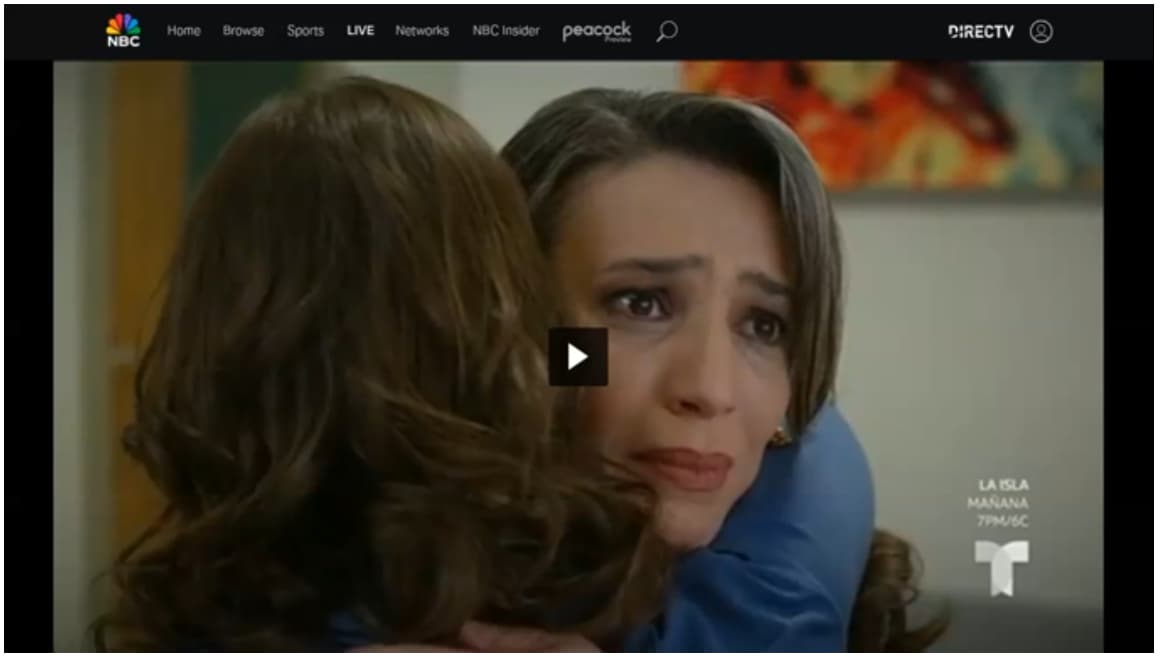
Page refreshes on nbc.com and play video and full screen does not run again. If i close stream and wait a few seconds it will load up the page and play again.
But it is a issue when i am recording because i have to cancel the recording then wait and record again, if i catch it in time.
Have had this issue happen on cc4c:test and cc4c:baseline.
m3u looks like this:
#EXTINF:-1 channel-id="telemundo",Telemundo
chrome://192.168.1.x:5589/stream?url=https://www.nbc.com/live?brand=telemundo&callsign=telemundo
Example from recording, stayed like this for 10 minutes until i realized and stopped the recording.
On Sunday I saw the same issue as @xBT reported where it refreshed and paused...for hours, unfortunately.
1 Like
I believe I was able to duplicate what you're talking about, using the player in the CDVR WebUI. In that player it appeared the Telemundo stream was frozen within about 10 minutes. However, when I connected to the container using VNC, I realized the stream was still playing.
So, I switched to testing with two CDVR clients, and I've been streaming Telemundo for about 40 minutes with no issues. I'll leave it going for the next hour or two, but I suspect we're looking at an issue that's confined to the WebUI player. I've seen this before with this player, and I think it typically happens when the feed goes to commercial.
EDIT: 2+ hours now with no freezes.
Your previous posts in this thread suggest you're not using the Docker version, has that changed?
Thanks for asking. That has not changed. I'm pulling from the fancybits repo and running on my M1 Mac mini.
Sometimes i have stream running for hours with no issues.
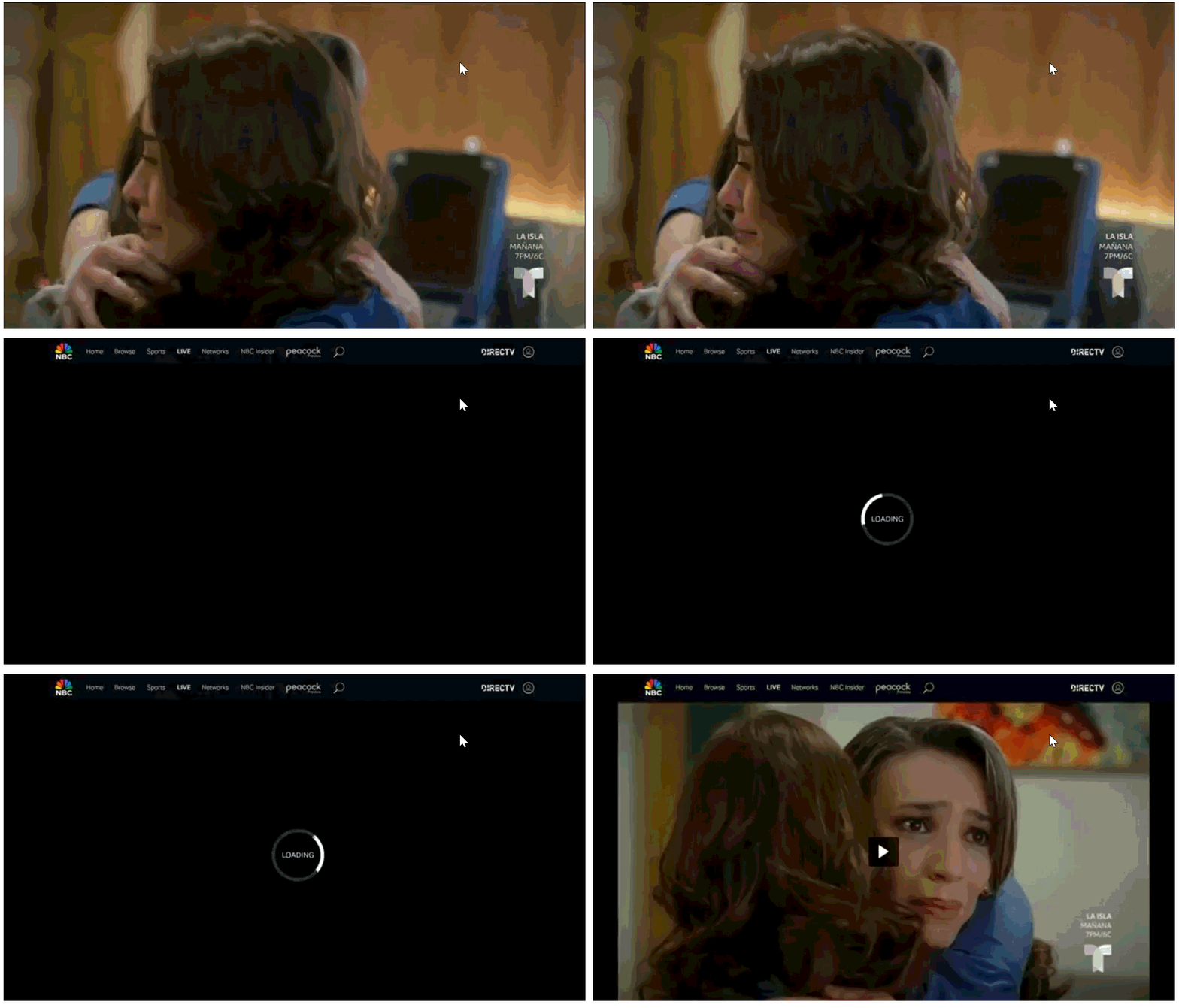
Yesterday it did it 3 minutes in, to the recording. recorded the play button for 31 minutes.
I watch the stream on my firestick, what i have ended up doing is when i notice it happens i run to my computer and connect to container using vnc and start the player manually and it starts playing again.
snippet is from the recording at the 3min mark:
1 Like
Sounds like the stream is getting interrupted. What are the specs on your Docker host computer? What OS are you running on the host? What's you Internet connection like? Is there a VPN involved?
EDIT: I just had it happen to me after around 4 hours. This is the first time I'm using NBC via cc4c, are you seeing this with other sites too?
That's the channel i mostly use with cc4c, but i have not had this issue on other sites.
From what i see in the recording the whole page does not refresh just the video frame, so it will not run the functions on: cc4c github - nbc code because the whole page did not refresh.
Is it possible to add a timer that would check every x amount of seconds if video is paused.
Example:
setInterval(() => {
  let video = document.querySelector('video');
  const isPaused = video.paused;
  if (isPaused) {
   // Run Code to Play Video and Full Screen
  }
}, 10000); // Executes every 10 second, or set in env var
Users can allow if they want this type of timer to run via env var, Ex.
allowPausedTimer=False; // Default is False, If true it setInterval will run on `pauseInterval`
pauseInterval=10000; // Default 10 Seconds
You should give it a try and see how it works.
Although I've contributed some to this project, I'm mostly just a user like you. My particular interest is in the Docker version, as I virtualize and containerize everything.
This issue is looking like it's not specific to the Docker version, so I'm going to bow out.
Forked the repo and have been testing it.
Works so far for me it checks if it is paused and re-runs the code to play and full-screen the video.
Made some other changes to fix some code that was not working correctly or deprecated.
Used JSDoc to add types to some functions to allow type-hints.
Here is my repo:
1 Like
cc4c Transcoding Fails on UGREEN NAS:
[LIBVA]:CRITICAL - DdiMedia_SyncBuffer:4286: Invalid buffer
Hi all,
I'm running into a persistent hardware transcoding error when using cc4c in a Docker container on my UGREEN NAS.
The strange part is that the transcode seems to work perfectly, but the process crashes with a critical error at the very end, right as it's finishing. This isn't a "permission denied" error at the start, but a crash during what looks like memory cleanup.
My Setup
• NAS: UGREEN 480T Plus
• NAS OS: UGOS Pro (Latest Firmware: 1.9.0.0075)
• Container: cc4c running in Docker, managed via Portainer
• GPU Passthrough: "Graphics Card Performance" is enabled in the UGOS Docker app.
The Error Log
The log shows the Intel iHD driver initializes correctly, the stream maps, and the h264_vaapi encoder successfully encodes all 60 frames. But then, it terminates with this error:
[AVHWDeviceContext @ 0x48053d40] VAAPI driver: Intel iHD driver for Intel(R) Gen Graphics - 24.4.2 (b813073).

[h264_vaapi @ 0x4869bc00] Using VAAPI profile VAProfileH264High (7).

Stream #0:0: Video: h264 (High), 1 reference frame, vaapi... 1280x720 ... 4000 kb/s, 60 fps

frame=   60 fps=0.0 q=-0.0 Lsize=N/A time=00:00:00.96 bitrate=N/A speed= 3.3x

Output file #0 (/dev/null):

Output stream #0:0 (video): 60 frames encoded; 60 packets muxed (37764 bytes);

Total: 60 packets (37764 bytes) muxed

Terminating demuxer thread 0

[LIBVA]:CRITICAL - DdiMedia_SyncBuffer:4286: Invalid buffer
What I've Tried So Far
Based on my investigation, this seems to be a driver/library incompatibility, not a user permission error.
- Updated NAS Firmware: I am running the latest UGOS Pro 1.9.0.0075, which was supposed to include a "new transcoding framework" to fix bugs. The problem persists.
- Re-pulled Container Image: In Portainer, I forced a "Re-pull image" on my cc4c stack and updated it to ensure I have the latest container with the newest FFmpeg/libva libraries.
- Toggled GPU Passthrough: I have turned the "Graphics Card Performance" setting off and on again in the UGOS Docker settings.
- Rebooted: I have rebooted the NAS multiple times.
My hypothesis is that the FFmpeg/libva libraries inside the cc4c container are still incompatible with the new Intel iHD driver (v24.4.2) that UGREEN is using in its latest firmware.
Is this a known issue? Is there a beta or dev tag for the cc4c container I should be using that has newer, more compatible libraries?
Thanks for any help you can provide!
What does the Docker Compose you're using look like?
Im using project one click to install fresh... no existing anything: empty docker until I start with the one click install. olivetin-ezstart... So portainer, olivertin, and channels all install fine.All run and behave normally until HW transcode is used. SW transcode works fine.
version: '3.9'
services:
  cc4c:
    # 2025.04.20
    # GitHub home for this project: https://github.com/bnhf/chrome-capture-for-channels.
    # Docker container home for this project with setup instructions: https://hub.docker.com/r/bnhf/cc4c.
    image: bnhf/cc4c:${TAG:-latest}
    container_name: cc4c
    shm_size: '1gb'
    devices:
      - /dev/dri:/dev/dri # Uncomment for Intel Quick Sync (GPU) access
    ports:
      - ${HOST_PORT:-5589}:${CC4C_PORT:-5589} # cc4c proxy port
      - ${HOST_VNC_PORT:-5900}:5900 # VNC port for entering credentials
    environment:
      - VIDEO_BITRATE=${VIDEO_BITRATE:-6000000} # Video bitrate in bits per second  [number] [default: 6000000]
      - AUDIO_BITRATE=${AUDIO_BITRATE:-256000} # Audio bitrate in bits per second  [number] [default: 256000]
      - FRAMERATE=${FRAMERATE:-30} # Minimum frame rate  [number] [default: 30]
      - CC4C_PORT=${CC4C_PORT:-5589} # Port number for the server  [number] [default: 5589]
      - VIDEO_WIDTH=${VIDEO_WIDTH:-1920} # Video width in pixels (e.g., 1920 for 1080p)  [number] [default: 1920]
      - VIDEO_HEIGHT=${VIDEO_HEIGHT:-1080} # Video height in pixels (e.g., 1080 for 1080p)  [number] [default: 1080]
      - VIDEO_CODEC=${VIDEO_CODEC:-h264_nvenc} # Video codec (e.g., h264_nvenc, h264_qsv, h264_amf, h264_vaapi)  [string] [default: "h264_nvenc"]
      - AUDIO_CODEC=${AUDIO_CODEC:-aac} # Audio codec (e.g., aac, opus)  [string] [default: "aac"]
      - TZ=${TZ} # Your local timezone in Linux "tz" format.
    volumes:
      - cookies:/home/chrome/chromedata/Default/Cookies # Creates a persistent Docker Volume in /var/lib/docker/volumes for Chrome cookie data.
      - logins:/home/chrome/chromedata/Default/Login Data # Creates a persistent Docker Volume in /var/lib/docker/volumes for Chrome user login data.
      - localstorage:/home/chrome/chromedata/Default/Local Storage # Creates a persistent Docker Volume in /var/lib/docker/volumes for Chrome user local data.
      - prefs:/home/chrome/chromedata/Default/Preferences # Creates a persistent Docker Volume in /var/lib/docker/volumes for Chrome user preferences data.
      - secure:/home/chrome/chromedata/Default/Secure Preferences # Creates a persistent Docker Volume in /var/lib/docker/volumes for Chrome user secure data.
    restart: unless-stopped

volumes:
  cookies:
  logins:
  localstorage:
  prefs:
  secure:
If you want to update the container to test (this is not permanent -- it'll be good until the next time you stop and restart the stack), you can exec into the container (using the Portainer "Quick Action" button for this purpose), and execute:
apt update
apt upgrade
Inspect the list of packages upgraded to see if you think anything might be relevant. This will update everything in the container to current for the Debian 12 (bookworm) image it's based on.
However, having said all that, be aware there are limitations in the Linux version of Chrome and Puppeteer that result in very few websites even using hardware acceleration in cc4c. Weatherscan is about the only one I've ever seen take advantage of it.
I would would suggest disabling hardware acceleration, and go with software.
1 Like