Chrome Capture for Channels

Sure:

Bun v1.2.21 (Linux x64)
Cleaning up...
Google Chrome 140.0.7339.127 
The VNC desktop is:      b9d1fab45a45:0
The VNC port is:         5900
[2025/09/10 13:24:25.913] Selected settings:
[2025/09/10 13:24:25.918] Video Bitrate: 9500000 bps (9.5Mbps)
[2025/09/10 13:24:25.918] Audio Bitrate: 256000 bps (256kbps)
[2025/09/10 13:24:25.918] Minimum Frame Rate: 30 fps
[2025/09/10 13:24:25.918] Port: 5589
[2025/09/10 13:24:25.918] Resolution: 1920x1080
[2025/09/10 13:24:25.937] Chrome Capture server listening on port 5589
[2025/09/10 13:24:44.095] Launching Browser, Opts {
  executablePath: '/usr/bin/google-chrome',
  pipe: true,
  headless: false,
  defaultViewport: null,
  userDataDir: '/home/chrome/chromedata',

[
    '--no-first-run',
    '--hide-crash-restore-bubble',
    '--allow-running-insecure-content',
    '--autoplay-policy=no-user-gesture-required',
    '--disable-blink-features=AutomationControlled',
    '--hide-scrollbars',
    '--window-size=1920,1080',
    '--disable-notifications',
    '--disable-background-networking',
    '--disable-background-timer-throttling',
    '--disable-background-media-suspend',
    '--disable-backgrounding-occluded-windows',
    '--auto-accept-this-tab-capture',
    '--allowlisted-extension-id=jjndjgheafjngoipoacpjgeicjeomjli',
    '--use-gl=angle',
    '--use-angle=gl-egl',
    '--enable-features=VaapiVideoDecoder,VaapiVideoEncoder',
    '--ignore-gpu-blocklist',
    '--enable-zero-copy',
    '--enable-drdc',
    '--no-sandbox'
  ],
  ignoreDefaultArgs: [
    '--enable-automation',
    '--disable-extensions',
    '--disable-default-apps',
    '--disable-component-update',
    '--disable-component-extensions-with-background-pages',
    '--enable-blink-features=IdleDetection',
    '--mute-audio'
  ],
  enableExtensions: [ '/home/chrome/node_modules/puppeteer-stream/extension' ]
}
179 |                     ensureNewDocumentNavigation = !!response.loaderId;
180 |                     if (response.errorText === 'net::ERR_HTTP_RESPONSE_CODE_FAILURE') {
181 |                         return null;
182 |                     }
183 |                     return response.errorText
184 |                         ? new Error(`${response.errorText} at ${url}`)
                                ^
error: net::ERR_BLOCKED_BY_CLIENT at chrome-extension://jjndjgheafjngoipoacpjgeicjeomjli/options.html#55200
      at navigate (/home/chrome/node_modules/puppeteer-core/lib/cjs/puppeteer/cdp/Frame.js:184:27)
[2025/09/10 13:24:44.846] New target page created: about:blank
Bun v1.2.21 (Linux x64)

I note that is still has the "--allowlisted-extension-id" which I thought was a problem.

1 Like

Interestingly, I was testing with WeatherStar 4000+, and that was working fine. Now testing with a Sling channel, I'm seeing one failure followed by an immediate success:

Google Chrome 140.0.7339.127
The VNC desktop is: d21dc53fb3f5:0
The VNC port is: 5900
[2025/09/10 12:31:43.567] Selected settings:
[2025/09/10 12:31:43.569] Video Bitrate: 9500000 bps (9.5Mbps)
[2025/09/10 12:31:43.569] Audio Bitrate: 256000 bps (256kbps)
[2025/09/10 12:31:43.569] Minimum Frame Rate: 60 fps
[2025/09/10 12:31:43.569] Port: 5589
[2025/09/10 12:31:43.569] Resolution: 1920x1080
[2025/09/10 12:31:43.574] Chrome Capture server listening on port 5589
[2025/09/10 12:32:13.128] Launching Browser, Opts {
executablePath: '/usr/bin/google-chrome',
pipe: true,
headless: false,
defaultViewport: null,
userDataDir: '/home/chrome/chromedata',

[
'--no-first-run',
'--hide-crash-restore-bubble',
'--allow-running-insecure-content',
'--autoplay-policy=no-user-gesture-required',
'--disable-blink-features=AutomationControlled',
'--hide-scrollbars',
'--window-size=1920,1080',
'--disable-notifications',
'--disable-background-networking',
'--disable-background-timer-throttling',
'--disable-background-media-suspend',
'--disable-backgrounding-occluded-windows',
'--auto-accept-this-tab-capture',
'--allowlisted-extension-id=jjndjgheafjngoipoacpjgeicjeomjli',
'--use-gl=angle',
'--use-angle=gl-egl',
'--enable-features=VaapiVideoDecoder,VaapiVideoEncoder',
'--ignore-gpu-blocklist',
'--enable-zero-copy',
'--enable-drdc',
'--no-sandbox'
],
ignoreDefaultArgs: [
'--enable-automation',
'--disable-extensions',
'--disable-default-apps',
'--disable-component-update',
'--disable-component-extensions-with-background-pages',
'--enable-blink-features=IdleDetection',
'--mute-audio'
],
enableExtensions: [ '/home/chrome/node_modules/puppeteer-stream/extension' ]
}
179 | ensureNewDocumentNavigation = !!response.loaderId;
180 | if (response.errorText === 'net::ERR_HTTP_RESPONSE_CODE_FAILURE') {
181 | return null;
182 | }
183 | return response.errorText
184 | ? new Error(`${response.errorText} at ${url}`)
^
error: net::ERR_BLOCKED_BY_CLIENT at chrome-extension://jjndjgheafjngoipoacpjgeicjeomjli/options.html#55200
at navigate (/home/chrome/node_modules/puppeteer-core/lib/cjs/puppeteer/cdp/Frame.js:184:27)
[2025/09/10 12:32:13.335] New target page created: about:blank
Bun v1.2.21 (Linux x64)
Cleaning up...
Google Chrome 140.0.7339.127
The VNC desktop is: d21dc53fb3f5:0
The VNC port is: 5900
[2025/09/10 12:32:15.836] Selected settings:
[2025/09/10 12:32:15.838] Video Bitrate: 9500000 bps (9.5Mbps)
[2025/09/10 12:32:15.838] Audio Bitrate: 256000 bps (256kbps)
[2025/09/10 12:32:15.838] Minimum Frame Rate: 60 fps
[2025/09/10 12:32:15.838] Port: 5589
[2025/09/10 12:32:15.838] Resolution: 1920x1080
[2025/09/10 12:32:15.844] Chrome Capture server listening on port 5589
[2025/09/10 12:32:15.959] Launching Browser, Opts {
executablePath: '/usr/bin/google-chrome',
pipe: true,
headless: false,
defaultViewport: null,
userDataDir: '/home/chrome/chromedata',

[
'--no-first-run',
'--hide-crash-restore-bubble',
'--allow-running-insecure-content',
'--autoplay-policy=no-user-gesture-required',
'--disable-blink-features=AutomationControlled',
'--hide-scrollbars',
'--window-size=1920,1080',
'--disable-notifications',
'--disable-background-networking',
'--disable-background-timer-throttling',
'--disable-background-media-suspend',
'--disable-backgrounding-occluded-windows',
'--auto-accept-this-tab-capture',
'--allowlisted-extension-id=jjndjgheafjngoipoacpjgeicjeomjli',
'--use-gl=angle',
'--use-angle=gl-egl',
'--enable-features=VaapiVideoDecoder,VaapiVideoEncoder',
'--ignore-gpu-blocklist',
'--enable-zero-copy',
'--enable-drdc',
'--no-sandbox'
],
ignoreDefaultArgs: [
'--enable-automation',
'--disable-extensions',
'--disable-default-apps',
'--disable-component-update',
'--disable-component-extensions-with-background-pages',
'--enable-blink-features=IdleDetection',
'--mute-audio'
],
enableExtensions: [ '/home/chrome/node_modules/puppeteer-stream/extension' ]
}
[2025/09/10 12:32:16.130] New target page created: about:blank
[2025/09/10 12:32:16.139] Target page changed: chrome-extension://jjndjgheafjngoipoacpjgeicjeomjli/options.html#55200
[2025/09/10 12:32:16.155] New target page created: chrome-extension://fignfifoniblkonapihmkfakmlgkbkcf/service_worker.js
[2025/09/10 12:32:16.164] New target page created: chrome-extension://jjndjgheafjngoipoacpjgeicjeomjli/background.js
[2025/09/10 12:32:17.147] Need to initialize stream capabilities
[2025/09/10 12:32:17.330] streaming https://watch.sling.com/1/channel/1a3c345b84b149918e0bad8f797df70a/watch
[2025/09/10 12:32:17.416] Target page changed: https://watch.sling.com/1/channel/1a3c345b84b149918e0bad8f797df70a/watch
[2025/09/10 12:32:17.428] URL contains watch.sling.com
[2025/09/10 12:32:17.933] New target page created: https://watch.sling.com/7.1.8/service-worker.js
[2025/09/10 12:32:19.812] New target page created: blob:https://watch.sling.com/dab983f0-ccfc-42b3-8d71-04b17efd7663
[2025/09/10 12:32:19.852] Browser page closed: blob:https://watch.sling.com/dab983f0-ccfc-42b3-8d71-04b17efd7663
[2025/09/10 12:32:22.650] Set Sling to Full Screen and Volume to max
[2025/09/10 12:32:46.165] Browser page closed: chrome-extension://fignfifoniblkonapihmkfakmlgkbkcf/service_worker.js
[2025/09/10 12:32:46.166] Browser page closed: chrome-extension://jjndjgheafjngoipoacpjgeicjeomjli/background.js
[2025/09/10 12:32:49.342] Browser page closed: https://watch.sling.com/7.1.8/service-worker.js

EDIT: BTW, you can also try bnhf/cc4c:test if you like, which is still using Chrome 136.

1 Like

Also interesting, my Proxmox LXC container version of cc4c -- built with the same code, doesn't fail once before succeeding like the Docker version:

Google Chrome 140.0.7339.80 
Starting xvfb, x11vnc, and npm...
The VNC desktop is:      cc4c2:0
The VNC port is:         
[2025/09/10 19:31:54.274] Selected settings:
[2025/09/10 19:31:54.277] Video Bitrate: 9500000 bps (9.5Mbps)
[2025/09/10 19:31:54.277] Audio Bitrate: 256000 bps (256kbps)
[2025/09/10 19:31:54.277] Minimum Frame Rate: 30 fps
[2025/09/10 19:31:54.277] Port: 5589
[2025/09/10 19:31:54.277] Resolution: 1920x1080
[2025/09/10 19:31:54.284] Chrome Capture server listening on port 5589
[2025/09/10 19:33:17.069] Launching Browser, Opts {
  executablePath: '/usr/bin/google-chrome',
  pipe: true,
  headless: false,
  defaultViewport: null,
  userDataDir: '/opt/chrome-capture-for-channels/chromedata',
  args: [
    '--no-first-run',
    '--hide-crash-restore-bubble',
    '--allow-running-insecure-content',
    '--autoplay-policy=no-user-gesture-required',
    '--disable-blink-features=AutomationControlled',
    '--hide-scrollbars',
    '--window-size=1920,1080',
    '--disable-notifications',
    '--disable-background-networking',
    '--disable-background-timer-throttling',
    '--disable-background-media-suspend',
    '--disable-backgrounding-occluded-windows',
    '--auto-accept-this-tab-capture',
    '--allowlisted-extension-id=jjndjgheafjngoipoacpjgeicjeomjli',
    '--use-gl=angle',
    '--use-angle=gl-egl',
    '--enable-features=VaapiVideoDecoder,VaapiVideoEncoder',
    '--ignore-gpu-blocklist',
    '--enable-zero-copy',
    '--enable-drdc',
    '--no-sandbox'
  ],
  ignoreDefaultArgs: [
    '--enable-automation',
    '--disable-extensions',
    '--disable-default-apps',
    '--disable-component-update',
    '--disable-component-extensions-with-background-pages',
    '--enable-blink-features=IdleDetection',
    '--mute-audio'
  ],
  enableExtensions: [
    '/opt/chrome-capture-for-channels/node_modules/puppeteer-stream/extension'
  ]
}
[2025/09/10 19:33:17.240] New target page created: about:blank
[2025/09/10 19:33:17.245] New target page created: chrome-extension://jjndjgheafjngoipoacpjgeicjeomjli/background.js
[2025/09/10 19:33:17.249] Target page changed: chrome-extension://jjndjgheafjngoipoacpjgeicjeomjli/options.html#55200
[2025/09/10 19:33:18.255] Need to initialize stream capabilities
[2025/09/10 19:33:18.404] streaming https://watch.sling.com/1/channel/1a3c345b84b149918e0bad8f797df70a/watch
[2025/09/10 19:33:18.595] Target page changed: https://watch.sling.com/1/channel/1a3c345b84b149918e0bad8f797df70a/watch
[2025/09/10 19:33:18.607] URL contains watch.sling.com
[2025/09/10 19:33:20.929] New target page created: blob:https://watch.sling.com/c08e5098-ea74-4046-b2ee-04b002692383
[2025/09/10 19:33:20.958] Browser page closed: blob:https://watch.sling.com/c08e5098-ea74-4046-b2ee-04b002692383
[2025/09/10 19:33:23.723] Set Sling to Full Screen and Volume to max
[2025/09/10 19:33:47.248] Browser page closed: chrome-extension://jjndjgheafjngoipoacpjgeicjeomjli/background.js
1 Like

! have been testing with Weatherscan. And, if I use the :"test" tag instead of ":latest", it works.

image

Looks fine to me. Out of curosity, what processor (+ specs) is your Docker host running?

1 Like

I just update my previous post. It is working using the ":test" tag version of the image.

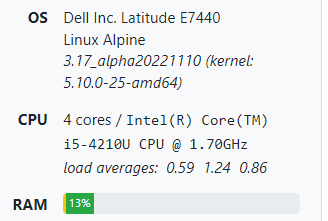
The host is not huge:
image

I used the output from Channels for convenience. It's correct about the CPU type at least.

1 Like

I'd still like to get to the bottom of what's going on here, but realistically you're not going to be able to do much with cc4c on that platform.

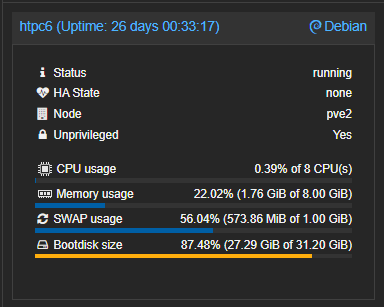
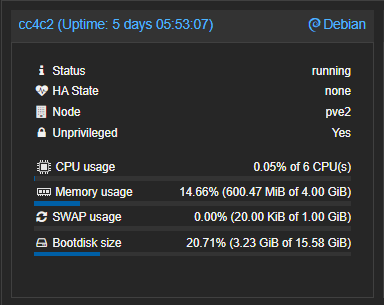
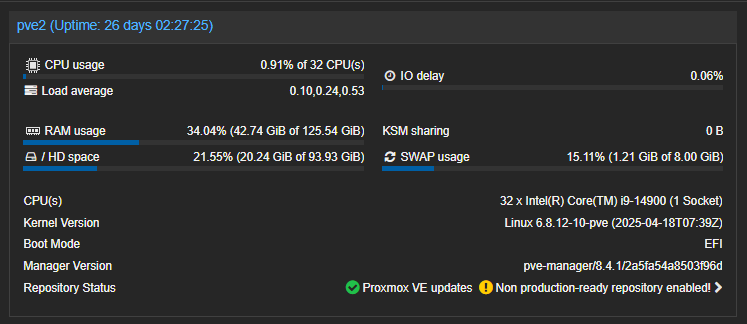
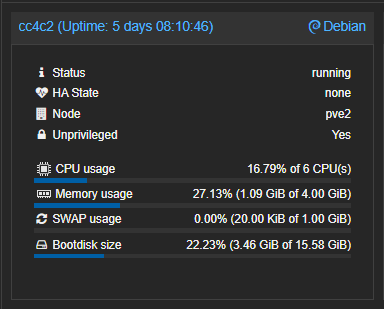
I run cc4c in a couple of Proxmox LXC containers, one running Docker (htpc6) and the other a direct install of cc4c (cc4c2) in a Debian LXC:

screenshot-pve2-localdomain-8006-2025-09-10-14-37-05

screenshot-pve2-localdomain-8006-2025-09-10-14-37-26

The hypervisor (Proxmox) is running bare metal on:

I have heard of a person or two having success with 8th or 9th gen CPUs, by reducing resolution and framerate -- but I don't know of anyone running it on a 4th gen setup.

Right now, I'm not looking for much. This weather channel display and maybe a home info page is all I'm looking to support at this moment. I'm sure I'll want more later.

6th gen i7 here and I can run it fine. I5 won't work unless they have at least as powerful as the 6700

In Docker?

Haven't fooled with docker yet. Still working on peacock/HBOmax/prime sports integration with my main.js

I havent figured out docker yet and where main.js is involved

What I was talking about was cc4c performance when used in a Docker container, which is a different equation then when installing directly.

Looks like you're barely taxing those CPUs given the stats shown.

I wasn't streaming anything at the time. If I was watching/recording multiple channels through cc4c it'd be a little different. I'm not saying you need my setup to be successful with containerized cc4c, but a 10-12 year old i5 platform is a big stretch -- especially running in Docker.

Here's what the dedicated cc4c LXC looks like with one channel streaming:

screenshot-pve2-localdomain-8006-2025-09-10-16-55-05

Well, I need a new desktop (mine won't run Win 11) and a new NAS (obsolete OS, age, size. When I got it, 6TB drives were huge). I'll probably have to limp by with this folding docker server for a bit longer.

UPDATE:
I started TOP up on the host and watched Chrome grab 100% of two cores and some of another to run Weatherscan. I couldn't run two copies. Hm... I need to go make that setting now.

Hm, my desktop is an i5-750 (first gen) and has 4 actual cores (instead of 2 cores, 2 threads) and might be better than this 4th gen. Maybe I put it in as my Media Server/Docker Host for a little while. :slight_smile:

1 Like

that cpu will not be able to handle much of anything besides maybe weather. nbc definitely not.

How do I get this working with my GPU? Running in docker with the same hardware acceleration config I use for all my containers (map /dev/dri and add to the right group) and it's not even touching my card while the CPU is fully revved up. Hoping this can help keep a stable frame rate at 1080p/60. Using this to watch TNF on Prime's Twitch channel for reference

If you add Weatherscan as a channel, I think you'll find the GPU is available and can be used. Unfortunately, the Linux version of Chrome seems to be somewhat limited in its implementation -- as far as utilizing hardware acceleration.

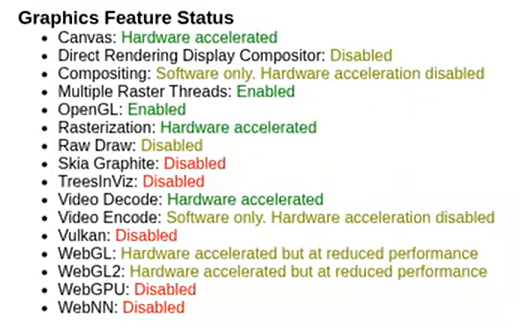
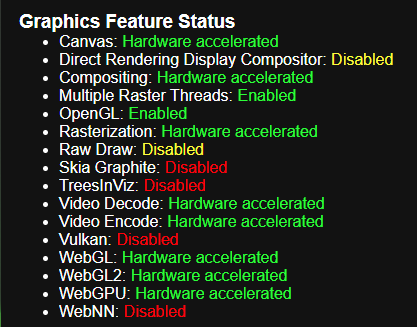
You can also setup chrome://gpu as a channel to verify which Chrome graphics features have hardware acceleration available. It's a noticeably reduced list compared to what you'll see with Chrome installed in Windows or MacOS.

I have a couple of containerized versions of cc4c, one in Docker and the other in a Proxmox LXC. Both work well for me with the streaming sites I use, which include Sling and YTTV. One of the systems is a 10th gen i7 running Proxmox, and the other is a 14th gen i9, also running Proxmox.

I've played around with trying to get the GPU working with more that Weatherscan, with little success. As best I can tell, we're limited by Linux Chrome. Feel free to have at it though, as maybe someone looking at it fresh will have some new ideas. :slight_smile:

Just to give you an idea what I'm talking about, here's chrome://gpu from cc4c running in an LXC (white background), and from my Windows system (black background):

Screenshot 2025-09-18 193744

Screenshot 2025-09-18 193946

Here's intel_gpu_top running on the hypervisor, when streaming Weatherscan in the cc4c LXC -- so it's clearly working when it can:

intel-gpu-top: Intel Raptorlake_s (Gen12) @ /dev/dri/card1 -  111/ 694 MHz;   0% RC6;  0.27/110.62 W;      288 irqs/s

         ENGINES     BUSY                                                                                                                 MI_SEMA MI_WAIT
       Render/3D   12.78% |██████████████                                                                                               |      0%      0%
         Blitter    0.00% |                                                                                                             |      0%      0%
           Video    0.00% |                                                                                                             |      0%      0%
    VideoEnhance    0.00% |                                                                                                             |      0%      0%

   PID              NAME            Render/3D                        Blitter                          Video                        VideoEnhance           
3135774            chrome |████▏                         ||                              ||                              ||                              |
945892             chrome |                               ||                              ||                              ||                              |

Do you have a guide for best chrome settings?

1 Like

Well thanks, sorry if it was too long, you forgot to put there the part about me offering rewards for the help, but like I said: thank you!