Cleaning up the install directory?

Hi,

I noticed my nightly backups are over 2GB so had a look at the install directory to find dated directories? Is there an automatic way of pruning this or can I safely delete all but the last one? I cannot find any info on backups, or are they indeed backups?

You're placing the Channels DVR executables directory and your recording directory in the same place.
Have to assume you're running Channels DVR in a docker container and mis-managed your volume mappings.
The largest directories are the Channels DVR executables and are automatically trimmed when you update to a new version.

Hi!,

Thank you for the reply and apologies for the late response but I did not notice anyone had responded.

I am running a docker (unraid) you are correct, but my only mappings are for the install directory and recordings folder? so not much I can mess up here?

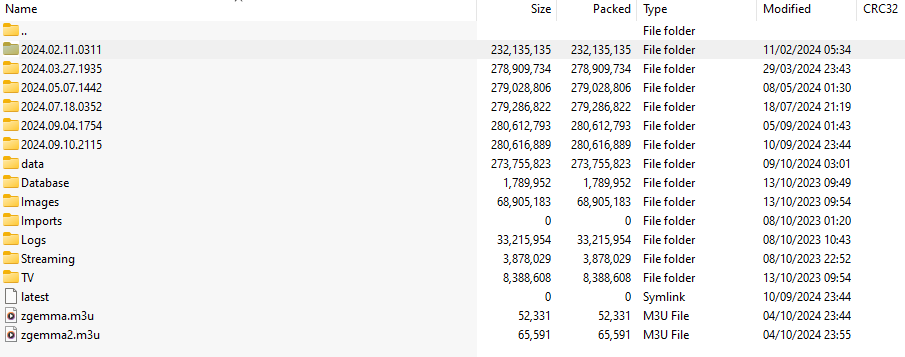
I have one location for the install, and another for the recordings? The screenshot in my first post is of the appdata directory.

I have removed the TV Directory (8MB) but the build up of data is in the 2024.* directories.

any idea what is wrong and what I can delete please?

You didn't originally say which directory that is you posted a screenshot of in your first post.

It contains the executable/log folders 2024.* and data and the symlink latest which you show should be in /mnt/cache/appdata/channels-dvr

It also contains your DVR recording folders Database, Images, Imports, Logs, Streaming and TV which you show should be in /mnt/cachetwo/ChannelsDVR/Recordings

The only thing I can think of is maybe at one point you chose /channels-dvr as your DVR folder in the web UI, instead of /shares/DVR

Leave the 2024.* directories alone. They are older versions of the executables and Channels will delete the oldest one when you update it to a new version. It will always keep the 6 most recent.

This topic was automatically closed 30 days after the last reply. New replies are no longer allowed.
