Cleanup Script for cache & DB Backups

I couldn't really find anything in the gui to address this but it seems like Channels does a poor job of maintaining it's own file system. For example my Database directory had grown to over 10GB with daily backups.

I had Claude write me a pretty basic script that I'm now running as a cron job that deletes files or directories in the following paths (your paths might vary)

Remove any .jpg files from this directory that are more than 7 days old.
/mnt/plex-media/Media/Videos/ChannelsDVR/Images

Remove any files or directories from the following paths that are more than 7 days old.
/mnt/plex-media/Media/Videos/ChannelsDVR/Images/cache
/mnt/plex-media/Media/Videos/ChannelsDVR/Images/tmsimg
/mnt/plex-media/Media/Videos/ChannelsDVR/Logs/recording
/mnt/plex-media/Media/Videos/ChannelsDVR/Logs/comskip
/mnt/plex-media/Media/Videos/ChannelsDVR/Metadata
/mnt/plex-media/Media/Videos/ChannelsDVR/Streaming/cache
/mnt/plex-media/Media/Videos/ChannelsDVR/Database

I've had this running for a couple of weeks now with no observable issues. Am I missing something here? Is there a better way to do this or an option that I could have turned on to manage this in current code?
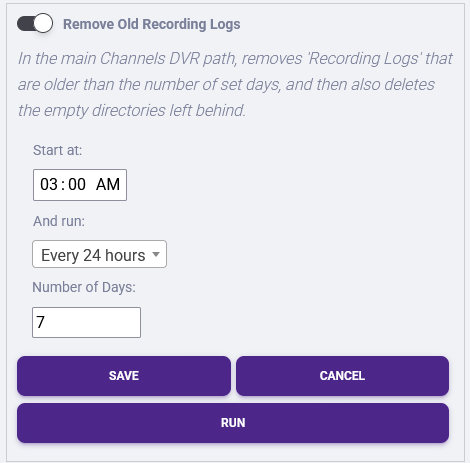
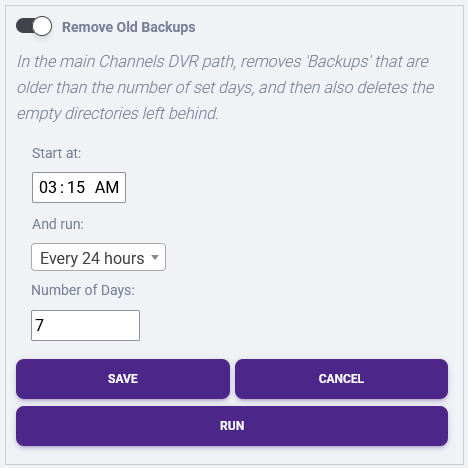
Not in Channels directly, no, but in Media Tools Manager for Channels (a Streaming Library Manager extension), there are already automation routines you could run to do cleanups, like so:

image

image

Your routine is actually removing too much. For instance, those images are just going to get rebuilt because they are the things seen on the clients when looking at a recording. I won't get into the rest because they are discussed elsewhere on the board, but suffice to say, you could be causing other issues, even if you haven't run across it yet.

1 Like

Well I don't keep recordings in Channels to begin with I actually migrate those files to plex.
I might have a bit of a niche use case since my primary usage of Channels is for the virtual channels feature. I was using ErsatzTV originally but Plex has an issue with combining a real program guide from a service and an XML program guide from something virtual. Which is why I use channels.

Good to know that there is a 3rd party tool for doing some of this but IMO you shouldn't need a 3rd party tool to manage how many DB backups are retained or log rotation.

Reminder that caches speed up software, thats why they exist. They do not exist to take up storage.

Removing caches will in fact make your system slower, and they will all just reappear after you remove them, but at the expense of your experience and your resources. That's how caches work.

Our caches self purge, they don't just keep taking up space forever. Backups are retained for the last 30 days. Channels DVR Server does in fact manage its caches and backups.

And just to make it clear, your solution is not recommended, and we don't recommend anyone doing this either.

Another reminder that AI tools know nothing about this, and will do whatever you ask them to do. They do not care if it's right/wrong/or against your interest.

Wield them in the right way.

2 Likes

Is this documented anywhere because I did look in the support documentation prior to even building a script. I had over 100 something backup files going back to January when I turned up this service so if they were purging that job is not working. I could find nothing in settings to control how many copies were kept.

Backups are kept for 30 days. If you have more than that, something is definitely up — my best guess would be something permissions related, but if you submitted diagnostics that would be the first step in trying to figure it out (though we'd likely need you to run some commands on the computer to know more).

Okay I modified my script only to clean up backups older than 7 days. Not sure why they weren't auto deleting but I don't need 30 days for this either. It would be great if this was configurable and documented.

The cache for me is irrelevant. The primary use case for me is a virtual channel for my wife. She flips it on and goes. Not searching the guide or looking at the screencaps so having a cache of images for each episode in the library is a waste.

I've started exploring Tunarr to see if it might be a better fit for my use case. I do thank you both for the replies regardless.

It's not configurable because the amount of disk space that is being used is the same as around 1-2 hours of content recorded off of an OTA antenna — it's just not that much data and it provides protection for users if there was a database or disk corruption that was not noticed immediately.

The cache may be something that you think is irrelevant, but they are things the system needs and will regenerate automatically when it is needed, so you're quite likely going to be doing the same processing over and over again every day after you clean too much up.

One of the nice things about Virtual Channels is that it has very minimal load on the DVR server itself. When watching at home there is no transcoding of the source material and it is all shown at the highest quality of the source material.

Additionally, you're tainting this community with irrelevant opinions that make it look like you shoudl be clearing the cache. For those that are actually using the software, if they follow your lead, in terms of this thread you started, they will be actively harming their experience.

There's no reason for you to have started this thread for something that is so completely niche to your use case.

I'm closing this thread and imploring anyone that finds it to not follow in these footsteps, or you will actively harm your experience.

Let software do it's job.

1 Like