Commercial Detection Doesn't work

On pretty much all my recordings the commercial detection doesn't work anymore. Looking in the logs I see the following. Can anyone tell me what it means?

2026/04/20 21:05:00.158168 [DVR] Processing file-515: TV/FBI/FBI S08E18 Behavior 2026-04-20-1955.mpg
2026/04/20 21:05:00.576970 [DVR] Running commercial detection on file 515 (TV/FBI/FBI S08E18 Behavior 2026-04-20-1955.mpg)
2026/04/20 21:05:41.916987 [DVR] Commercial detection failed for FBI S08E18 Behavior 2026-04-20-1955.mpg: exit status 11: Comskip 0.82.011, made using ffmpeg
Donator build
1 Like

It works fine for me with Channels DVR running on Windows. Your error log shows a failure. The developers will need more into: Platform and source. I suggest you send diagnostics to them and add the submission number to this post.

See this thread:

1 Like

Read that thread. Went ahead and updated to the latest release to see if that works.

I'm on MAC M4, Source is HDHomerun.

The developers would need you to submit diagnostic logs from the DVR server if it happens again.

You can also look in the comskip log for the recording it failed on and there maybe a telltale error in the last few lines (or at least you'll see what it was doing when it crashed).

After I updated to the latest version 2026.04.21.2023 the commercial detection started working again. But now every recording is showing interrupted and there will be gaps and jumps on playback.

Fired up the old Windows 10 computer. Enabled the Channels server on it with the same update. The recordings on that do not show interrupted and no gaps or jumps.

All my Apple stuff is on the latest Apple Firmware. Everything is ethernet wired, not WIFI. So there is something Apple related I would think.

Good idea, as suggested previously, to submit diagnostic logs to help to troubleshoot. I'm running the latest stable release of channels (2026.03.02.0200) on macOS Tahoe 26.3 on an M2 Mac mini...all is well.

I sent the diagnostic logs. My Mac is an M4 on 26.3.1. Channels version 2026.04.21.2033.

Recording interrupted is a symptom of a network issue. This could be between your home and the source on the internet or on your local network. As the problem followed your Apple that's where you should start. Replace the jumper cable between your switch and the Apple. If that does not work, swap ports for the apple with a known working port. It's also possible there is a load issue on the Apple or your network. If you have multiple switches, swap jumpers and ports for the switches uplinks.

Good luck

Network issue was my first guess. Swapped out cables, etc. No change. Even tried my MAC on WIFI but didn't see any change there either. What's funny is the Windows computer seems to be fine no matter where it's connected. I've had it both in the basement where my HDHomerun is and in my Study where the main router is. Biggest problem with the Windows computer is it is old and having some shutdown isssues from time to time. Not worth trying to figure that one out, thus the reason for wanting to stick with the MAC.

JimW - just a thought: is WiFi also enabled/connected on your Mac mini? Like yours, mine is hardwired to the network but one day I found WiFi had also been turned on and connected and I was getting some other "odd" network-related behavior. That may not be the case with your setup but sharing just in case. Hopefully you get it figured out soon - and please share the details when you do!

Wi-Fi is definitely off.

Just wondering if there is some setting on the Mac that might be causing my issues?

It could be an Internet issue that went away. Follow old school troubleshooting and try the Mac again. If the problem returns with the Mac it is probably the Mac. Try a different NIC on the Mac. USB Ethernet should be fine.

I haven't stopped the server on the MAC. Been running both the Windows and the MAC for comparison. All the recordings from the MAC are bad whereas the Windows have all been good. This is the same recordings on both. Just been a couple days so not a whole lot of data yet but so far....

That confirms it's the Mac. Try using a different NIC. If you don't have one, try WiFi. If this is a very old Mac, you may be hitting some old network issues that have been addressed years ago in newer Macs.

It's a M4 MAC Mini less than a year old. Latest firmware.

Gonna try one thing. I have an external drive that I was using for recording storage. Gonna try the internal drive to make sure that isn't an issue. The external drive is also fairly new, but who knows. Got some recordings scheduled for this evening.

What is the source for the interrupted recordings?
Is it the exact same source that works on Windows?

i.e. IPTV, TVE, Custom M3U, HDHR Tuner, etc.

HDHomeRun. Flex 4K if I remember correctly. Same source for both.

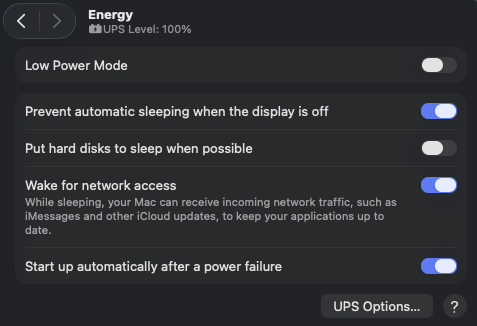
Do you have your M4 Mac Mini set to never sleep
image

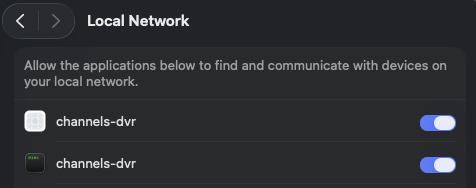
Privacy & Security > Local Network
Does channels-dvr have access?
image

No I didn't. It is now.

Yes it does.

I do have it set to auto start without a login on power failure.