Is there documentation anywhere as to what I'm looking at? For example: for each time period, I see 3 images. What do these represent? Maybe beginning, middle, end of the time period, or something else. When you click the check box, the background for that time period turns green. I assume that means you have decided this is "show" and not "commercial". How do I add a commercial that wasn't detected?
I've looked at this several times in the past, but decided that I didn't know enough about what is displayed to make intelligent decisions about how to edit the commercials. I'd really love to see a guide to use this feature.
I don't know the exact answer, but that's been my assumption.
Yes.
More complicated answer here. Very occasionally, there's been a block identified as show or commercial where the thumbnails suggest it's all show. Two options when this happens (more often than not for me on "interrupted" recordings), if it matters enough, you can pull the recording into LosslessCut using the EDL file and fix that goofed-up block.
LosslessCut creates an LLC file that can be used to update CDVR commercials metadata using an OliveTin-for-Channels Action. I've only ever needed to do this a few times myself, but I created the OliveTin Action to update CDVR anyway.
The second option of course, is to skip over that "embedded" commercial manually, and call-it-a-day. This is the faster option.
Here's a link about the LosslessCut option, but keep in mind, this (at least for me) is very rarely needed:
Really feeling stupid here. I have very little knowledge about how all the files are interrelated, where they live, or what tools are used to manipulate them (LosslessCut, LLC, EDL, etc.), but I'm willing to learn. Any pointers to documentation would be greatly appreciated.
Thanks @Rice . I finally figured out how to do this.
But I have a question to the devs though. On the Jimmy Kimmel show, VERY consistently, it does not mark the third commercials block, which lasts for about 11 minutes, and in the middle it also includes the commercial for the next night's Jimmy Kimmel show. Is there a reason for this consistent behavior, and can anything be done about it (other than me fixing it manually every day)? Thanks!
Yes: the commercial marking program likely sees all of that content as part of the program. It is likely because the audio is fairly consistent with the actual programming, and there likely are other visuals on screen that are inhibiting the detection, such as a ticker/chyron/frame.
No, not really. You can try modifying the comskip.ini file that Channels uses to tweak the detection settings, but there will be trade-offs; if you improve the detection for this one program, it will likely worsen the detection for others.
Also, remember that commercial detection is handled by a separate program and not Channels. The Channels developers may contribute some code when it suits their needs, but they did not write the bulk of the program.
Ah, I didn't know it was 3rd party. Where is the comskip.ini file? I looked in the ChannelsDVR\latest folder on Windows (where comskip.exe resides), but I don't find an ini file there.
The commercial segments in question are detected, but marked green. When I look at the actual commercials, there is no chyron, or logo or anything that is visible. They are just normal garden variety commercials, which is why I am a bit at a loss as to why these particular ones are marked green.
The INI file used is saved along with each file's log entries in the Logs directory. Your override INI file can be placed in the root data directory. Or, you can Channels' API to PUT /comskip/ini/key/value where key is the entry you wish to modify, and value is the new setting.
(A search of the forum for comskip.ini will give you lots of information, as this is a topic that has been discussed far beyond the horse's death.)
Does anyone know where the comskip.ini file is on Windows? It's not in the "latest" executable directory, nor is it in the "data" directory where the logs are stored.
Thanks. I totally take your point about "waste of time", but it still bugs me that I can't find that darned ini file. Also, just technically curious, if you can indulge me!
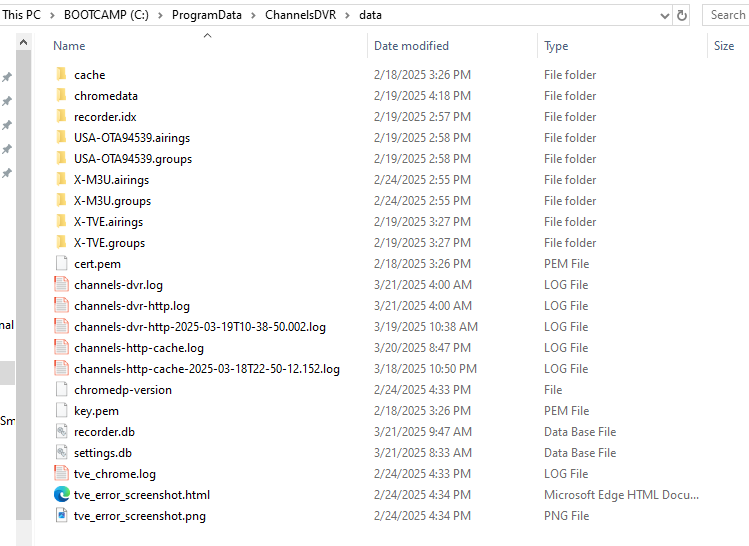
The path you provided seems to be a MacOS/Unix type path. On windows I don't see any "logs" directory at all. The logs that I find are in the ChannelsDVR\data folder, which looks like the screengrab below (and has a bunch of log files). Is there a different "logs" folder somewhere else in Windows? I tried searching for it, but can't seem to find anything. Thoughts?
Ah! Found it (them?). There is a comskip.ini file in each XX folder of which there are many per day! Are they all copied from some master file, or if I make change to the last one, it will get copied over to the next one?
The default max_commercialbreak in comskip.inI is 660 seconds (10 min). The long break in Jimmy Kimmel (and Cobert and Fallon) is 11 minutes, so change to: max_commercialbreak=720 in comskip.inI
Thanks @tonyt57 . There was no entry for max_commercialbreak in comskip.ini, only min_commercialbreak. I added a line to set it to 720 for the latest edition of comskip.ini (as I said before, there are multiple versions in the log folder). Let's see what that does!
There are many settings in comskip that have default values if not set in comskip.ini. If you were to be able to see the log file when comskip runs you would see all the settings comskip used. If not in the ini file, max_commercialbreak=600
See the previous post by @ChDVRuser regarding how Channels handles the ini file