
I am starting to user my DVR more and my wife absolutely hates commercials.
what are the best settings to use? How many threads/cores should I use?
thank you in advance
Each thread takes a CPU core.
DS220+ has a dual-core Intel Celeron J4025 cpu.
So a setting of 1 thread will result in 50% cpu usage and a setting of 2 threads would be 100%.
You would have to use an override comskip.ini or the comskip api to set 2 threads I think.
ok...I will test it and see how it works...
is there a way to record more than two things at the same time?
You can record as many things as your sources and bandwidth allows, but normal comskip is done one recording at a time after they finish.
You can select recordings you already have and have it rerun comskip on them and it will queue up the comskip job runs.
so if it records and I don't watch it for a week will comskip automatically go back and run or do I have to run it manually? how long does it take to run?
Not sure I understand the question, If you have comskip enabled it will run after the recording is completed. You can manually run comskip on any recording or import in your library.
As long as it takes. Could be a minute or an hour. Try it with an existing recording from your library (pick a short one if you have it). Or start a recording manually and cancel it after a few minutes to get a short recording to test with. MPEG2 recordings are processed faster than H.264 recordings. The more threads you throw at it (within limits) the faster it runs. In your case you probably need to use 1 thread.
If you search the forum there were threads from a couple years ago where users were asking the same thing. How many threads to use, how long does it take. The best answer is try it with your setup to find out.
1 Like
thank you for the info
I have found that it takes about 1/3 the real full time to do comskip commercial detections on my Synology 220+ for TVE sources. So a half hour sitcom chugs away for a little less than 10 minutes. The 3 hours of On Patrol on Reelz take just over an hour.
1 Like
awesome...but does it do it on its own or do I have to tell it to do it?
2 Likes
It happens automatically after every recording, as long as you didn't go in and turn off that feature.
ok...it seems like the synology 220+ is an older version...what version would perform better?

I am not an expert, but I believe the general consensus is that the 220+ is currently the best Synology 2 bay system. Just considering only Synology systems, the DS920+ is probably the next logical step up being a 4 core (Intel Celeron J4125). It is a 4 bay (expandable) and has 2x built-in M.2 2280 NVMe SSD slots.
1 Like
I've been running ChannelsDVR (plus other services) on a DS220+ since January - it's a capable little NAS. It also does pretty well with comskip: for example, last night I recorded Monday Night Football OTA (plus I recorded a 30-minute OTA show and a 60-minute TVE show that started at the same time as MNF) . Comskip completed in about 3 minutes for the 30-minute OTA show (while two other recordings were in-progress), 10 minutes for the 60-minute TVE show (while one other recording was in progress), and just under 18 minutes for the 3 and 1/2 hour MNF recording.
wow that is awesome...
1 Like
This is what I have for my 220+. Doesn't tax my system like live detection did. Thread count can't be changed. Commercial detection accuracy is about 75%.
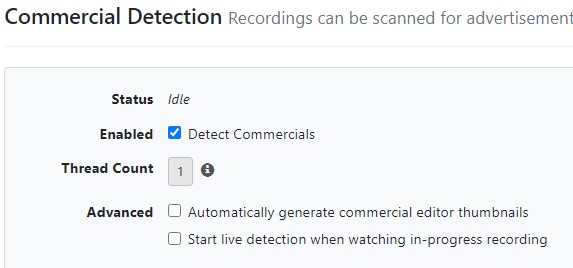
1 Like
Love me some On Patrol Live!
This topic was automatically closed 365 days after the last reply. New replies are no longer allowed.