Deep video processing has to read the entire video file in order to prep for the advanced features we are currently working on and delivering like Intro & Credits detection and Enhanced Commercial Detection. This can be a very I/O intensive process depending on where the video file is located (network share vs local disk) and the speed of the disk itself.
Additionally, it looks like you are routinely recording 4-5 things at a time, which is much more heavy on I/O resources than anything that the deep video processing is doing. So it seems that your system is already under a heavy I/O load from recording multiple things at once, and adding deep video processing isn't helping its situation.
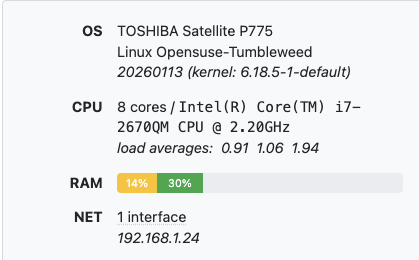
You're doing all of this on a 15 year old laptop that is actually 50% slower than Intel n100 based mini PCs that cost around $129. So we wouldn't exactly call this a "lower resourced" computer, this is a very very old and slow computer.
So, if the issue is that the computer is becoming non-responsive, then sure, turn off Deep Video Processing. If it's just that it's using more resources than used to, but working fine, then that's not a bad thing. Computers are supposed to use resources to get work done.
But your spec isn't something we would consider average or need to optimize for, even in terms of communicating how Channels DVR Server performs on lower resourced computers.