
So it does allow dvr or not? When you say in channels dvr it has to load the other app right what's the load time? I assume at least 5 seconds? From what I understand it opens the app. If you hit back button does it go back to channels or do you have to hit home and find your way back
It allows recording in channels dvr IF you connect it to ADBTuner and an encoder with firesticks/onn devices OR if you run it through prismcast. It does not allow recording if you use the stream links natively. when using the stream links natively it opens the corresponding app on your device and does not stay within channels dvr. Depending on the device the back button will either work or not.
Prismcast uses chrome capture. I don't really use that either, but if it works it does record. And yes, the espn feeds are from the fruitdeeplinks source, so they do not stay as a "linear channel" but as singular programs with their own playlist per program.
1 Like
I also got in installed in prismcast, I got the links to work, but it only plays for about 20 seconds and then stops.
The links you got installed in prismcast are like fruitlinks 1 through 50, and they are pretty much dead links, unless there's actually something playing. You need to also install a new source in channelsdvr custom channels using the provided xml for the guide.
I'm just lost how fruitdeeplinks works I need some video guides the nerd gatekeeping he is sad
Ok, I'm going to put my little guide of how I got it to work in prismcast running on a windows docker system.
After you go through the FruitDeepLinks settings and input all of your streaming services, under your dashboard it would have provided you with a bunch of links.
In Prismcast you import the (multisource_lanes_prismcast.m3u). This will create 50 channels in Prismcast. This is how it looks like:
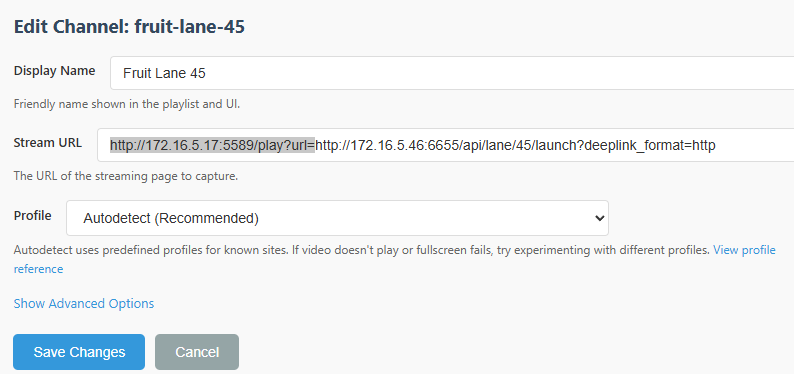
In my case after trial and error I had to remove the highlighted part for each of the channels for it to work properly.
Then, in ChannelsDVR you go settings, sources and add a new source.
In the source section you use TEXT and that same m3u you used to import to PrismCast you paste as text in the text box.
Mine was something like this.
#EXTM3U
#EXTINF:-1 channel-id="fruit-lane-1" tvg-name="Fruit Lane 1" tvc-guide-stationid="lane.1",Fruit Lane 1
http://172.16.5.17:5589/hls/fruit-lane-1/stream.m3u8
Then for the Guide, you put in the XML from the FruitDeepLinks
multisource_lanes.xml
Channels will pull the guide data and open up the appropriate channels only when they are available.
That's how I got it to work for me. Hope my crappy explanation makes sense to someone 
The original post of this thread basically explains how this works. The deeplinks themselves are just whatever is hit to open the specific event that the Apple Sports tab sends you to. That's it. The links aren't the complicated part - it's the managing of multiple apps/sports/etc that is.
Nobody is "gatekeeping" - you might get better traction if you don't post 1-line searchable questions on every thread around encoding.
So you can record with this without a linkpi?
It's actually a bit easier than that. There's nothing to do in PrismCast other than login to the providers you're using in FDL, via the PrismCast controlled Chrome.
Otherwise, all you need to do is create a CDVR Custom Channels source that looks like this:
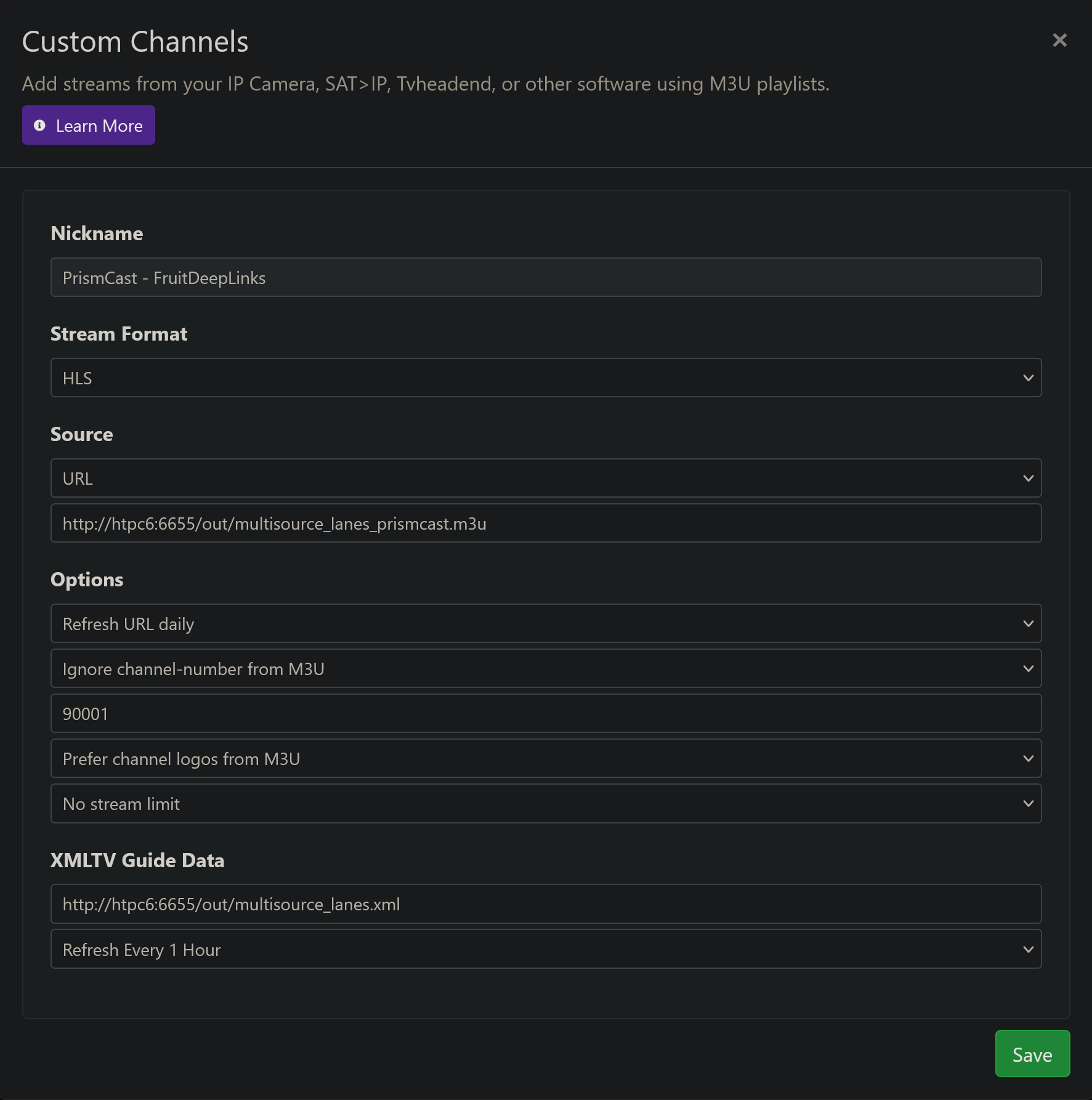
Where the Source URL is a copied link from FruitDeepLinks (multisource_lanes_prismcast.m3u), and the XMLTV Guide Data is also a copied link from FDL (multisource_lanes.xml).
That's it.
2 Likes
This topic was automatically closed 30 days after the last reply. New replies are no longer allowed.