
Just prompts to download a file
Ohh I figured out a way to find the cloudfront links. I used VideoDownloadHelper in FF to find the details.
TVNZ1:
https://dz1g25geip0uq
TVNZ2:
https://d5qh9kd2mz71z
Duke:
https://d32ubfwfcm754e
@matthuisman do these cloudfront links update often? If load them into Channels will I have to constantly update them?
Ahh, yes. Unless you use a browser (like Brave) that tells you where the file is being downloaded from,

you would have to use your browser network inspector to see the location in the response header of the 302 redirect from mjh.nz
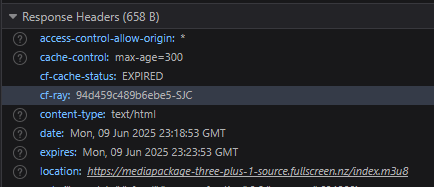
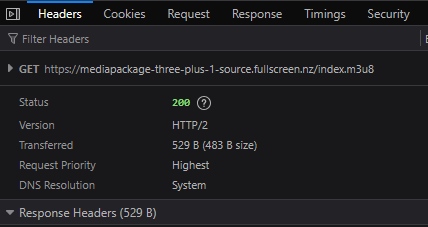
or look at the redirected get
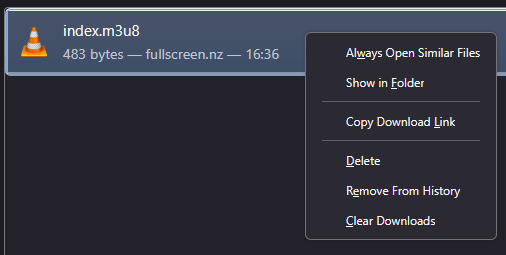
FF will let you copy the Download url for saved downloads
Bing - thats why i use redirects so your links dont get outdated.
I think nz urls dont change that often so might be safe,
But i dont want to be constantly asked when they change.
id rather we work with @tmm1 to figure out why the redirects are not working.
I still suspect referer header is being added?
1 Like
Somebody should make a docker out of it.
Have you tried the latest dvr pre-release?
Sounds like it might be related to your issue, just saying
No I hadn't but I just installed the latest pre-release 2025.06.10.1557, re-started, held my breath and.... sadly let it out again. Still the same error 
2025/06/11 11:06:40.153543 [ERR] Failed to start stream for ch2: M3U: Could not fetch playlist from i.mjh.nz: GET: https://i.mjh.nz/.r/tvnz-2.m3u8: 403 Forbidden
2025/06/11 11:06:40.153543 [HLS] Couldn't generate stream playlist for ch2-dANY-ip127.0.0.1: M3U: Could not fetch playlist from i.mjh.nz: GET: https://i.mjh.nz/.r/tvnz-2.m3u8: 403 Forbidden
2025/06/11 11:06:40.153543 [HLS] Stopping transcoder session ch2-dANY-ip127.0.0.1 (out=0s finished=false first_seq=0 last_seq=-1)
1 Like
 well, it sounded good
1 Like
@tmm1 installed it, restarted, still same issue sadly.
Not sure if the redirect headers are right? But I'm not very technical
referrer header was just my guess @tmm1
Anyway to debug what headers are being sent?
If I can get the headers its sending to the redirected url, I can figure out which one is causing issues 
1 Like
Hmm would have to use something like Proxyman to see what's happening. The links don't work for me, but maybe I can see what the headers are.
@tmm1 is THIS proxyman log of any help? I downloaded Proxyman, watched Channel 3 (which worked) then tried TVNZ 2 which is one of the channels that has the issue.
This pre-release fixed it! Working like a charm now.
@tmm1 and @matthuisman thanks for your help with this matter.
oh wow! neat!!
Ive been meaning to get back to this to try debug myself!
@tmm1 may I ask what was the fix? Was it referrer being sent?
@slampman interested to hear if this also fixed your issue with Three, Duke and Eden
@matthuisman Duke started working a couple of weeks ago. I just tried three and Eden and still getting 503 errors. I can watch via browser directly from the source jus not through channels
@slampman
You sure you on v2025.06.11.0058 ?
There were multiple attempts at fixing I believe
Maybe your issue is different.
Threes direct url is: https://fv23-three.fullscreen.nz/index.m3u8
If you put that into channels - you say it works?
Are you physically in NZ?
If your using a vpn or smart dns then i suspect it isnt working correctly for channels?
This topic was automatically closed 30 days after the last reply. New replies are no longer allowed.