Create Pass for shows not in the Guide

Is there any way to create a pass for a show or team pass for something not in the guide. For example, I just moved to Channels DVR from Xfinity and then Spectrum cable, and had Better Call Saul scheduled to record on those, but I can't create a pass in Channels because there isn't an upcoming episode in the guide. I think I can create a pass using the show name, but I'd rather Channels used the SeriesID that it uses for passes created in the guide. Same goes for team passes. I want to schedule Cleveland Browns games, but since none are scheduled for the next few weeks in my area, search doesn't give me that option. I want to program it for everything I had previously scheduled and not have to look through the guide every week to make sure I don't miss something.

It'd be nice if there was a way to search for the SeriesID or TeamID that Channels uses.
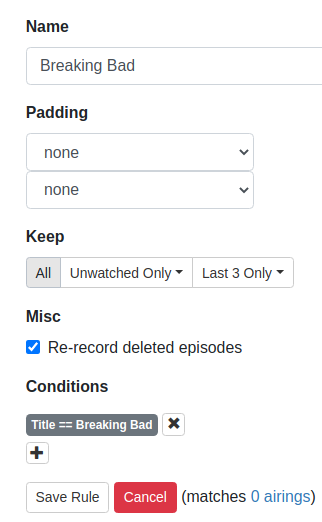
I do it by going to DVR|Passes|Gear Icon, and selecting 'New Advanced Pass'. Then I name it whatever (usually the series name), and then add Title =={title of show}, and tags == New

Seems to work, since shows that weren't in the guide are now scheduled to record. You can change it to series ID later if you wish.

I had a need to create a Pass for Breaking Bad about a month ago.
See my Screenshot:

Thanks. I'll give that a try.

Got it. However it shows that they are Team Passes instead of Series passes. Hope it doesn't make a difference.

Where does it show that?

1 Like

Here's Advanced:

I was not able to reproduce "Team Pass"

Was that created from Title == or is it saved as a series from Search with SearchID ==?

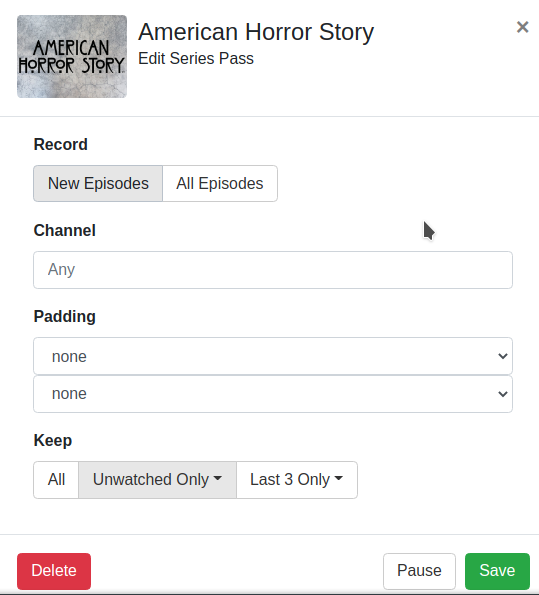
I searched for "American Horror Story" Then created a new Pass from "New Series Pass"

1 Like

Thats why it shows as series pass. Create a new advanced pass just by using Title == show name and it will think it's a Team Pass

OK. I was able to reproduce "Team Pass" doing as you suggested.

1 Like

When you do this, does it place the show icons in the passes like scheduling from the guide?

None of my passes have icons.

I have the same problem. None of the passes have images. Running v 2020.11.29.1807.

Update -- after rebooting the server, icons are back except for Pluto channels.

Some of mine have images (on my iPad iOS Client).
Seems the ones that have a Series ID have it and those without a Series ID don't.
I do have one pass using a Series ID that doesn't display an image.

Oh, I see what you mean now.
In the DVR web UI when you click on the name of a pass.
Yes, some of mine have images there.

Can't figure out what causes images not to appear, some examples.
NO IMAGE........................HAS IMAGE
100 Days Wild-750............100 Days Wild-750
. Channel == 750...............Channel == 750
. Title == 100 Days Wild....SeriesID == 18546974

Building Off the Grid-204...Building Off the Grid-750
. Channel == 204...............Channel == 750
. SeriesID == 10480715....SeriesID == 10480715
. Tags == New

Building Off the Grid-6108
. Channel == 6108
. SeriesID == 10480715
. Tags == New

Cooper's Treasure NEW
. SeriesID == 13895698
. Tags == New

Growing a Greener World-706
. Channel == 706
. SeriesID == 8086544

Growing a Greener World-6004
. Channel == 6004
. SeriesID == 8086544

Nature-706
. Channel == 706
. SeriesID == 185481

Primal Survivor....................00-WL Primal Survivor
. SeriesID == 12398218......Title CONTAINS Primal Survivor

Rick Steves' Europe S01-S04-6004
. Channel == 6004
. SeriesID == 477118
. SeasonNumber < 5

Rick Steves' Europe S06-6004
. Channel == 6004
. SeasonNumber == 6
. SeriesID == 477118