
Hey Y’all - I found a tv station that is publicly streaming…how can I see the associated m3u file path to add to channels as a custom channel? This site has several but I will use the link below as an example. Thanks.
I looked at the link and don't see an m3u file. You might want to contact them and suggest that they create one and the appropriate guide data.
Otherwise you will need to use one of the many capture solutions such as chrome capture.
I don't know what you guys were looking at .. but they are clearly there in network inspector
33.1
https://2-fss-2.streamhoster.com/pl_138/201950-1309230-1/playlist.m3u8
33.3
https://2-fss-2.streamhoster.com/pl_138/201950-1311088-1/playlist.m3u8
33.4
https://2-fss-2.streamhoster.com/pl_138/201950-2724904-1/playlist.m3u8
1 Like
As you have a URL for those m3u's, you can go to sources and add a custom channel for each. You will need to figure out the guide data. Someone else may be able to help with that.
Thank you much!!!!! I don’t have the tools to see that…but I figured it had to be available. Thanks again!
I have tried creating a custom channel using HLS, Mteg and streamlink and all those times it says the m3u link is bad. 
I had no problem with those streams here. Perhaps if you shared exactly the text you are using for your M3U playlist, more guidance could be offered.
(Those URLs provided above are not M3U playlists; they are the URLs to the HLS streams you add to the playlist.)
1 Like
I am a bit confused and I apologize. When I click on the above links, it takes me directly to the stream and I can watch that channel. Usually I just have to copy that type of link and past it into the URL field when creating a custom field, but that isn’t working for some reason.
I understand you're confused, and that what you are doing isn't working. This is the reason why I asked for you to post the actual text you are using for your M3U playlist.
2 Likes
Okay. I am sorry. I just tried it again and snapped a picture. See attached. I really appreciate the help.
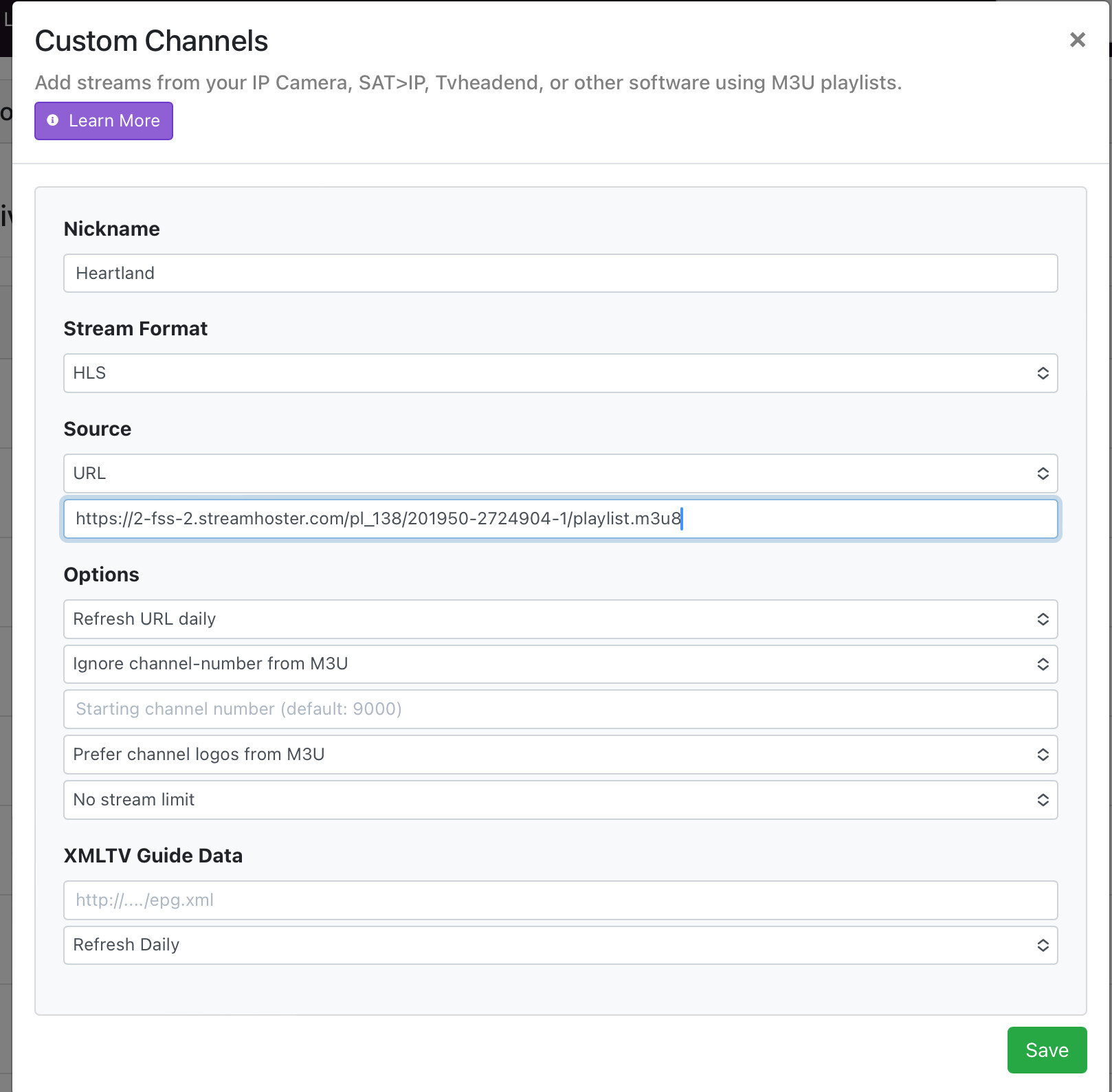
As I stated earlier, the URLs are not M3U playlists. You have to create one listing those. You need to change the Source to Text, and enter something like:
#EXTM3U
#EXTINF:-1 channel-id="kvvb-33.1" channel-number="33.1",KVVB 33.1
https://2-fss-2.streamhoster.com/pl_138/201950-1309230-1/playlist.m3u8
You need to pair #EXTINF lines with the URL it points to immediately after.
You may wish to further consult the Custom Channel documentation for how to properly format and tag your M3U playlist. (And remember, .m3u8 links are for HLS streams, they are not .m3u, which is a different type and what Channels expects.)
1 Like
Oh oh…gotcha okay. I will work on that now..Thanks a bunch.
WOW...It worked..I wanted 2 of the 3 channels and I did it. Thanks to your help!!! This made my day. Thanks again.
Can I ask you another question? This station is 2 hours behind me…Is there a way to account for that in Channels? The guide is appearing as if my time is the local time for this channel..so the guide is 2 hours ahead….I hope this makes sense.
Thank you. I was tinkering with this all night long last night and I don't think I ever got it to work. Is this how it should look in the text?
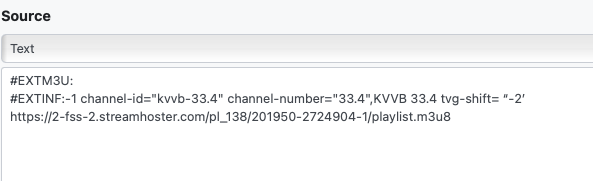
No. All the tags need to come before the name. The format is:
#EXTINF:duration tag1="value1" tag2="value2" […],title
item
For live streams, the duration is always -1. Everything after the comma is considered that entry's title/name. The following line describes where to find the media described above.
1 Like
I have never had a colon : behind
#EXTM3U
Not sure if that's a problem or not
You're right, that's a typo on my part. Thank you.
I see you meant for the OP, not me. Correct, there is no : in the initial line of text.
Thanks for all your help…especially not doing it for me, making me learn. This has been fun…I finally got it working right with the time shift. I have been trying to get that Heartland station for a long time…the signal doesn’t come through very good OTA in my area, so this made my day. Thank you again!