
Fixed update image
Just tested 4 movies and works had to add this headers as tvimate looks for this
Accept-Ranges: bytes and Connection: keep-alive
1 Like
I realize that the categorys are all over the place lol 
Just noticed this while checking the README:
videoBitrate: Video bitrate (default: 3M)
Is it 3mbps of H.264 or H.265?
The definition is also hard coded to 720p. Couldn't it be determined by the incoming stream from the website?
Or maybe you don't have access to that piece of information?
The videoBitrate: 3M refers to H.264. I use FFmpeg to transcode the incoming HLS stream to MPEG-TS for compatibility. The encoding is done with libx264 (H.264). Regarding resolution/bitrate detection:
You're right that ideally we'd detect the incoming stream quality. The challenge is:
- DirecTV Stream - We capture live TV via browser automation. The stream quality varies by channel and is already adaptive (HLS). We transcode to a consistent format.
- VOD providers - These actually DO provide multiple quality options (480p, 720p, 1080p). The API returns quality-specific URLs. Currently we grab the best available (usually
1080p) and proxy it directly without transcoding.
I could use ffprobe to detect resolution/bitrate before transcoding
2 Likes
Thanks for your explanations. 
That would be fantastic if you could do this! 
In my humble opinion, 3M as a default value for H.264 is on the low side. I would feel more comfortable if it was at least 4M.
It's good that you made it an option but I think the default should be higher for a better plug-and-play quality. 
Just my opinion. We'll see what others think.
2 Likes
 cant detect the stream I can make it customizable by adding a gui in the backend witch will let you configure everything for the stream.
It will be great to have a GUI for configuration. 
just tested on mac silicon and it works no issues
docker pull sunnyside1/directvtuner:latest
3. Run with the --platform flag:
docker run -d \
 --name dvr-tuner \
 --platform linux/amd64 \
 -p 5901:5901 \
 -p 6080:6080 \
 -p 7070:7070 \
 -p 9222:9222 \
 --shm-size=2g \
 sunnyside1/directvtuner:latest
The key is --platform linux/amd64 - this
tells Docker to use Rosetta 2 emulation for
the x86_64 image on Apple Silicon.
also tested couple of channels and they look really good might be bc of the gpu on the macs
There seems to be an issue where the url for the stream for movies is expiring early working on a fix stay toon
I managed to get the stack/container working on my Synology DS920+ NAS.
This worked for me:
I had to create the following sub directories to my docker directory using Synology File Station
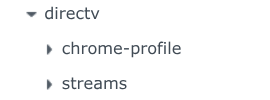
Portainer Stack:
version: '3.8'
services:
  dvr-tuner1:
    image: sunnyside1/directvtuner:latest
    container_name: dvr-tuner1
    ports:
      - "7070:7070"   # IPTV API
      - "6080:6080"   # noVNC web viewer
      - "5900:5900"   # VNC
      - "9222:9222"   # Chrome debugging
    volumes:
      - /volume1/docker/directv/chrome-profile:/data/chrome-profile
      - /volume1/docker/directv/streams:/data/streams
    restart: unless-stopped
3 Likes
Things I'm working on
GUI configuration
Tunner1 as master meaning if you have more then 1 tunner for directv and one is busy then it will send the request over to the 2nd one and so on.
Let me know if there's anything else….
The first m3u before the update would not play for me, however it had all the logos and guide data was perfect with none missing. After the update was pushed I was able to play streams from the m3u but most don't have logos and guide data is spotty. Also I'm still not able to stream vod even after the update. Using VLC as the media player and the docker is installed on Ubuntu 20.04
I'll check
I see that most folks are testing playing channels/movies using VLC. I also see some mentions of TvMate. I'm really unfamiliar with either of those apps, and exclusively use Channels DVR for my live and recorded media.
I am trying to get a Custom Channel Source working in Channels DVR. I have successfully added the source using the following settings:
Source/URL: http://192.168.1.100:7070/tve/directv/playlist.m3u
XML Guide Data: http://192.168.1.100:7070/tve/directv/epg.xml
I'm getting about 750 channels in the source list. There is some strangeness in the list. It seems that there is some duplication of channels. I'll try re-pulling the latest stack and reloading the m3u to see what I find.
So far, I have not managed to get any of the channels to play. I'm just beginning to experiment and will dig deeper tomorrow.
3 Likes
A couple of examples of the duplication in my Channels DVR Custom Source:
When I select hide/unhide, it changes both entries simultaneously...


I'm in the same boat. When I try to access a channel, I get "Connection Lost...503 Service Unavailable". I'm using Docker for Windows on a Windows 11 machine.
looking at this
3 Likes
Due to the limit in Channels of 750 channels, i'm loading the m3u and epg inito Playlist manager. After it loads i will see if we can see what type of stream is being provided.
Playlist manager has native Gracenote support so we can check some obvious stuff and see what is up.
I checked the streams provided in the playlist from the container and they are not working.
Due to the fact that i only have a free directv account, it shows me the 147 available channels. I will keep the lists loaded in Playlist manager and test as things progress.
2 Likes
i see the issue the epg is getting all the channels even non-streamable. Try using this ttp://192.168.1.92:7070/playlist.m3u just for testing