Docker Container Update

The fancybits/channels-dvr:latest Docker image has not been updated in approximately 12 months. A recent vulnerability scan using Trivy reports a total of 36 findings, including five classified as high severity. Is there a newer or recommended image that should be used instead, or could a more current image be published?

HIGH CVE-2025-31498 c-ares 1.34.3-r0
HIGH CVE-2025-26519 musl-utils 1.2.5-r8
HIGH CVE-2025-26519 musl 1.2.5-r8
HIGH CVE-2024-12797 libssl3 3.3.2-r4
HIGH CVE-2024-12797 libcrypto3 3.3.2-r4
MEDIUM CVE-2025-9231 libssl3 3.3.2-r4
MEDIUM CVE-2025-9231 libcrypto3 3.3.2-r4
MEDIUM CVE-2025-9230 libssl3 3.3.2-r4
MEDIUM CVE-2025-9230 libcrypto3 3.3.2-r4
MEDIUM CVE-2025-9086 libcurl 8.11.1-r0
MEDIUM CVE-2025-9086 curl 8.11.1-r0
MEDIUM CVE-2025-62408 c-ares 1.34.3-r0
MEDIUM CVE-2025-5399 libcurl 8.11.1-r0
MEDIUM CVE-2025-5399 curl 8.11.1-r0
MEDIUM CVE-2025-5025 libcurl 8.11.1-r0
MEDIUM CVE-2025-5025 curl 8.11.1-r0
MEDIUM CVE-2025-4947 libcurl 8.11.1-r0
MEDIUM CVE-2025-4947 curl 8.11.1-r0
MEDIUM CVE-2025-10148 libcurl 8.11.1-r0
MEDIUM CVE-2025-10148 curl 8.11.1-r0
MEDIUM CVE-2025-0725 libcurl 8.11.1-r0
MEDIUM CVE-2025-0725 curl 8.11.1-r0
MEDIUM CVE-2025-0665 libcurl 8.11.1-r0
MEDIUM CVE-2025-0665 curl 8.11.1-r0
MEDIUM CVE-2024-58251 ssl_client 1.37.0-r9
MEDIUM CVE-2024-58251 busybox-binsh 1.37.0-r9
MEDIUM CVE-2024-58251 busybox 1.37.0-r9
MEDIUM CVE-2024-13176 libssl3 3.3.2-r4
MEDIUM CVE-2024-13176 libcrypto3 3.3.2-r4
LOW CVE-2025-9232 libssl3 3.3.2-r4
LOW CVE-2025-9232 libcrypto3 3.3.2-r4
LOW CVE-2025-46394 ssl_client 1.37.0-r9
LOW CVE-2025-46394 busybox-binsh 1.37.0-r9
LOW CVE-2025-46394 busybox 1.37.0-r9
LOW CVE-2025-0167 libcurl 8.11.1-r0
LOW CVE-2025-0167 curl 8.11.1-r0

The Docker container is not updated often, as the CDVR server software it contains is updated independently and saved in one of the bound directories.

If you'd like to build your own, it's pretty easy with Portainer, and I outlined the process here to build with Chrome instead of Chromium (amd64 only though). You could do the same with Chromium for arm64:

You can create your own if you like:

The Docker container is not updated often, as the CDVR server software it contains is updated independently and saved in one of the bound directories.

Just to make sure I’m understanding correctly, this wouldn’t include the software packages running within the container, right? While building my own image is certainly an option, I had assumed that the subscription would cover this type of maintenance so it could be handled on the developer’s side rather than by the end user.

Also, thank you for the link to the guide!

It would include the packages running in the container, when it come to CDVR Server. The latest version of which is downloaded when you first spin-up the container, and is then kept updated automatically to the latest stable release (without requiring a container update).

For TVE users, you typically want to update even more often, and that's done via pre-releases (which come out fairly frequently). It works reasonably well this way, and avoids a constant stream of new containers needing to be built and published.

I updated to the 2026.01.04.0550 pre-release and then ran apk list --installed inside the Channels DVR container, but I still see the same outdated packages. I may be misunderstanding your explanation, but my interpretation was that these packages would be updated and kept current as part of the stable or pre-release updates.

When you start talking about keeping the underlying OS up-to-date, that's a different matter. One of the great things about the Docker world is that an application is packaged with a known OS in a known state -- updating the underlying OS takes away that advantage.

If you want to be on the latest OS, with all the latest updates, Docker might not be the way for you to go. If you want both things, then you should probably consider building your own containers, or install CDVR directly on your host OS.

If you want to be on the latest OS, with all the latest updates, Docker might not be the way for you to go.

My concern is not about running the latest operating system or having the newest packages installed. Rather, it is the use of remote access, without Tailscale, while the container is running packages with known vulnerabilities that remain unpatched. Although I understand the image is packaged with a known operating system in a known state, failing to keep the underlying OS packages up to date introduces a legitimate security risk.

It appears that the responsibility for maintaining and updating those packages is left to the end user, which, in my opinion, is unfortunate for a paid subscription service. Thank you for taking the time to respond and for sharing the link on how to build my own container.

The DVR software is standalone and does not use any of the packages listed with CVEs.

We do plan to update the container and will probably switch to a different base image, but it's not a huge priority at the moment.

If they’re not in use, why are they installed? I’ve used Docker for a long time, but I’ve never really looked under the hood of a container, so I’m trying to learn. Are these packages included by default when the image is built?

1 Like

Though Channels isn't open source, they have published the Dockerfiles they use to build their Docker images:

As you'll see in the repo, there are very few packages added beyond what's in the base Alpine image.

@J0E

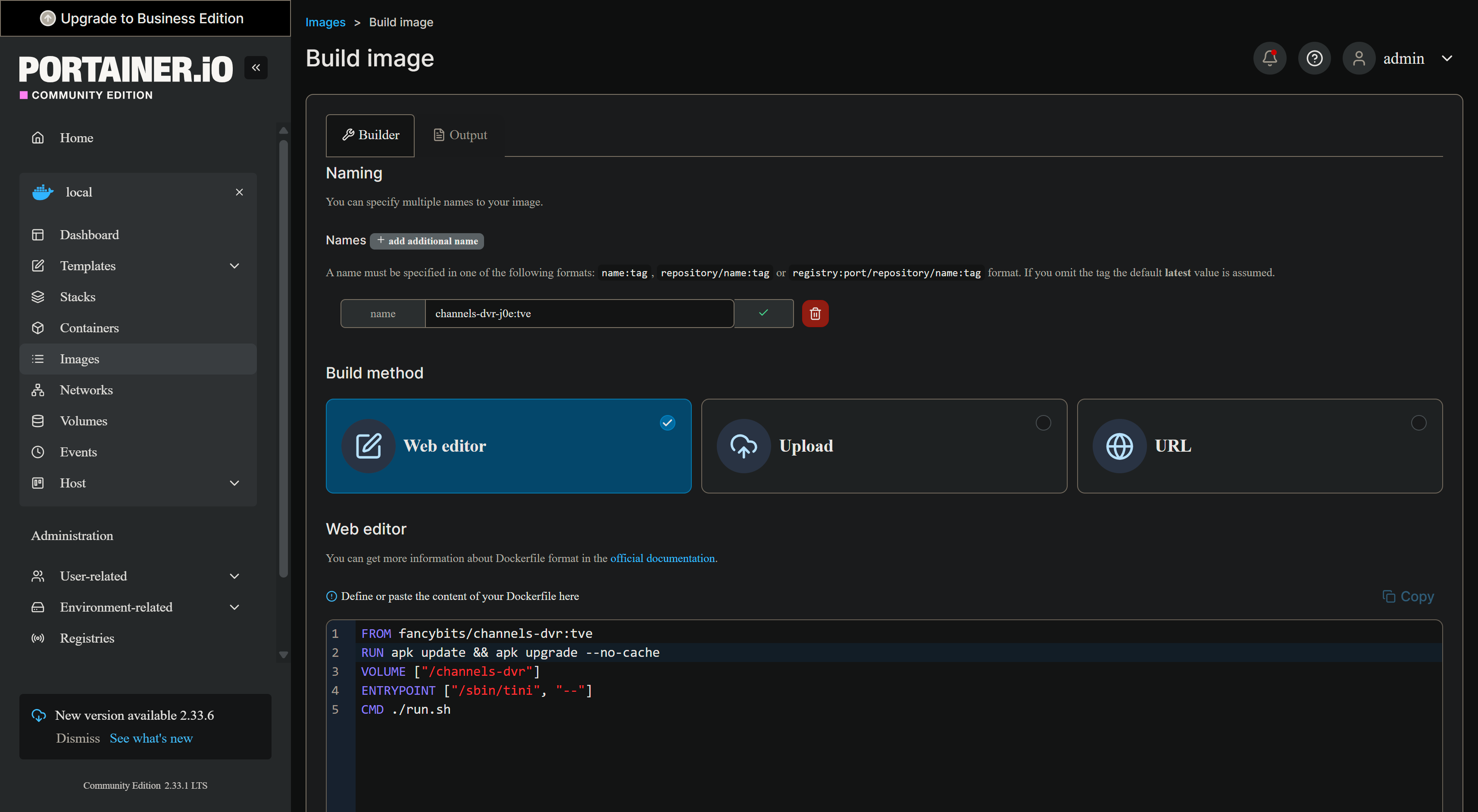
I did a quick little image update Dockerfile for you, that you can use in Portainer to create an updated image. This particular example takes the current channels-dvr:tve image and updates the base OS packages. This should work on whatever CDVR image you need.

This is a fast and easy process, and unlike the CDVR developers that have to consider ramifications for a much wider audience, this image has an audience of one -- you. :slight_smile:

Dockerfile:

FROM fancybits/channels-dvr:tve
RUN apk update && apk upgrade --no-cache
VOLUME ["/channels-dvr"]
ENTRYPOINT ["/sbin/tini", "--"]
CMD ./run.sh

It'll look like this in Portainer-Images:

The output from the build (which is very fast), will look like this:

Step 1/5 : FROM fancybits/channels-dvr:tve


 ---> cd4385b47a5b

Step 2/5 : RUN apk update && apk upgrade --no-cache


 ---> Running in 6f856e5732a8

fetch https://dl-cdn.alpinelinux.org/alpine/v3.21/main/x86_64/APKINDEX.tar.gz

fetch https://dl-cdn.alpinelinux.org/alpine/v3.21/community/x86_64/APKINDEX.tar.gz

v3.21.5-137-g5140a0d78c3 [https://dl-cdn.alpinelinux.org/alpine/v3.21/main]
v3.21.5-134-g41635b0fc8a [https://dl-cdn.alpinelinux.org/alpine/v3.21/community]
OK: 25443 distinct packages available

fetch https://dl-cdn.alpinelinux.org/alpine/v3.21/main/x86_64/APKINDEX.tar.gz

fetch https://dl-cdn.alpinelinux.org/alpine/v3.21/community/x86_64/APKINDEX.tar.gz

Upgrading critical system libraries and apk-tools:
(1/1) Upgrading apk-tools (2.14.6-r2 -> 2.14.6-r3)

Executing busybox-1.37.0-r9.trigger

Continuing the upgrade transaction with new apk-tools:

fetch https://dl-cdn.alpinelinux.org/alpine/v3.21/main/x86_64/APKINDEX.tar.gz

fetch https://dl-cdn.alpinelinux.org/alpine/v3.21/community/x86_64/APKINDEX.tar.gz

(1/45) Upgrading musl (1.2.5-r8 -> 1.2.5-r9)

(2/45) Upgrading busybox (1.37.0-r9 -> 1.37.0-r14)

Executing busybox-1.37.0-r14.post-upgrade

(3/45) Upgrading busybox-binsh (1.37.0-r9 -> 1.37.0-r14)

(4/45) Upgrading alpine-release (3.21.2-r0 -> 3.21.5-r0)

(5/45) Upgrading ca-certificates-bundle (20241121-r1 -> 20250911-r0)

(6/45) Upgrading libcrypto3 (3.3.2-r4 -> 3.3.5-r0)

(7/45) Upgrading libssl3 (3.3.2-r4 -> 3.3.5-r0)

(8/45) Upgrading ssl_client (1.37.0-r9 -> 1.37.0-r14)

(9/45) Upgrading libexpat (2.6.4-r0 -> 2.7.3-r0)

(10/45) Upgrading libpng (1.6.44-r0 -> 1.6.53-r0)

(11/45) Upgrading libffi (3.4.6-r0 -> 3.4.7-r0)

(12/45) Upgrading libblkid (2.40.4-r0 -> 2.40.4-r1)

(13/45) Upgrading libmount (2.40.4-r0 -> 2.40.4-r1)

(14/45) Upgrading glib (2.82.4-r0 -> 2.82.5-r0)

(15/45) Upgrading xz-libs (5.6.3-r0 -> 5.6.3-r1)

(16/45) Upgrading libxml2 (2.13.4-r3 -> 2.13.9-r0)

(17/45) Upgrading tiff (4.7.0-r0 -> 4.7.1-r0)

(18/45) Upgrading gtk-update-icon-cache (3.24.43-r2 -> 3.24.49-r0)

(19/45) Upgrading cairo (1.18.2-r1 -> 1.18.4-r0)

(20/45) Upgrading cairo-gobject (1.18.2-r1 -> 1.18.4-r0)

(21/45) Upgrading libtasn1 (4.19.0-r2 -> 4.20.0-r0)

(22/45) Upgrading gtk+3.0 (3.24.43-r2 -> 3.24.49-r0)

(23/45) Upgrading icu-data-full (74.2-r0 -> 74.2-r1)

(24/45) Upgrading llvm19-libs (19.1.4-r0 -> 19.1.4-r1)

(25/45) Upgrading hwdata-pci (0.390-r0 -> 0.393-r0)

(26/45) Upgrading libuuid (2.40.4-r0 -> 2.40.4-r1)

(27/45) Upgrading giflib (5.2.2-r0 -> 5.2.2-r1)

(28/45) Upgrading libjxl (0.10.3-r0 -> 0.10.4-r0)

(29/45) Upgrading cjson (1.7.18-r0 -> 1.7.19-r0)

(30/45) Upgrading mbedtls (3.6.2-r0 -> 3.6.5-r0)

(31/45) Upgrading libsodium (1.0.20-r0 -> 1.0.20-r1)

(32/45) Upgrading icu-libs (74.2-r0 -> 74.2-r1)

(33/45) Upgrading sqlite-libs (3.47.1-r0 -> 3.48.0-r4)

(34/45) Upgrading nss (3.107-r0 -> 3.109-r0)

(35/45) Upgrading openh264 (2.5.0-r0 -> 2.6.0-r0)

(36/45) Upgrading libxslt (1.1.42-r1 -> 1.1.42-r2)

(37/45) Upgrading chromium (132.0.6834.83-r0 -> 136.0.7103.113-r0)

(38/45) Upgrading c-ares (1.34.3-r0 -> 1.34.6-r0)

(39/45) Upgrading libcurl (8.11.1-r0 -> 8.14.1-r2)

(40/45) Upgrading curl (8.11.1-r0 -> 8.14.1-r2)

(41/45) Upgrading musl-utils (1.2.5-r8 -> 1.2.5-r9)

(42/45) Upgrading tzdata (2024b-r1 -> 2025c-r0)

(43/45) Upgrading xkbcomp (1.4.7-r0 -> 1.5.0-r0)

(44/45) Upgrading xorg-server-common (21.1.14-r0 -> 21.1.16-r0)

(45/45) Upgrading xvfb (21.1.14-r0 -> 21.1.16-r0)

Executing busybox-1.37.0-r14.trigger

Executing glib-2.82.5-r0.trigger

Executing gtk-update-icon-cache-3.24.49-r0.trigger

Executing gtk+3.0-3.24.49-r0.trigger

OK: 729 MiB in 207 packages

 ---> Removed intermediate container 6f856e5732a8

 ---> bdce0244226d

Step 3/5 : VOLUME ["/channels-dvr"]


 ---> Running in 636efe7ff74e

 ---> Removed intermediate container 636efe7ff74e

 ---> 1bdc63ac1173

Step 4/5 : ENTRYPOINT ["/sbin/tini", "--"]


 ---> Running in d30c920eac09

 ---> Removed intermediate container d30c920eac09

 ---> f6865eab15dd

Step 5/5 : CMD ./run.sh


 ---> Running in 58fb298f5b91

 ---> Removed intermediate container 58fb298f5b91

 ---> dfaa36611ea8

Successfully built dfaa36611ea8

Successfully tagged channels-dvr-j0e:tve

Then when deploying the image in Portainer-Stacks, you'd use this new local image like so:

services:
  # 2026.01.06
  # Docker Hub home for this project: https://hub.docker.com/r/fancybits/channels-dvr
  channels-dvr:
    image: channels-dvr-j0e:${TAG}
    container_name: channels-dvr-j0e
    devices:
      - /dev/dri:/dev/dri
    ports:
      - ${HOST_PORT}:${CHANNELS_PORT}
    environment:
      - CHANNELS_PORT=${CHANNELS_PORT}
      - TZ=${TZ}
    volumes:
      - ${HOST_DIR}/channels-dvr-local:/channels-dvr
      - ${DVR_SHARE}:${DVR_CONTAINER_DIR}
    network_mode: host
    restart: unless-stopped
#volumes: # use this section if you've setup a docker volume named channels-dvr, with CIFS or NFS, to bind to /channels-dvr inside the container
  #channels-dvr:
    #external: ${VOL_EXTERNAL}
    #name: ${VOL_NAME}

With env var overrides along these lines (adjust for your needs):

TAG=tve
HOST_PORT=8089
CHANNELS_PORT=8089
TZ=US/Mountain
HOST_DIR=/data
DVR_SHARE=/data/channels-data
DVR_CONTAINER_DIR=/data/channels-data
1 Like

This is a fast and easy process, and unlike the CDVR developers that have to consider ramifications for a much wider audience, this image has an audience of one -- you.

Thank you, @bnhf. I’m not trying to be difficult, and if I’m coming across that way, I apologize. I’m just trying to better understand and learn more about what’s under the hood in the container.

No worries -- you weren't coming across that way.

I get that, and hopefully some of what I'm posting will help you on that journey.

1 Like