
A year or 3 ago, I set up Channels DVR in a Docker container. I used a run command that I had intended would split my content to a volume on a NAS, and would put the configuration space on the docker host. Somehow, I ended up with it all on the NAS volume and not at the level I planned. It worked, but it wasn't what I planned, but it worked. So I left it.
I just built a new NAS and (for now) I'm not moving docker containers, the docker host is separate from the NAS boxes. I stopped the old container, synced my recordings over from the old NAS to the new NAS, moved the configurations over to a local folder from the old NAS. Did a new DOCKER run command, and (with a hiccup or two), up came Channels DVR. And it sees the database, and all the existing recordings, and even the volume where I have movies and stuff I let it peek at but not touch.
But. It's not recording where it's supposed to. It shows only 300 GB of space, where the NAS should show a couple of TB. I'm still not exactly sure where it's going.
I know I've messed up. I'm just not sure exactly how. Help!!
Docker volume specs:
   --volume /opt/channels-dvr:/channels-dvr
   --volume /mnt/dvr/recordings:/shares/DVR
   --volume /mnt/media/plex:/plexmedia:ro
/mnt/dvr/recordings is pointed to a NAS share that contains my existing recordings, but I also created a sym link in /opt/channels-dvr called recordings that points there so that Channels DVR would see it. But the recordings are not going there. Got created. Somewhere. I can play it back. The path on 3 days worth of news shows the exact same path down to the file name itself (starting at TV/).
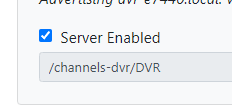
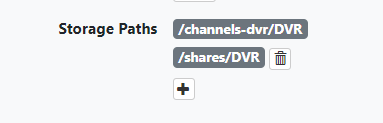
I finally found where the files are. Instead of being under recordings here
ls /opt/channels-dvr/DVR
Database  Images  Imports  Logs  Metadata  recordings  Streaming  TV
it's under the TV here:
ls /opt/channels-dvr/DVR/TV
'NBC Nightly News With Tom Llamas'  'World War II With Tom Hanks'  'WYFF News 4 at 6pm'
ideally, I want the recordings to be going to /mnt/dvr/recordings..., which is what I thought --"volume /mnt/dvr/recordings:/shares/DVR" would do