
I searched and found other posts, seems Channels does support Atmos.
But i am not seeing it trigger Atmos playback mode, the Stats during playback just say eac3 6 channel.
I am using Airpods Pro 2 with spatial audio enabled.
When i playback the same file in Infuse Pro, it says Atmos, and the Airpods menu in the Control menu of the ATV, changes to Dolby Atmos, where as, when i play in Channels, it stay on Multichannel Audio indicator.
I have Surround sound enabled in Channels app setting.
Is app version: beta 7.24.425
Media info for this files for audio says this
Format : E-AC-3 JOC
Format/Info : Enhanced AC-3 with Joint Object Coding
Commercial name : Dolby Digital Plus with Dolby Atmos
Codec ID : A_EAC3
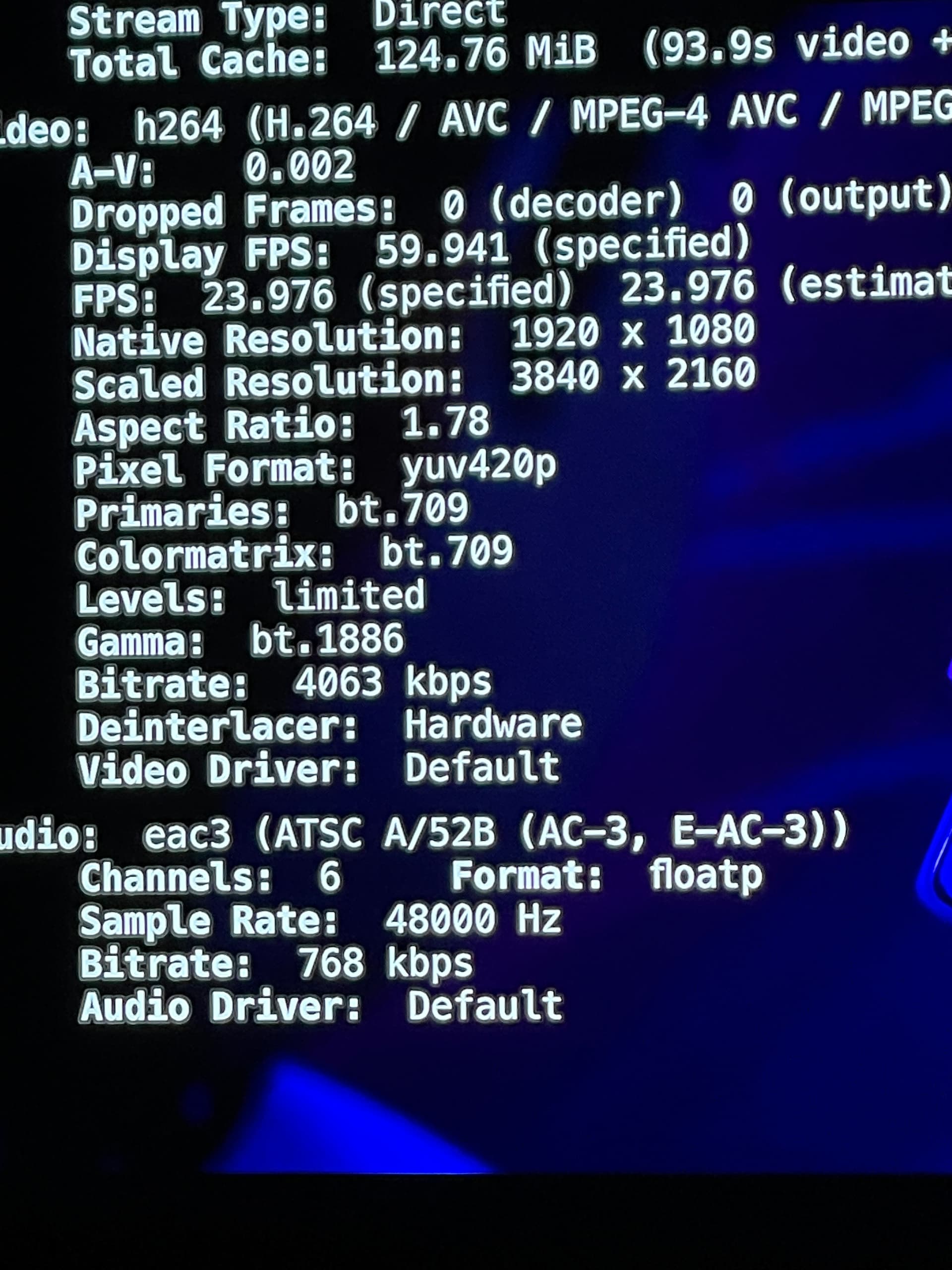
I pretty sure i have seen Atmos show up on those OSD stats before when it is working.
EDIT: I can toggle Atmos playback in Infuse while playing. And I do notice a difference. Atmos sounds slightly less hallow/echoy than plain multichannel, but is lower volume.
Though, i honestly, find the Audio output of Channels, even though it not using Atmos it seems, sounds a bit better to my ears most of the time.
But just wonder if something is up for it to not trigger Atmos, or is there a setting i need to adjust somewhere.