
Hi all, I have Channels DVR on two Synology NAS boxes (DS120J and DS220+). To the best of my knowledge programs recorded on the DS220+ have no problems; however, many of the programs recorded on the DS120J regularly suffer from INTERRUPTED RECORDING, where it appears the program either started late, ended early or encountered some reception/tuner issues. Both devices are in the same house and using the same programming sources (HDHomeRun tuners with OTA and a Spectrum TVE source). Is it possible that the DS120J is the root of the problem? If so, I will replace it in a heartbeat. I also have a DS920+ and am considering moving both installations there either via Docker or VM. What are your thoughts? Thx, Rob
Can’t talk specifically for the DS120J, but initially I installed CDVR on a DS220J and had similar issues. I believe the (J) series are not quite the idea system for this operation, I move the CDVR over to a Mac Mini and haven’t looked back. I recently replaced my (J) series to a DS224+ where I run all my containers but haven’t moved the CDVR instance over to it yet, appears to be running fine in its current state.
Thanks @JCyea. I understand the J-Series may be underpowered. In fact, I believe they're incapable of running Docker, which was why I eventually bought a DS220+ to handle that install. I'm trying to setup the DS920+ with Channels and running into trouble migrating the backup. The step-by-step guide works fine until it comes to find the backup and moving it to the new NAS. At that point, I can't seem to open the backup or do anything with it. Very frustrating. I also am having trouble setting up TVEverywhere with Spectrum on the DS920+ as I keep getting a "No Login Form Found" error. This may be a TVE or Spectrum issue, but man is it annoying.  At any rate, thanks for your reply. I hope your MacMini continues to remain stable.
You have to move all the folders first then load one of the backups that was copied over.
I'm trying to follow the instructions at Channels Support - How do I move Channels DVR Server to a new computer?. Are these NOT the right instructions. I went through each step, and get to a folder called backup-20241205.175806 that I can do nothing with. I can see inside that folder and find 2 .db files, but you're referring to folders, of which I only see one (above).
Can you screenshot where you are in the dvr web UI when you get stuck?
Let me see if I can get back to that point.
After not being able to get RESTORE to work, I went ahead and SETUP ChannelsDVR on the 920+. Can I still go back to the WELCOME URL and pick RESTORE? I don't want to do that and screw things up any further. If I can do that, then I should be able to get the screenshot you're asking for.
Yes pick restore and navigate to where you put your recordings. Find the Database folder and click the Open button
Here's the screenshot. I moved the backup folder to the new machine and extracted the files. I can't select the listed backup folder or do anything with it.
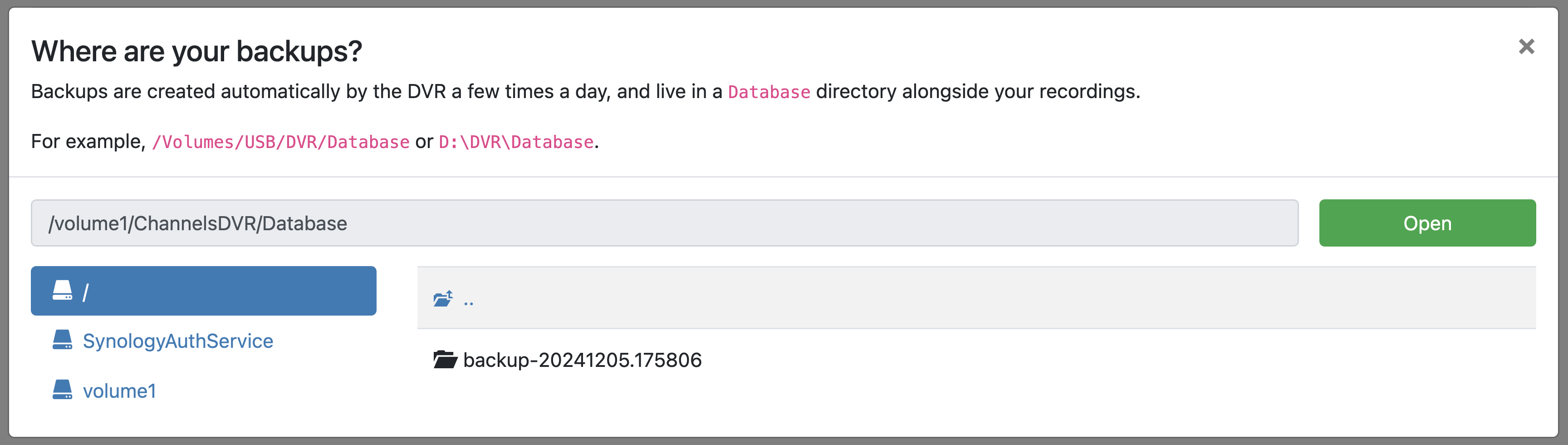
Click the green button
I guess I thought I needed to click the file and then the green button. Overthinking it apparently.
You're not the only one.
I mentioned that when they re-did the on-boarding setup for new users.
Something like changing the 'Open' button to a 'Next' button tells you there's more steps to come.
Where are your backups? was the question, but Open seems like the final step in the process.
This topic was automatically closed 365 days after the last reply. New replies are no longer allowed.