DVR Crashing

Hello,

My DVR has started crashing and nothing in the logs is helping me to diagnose why.

I am running on docker using TVHeadend as a backend (Im certain this isnt a TVH issue). Every so often the Channels instance seems to reboot, interupting live TV being watched and recorings in progress.

I have spent a lot of time setting up my EPG lineup so reluctant to start all over again. Can anyone suggest something to try?

Here is what the logs say when a crash happens:

2023/12/05 10:15:29.792497 [TNR] Opened connection to M3U-TVHeadend for ch1 UK | BBC One FHD
2023/12/05 10:20:06.640826 [SYS] Starting Channels DVR v2023.11.13.2159 (linux-x86_64 pid:8) in /channels-dvr/data
2023/12/05 10:20:06.656862 [SYS] Started HTTP Server on 8089
2023/12/05 10:20:07.105858 [M3U] Refreshed lineup for TVHeadend with 393 channels
2023/12/05 10:20:07.591390 [DVR] Waiting 10h34m52.408615187s until next job 1701809700-10 I'm a Celebrity... Get Me Out of Here!
2023/12/05 10:20:07.607119 [DVR] Recording engine started in /shares/DVR
2023/12/05 10:20:07.610028 [SYS] Bonjour service running for dvr-fb4b170a7fcb.local. [172.22.0.33]
2023/12/05 10:20:09.630710 [SYS] Created database snapshot: backup-20231205.102009
2023/12/05 10:20:09.631055 [SYS] Removing old backup backup-20231205.080009
2023/12/05 10:20:17.626481 [IDX] Pruned 14 expired airings from X-M3U in 14.388447ms.

EDIT:

Spotted some other posts referencing enhanced logs, now submitted:
828dd655-6356-4d36-b9c5-d6eb825ade8f
1 Like

What is your server OS and hardware? Are there other applications on the server and do they crash at the same time? Dose the entire server crash or just cDVR?

Thanks for the response - It’s unraid with channels running in the official docker container.

The issue is isolated to channels, other containers and the server itself are fine.

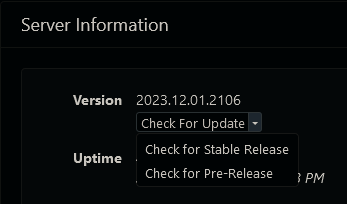
Try updating channels to the latest Pre-Release version (might have already been fixed).
Screenshot 2023-12-05 at 12-50-19 Channels Settings

@chDVRuser Thanks for the suggestion - How do I get it to show the pre-release option?

EDIT: Sorry what a donut, just had to click the arrow lol. Will report back after some testing.

Unfortunatley the issue still persists.

Playback is perfect, super crisp then cuts out.. no buffer or anything. "connection to the tuner was lost" if I press play it will reconnect and continue playing.

1 Like

Is it only this source that causes the problem?
Do you have other sources in Channels that work?

And there's nothing else in your current log between Opened connection and Starting Channels?

This is the only source I have unfortunately. I have tried multiple channels with this source and still the same issue.

The source for this is a TV Headend container, I am able to use the tvheadend client to play all the channels without issue. Its not the best looking/user friendly app so I really love having channels as the front end/DVR

Yes correct thats all the logs show. I suspect the enhanced logs may show more, hoping a channels dev will come along to this post and look at them

Have you checked the server logs for the same time period?
Not familiar with unraid but something like linux dmesg.

This doesn’t sound like your server is crashing at all. It sounds like you’re losing connection to your IPTV provider.

These providers have notoriously terrible infrastructure and can be very latent with their streams. This will cause problems with Channels as it expects a certain level of quality from the streams or things will go bad. It sounds like your streams are timing out.

I would posit that you are using TS streams from your provider. TS streams are very sensitive to latency. Use their HLS (m3u8) streams instead and you’ll have a better experience.

1 Like

I would check dmesg and unraid logs

Thanks all for the replies.

I have a few updates to share which I think suggest the issue lies somewhere in the way TVHeadend sends data to Channels or how it is handled by channels rather than an issue with the source.

  1. when streaming via TVHeadend the “crashing” continues. However when using my iPad the error has some additional wording stating that the “transcoder has stopped” but it is direct play and not using the transcoder.

  2. if I add the M3U file directly to channels the streams play without the crashes, there can sometimes be the odd stutter but generally the streams play well.

  3. Finally, I tried using NextPVR as the backend and this seems to have been the ideal solution. There is no crashing or stuttering and I can expose my M3U to other sources as required.

Therefore I do think it would be good if someone could look at the logs to understand what is going on in the background when TVHeadend is used to spot what is going on when it “crashes”. I am using the pass through profile in TVH and the channels stats show it is playing via direct play.

Thanks for the help so far. I have a working solution but would still like to get to the bottom of the issue as I prefer TVHeadend.

Thanks Mark

This topic was automatically closed 365 days after the last reply. New replies are no longer allowed.