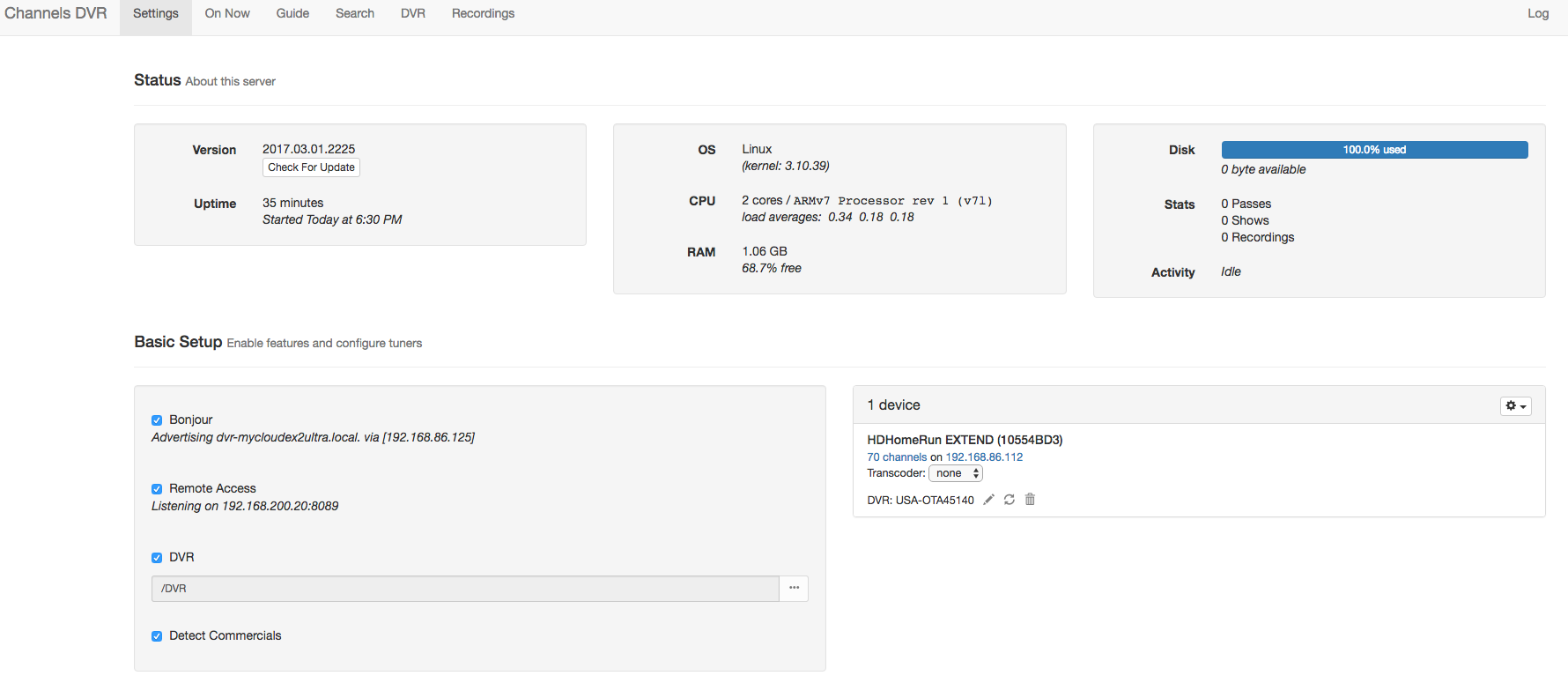
Just getting my DVR set up for the first time using a brand new MyCloudEX2Ultra and I'm having issues. The DVR Web page (settings, etc.) is showing my disk use at 100 percent - even though I haven't recorded anything yet. I was having earlier with programs recordings, seeming to show as recorded but when I went to watch them I get the "spinny circle" for about 3-5 seconds and then it would revert back to the "watch" page without playing.
I have tried a few things, including switching my drive to "spanning" instead of a RAID configuration to possibly get more space. I was getting this error prior to doing that, too. Not sure if the two issues are related. Here's a screenshot of my Channels DVR settings, etc. page. Also might be worth noting that I cannot get shows to play in the Web browser now (but I was able to do that previously). Thank you!