
I think the side effect of this workaround is that the stream will use more CPU after switching to level 5, so there is still a reason to fix the index. If this works, at least you don't have to fix it before you can watch it.
Who's going to do that? Not the Channels devs. Rebuilding it doesn't fix it. So that leaves what options besides what I've been doing, deleting the video index.
That's what I meant by "nuking it from orbit". There must be some reason that they deprecated the API call that I found references to in discussions with tmm1: New Option on Recording - Regenerate Streaming Index - Channels DVR Server - Channels Community
"Yes, PUT /dvr/files/XXX/m3u8"
But, that returns aa 404 now. I'm not sure if that accomplished the same thing as deleting the whole folder, though.
In either case, you're looking at a DVR feature request.
1 Like
Maybe it's not a feature request. If rebuilding the index doesn't fix the problem but deleting the folder does, then it may be a problem with other files in the folder:
Right, "the index" is probably a simplification of what's actually being deleted. In Channels DVR, the metadata folder alongside a recording typically contains more than just the seek index — things like cached codec/stream analysis, segment timing maps, commercial detection results, thumbnails, and possibly a pre-built HLS segment manifest. When the server does an API "rebuild index" it may only regenerate the seek index file, leaving the other stale/inconsistent metadata in place. Deleting the whole folder forces a clean rebuild of everything from the raw video bytes on next access.
The transcoded stream sidesteps all of it because it re-reads and re-encodes the source file directly, ignoring whatever is in the metadata cache. That's exactly why our fallback works — it's not that transcoding is "better quality" for this file, it's that it bypasses the corrupted metadata entirely.
For this user specifically, the practical takeaway is: our auto-fallback means they no longer need to delete anything to watch the recording, but the underlying metadata corruption in Channels DVR is still there. If they want a permanent fix for that file (seeking performance, commercial skip accuracy, etc.), deleting the metadata folder is still the right move — and since the Channels devs apparently won't expose an API to do it cleanly, it's a manual operation on the server filesystem.
So, if this isn't a resource issue causing something in the metadata folder to be incorrectly written in the first place, there this could be a bug that they need to fix. Or, it's a feature request to provide a mechanism to rebuild all of the folder's contents (or just the problematic part if that can be isolated)
If you care to track this down, try removing one file at a time to see the effect.
The new version is live now
Yah, since they started fingerprinting recordings they changed to API to
PUT /dvr/files/<file#>/fingerprint
Accessed by the Option Reprocess Video
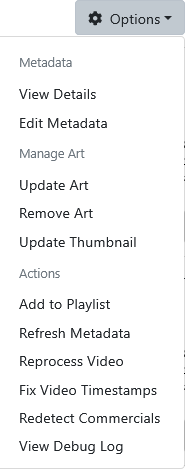
It rebuilds the video index.
Incorrect. It does not rebuild it.
As far as the devs are concerned, there is no problem (it becomes a "me" problem) unless others report it, and then it's unsupported because it's not a supported client problem.
It's already in there
Thank You. It's working and falls back to transcoding as you said.
When I delete the video index it has to transcode anyway. Now I don't need to delete the video index (but I will as they are useless to me and just take up space  )
)
OK, well that's something! Another thing you could do is to move the metadata folder and then compare the old files to the new ones that are created to see what changed. If you can isolate a specific file, and the data in the file that's causing the problem, maybe the devs would be inclined to fix it.
you mean always, or just the first time? If always, what happens if you delete the folder then use the reprocess video command?
It doesn't happen on every recording (just most of them).
When it does happen, if I delete the video index and recreate it, it still fails.
I started noticing this years ago using the DVR web UI player.
I'm surprised nobody else has brought it up (or maybe they didn't spend the time to dig as deep).
the resolution is very odd (nintendo ds?) so it doesn't seem to matter which source the recording was from?
I mainly use dvrdesk for checking live souces, but just now i tried some recordings from different sources and haven't encountered the error. on 1.11.0 and 1.14.0. although both versions transcode recordings from hdhr, while ah4c recordings do the simple remux.
yea, don't really ever expect the web ui to play. haven't payed attention in a long time as to which recordings work and don't.
I though it odd also, but that's supposedly coming from Channels DVR for a recording (not Live).
That one was a 1280x720p@30fps recording from the FrndlyTV channel MeTV+
I've also seen it happen on HDHR Prime recordings from my PBS station ([email protected]).
If you want some stats, let me know what you want me to keep track of when it happens again.
The video index file I'm talking about is named stream.m3u8 in the Metadata/file# folders
the only thing i can think of is just the timing of the recording catching a low res image during a keyframe at the beginning.
otherwise these advance settings come to mind, using any of these?
Experimental Remote Live TV Segmenter
Use HEVC for transcoding
Web Player Adaptive Streaming
I have all these off, so idk
That Video element: 683x384 resolution came from the DVRDesk Copy Report button.
You would have to ask @jay343 where that comes from.
I don't have any Advanced Experimental settings enabled.
so I watched the cdvr log while playing recordings from dvrdesk. ah4c recordings show no entry (remux) and one of my local news recordings shows this
2026/06/14 23:04:11.181178 [HLS] ffmpeg: file41844-ip10.0.0.35:  [mpegts @ 0000021397569980] Packet corrupt (stream = 1, dts = 4922541299), dropping it.
2026/06/14 23:04:11.181178 [HLS] ffmpeg: file41844-ip10.0.0.35:  [mpegts @ 0000021397569980] Packet corrupt (stream = 2, dts = 4922541299), dropping it.
2026/06/14 23:04:11.182822 [HLS] ffmpeg: file41844-ip10.0.0.35:  [mpegts @ 0000021397569980] stream 2 : no PTS found at end of file, duration not set
2026/06/14 23:04:11.183356 [HLS] ffmpeg: file41844-ip10.0.0.35:  [vost#0:0/h264_mf @ 00000213981a5000] -enc_time_base -1 is deprecated, use -enc_timebase demux
2026/06/14 23:04:11.186124 [HLS] ffmpeg: file41844-ip10.0.0.35:  [aost#0:1/aac @ 000002139821e880] -enc_time_base -1 is deprecated, use -enc_timebase demux
2026/06/14 23:04:11.187770 [HLS] ffmpeg: file41844-ip10.0.0.35:  [aost#0:2/aac @ 0000021397572700] -enc_time_base -1 is deprecated, use -enc_timebase demux
2026/06/14 23:04:12.145346 [HLS] ffmpeg: file41844-ip10.0.0.35:  [h264_mf @ 00000213981a52c0] stream format change
I do have a bad antenna signal now that the trees are full of leaves, so many local channels recordings have glitches, and I was hoping it could shed some light. I'll have to see in the morning when the leaves are wet, and pixilation goes crazy.
have you tried copying one into the imports dir and seeing if there's any difference? not sure there would be or what it'd tell us.
If I did that it wouldn't have a video index, so would transcode just like if I had deleted the video index.
Just seems like the CDVR recording timestamp rewriter and remuxing is tuned for the Channels clients (obviously).
I've had to remux some recordings because their recording timestamp rewriter caused timestamp issues.
This has been going on for years, so I don't think anything will get done because I'm trying to play the recordings in unsupported clients like a browser or DVRDesk.
All of the problem recording files play fine in VLC and my Video Editor.
DVRDesk Native 2.1 is out
DVRDesk has been rebuilt from scratch. DVRDesk Native is a new desktop client for Channels DVR on Windows and Linux. It's built in Rust, and video plays through mpv instead of a web browser engine. This is now the recommended version of DVRDesk. The 1.x app will still get fixes, but new features will land in Native.
Why a rewrite?
The 1.x app ran inside an embedded browser and played recordings with a JavaScript HLS player. Most of the playback problems people reported came from that setup, and no amount of patching fully fixed them:
-
Some recordings wouldn't play at all, even though the files themselves were fine.
-
Playback on Linux could crash when the player retried a bad stream.
-
A stream could freeze on one frame, get stuck in a recovery loop, or spin forever before it started.
Native plays video with libmpv, the engine behind the mpv player, and has no browser in the loop. Those whole classes of failures are gone.
Faster, more reliable playback
-
Direct-file playback. Recordings and live channels are streamed straight from the DVR instead of going through Channels DVR's HLS packaging. Playback starts much faster, especially for recordings that are still in progress.
-
Captions come from the recording itself. Both broadcast closed captions and Channels' own generated captions are read from the video file. You no longer need a shared network folder or sidecar
.srtfiles, so the Storage Share Path setting is gone. -
Commercial auto-skip works from the recording's own commercial markers.
-
A native interface. With no embedded browser underneath, the app is quicker to move around in.
What's new
-
A live program guide grid. Live TV is now a proper guide with channels down the side and a scrolling timeline. It shows what's recorded, scheduled, or recording now. You can filter by channel source or genre, keep favorites, and search. Click a program that's on now to tune in. Click a future program to record it or create a pass for the series.
-
Offline downloads. Download a finished recording to your computer and watch it without connecting to the DVR. Downloads pick up where they left off if interrupted.
-
Library Collections. Browse your Channels DVR collections alongside Recent, TV Shows, Movies, Videos, and Search.
-
Stable genre filters. A channel keeps its genre rather than changing with whatever happens to be airing.
-
Encrypted channels hidden by default. DRM and CableCARD channels your server can't tune no longer clutter Live TV. "Show hidden channels" brings them back.
-
Programming history (optional). Channels DVR's guide only looks forward. The new guide-history-service is a small companion service you can run on your DVR box, a NAS, or a Raspberry Pi. It records guide data as it airs, so the grid can show what was on yesterday. On Linux, Settings has a wizard that deploys it locally or over SSH.
-
An update check that tells you when a new Native release is out.
Bringing your settings over
Your servers, keybindings, theme, and other preferences carry over:
-
Automatic import (Windows and Linux): open DVRDesk Native, go to Settings, and click Import Automatically. It reads your 1.x settings directly. You don't need to open the old app, and it can stay installed.
-
Manual copy: in DVRDesk 1.15, open Settings → Migrate to DVRDesk Native, click Copy Settings for Migration, and paste the result into Native's Settings.
Native installs alongside 1.x, so you can run both while you try it out.
Installing
-
Linux: install the
.deb. It pulls inlibmpv2automatically. -
Windows: download the portable
.zip. Native uses mpv for playback, which you install once:
winget install mpv-player.mpv-CI
macOS isn't supported yet.
Thanks
This rewrite owes a lot to Clicker by mackid1993, another native Channels DVR client. Its open source showed the way on embedding mpv, direct-file playback, and downloads. Thank you!
Please report bugs and feature requests on GitHub.
1 Like
Nice! I apparently already had mpv installed so it worked out of the zip.
couple things.
- did not find a way to customize the closed caption size, color, ect.. they are quite large by default.
- if you full screen watching something and close without exiting full screen, then there is no way to exit full screen.
- will it get an icon?
- will the terminal window stay or eventually be removed or hidden?
I know its a wip, so take your time, I love it! 