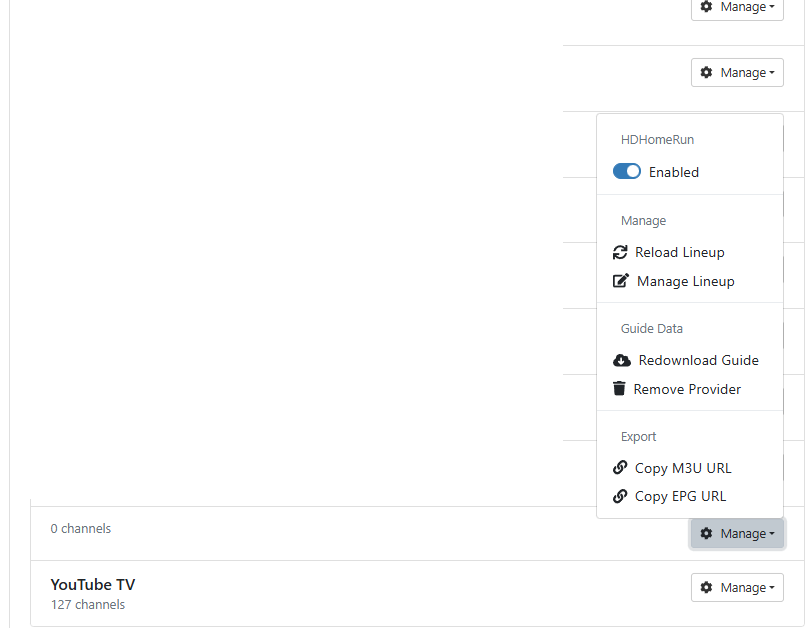
Empty source is not removable

There is an untitled source with "0 Channels" in my list of sources. I cannot edit or remove it. I didn't create it so it may have been created as the result of a failed attempt at creating a Tubi source with OliveTin Project "One-Click". Regardless, the source is stuck there. It's not affecting or interfering with anything but it's disconcerting.

Thanks for any help.

I've never seen Project One-Click do anything like that -- but you could try the Delete a Project One-Click Channels DVR Extension, and select the Tubi option:

screenshot-htpc6-2026_01_06-09_28_23

That should clear out anything related to a Tubi installation.

To be honest, I don't know how the source got created. I only thought it could have been one-touch because I haven't attempted to add a source other than that. Anyway, thanks for the advice but that didn't delete the source. That makes sense as there is no tubi-for-channels docker image in Portainer. So, it appears that the tubi-for-channels project did not get created.
Although there is no name on the source itself, "HDHomeRun" appears at the top of the context menu. Please note the context menu in the attached image and the absence of the trashcan icon.


Here's the standard out for the delete of the project:
Deleting CDVR Custom Channels Source - TubiTV...
true

Deleting CDVR Custom Channels Source - TubiTV-NoEPG...
true

Portainer reports the stack ID for tubi-for-channels as ...

Stopping Portainer Stack ID ...

Deleting Portainer Stack ID ...
404 page not found

Portainer reports the image ID for tubi-for-channels as ...

Deleting Portainer Stack ID ...
{"message":"image name cannot be blank"}

The fact that it says HDHomeRun at the top of that image seems like a clue...

I agree that HDHomeRun is a good clue but that doesn't help me delete it.

That basically tells us there was nothing related to a previous Project One-Click Tubi installation hanging around.

Hopefully someone with HDHomeRun experience will have an idea. I haven't had one of those units in quite a few years.

Agreed.
I do have an HDHomeRun source and it is working fine.
As mentioned, it's not affecting anything so I'll just ignore it until someone else sees this post and knows what's going on.

Cannot help without diagnostics

Will do. I'll run diagnostics as soon as I am able. Thanks!

Move the enabled button then a remove should appear.

I don’t think you can remove a source while it’s enabled. On my server, the remove button only shows on non-enabled sources.

I’ll look at that when I get home. Thanks for the suggestion.

You might also need to restart your server. It’s been awhile since I changed an HDHR source.

1 Like

Perhaps at some time you added your HDHR Tuner via its IP address and now it's changed?

funny enough this thread made me look at mine and I noticed my flex didn't have it's assigned ip, but had been working all along. so while I reserved its IP and rebooted the flex I toggled the source to off, but still no option to delete. I think as long as nothing is blocking the discovery, or once channels knows the mac then it just sees it. I tried adding the new IP but nothing changed. I then enabled the flex and channels reflected the correct IP. so I think enabling it should flag for deletion.

Restarting was the fix. I was a non-believer but this source is now gone.

I don't recall adding the HDHomeRun by IP. Thanks for the suggestion though. Anyway, restarting the the service (channels-dvr) fixed it.