What can I do about this?
From my testing it seems the ESPN channels will play for hours and hours, maybe forever.
The Fox Sports / Fox One stuff will play for a few minutes or maybe 30 minutes max and time out.
I can't seem to figure out why!??!?!?

What can I do about this?
From my testing it seems the ESPN channels will play for hours and hours, maybe forever.
The Fox Sports / Fox One stuff will play for a few minutes or maybe 30 minutes max and time out.
I can't seem to figure out why!??!?!?
I was only mentioning Axios because I'm not a developer and don't know what version of it is being used in this project. Could be an older version and the latest version has fixes 
I'm not seeing the timeout problems you are.
All my issues were resolved by overriding the DNS server the container uses.
For some reason it didn't like using my Cloudflare DoH DNS, but is happy with Xfinity DNS.
The image builds with the latest version of Axios each time. And there's not enough evidence to suggest an issue with Axios here anyway.
I'm planning to test an option in EPlusTV soon to disable proxying the stream manifests/playlists, which could give you the option to bypass Axios.
Can you show me where/how to do this? I use docker desktop and have VERY limited experience with docker! Thanks
How did you set up the EPlusTV container? Did you do it using the command-line or with a compose file (I am not sure if Docker Desktop has this ability or if it is all command-line)?
If you are using a compose file then it would look something like this (template taken from the link I referenced in another post, which is A Docker Compose for Every Channels Related Extension...:
services:
  # GitHub home for this project with setup instructions: https://github.com/tonywagner/EPlusTV-NEW
  # Docker Hub home for this project: https://hub.docker.com/r/tonywagner/eplustv
  eplustv:
    image: tonywagner/eplustv:${TAG}
    container_name: eplustv
    ports:
      - ${HOST_PORT}:${PORT} # For use with Portainer this port is being mapped to 8185, as Portainer uses port 8000
    environment:
      - START_CHANNEL=${START_CHANNEL} # What the first channel number should be.
      - NUM_OF_CHANNELS=${NUM_OF_CHANNELS} # How many channels to create? This is dependent on the networks you are using. A good number to start with is >= 150 if you are using ESPN+.
      - LINEAR_CHANNELS=${LINEAR_CHANNELS} # Break out dedicated linear channels.
      - BASE_URL=${BASE_URL} # If using a reverse proxy, m3u will be generated with this uri base.
      - PROXY_SEGMENTS=${PROXY_SEGMENTS} # Proxy keyed *.ts files.
      - PUID=${PUID} # Current user ID. Use if you have permission issues. Needs to be combined with PGID.
      - PGID=${PGID} # Current group ID. Use if you have permission issues. Needs to be combined with PUID.
      - PORT=${PORT} # Port the API will be served on. You can set this if it conflicts with another service in your environment.
    volumes:
      - eplustv:/app/config
    restart: unless-stopped
    dns:
      - "1.1.1.1" # override docker DNS with Cloudflare primary
      - "1.0.0.1" # override docker DNS with Cloudflare secondary
volumes:
  eplustv:
    name: ${HOST_VOLUME}
You would then need to either enter the environmental variables into the appropriate section of the docker tool that you are using and change to the correct values for your setup:
HOST_PORT=8185
START_CHANNEL=1
NUM_OF_CHANNELS=150
LINEAR_CHANNELS=false
BASE_URL=default
PROXY_SEGMENTS=false
PUID=1000
PGID=1000
PORT=8000
HOST_VOLUME=eplustv_config```I run docker desktop in Windows. To my knowledge I haven't changed any settings since install. Latest version installed and all updates applied.
Under Images in docker I have: tonwagner/eplustv
All I do when a new release is dropped is open a command prompt and enter:
docker run -p 8000:8000 -v config_dir:/app/config tonywagner/eplustv
That is it. I can edit the starting channel# and # of channels on the eplus web config page.
This has been changed in the latest EPlusTV version 4.14.3
For a command line docker run command, use
--dns=1.1.1.1 --dns=1.0.0.1 for Cloudflare DNS or
--dns=8.8.8.8 --dns=8.8.4.4 for Google DNS or
--dns=9.9.9.9 for Quad9 DNS, etc.
Refer to Docker Documentation
Just built a new server with truenas. I am getting the following error when I try to update
[EINVAL] options.app_version: Upgrade version must be greater than current version
| Error Name: | EINVAL |
|---|---|
| Error Code: | 22 |
| Reason: | [EINVAL] options.app_version: Upgrade version must be greater than current version |
| Error Class: | ValidationErrors |
Problem with Fox One Linear channels and XMLTV guide data.
Since the Gracenote guide data is wrong for some channels, I wanted to use a 2 source method.
One source for channels with Gracenote guide data
A second source for channels using Fox One guide data (linear-xmltv.xml)
It's not working.
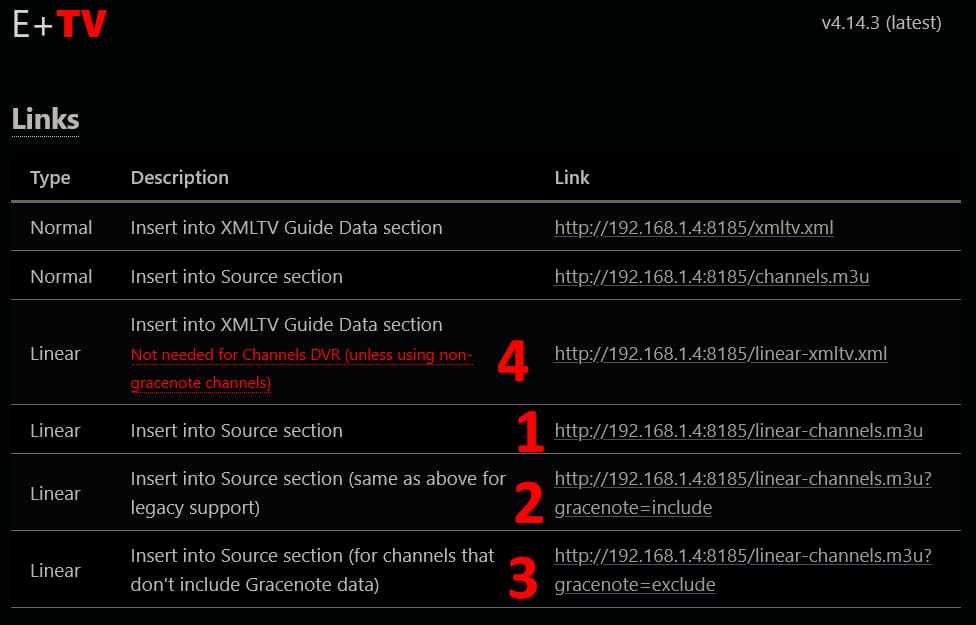
1 and 2 contain the same information, including the gracenote/tms station id tvc-guide-stationid=
3 is empty (just contains the line #EXTM3U)
4 is the Fox One guide data that I'm trying to use
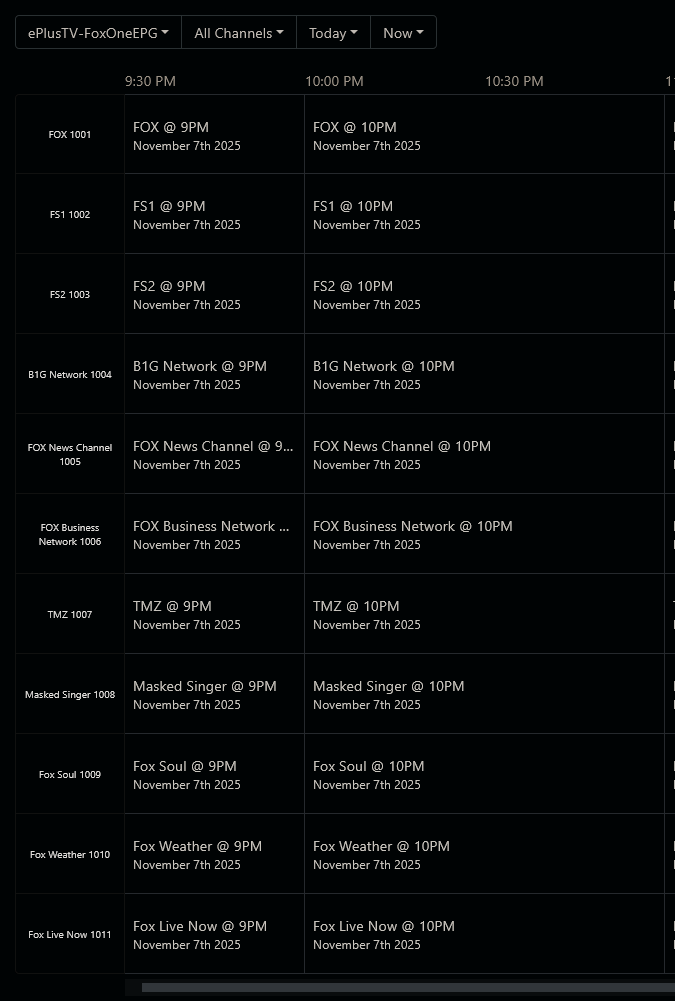
So as an example, I want the Fox One (not Gracenote) epg for The Masked Singer channel
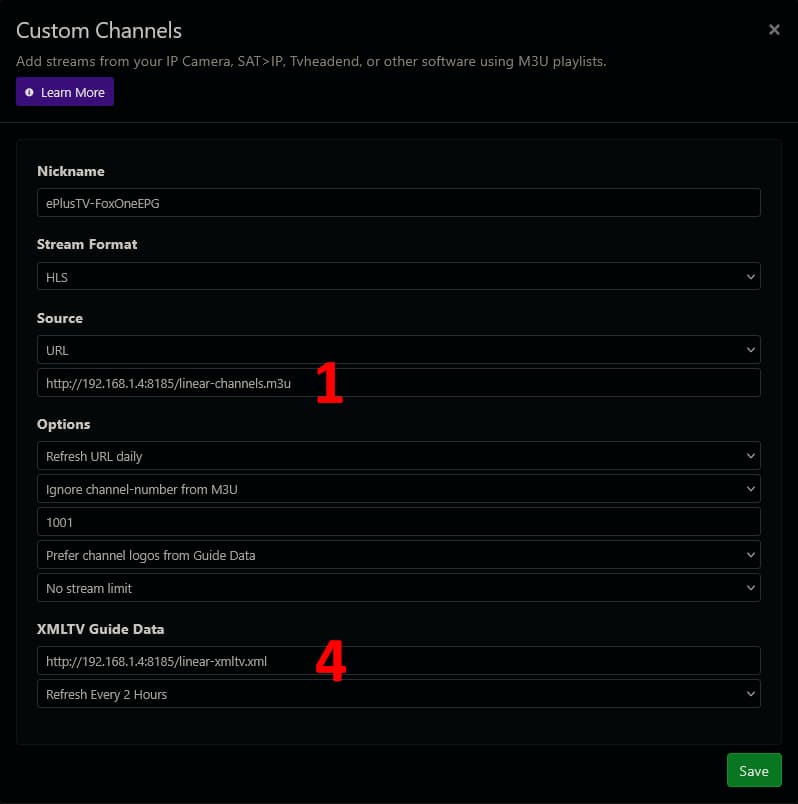
I add a custom m3u source to Channels DVR with the following settings
Since the linear-channels.m3u contain the gracenote/tms station id tvc-guide-stationid=, Channels DVR ignores the linear-xmltv.xml epg.
Can we also get a linear-channels.m3u that doesn't contain the gracenote/tms station id tvc-guide-stationid= that could be used with Fox One linear-xmltv.xml epg.
Right now to work around it, I download the linear-channel.m3u to a file, edit the file to remove the gracenote/tms station id tvc-guide-stationid, then copy and paste it into the Channels DVR custom m3u source settings as a Text Source.
Since masked singer channel is not working correctly, it should be able to have the gracenote id taken out of the code. It just has to be stripped for the channel in two places and then the gracenote=exclude should work. I will test it out.
Thanks,
It's an unusual channel as it plays ad-less episodes (average 44 minutes each).
Gracenote epg lists each episode as 60 minutes, so recording with gracenote epg gets you parts of two or three episodes in the 60 minute time slot.
I tested it out and it it worked, adding it to the non-gracenote m3u. It will then pull the guide data from the xml. I made a PR for it so once Tony approves it can be safely added.
This has been merged in v4.14.4
Thanks @GenericChannelsUser and @tonywagner
It's working.
The only possible issue I see is that the m3u playlist linear-channels.m3u?gracenote=exclude does not contain the m3u tag channel-id, so Channels DVR falls back to using the tag
tvg-name="FOX Digital" for the channel ID. This will cause a problem if more than one non-gracenote channel uses this same tvg-name.
Container crashed and restarted after requesting a Rebuild EPG
Running v4.14.4
I did a Rebuild EPG from the container web page
2025-11-11T04:08:19.077554683Z Updating FOX One prelim token
2025-11-11T04:08:19.388919513Z Refreshing TV Provider token (FOX One)
2025-11-11T04:10:41.352368095Z === Getting events ===
2025-11-11T04:10:41.353730396Z Looking for FOX One events...
2025-11-11T04:10:43.420569923Z TypeError: Response body object should not be disturbed or locked
2025-11-11T04:10:43.421294367Z     at extractBody (node:internal/deps/undici/undici:5344:17)
2025-11-11T04:10:43.422417862Z     at new Request (node:internal/deps/undici/undici:6325:48)
2025-11-11T04:10:43.422498330Z     at new Request (/app/node_modules/@hono/node-server/dist/index.js:68:5)
2025-11-11T04:10:43.422559150Z     at newRequestFromIncoming (/app/node_modules/@hono/node-server/dist/index.js:99:10)
2025-11-11T04:10:43.422612523Z     at Request.[getRequestCache] (/app/node_modules/@hono/node-server/dist/index.js:120:35)
2025-11-11T04:10:43.422660990Z     at Request.[getAbortController] (/app/node_modules/@hono/node-server/dist/index.js:115:26)
2025-11-11T04:10:43.422711671Z     at ServerResponse.<anonymous> (/app/node_modules/@hono/node-server/dist/index.js:443:34)
2025-11-11T04:10:43.422761719Z     at ServerResponse.emit (node:events:517:28)
2025-11-11T04:10:43.422806971Z     at ServerResponse.emit (node:domain:489:12)
2025-11-11T04:10:43.422850138Z     at emitCloseNT (node:_http_server:1020:10)
2025-11-11T04:10:46.136777271Z
2025-11-11T04:10:46.137489868Z > [email protected] start
2025-11-11T04:10:46.137605001Z > ts-node -r tsconfig-paths/register index.tsx
2025-11-11T04:10:46.137659379Z
2025-11-11T04:11:08.493342196Z === E+TV v4.14.4 starting ===
Wow.. This is just wild. My ESPN+ worked fine until a couple days ago. I have recordings on SEC+ up until Friday night. Spectrum changed my package to one that didn't have ESPNU or News, I was trying to set it up through my Disney+ Espn and thought I had broken it... Guess I didn't.
OK. I noticed that my SEC Network+ was working under EPlusTV last night. Is it intermittently not working or do certain channels still work? Thanks
SEC Network+ isn't DRM-d so it'll work. The only things ESPN-wise that are DRM'd are ESPN+ (or ESPN Select)