ESPN+ with Custom Channels via ADBTuner

Your ESPN4cc4c stack looks like a bit of a copy-and-paste from different posts. If this were done through Project One-Click, it would look more like this:

services:
  espn4cc4c:
    # 2025.11.23
    # GitHub home for this project with setup instructions: https://github.com/kineticman/ESPN4CC4C
    # Docker container home for this project: https://github.com/kineticman/ESPN4CC4C/pkgs/container/espn4cc4c
    image: ghcr.io/kineticman/espn4cc4c:${TAG:-latest}
    container_name: espn4cc4c
    dns_search: ${DOMAIN:-localdomain} # For Tailscale users using Magic DNS, add your Tailnet (tailxxxxx.ts.net) to use hostnames for remote nodes, otherwise use your local domain name.
    init: true
    ports:
      - ${PORT:-8094}:${PORT:-8094}
    environment:
      - TZ=${TZ:-America/New_York}
      - VC_RESOLVER_BASE_URL=${VC_RESOLVER_BASE_URL:-http://192.168.86.72:8094}
      - CC_HOST=${CC_HOST:-192.168.86.72}
      - CC_PORT=${CC_PORT:-5589}
      - CH4C_HOST=${CH4C_HOST:-127.0.0.1}
      - CH4C_PORT=${CH4C_PORT:-2442}
      - PORT=${PORT:-8094}
      - APP_MODULE=${APP_MODULE:-bin.vc_resolver:app}
      - VALID_HOURS=${VALID_HOURS:-72}
      - LANES=${LANES:-40}
      - ALIGN=${ALIGN:-30}
      - MIN_GAP_MINS=${MIN_GAP_MINS:-30}
      - M3U_GROUP_TITLE=${M3U_GROUP_TITLE:-ESPN+ VC}
      - VC_M3U_PATH=${VC_M3U_PATH:-/app/out/playlist.m3u}
      - WATCH_API_KEY=${WATCH_API_KEY:-0dbf88e8-cc6d-41da-aa83-18b5c630bc5c}
      - FILTER_ENABLED_NETWORKS=${FILTER_ENABLED_NETWORKS:-*}
      - FILTER_EXCLUDE_NETWORKS=${FILTER_EXCLUDE_NETWORKS:-}
      - FILTER_ENABLED_SPORTS=${FILTER_ENABLED_SPORTS:-*}
      - FILTER_EXCLUDE_SPORTS=${FILTER_EXCLUDE_SPORTS:-}
      - FILTER_ENABLED_LEAGUES=${FILTER_ENABLED_LEAGUES:-*}
      - FILTER_EXCLUDE_LEAGUES=${FILTER_EXCLUDE_LEAGUES:-}
      - FILTER_ENABLED_EVENT_TYPES=${FILTER_ENABLED_EVENT_TYPES:-*}
      - FILTER_EXCLUDE_EVENT_TYPES=${FILTER_EXCLUDE_EVENT_TYPES:-}
      - FILTER_ENABLED_LANGUAGES=${FILTER_ENABLED_LANGUAGES:-*}
      - FILTER_EXCLUDE_LANGUAGES=${FILTER_EXCLUDE_LANGUAGES:-}
      - FILTER_REQUIRE_ESPN_PLUS=${FILTER_REQUIRE_ESPN_PLUS:-}
      - FILTER_EXCLUDE_PPV=${FILTER_EXCLUDE_PPV:-false}
      - FILTER_EXCLUDE_REAIR=${FILTER_EXCLUDE_REAIR:-false}
      - FILTER_EXCLUDE_NO_SPORT=${FILTER_EXCLUDE_NO_SPORT:-false}
      - FILTER_CASE_INSENSITIVE=${FILTER_CASE_INSENSITIVE:-true}
      - FILTER_PARTIAL_LEAGUE_MATCH=${FILTER_PARTIAL_LEAGUE_MATCH:-true}
    volumes:
      - ${HOST_DIR:-.}/data:/app/data
      - ${HOST_DIR:-.}/out:/app/out
      - ${HOST_DIR:-.}/logs:/app/logs
    healthcheck:
      test: ["CMD", "curl", "-fsS", "http://localhost:8094/health"]
      interval: 2m
      timeout: 5s
      retries: 2
      start_period: 60s
    restart: unless-stopped

And the env vars I use:

TAG=latest
DOMAIN=localdomain tailxxxxx.ts.net
HOST_PORT=8094
TZ=America/Denver
VC_RESOLVER_BASE_URL=http://htpc6:8094
CC_HOST=cc4c
CC_PORT=5589
CH4C_HOST=ch4c
CH4C_PORT=2442
LANES=40
FILTER_EXCLUDE_REAIR=true
HOST_DIR=/data/espn4cc4c

The using this Action:
Screenshot 2026-08-16 at 10-52-27 OliveTin - Organizr V2

I added 40 virtual channels to ADBTuner, and the CDVR Custom Channels Source:

Spot checking half-a-dozen channels they all tuned except for the Red Sox game, as I don't have an MLB.tv subscription.

As far as your issues with PrismCast go, what are the specs on your host system? The Docker version of PrismCast requires significant resources to run.
It is, I've not yet migrated over to using OneClick. I started building a testing environment using it, but that's been only in my spare time.

Specs are:

OS
Intel(R) Client Systems NUC11PAHi7
linux ubuntu
24.04 (kernel: 6.8.0-136-generic)
CPU
8 cores / 11th Gen Intel(R) Core(TM) i7-1165G7 @ 2.80GHz

I use the version that taps into the Intel GPU so I can run 4+ tabs and haven't seen a degredation in performance. In my testing, I'm only running one tab at a time. And since I can run ESPN Linear from within Prismcast using the standard config and confirmed that both the linear channel that tunes fine from within the prismcast pre-defined channel and the ESPN4cc4c link are pointing to the same web address, I don't believe it's an issue of horsepower.

Some additional querying within co-pilot gave me this:

If both the working PrismCast ESPN channel and the failing ESPN4cc4c channel ultimately land on the exact same ESPN player URL, then:

Authentication is working.
The correct event is being selected.
The browser is reaching the same page.
The ESPN video player itself is capable of playing.

That makes me suspect the difference is what PrismCast is seeing before or after it arrives at that page, not the final URL itself.

A few things I'd check:

Compare the stream health in the PrismCast dashboard

When the built-in ESPN channel is playing successfully:

Does PrismCast show bitrate?
Stream health?
Active stream duration?

Then compare that to ESPN4cc4c right before it fails.

Look for errors in the browser console

In the VNC Chrome session:

Press F12 (or open DevTools).
Go to Console.
Tune ESPN4cc4c.
Watch for red errors, particularly:
autoplay
media
MSE
DRM
CORS
player exceptions

The video may be visible while JavaScript is still throwing an exception that prevents PrismCast's playback detector from completing.

When I hit f12 in the chrome tab, it dissapears as soon as the tab closes and then reopens, so not much value there. And for Prismcast dashboard, I'm not aware of anything that produces the type of information co-pilot is asking for.

1 Like

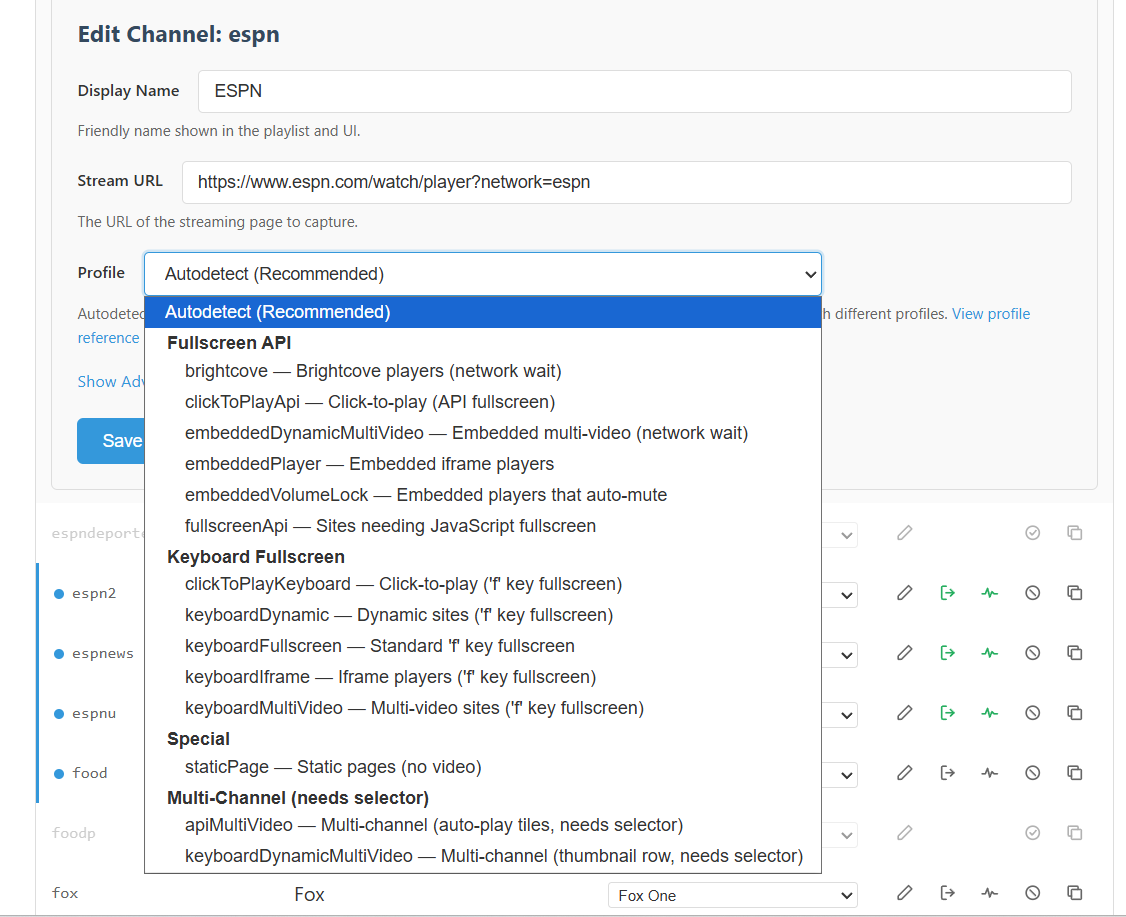
Do you know what profile PrismCast uses when you tune the ESPN linear channel using another method? We may need to force that same profile by adding &profile= to the tuning URL.

Set to audodetect, so not sure which one it's using.

Check in the log to see if it shows which profile is actually used for ESPN from a source that's working for you.

[2026/08/16 09:05:07.130 PM] [espn-v6lufz] Streaming ESPN: ESPN.com, keyboardMultiVideo, FFmpeg [H264]. Tuned in 7.1s.

OK, so try changing the first line of your text-based M3U in your CDVR Custom Channels Source to:

#EXTM3U

#EXTINF:-1 tvg-id="1" tvg-name="ESPN+ EPlus 1" tvg-chno="20010" group-title="ESPN+ VC",ESPN+ EPlus 1
http://mac-mini-m4:5589/play?url=http://htpc6:8094/vc/1&profile=keyboardMultiVideo

Of course, you'd change the mac-mini-m4 and htpc6 values to whatever is correct for you. If that works, when tuning to whatever is on in lane 1, add the &profile=keyboardMultiVideo to the end of each lane's tuning URL.

EDIT: Don't forget to reload the M3U.

Not porting into Channels yet, but was able to get VLC to access that stream with the added profile at the end. Since I am automating this through ESPN4cc4c into Dispatcharr, I have to manually configure all 40 stations I believe. Not complaining, it's a solution, just will take some time to do that. Hopefully ESPN4cc4c can be updated to accommodate that modification in the future.

One solution in place, couple more to tackle. :wink:

Thanks for posting this. I just recently set up ESPN4CC4C to use with Prismcast and this worked perfectly. I just copied the playlist text from the file in the Out folder and added the profile text to each lane's URL then pasted it into CDVR as a text M3U.