Exit Recordings and return to previous show

First off, Kudos for this awesome software and awesome support!

Question: Can you exit from Recordings/DVR menu back to what you were just watching with a single button?

I was hoping just by pushing the exit/back button while you are in the Recordings would accomplish this, but it doesn't. I have to arrow to the far left and select something like the guide or live tv just to exit the Recordings, then find my way back to the show. Sometimes you just browse the recordings and decide to exit instead.

If there is a how-to on this please point me in the right direction. I've search but can't find info on this or workaround. I just subscribed about a week ago, so I'm still learning and finding all the nuggets. Thanks

Setup:
Channel DVR Server: QNAP App
Channel Client: Shield TV Pro
Remote: Harmony Smart Control + All-in-one remote
Sources: HDHomerun + Directv + Pluto TV
One of the things I miss from DirecTV Genie... It would maintain a stack of where you had navigated in the UI and the back button would move back through the stack.

We've been a DirecTV subscriber for a very long time and this is one of those "Wife Factor". She really miss having that feature.

I’m quite confused. That’s exactly how the app works.

Oh, the app IS working like this. If the player exited to the list of episodes for the show you watched, it would not be working as you’d described.

If you start a show from the Recordings view, this is the view you will go back to when exiting playback.

Exiting playback and being in a completely different view would be disorienting.

After reading the OP yet again, no, the back button won’t take you back to the player. It takes you back through the UI. Taking you back to the player would break its entire functionality.

This is normal UX for steaming apps.

Not true.

Let's say you did the following:

  1. Go to guide
  2. Exit back to video
  3. Go to Now Playing
  4. Go to Search
  5. Exit back to video

Pressing Back repeatedly will do those things in reverse order.

As much as I liked that behavior, I doubt it makes sense for Channels.

You can setup a button on your remote to go back to the live tv player.

Or you could use PIP to keep video going while you navigate around other sections.

Bear with me, rookie here... here's the scenario I'm trying to accomplish:

  1. I'm watching Live TV, say channel 5.1
  2. Push the "Recordings" button and just browse.
  3. Want to exit Recordings and continue watching channel 5.1 again.

Looking for a single button solution for #3. Kind of like what DirecTV currently have.
Thanks

I use stream4k as a client and while the livetv button mapping is great - whenever I actually use it the experience goes down hill immediately ( everything loads slowly, jumpy navigation, video freezes, etc). I have no idea why that would be but it’s annoying to the point I avoid ever hitting it.

@bubing what you describe is pretty much what channels is doing when I hit livetv…

Probably need to de-tivo so the built-in live stuff doesnt' trigger

The video player is always considered the top of the stack. You can’t go to anything beyond it. So pressing back would never get you back to the video player.

The only way to leave the video player is to use the back button, so by definition you’re back an item in the stack.

You never navigate “forward” from the video player.

I followed all the steps from the de-TiVo thread over at tivocommunity including the cli commands .. perhaps I missed a package somewhere. When I get around to it I’ll start a separate thread for it I don’t want to hijack this one.

@freeside et all; just did some additional testing. When I'm in Recordings and hit livetv; it does go back to the previous channel (5.1 in my scenario) for a couple of seconds, followed by the "Preparing your TV" Channels message. Then goes to channel "0"; which isn't even in my Custom Channel list. Additional thoughts/ideas?

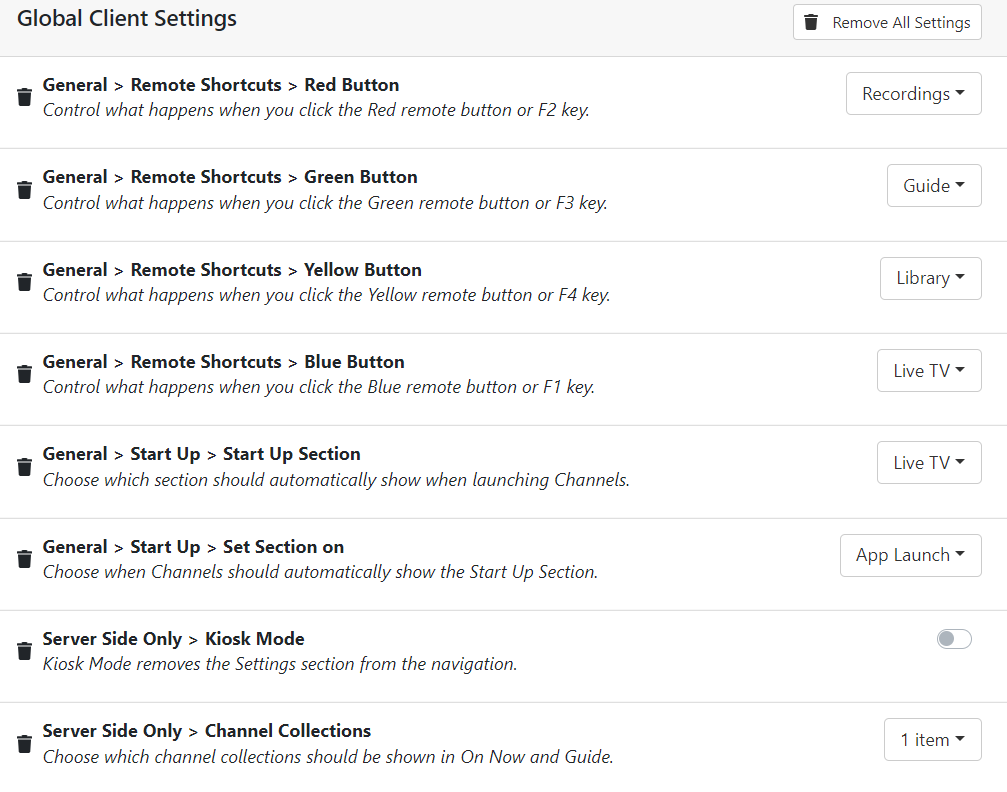
Below is what I have for my Global Client Settings; There are no overriding Client settings.