Fast Forward with 1-2 Second Auto Rewind?

I tried searching for these topics but maybe I was not using the right terminology because I couldn't find any previous threads. Forgive me if these are repeats.

At this point, I have replicated almost all of my favorite TiVo features in the Channels DVR ecosystem. However, there are still two things I really miss, though I suspect they may be Apple limitations.

The main one is how, when fast forwarding at the 2x or 3x speeds, a TiVo will move the stop point back a few seconds when you stop fast forwarding so that you don't miss the beginning of the next show segment, or the next play if you're watching an NFL game. Is there any possibility that this could be possible in the Channels AppleTV app? Or, are things like FF/RW and function of tvOS? Commercial skipping doesn't always work, so being able to FF and then stop and have it tick back just enough so that you'd don't miss anything and/or have to manually RW was a pretty awesome TiVo feature. For football, I have slightly compensated by setting the FF interval to 7 seconds because tapping it 3 times is usually a reliable way to move from snap to snap without missing something.

The other feature I miss is when watching a recorded event and being able to play it back at 1.33x but having the player adjust the audio so it still sounds almost normal, and not Chipmunk-ish. This was another nice quality of life TiVo feature that I used a lot for soccer, when I could watch a recording of a 90 minute game in 60 minutes and have the audio sound not terrible.

I think Channels is amazing, and the community of add-ons makes it even more awesome, but after 25 years (starting with a DirecTiVo,) is was still a hard decision for me to decommission my TiVo Bolt (on its 3rd HD and still set to the original interface.)

2 Likes

I also switched from TiVo to CDVR about 6 months ago and also miss the "jump back" after FF. I also think it would be nice if CDVR had more FF speed options (1x, 2x, 3x).

FF/RW is an archaic way to get through content. Embrace seek with the default 30s forward and 7s back, and you will find it is much better than actually holding the buttons and linearly going through your content. We're not dealing with tape here.

With the back seek set less than your forward seek, you'll find that you only need to do a couple clicks forward to jump to where you want, with a single back to correct any over seeks.

Additionaly, these seek times are configurable.

1 Like

I understand your point, and by coincidence I was actually just testing this an hour ago by setting the back seek to 3 seconds for all three types of content to see how it felt. To clarify, though, I do usually tap to FF thru content in 30 second chunks rather than holding down the FF button. I think the idea is that the commercial breaks (at least ones that aren't auto-detected, or if you're watching a live show via the buffer) are never perfectly 30 second chunks, so if you know it is more likely than not that you're going to overshoot the beginning of the next segment of the show that you are watching, why not have an automatic option to pull it back by a few seconds.

Because, just like you said that 30s isn't perfect or reliable moving forward, neither is jumping back a few seconds every single time you seek forward. That would feel bad on every seek, and like you said about seeking forward, not be reliable.

Instead, the power is in your hands to make the corrections as you go through the content. That's why we don't set the backward seek time to be the same duration as the forward seek time, by default.

What exists in Channels now is very intentional, and we have no plans to make changes around this.

1 Like

Yeah you're right, it's the "every single time" part that that I hadn't considered. In my continued testing this morning after setting it to 3 seconds, it feels like it might be a good solution. It's just getting used to a 2nd button press because my remote hand has 25+ years of muscle memory to undo :wink:

1 Like

:smile: Yeah I get that.

Just remember, TiVo never had seek functions. It made everyone use a relic of the VHS past (RW/FF), and the skip back feature made more sense because it was compensating for the time between you seeing what you wanted to stop on, and you releasing and it stopping. It truly was a great idea.

We don't need either of those in 2025.

2 Likes

TiVo actually did have 30 sec skip forward, not sure on the newer units though, my last TiVo was a Roamio. I tried to use it a few times over the past two decades but never liked it and always went back to the FF method. I'd gotten so good at it that I could pretty much nail the start of a segment 90% of the time with the other 10% being within a second or two.

Personally, I am fine using the 30 sec skip forward with a 7 sec skip back (TiVo's "Instant Replay" button was always 7 sec), but my wife not so much. She is trained for the FF/skip back by 25+ years of TiVo usage.

I do find it a little clunky and not as smooth an experience, but I'm willing to live with it for sure. For example, if I overshoot the start of a segment with one too many 30 sec skips, I have to hit the 7 sec back button 4-5 times to get close to the start and then I usually still have to watch a few seconds of commercials.

Appreciate all you do!

1 Like

I had been debating whether to post something almost identical to your last paragraph. I have been trying to find the right balance of FF timing and RW timing. I'm currently experimenting with 10 seconds/3 seconds, but I am finding even a current model AppleTV will hiccup with showing the preview video if I tap too fast when FF'ing over a 2-3 minute commercial break. It may take me a while to find the sweet spot.

I would say for the most part the way this is currently setup works well. However I do feel there is a need for fast forwarding much faster than the current FF. It has to do with content that is in excess of 3 hours. Will say you screwed up and started something over. In order to get back to the spot you were at. It takes a very long time to FF. It would be nice to have something that can move 4 times faster than the current fast forward. I feel this has been a missing need that ChannelsDVR doesn't have and should.

1 Like

You can pause the player and then seek around quickly via touch/drag

Thank you for pointing that out. I actually had to turn on the Click and Touch feature for the remote to test that. You are not kidding about that being much faster. But I turned it off cause I hated the touch part of the remote and prefer the click method or click and hold. Now I'm torn between it lmao.

1 Like

I turn that off too. Too much phantom input for me, even at the lowest sensitivity setting.

Yes that is why I turned it off right when I got the AppleTV. Then didn't even realize that was a feature of ChannelsDRV the entire time I have had it. I still think its warranted for the push and click to a faster FF for those that turn this feature off.

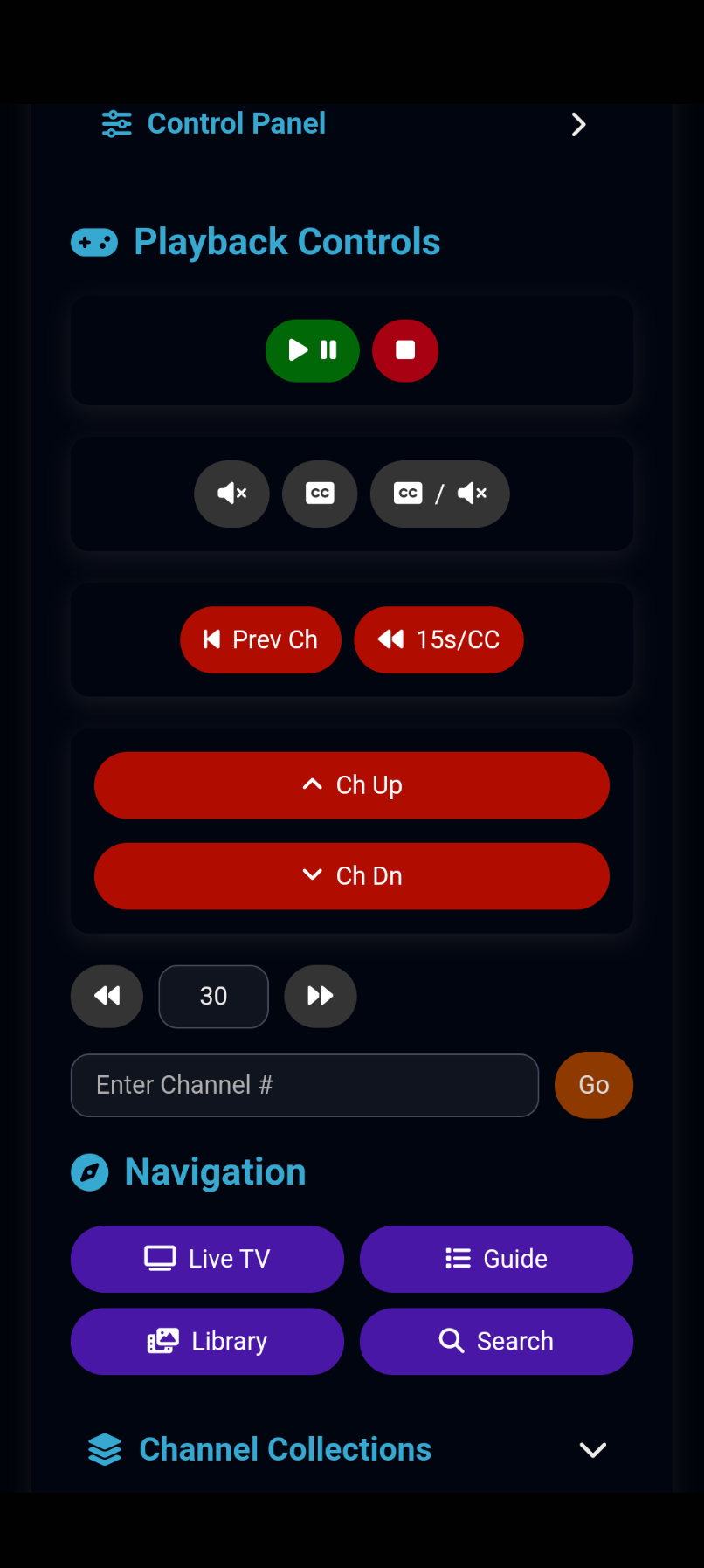
After reading this discussion, I decided to make a change to my Channels Remote App. Right now, it seeks in seconds which is not optimal if you want to jump an hour ahead. I'm adding a toggle to switch between seconds or minutes where a user can adjust it as needed. Here is how it looks now. I will have an update sometime this evening.

I didn't know about this until just now. This looks awesome. I can post this question in another channel if preferred, but it looks like port 5000 is now used by macOS 26, which I am running on my Mac server, for the "Control Center" process. I was trying to set this up using OliveTin and it failed. I know I can pick any unused port, but to future proof my install, would you recommend a specific alternate port?

% lsof -nP -iTCP:5000 | grep LISTEN 

ControlCe 952 bmarks   10u  IPv4  0x3a3c9703741aa77      0t0  TCP *:5000 (LISTEN)
ControlCe 952 bmarks   11u  IPv6 0xc3cf3e34a55b507e      0t0  TCP *:5000 (LISTEN)

Just use what you have available. Personally, I use 5020 for the external port.

I also came from TiVo and stopped using the Apple remote almost as soon as I got Channels installed. I have the TiVo Slide remote configured for my AppleTV 4K and it is so much better. The only time I use the Apple remote is to quickly drag through a show but that is very rare.

I do miss the skip to tick feature of the TiVo, Channels doesn't have that but in return they have the ability to quickly drag through a show.

Agree that FF/REW is otherwise obsolete.

Not exactly like TiVos skip to tick, but if something has comskip you can skip to the next comskip marker.

Yeah, I went through the IR learning steps with my Slide as well, and I've been trying to use that exclusively the last few days. I had a weird bug, though, where it wouldn't complete the 3rd option with the Guide and Channel Up/Down buttons. It fails every time on Channel Down. But yeah, overall it works really well. I really wish someone would've cracked the TiVo Stream 4K remote so it could be learned using IR, but if it hasn't happened by now, I don't think it's ever going to happen. Paired via Bluetooth, there are just too many buttons that don't work. I like that remote enough that I was even considering getting one of the newest ONN boxes to use as a 2nd ah4c tuner and pair it with the Stream 4K remote.