FastChannels - FAST Channels aggregator/manager

Thank you @KineticMan for this awesome app!

I have a smaller cable provider (RCN / Astound). Currently I use PrismCast on a Windows 11 PC but am thinking about going the bridge route. Would you recommend ah4c or HDMI Capture? Is it possible to have two HDMI Captures running simultaneously?

You can do a single HDMI Capture device without ah4c, but with ah4c you can manage one or more. How often is a single tuner enough? :slight_smile:

Probably 75% of the time. I wasn't sure if AHC worked with smaller cable providers.

ah4c can work with any provider, though you'd really want one that has deeplink support. The FastChannels ah4c bridge, however, only works with providers listed in the FastChannels WebUI under "Premium Sources".

Thank you for the clarification! I think I'll start with the HDMI Capture.

Would I still be able to use PrismCast if I need additional tuners?

Which of the "Premium Sources" will you be using?

Yes, this is easily handled by CDVR. The steps are:

  • Set up two feeds (covering the same set of channels) one using the HDMI Capture Bridge, and the other the PrismCast Bridge.
  • Set the channel numbers for the HDMI Capture Bridge channels higher than the PrismCast Bridge Channels.
  • Set a stream limit of one in the CDVR Custom Channels Source for the HDMI Capture Bridge channels.
  • Do your tuning using the HDMI Capture Bridge channel numbers, and if that bridge already has one stream active, CDVR will roll over to the PrismCast Bridge channels.
1 Like

ESPN and Fox One in the "Premium Sources." Plus I use the TVE content too.

Thanks for the steps to make the HDMI overflow to PrismCast work!

ended up going with yttv as verizon limits me to 4 streams and no hbo outside the house. Plus they insist I have at leat 1 of their boxes.

IF there's no monthly charge, ask them to send it to you and chuck it in the closet. You'll then have it to return if/when you ever cancel their service, and they'll be happy.

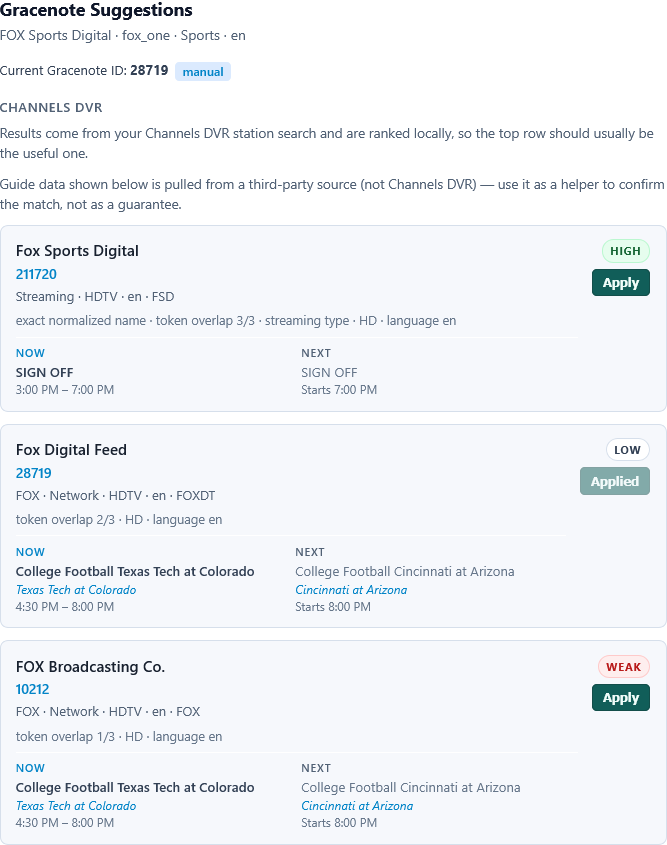
New Fox One channel today. Fox Sports Digital.
Need to remove Gracenote suggestion 211720 (shows SIGN OFF for epg)

28719 or 10212 looks correct

I set the HDMI device source to one stream. I have more than one source for prismcast & android bridge channels. It seems to make sense to focus the stream-limit on the HDMI device itself, since having one stream on the Roku android bridge and one on the Amazon one would result in something not working as expected.

Why does the channel number need to be higher on the Android Bridge channels than on the Prismcast bridge ones? I have it set that way on two of my bridge-pairs, but it's currently reversed on the other. Should I change that around? I thought the guiding factor in which sources get picked first is the priority order set in the Channels sources. But my experience is pretty limited, so please correct me if I'm wrong.

At this point what are the best free sources out there for FastChannels?

Plex, Stirr, Pluto, or something else?

If you're referring to the capture source (i.e. your virtual encoder), I doubt that would do anything to trigger CDVR to rollover to the next available source (though I don't know for sure), which is what we're talking about here.

It's fine to have multiple PrismCast sources, as there are plenty of virtual tuners available there. However, if you have a single capture card, and you want CDVR to roll over to another source, if that single capture card is busy -- then you should set things up as I described.

That has to do with the way Channels decides what channel to use when recording. Favorites have the highest priority, then the highest numbered channel next. This assumes that you want your capture card to be the first device selected, with a fallback to PrismCast or other sources.

Overall, I was answering a specific question from another user, that wanted tunes to fallback to PrismCast if their Capture Card is in use. If you have multiple CDVR Custom Channel Sources pointed at a single capture card, you will have problems when that card is in use, if another tune attempts to use that card at the same time.

I think most of us would like CDVR to rollover to another source for that same channel, rather than having the tune fail, and that requires some attention to the details.

EDIT: When you're getting a proper stream limit rollover, your CDVR logs should look like this:

2026/10/01 19:18:27.499312 [ERR] Could not start stream for M3U-CDVRMinneapolis ch1404 TNT HD: M3U: Stream Limit Reached 
2026/10/01 19:18:27.536735 [TNR] Opened connection to M3U-FastChannelsDirecTV for ch90315 TNT

@jagrim I just wanted to follow up on this because I did some digging.

So, I completely reverse engineered the Android TV authentication flow and built it into Fast Channels just for some fun. And while doing that, I was able to figure out how they count the number of streams. We're currently appearing to be outside of the house, even though we aren't. And essentially, what they do is they like reserve a ticket and it keeps reminting every couple of minutes to confirm that it's still active. And we reserve the ticket and immediately die, essentially. So it never remints, it never looks like it's an active stream, which is almost better in some ways because it just looks like we're on a device that has perhaps crashed or the network has gone down suddenly, which happens, I'm sure, thousands of times a day for them. And it's just a needle in a haystack.

The side effect of this is you should have as many streams as you want, and it should not bark at you about IP address or location or anything like that. This was all my quest to get their digital ad insertion working so I would get ads like local to my market rather than the national feed because it was just bugging my OCD. At the same time, as I got that working, I built the Android TV authentication flow instead of the current one that impersonates a web browser. And while doing that, I figured out exactly how they handle counting streams. Counting them would actually look much worse for us and would probably raise more alarms than just doing it the way it's being done now and just letting the tickets sort of die. I just thought I'd mention that with your grandfathered package, you should be able to stream a couple of sticks and not have a problem, honestly. At the same time, I was also able to build profile support so you can choose what profile Fast Channels runs as so the request looks a little bit more legitimate, and that also helps with the ad insertion functionality I worked out.

I have a feeling, you know, we should be fine because they want our money. They don't care about a bunch of nerds on a forum watching TV on some other app. They care about IPTV farms rebroadcasting.

I will make a suggestion though, just for our own safety and security while doing this. Kinetic Man may want to consider putting the player source in a separate repo, making it private, and keeping it closed source from now on just to make it harder for bad actors to take advantage of this tool. Obviously, you can't protect everything, but there should be something in place to make it really hard to, you know, find this reverse engineering work and then, you know, take it and use it for rebroadcasting or something like that that.

I never did really understand why DTVS cares how many 'home' streams I use. In football season, I might have up to 6 sets going. Prior to ESPN going DRM, it was not an issue. Since DRM, I had to manage games utilizing the apps & my Osprey's. I limited my Osprey's to 3 due to stream restrictions. I've got my FC bridge with 4 sticks currently and #5 on the way. Yesterday, I had 4 going with captions & no issue and only seeing about 12-15% CPU usage.
After I get that 5th one up and running, I'm going to sit back, relax, and watch some old recordings. My next project is converting a 2012 Mac Mini with a dead hard drive that someone gave me to Promox.

1 Like

Yeah, I mean, you should be good with the number of streams, honestly. It shouldn't affect you.

You might want to even look at an ENC5 V2 if you actually go on YouYeeToo they have a discount right now if you sign up for their Discord server. Also, I built effectively a patch that I think might be superior to the Ospreys now.

It works just like the Ospreys do, but without all of that, you know, in home streaming limit stuff.

Well, it was there yesterday, but it's gone today.

Not sure how relevant this is, but in my overlay patch, I managed to find a way to capture the target Android device advertising ID, including Google TV/Android TV, where it's not readable by ADB. Fire TV is very easy, but Google makes it a lot harder. I found a method to grab those and persist them. So I'm not sure if it's helpful, but it might be relevant to another project down the line. So I figured I'd share, and if anyone's interested, let me know.

I may have asked for this before but, if so, I'm asking again...

Could you provide a way to make "Add to Channels DVR" add the feed as a mixed m3u rather than separate XMLTV and Gracenote sources? Could be a global setting. Could be a modification of the Feeds UI.

I understand that this option is only temporarily useful.

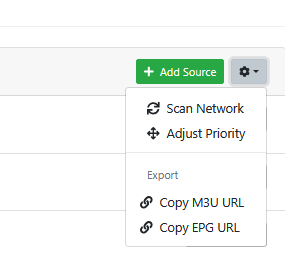
Thanks for the explanation of how Channels decides. If priority is favorites, then highest number, what function does this serve:

image

Yes, I have just one HDMI encoder (Fire stick fed through HDMI stick - not sure which is referenced by the "capture card" designation), and set the HDMI source to a single-stream limit. Did likewise for the Roku-androidbridge, PBS-androidbridge, and Amazon-androidbridge, but in the event that two of those try to use the Fire stick simultaneously, does whichever has the highest-numbered channel win, and the others hopefully fall back to Prismcast? I'm not sure how often I might have that situation, but am trying to plan properly for contingencies.