FastChannels 5.5.1 — What's New
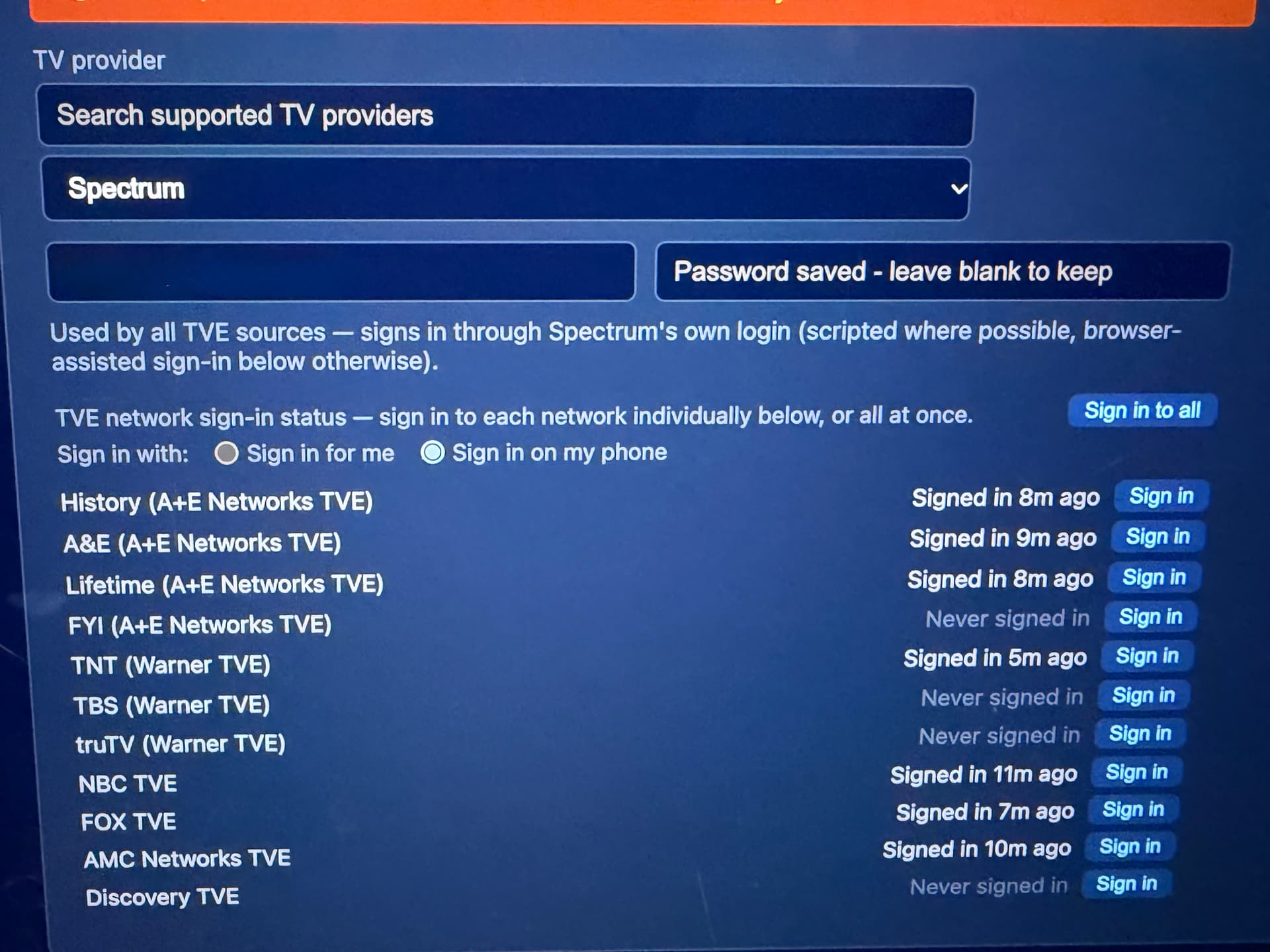
Sign in to TV Everywhere on your phone
Until now, TV-provider sign-ins ran through FastChannels’ built-in browser. That works well for some providers, but others can be difficult, especially with Spectrum/Cox bot checks or YouTube TV’s Google sign-in. Version 5.5.0 adds another option: sign in on your own phone or computer.
- Go to Settings → TV Everywhere and choose “Sign in on my phone.” Each network provides a link and QR code. Open the link or scan the code, sign in to your provider, and FastChannels automatically picks up the completed sign-in.
- Supported networks include NBC, FOX TVE, A+E, Warner (TBS/TNT/truTV), and AMC Networks.
- Discovery uses a 6-digit code entered on its activation page. For Spectrum and Cox users, this is now the recommended way to sign in to Discovery.
- FOX One has the same option on its own card.
- “Sign in for me,” which uses the built-in browser, remains available and is still the default.
Phone sign-ins cannot renew automatically when your provider expires them, so you’ll occasionally need to sign in again.
Alerts when a sign-in needs attention
Previously, an expired sign-in could leave you with channels that wouldn’t play and little explanation. Now, the network’s row turns amber and displays “Sign in again,” along with the reason.
The dashboard also shows a banner listing every sign-in that needs attention, including FOX One and ESPN. The alert clears automatically once you’ve signed back in.
ESPN with a TV provider
The ESPN source introduced in 5.4.0 required an ESPN plan on your MyDisney account. Users who receive ESPN through a TV provider instead could get “not entitled” errors on every channel.
The ESPN card now includes a TV-provider sign-in option with its own provider picker, link, and QR code. Complete the sign-in on your own device.
- You get the ESPN networks included in your TV package.
- NFL Network and MLB Network still require an ESPN plan.
Bridge page redesign
The Bridge page is now organized around setup, status, and channel coverage:
- A status strip shows the Bridge mode, active methods, bridged channel count, and health check.
- A getting-started checklist updates automatically and disappears once setup is complete.
- Each method—ah4c, HDMI Capture, and PrismCast—has its own tile showing any remaining setup requirements.
- A single coverage table shows which sources work with each method.
- HDMI Capture now has its own on/off switch. If you already had a capture URL saved, it is enabled automatically.
- Device Controls open for each device, with a “Request approval” button for Fire TVs that missed the “Allow USB debugging?” prompt.
For ah4c users, tuner numbers now match ah4c’s logs—thanks to bnhf for the PR! Script status uses clearer language, and the recommended way to keep FastChannels scripts current is to set UPDATE_SCRIPTS=true in ah4c. Updating ah4c will then update the scripts too.
Bug fixes
- Repeated Fire TV ADB approval requests: Without an
adb_keys volume in your Compose file, each update could make FastChannels appear as a new computer to your devices. The key is now stored with your data, so approval persists across updates.
- Stuck sign-ins: An unattended sign-in could delay other background jobs for up to half an hour. Sign-ins now run on a dedicated worker, and closing the window or pressing Cancel stops them.
- NBC: Free channels—including Bravo Vault, NBC News NOW, NBC Sports NOW, and the Telemundo feeds—were incorrectly disabled as “not in your subscription” with some providers. If these channels are already disabled, disable and re-enable the NBC source to restore them.
- Spectrum: The “Sign in with another account” step is now handled correctly. Outages and bot-check rejections produce a clear message instead of hanging. Travel Channels use more accurate names, such as “CW (Local),” and Gracenote IDs come directly from Spectrum’s lineup.
- Fubo: DRM channels are routed to the bridge as soon as they appear, without requiring an initial failed tune.
Upgrading
- No manual migration steps are required. The database updates automatically on first startup.
- Docker users:
docker compose pull && docker compose up -d
- FastChannels Player remains at 5.2.10. If your devices already have that version, no Fire TV player update is needed.
As always, let me know what breaks. Phone sign-in has been tested with Spectrum and Cox. Other providers should work the same way, and I’d appreciate hearing how it goes with yours.